1. Zamalonda Zathaview
The Baseus BS1 NC Semi-in-Ear Noise Cancelling Earbuds offer a blend of comfort and advanced audio technology. Featuring Adaptive Hybrid Active Noise Cancellation (ANC), Hi-Res Audio with LDAC support, and a lightweight design, these earbuds are engineered for extended listening and clear communication. They are also equipped with a 6-microphone AI system for clear calls and IP55 water and dust resistance.

Image: Baseus BS1 NC Semi-in-Ear Noise Cancelling Earbuds and their charging case in black.
2. Zamkatimu Phukusi
Onetsetsani kuti zinthu zonse zilipo mu phukusi:
- Baseus Bass BS1 NC Semi-in-Ear Earbuds (Left and Right)
- Mlandu Wolipira
- USB-C Charging Chingwe
- Quick Start Guide

Image: The complete retail package for the Baseus BS1 NC Earbuds, showing the earbuds, charging case, USB-C cable, and quick start guide.
3. Kulipiritsa Ma Earbuds ndi Case
For optimal performance, fully charge the earbuds and charging case before first use.
3.1 Kulipira ma Earbuds
- Ikani ma earbud m'bokosi lochapira. Onetsetsani kuti ali pamalo oyenera m'malo awo (L kumanzere, R kumanja).
- Tsekani chikwama chochapira. Mahedifoni a m'makutu adzayamba kuchapira okha.
3.2 Kulipira Mlandu
- Lumikizani chingwe choyatsira cha USB-C chomwe chaperekedwa ku doko loyatsira pa chikwamacho.
- Lumikizani mbali ina ya chingwe ku adaputala yamagetsi ya USB (osaphatikizidwe) kapena doko la USB la kompyuta.
- The LED indicator on the case will show the charging status:
- Green: 75% - 100% yolipiritsa
- Chachikasu: 25% - 75% yolipiritsa
- Chofiira: Below 25% charged
- A full charge for the case provides up to 40 hours of total playtime for the earbuds (with ANC off). A 10-minute charge can provide up to 2 hours of playback.

Image: The Baseus BS1 NC Earbuds resting in their open charging case, highlighting the 40-hour total playtime and rapid charging capabilities.
4. Kuyang'anira ndi Kulumikizana
4.1 Kulumikizana koyamba
- Tsegulani mlandu wolipira. Zomvera m'makutu zidzalowa basi munjira yoyanjanitsa.
- Pachipangizo chanu (foni yam'manja, piritsi, kompyuta), yambitsani Bluetooth.
- Saka "Baseus Bass BS1 NC" in the list of available Bluetooth devices.
- Select "Baseus Bass BS1 NC" to connect. A voice prompt will confirm successful pairing.
4.2 Kulumikizananso Kwadzidzidzi
Once paired, the earbuds will automatically reconnect to the last connected device when removed from the charging case and within Bluetooth range.
4.3 Kulumikizana kwa Multipoint
The Baseus BS1 NC supports Baseus Smart-Connect (BSC) technology, allowing simultaneous connection to two devices. This enables seamless switching between audio sources without manual re-pairing.
To use multipoint connection:
- Pair the earbuds with your first device.
- Chotsani ma earbuds kuchokera ku zoikamo za Bluetooth za chipangizo choyamba (musachotse).
- Pair the earbuds with your second device.
- Reconnect the earbuds to the first device from its Bluetooth settings. The earbuds should now be connected to both devices.
Audio will automatically switch to the device playing content or receiving a call.
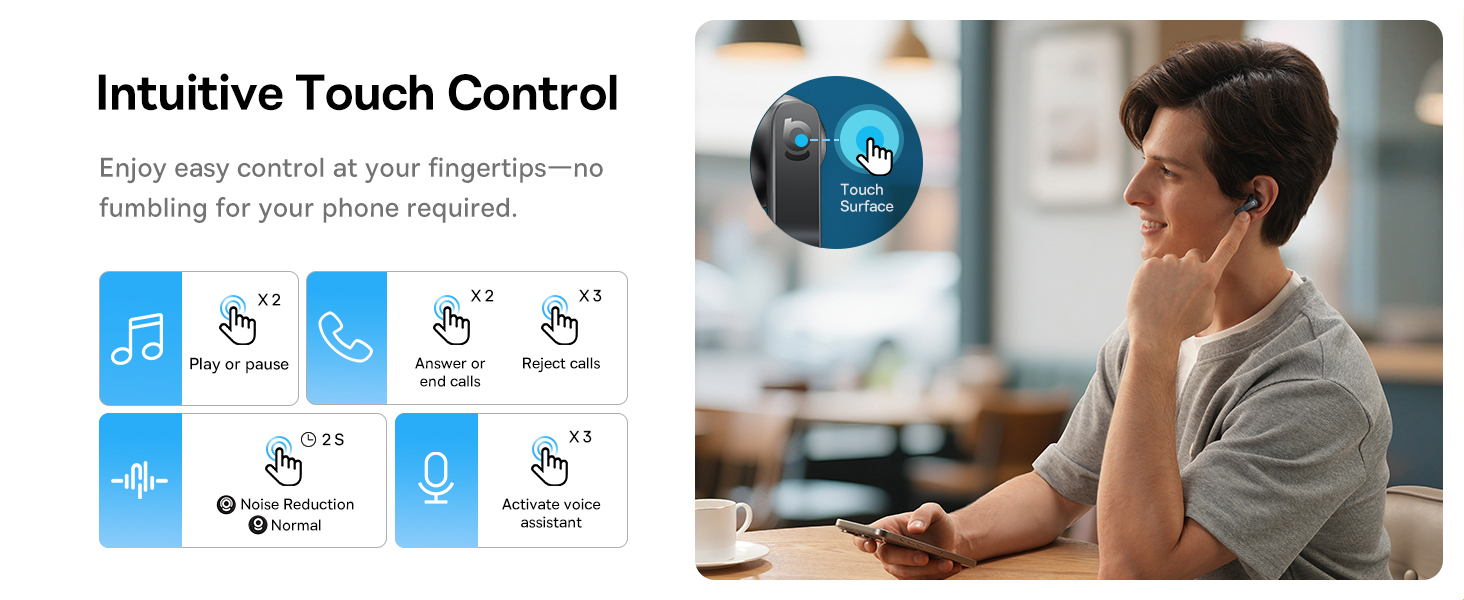
Image: A visual representation of the Baseus BS1 NC Earbuds connected to both a laptop and a smartphone, showcasing the instant multipoint connection feature.
5. Kuvala ma Earbuds
The Baseus BS1 NC earbuds feature a semi-in-ear design for comfortable, pressure-free wear. For optimal sound quality and noise cancellation, ensure a proper fit.
- Dziwani zomvera m'makutu zakumanzere (L) ndi kumanja (R).
- Ikani cholumikizira m'makutu chilichonse pang'onopang'ono m'makutu anu.
- Adjust the earbud until it feels secure and comfortable. The stem should point slightly forward or downward.

Image: A person wearing the Baseus BS1 NC Earbuds, illustrating their ergonomic and lightweight design for all-day comfort.
6. Malangizo Ogwiritsira Ntchito
6.1 Touch Controls
The earbuds feature intuitive touch controls on their stems. The following are default functions, which may be customizable via the Baseus app:
| Zochita | Ntchito |
|---|---|
| Double-tap (Left or Right Earbud) | Sewerani/Imitsani nyimbo, Yankhani/Imitsani kuyimba |
| Triple-tap (Left or Right Earbud) | Reject call, Activate voice assistant |
| Dinani ndi kugwira (2 masekondi) | Switch Noise Control Mode (ANC/Normal/Transparency) |

Image: An illustration detailing the intuitive touch controls on the Baseus BS1 NC Earbuds for various functions like play/pause, call management, noise reduction, and voice assistant activation.
6.2 Njira Zowongolera Phokoso
The Baseus BS1 NC earbuds offer three noise control modes:
- Adaptive Hybrid ANC (Active Noise Cancellation): Reduces ambient noise for an immersive listening experience. Ideal for noisy environments.
- Transparency Mode: Allows you to hear your surroundings while still enjoying your audio. Useful for awareness in urban settings or conversations.
- Mwachizolowezi: Standard audio playback without active noise cancellation or transparency features.
Switch between modes by pressing and holding the touch area on either earbud for 2 seconds.

Image: A cutaway diagram of a Baseus BS1 NC earbud in an ear, illustrating the semi-in-ear fit and the availability of Adaptive Noise Cancelling and Transparency Mode.
6.3 Hi-Res Audio with LDAC
These earbuds support LDAC technology, enabling high-resolution audio transmission for a detailed and rich sound experience. Ensure your device supports LDAC and activate it in your device's Bluetooth settings for the best audio quality.

Image: The Baseus BS1 NC Earbuds surrounded by sound waves, emphasizing features like Hi-Res Audio, SuperBass 2.0, and 13mm dynamic drivers for powerful sound.
6.4 6-Mic AI Clear Calls
The earbuds are equipped with 6 microphones and AI noise isolation technology to ensure your voice is clear during calls, even in noisy environments. Wind noise reduction further enhances call clarity outdoors.
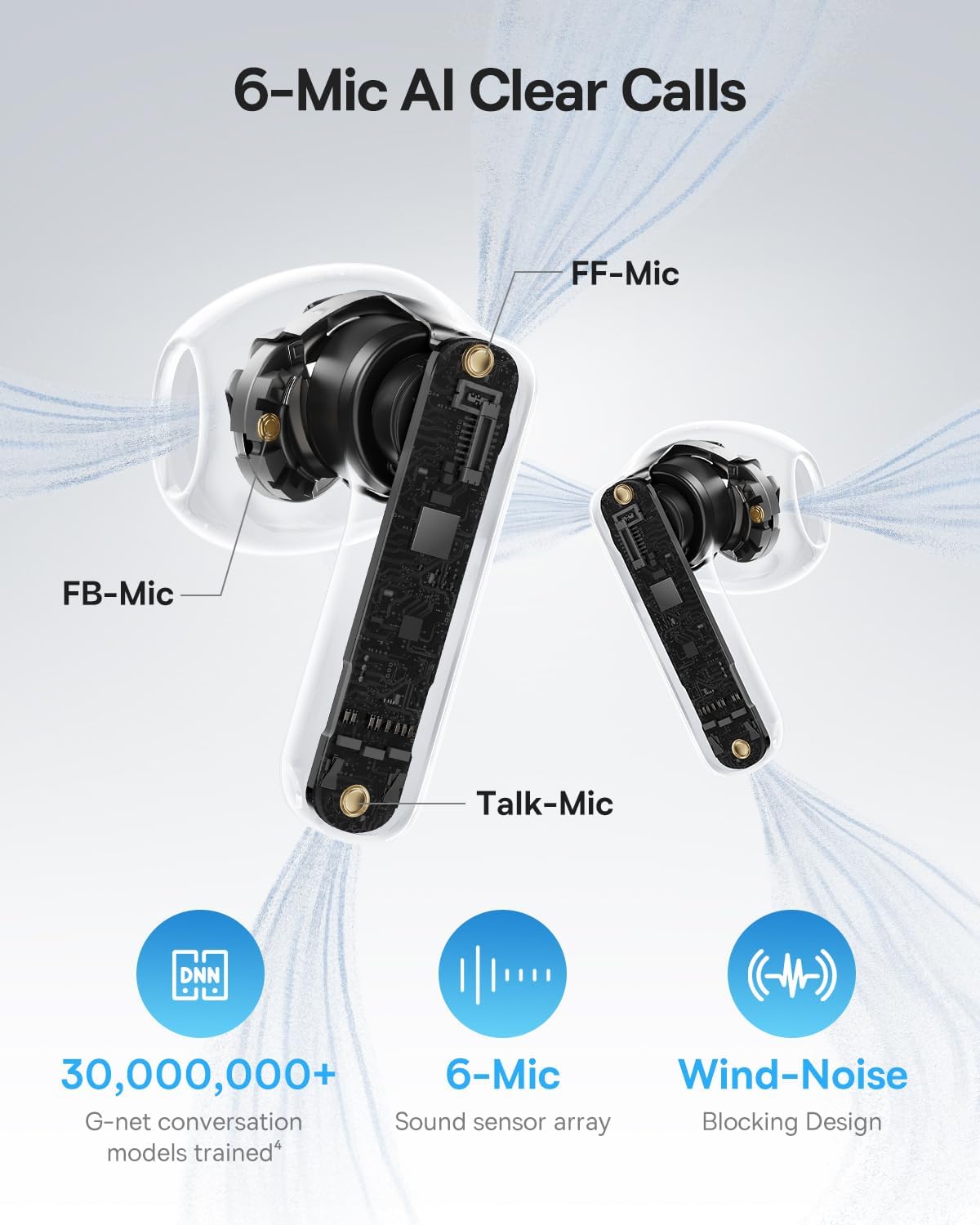
Image: A detailed diagram of the Baseus BS1 NC earbud, highlighting the placement of the FF-Mic, FB-Mic, and Talk-Mic, which contribute to the 6-Mic AI Clear Call technology and wind-noise blocking design.
6.5 Smart App Control
Download the dedicated Baseus app for enhanced control and customization options. The app allows you to:
- Adjust Bass Boost levels.
- Select from various EQ Modes.
- Control Spatial Acoustics settings.
- Use the "Find Your Earbuds" feature.
Note: In guest mode, no account creation or permissions are required to customize features, but GPS access is needed to locate lost earbuds.

Image: A smartphone displaying the Baseus app interface, which offers various sound control options including Bass Boost, EQ Modes, Spatial Acoustics, and a "Find Your Earbuds" function.
7. Kusamalira ndi Kusamalira
7.1 Kuyeretsa
- Nthawi zonse yeretsani zotsekera m'makutu ndi potchaja ndi nsalu yofewa, youma, yopanda lint.
- Osagwiritsa ntchito mankhwala owopsa, zosungunulira, kapena zotsukira zamphamvu.
- Gently remove any earwax or debris from the earbud mesh and charging contacts using a small, soft brush or cotton swab.
7.2 Kukaniza Madzi ndi Fumbi (IP55)
The earbuds are rated IP55, meaning they are protected against limited dust ingress and low-pressure water jets from any direction. This makes them suitable for workouts and light rain exposure.
- Musalowetse ma earbuds m'madzi.
- Ensure the earbuds are dry before placing them back into the charging case to prevent damage to the charging contacts.
- Choyimitsacho sichimamva madzi.

Image: The Baseus BS1 NC Earbuds shown with water droplets, signifying their IP55 rating for dust and water resistance.
7.3 Kusungirako
Sungani zomvera m'makutu m'chikwama chawo chochajitsa ngati sichikugwiritsidwa ntchito kuti muziteteze komanso kuti mukhale ndi chaji.
8. Mavuto
If you encounter issues with your Baseus BS1 NC earbuds, refer to the following common solutions:
- Palibe Mavuto a Phokoso/Kulumikizana:
- Onetsetsani kuti ma headphone ali ndi charger.
- Verify Bluetooth is enabled on your device and "Baseus Bass BS1 NC" is selected.
- Try placing earbuds back in the case, closing it, and then reopening to reset the connection.
- Iwalani chipangizocho muzokonda zanu za Bluetooth ndikukonzanso.
- M'makutu Mmodzi Sikugwira Ntchito:
- Onetsetsani kuti zomvera m'makutu zonse zachaji.
- Place both earbuds back in the case, close, and reopen.
- Tsukani zolumikizira zoyatsira pamakutu ndi mkati mwa chikwama.
- Kusamveka Kwabwino:
- Onetsetsani kuti zomvera m'makutu zakhazikika bwino m'makutu mwanu.
- Clean the earbud mesh to remove any obstructions.
- Check your device's audio settings and ensure LDAC is enabled if supported.
- ANC Sikugwira Ntchito:
- Ensure ANC mode is activated via touch control or the Baseus app.
- Adjust the earbuds for a better seal in your ears.
9. Zofotokozera
| Mbali | Tsatanetsatane |
|---|---|
| Dzina lachitsanzo | Baseus Bass BS1 NC |
| Kuwongolera Phokoso | Adaptive Noise Cancellation, Environmental Noise Cancellation, Hybrid Noise Cancellation |
| Kulumikizana Technology | Bluetooth 6.0, opanda zingwe |
| Wopanda zingwe Technology | Bluetooth 6.0 |
| Mtundu wa Bluetooth | 10 mita |
| Mtundu Woyendetsa Audio | Dynamic Driver |
| Kukula kwa Oyendetsa Audio | 13 mamilimita |
| Kuyankha pafupipafupi | 40 khz |
| Kuchedwa Kwama Audio | 60 Mphindi |
| Moyo wa Battery (Earbuds) | Maola 7 (kupuma kwa ANC) |
| Nthawi Yosewerera Yonse (ndi Nkhani) | Maola 40 (kupuma kwa ANC) |
| Charging Time (Rapid Charge) | Mphindi 10 kuti musewere kwa maola 2 |
| Madzi Resistance Level | IP55 (Earbuds only) |
| Mtundu Wowongolera | Touch Control |
| Zakuthupi | Acrylonitrile Butadiene Styrene (ABS), Polycarbonate (PC) |
| Kulemera kwa Chinthu (Zomvera m'makutu) | 4g pa khutu lililonse |
| Product Dimensions (Earbuds) | 1.2 x 0.7 x 0.7 mainchesi |
| Zida Zogwirizana | Devices with Bluetooth Audio Capability, including iOS, Android, Windows, Mac OS and Switch. |
10. Official Product Video
Watch the official product video for a visual guide on the Baseus BS1 NC Earbuds:
Video: An official product video from Baseus showcasing the features and usage of the Baseus BS1 NC Semi-in-Ear True Wireless Earbuds.
11. Chitsimikizo ndi Thandizo
For warranty information, technical support, FAQs, and further assistance, please visit the official Baseus support center.
Refer to the Quick Start Guide included in your package for a direct link or visit the Baseus webmalo.
Note: Protection plans may be available for purchase separately.


