Zofunika Zachitetezo
- Werengani ndikumvera malangizowa.
- Osagwiritsa ntchito mankhwalawa pafupi ndi madzi.
- Kuyeretsa kokha ndi nsalu youma.
- Onani voliyumutagya magetsi akuluakulu am'deralo.
- Do not block any ventilation openings. Install under the manufacturer's instructions.
- Osayika pafupi ndi zotenthetsera zilizonse monga ma radiator, zolembera zotenthetsera, masitovu, kapena zida zina (kuphatikiza ampLifiers) zomwe zimatulutsa kutentha.
- Gwiritsani ntchito zoyenereza/zowonjezera zomwe zafotokozedwa ndi wopanga.
- Chotsani mankhwalawa panthawi yamphezi komanso osagwiritsidwa ntchito kwa nthawi yayitali.
- Tumizani mautumiki onse kwa ogwira ntchito oyenerera.
Zamkatimu Phukusi
The Donner MAMP4 5.1 Channel Audio AmpLifier phukusi limaphatikizapo:
- Donner MAMP4 Stereo Receiver
- Kuwongolera Kwakutali
- FM Antenna
- Buku Logwiritsa Ntchito
Kukhazikitsa Guide
1. Connecting Speakers and Subwoofer
The MAMP4 amplifier supports a 5.1 channel setup, allowing connection of 5 speakers and 1 subwoofer. Ensure correct polarity (+/-) when connecting speakers.

Image: Diagram showing the 5.1 channel speaker and subwoofer connections on the rear panel of the Donner MAMP4 ampwopititsa patsogolo ntchito.

Chithunzi: Zambiri view of the rear panel of the Donner MAMP4 amplifier, highlighting speaker terminals and various input/output ports.
2. Kulumikiza Audio Sources
The amplifier offers multiple input options for various audio sources:
- Bluetooth 5.3: Pakuti opanda zingwe Audio kukhamukira zipangizo n'zogwirizana.
- USB: Connect a USB drive (up to 64 GB) for direct music playback.
- RCA: Connect devices like CD/DVD players or other audio equipment.
- AC-3: For surround sound input.
- Kuwala/Koaxial: Digital audio inputs for smart TVs and other digital sources.
- KUKHALA MU: General auxiliary input.
- Wailesi ya FM: Lumikizani antenna ya FM yomwe yaphatikizidwa kuti ilandire wailesi.
- Microphone Inputs (2x 1/4''): For karaoke or public address.

Image: Front panel of the Donner MAMP4 amplifier showing various input options including USB, AUX, and microphone jacks, along with Bluetooth and FM indicators.
3. Kulumikizana kwa Mphamvu
Connect the power cord to a wall outlet. Ensure the unit is turned off before making any connections.
4. Mphamvu Yoyambira
Press the Power button on the front panel to turn the amplifier on. The LED display will illuminate.

Image: The Donner MAMP4 amplifier integrated into a home theater setup, demonstrating its role in enhancing stereo and surround sound.
Malangizo Ogwiritsira Ntchito
1. Kusankha Kulowetsa
Use the 'MODE' button on the front panel or the 'INPUT' button on the remote control to cycle through available input modes: Bluetooth, USB, FM, RCA, AC-3, Optical, Coaxial, and AUX.
2. Volume and EQ Control
Adjust the master volume using the large knob on the front panel or the 'VOL+/-' buttons on the remote. The amplifier features independent controls for Treble, Midrange, and Bass on both the unit and the remote, allowing for customized sound profiles. The MAMP4 automatically saves your mode selection, volume, and EQ settings for convenience.
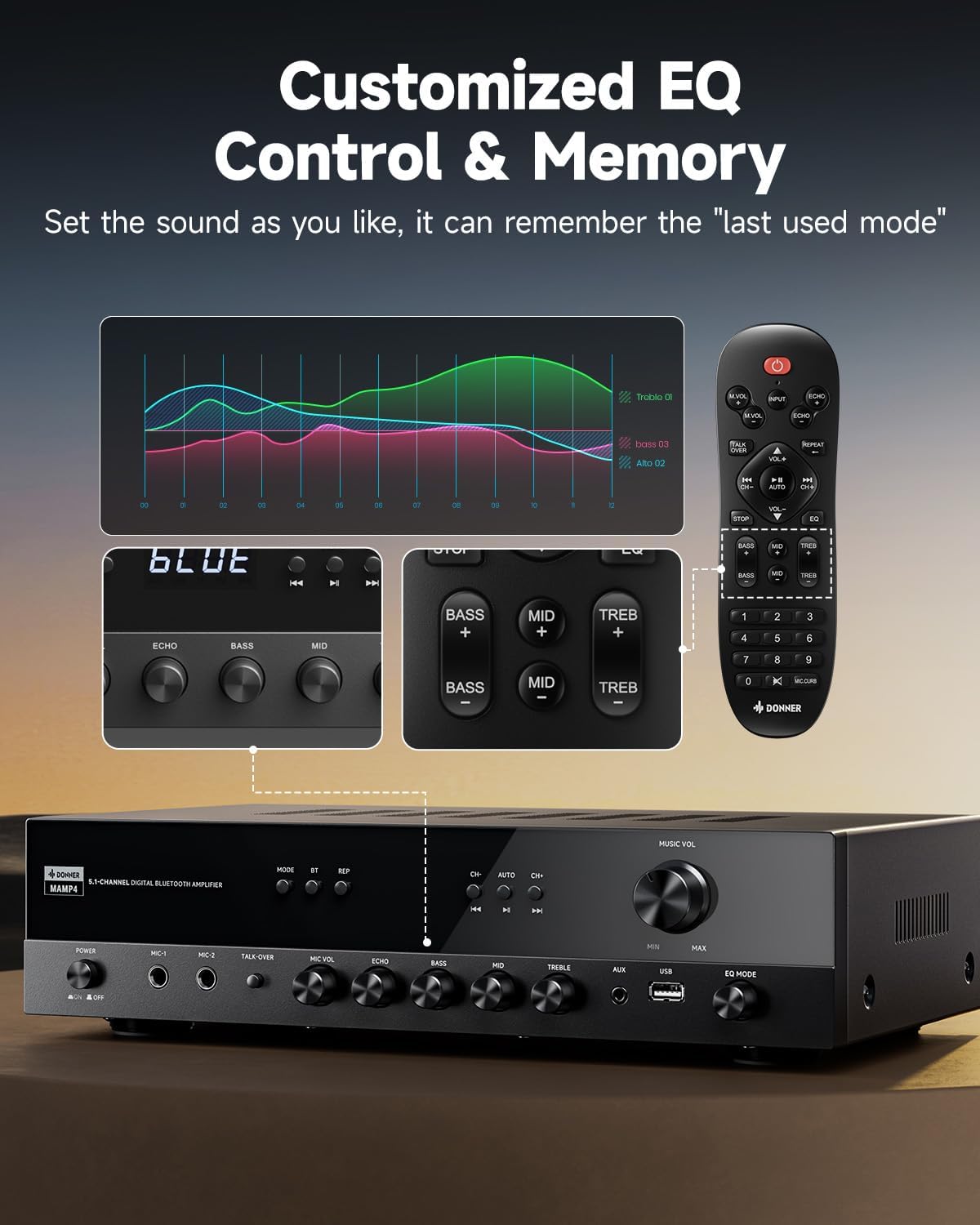
Image: Close-up of the Donner MAMP4 amplifier's front panel and remote control, illustrating the customizable EQ settings for bass, mid, and treble, and the memory function.
3. Kuyanjanitsa kwa Bluetooth
Select 'Bluetooth' mode. On your device, search for 'DONNER MAMP4' and pair. Use the Play/Pause button or Prev/Next buttons on the remote to control playback.
4. Ntchito ya Wailesi ya FM
In FM mode, you can quickly select your preferred FM frequency by entering the numbers directly using the remote control. Use the 'CH+/-' buttons for automatic channel search.

Image: The Donner MAMP4 amplifier with its remote control, demonstrating the ease of selecting FM frequencies by direct numerical input.
5. Microphone Functions
The amplifier includes dual 1/4'' microphone jacks. Adjust microphone volume and echo effect using dedicated knobs. The 'Talk Over' function lowers background music for clearer voice output during events or speeches.
6. Kuwongolera kwakutali
The upgraded remote control provides full functionality, including treble, midrange, bass, echo, and Talkover settings in any input mode.

Image: Comparison of the new and old style remote controls for the Donner amplifier, highlighting the expanded functionality of the upgraded remote for input selection, EQ, echo, and Talkover.
7. Product Summary Video
Video: A product summary video for the Donner ampchiwonetsero, chiwonetseroasing its features and functionalities.
8. Donner 5.1 Channel Stereo Receiver Overview
Kanema: Wogwira ntchitoview video from DonnerDirect, detailing the features and benefits of the Donner 5.1 Channel Stereo Receiver.
Kusamalira
To ensure the longevity and optimal performance of your Donner MAMP4 ampLifier, tsatirani malangizo awa:
- Kuyeretsa: Use a soft, dry cloth to clean the exterior of the unit. Avoid liquid cleaners or abrasive materials.
- Mpweya wabwino: Ensure that all ventilation openings on the amplifier are clear and unobstructed to prevent overheating.
- Posungira: If the unit will not be used for an extended period, unplug the power cord from the outlet.
- Mabatire Akutali: Replace batteries in the remote control as needed. Dispose of used batteries properly according to local regulations.
Kusaka zolakwika
If you encounter issues with your Donner MAMP4 amplifier, refer to the following common solutions:
- Palibe Mphamvu: Ensure the power cord is securely plugged into both the amplifier and a working wall outlet. Check the power switch on the front panel.
- Palibe Phokoso: Verify that the correct input source is selected. Check all speaker and audio source connections for proper seating and polarity. Adjust volume levels.
- Hissing Sound in Standby: The MAMP4 has optimized noise reduction with added relays. If a persistent hissing sound occurs, ensure all connections are secure and try unplugging the unit for a few minutes before reconnecting.
- Bluetooth Pairing Mavuto: Onetsetsani kuti amplifier is in Bluetooth mode and your device's Bluetooth is enabled and discoverable. Try restarting both devices.
- FM Radio Reception Poor: Ensure the FM antenna is properly connected and extended. Try repositioning the antenna for better signal.
- Maikolofoni Sakugwira Ntchito: Ensure microphones are securely plugged into the correct jacks. Adjust 'MIC VOL' and 'ECHO' knobs.
For persistent issues, please contact Donner customer support or refer to qualified service personnel.
Zofotokozera
| Mbali | Kufotokozera |
|---|---|
| Chitsanzo | MAMP4 |
| Mphamvu Zotulutsa (RMS) | L/R Speakers: 60W/4R; Surround & Center Speakers: 25W × 3 |
| Njira | 5.1 Channel |
| Mtundu wa Bluetooth | 5.3 |
| Thandizo la USB | Mpaka 64 GB |
| Zowonjezera pa Audio | 1 RCA, 1 AC-3, 2 Mic-in, AUX IN, Optical, Coaxial |
| FM pafupipafupi | 76-108 MHz |
| Kulamulira EQ | Treble, Midrange, Bass (independent adjustment) |
| Zapadera | Talk Over function, Settings Memory, Low Noise Design |
| Miyeso Yazinthu | 9.76 x 14.96 x 3.86 mainchesi |
| Kulemera kwa chinthu | 13.2 mapaundi |
Chitsimikizo & Thandizo
For warranty information, technical support, or any inquiries regarding your Donner MAMP4 amplifier, please contact Donner customer service.
- Wopanga: Wopereka ndalama
- Pambuyo pogulitsa Imelo: service@donnermusic.com
- Thandizo la Akatswiri: Tumizani mautumiki onse kwa ogwira ntchito oyenerera.


