1. Mawu Oyamba
Thank you for choosing the Tacens AEROSLIM500 MicroATX PC Case. This slim mini-tower is designed for efficient and compact PC builds, supporting MicroATX and Mini-ITX motherboards. It features optimized airflow, an integrated 500W TFX power supply, and modern connectivity. This manual provides essential information for safe installation, operation, and maintenance of your new PC case.
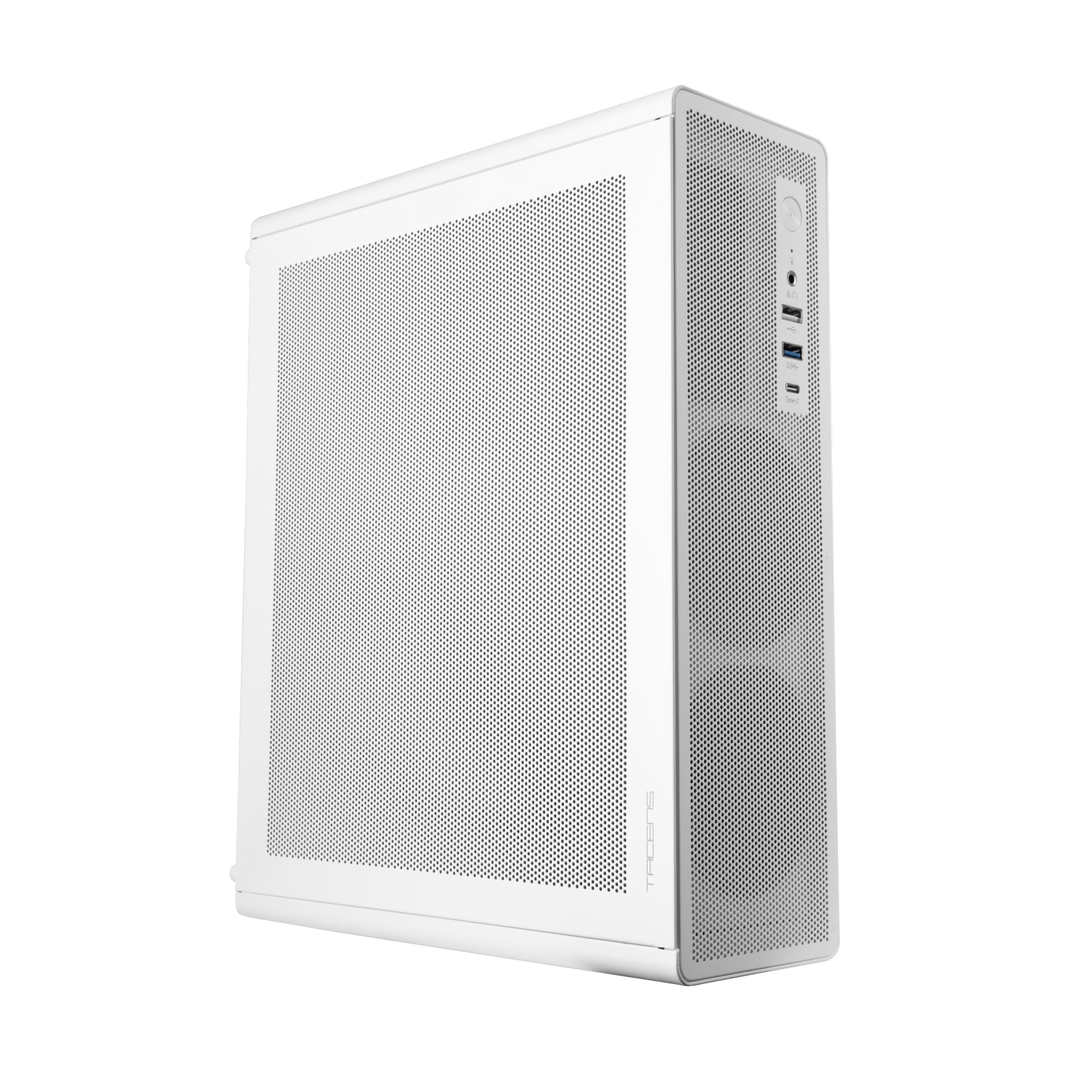
Figure 1: Tacens AEROSLIM500 MicroATX PC Case (Overall View)
2. Zambiri Zachitetezo
Chonde werengani ndikutsatira malangizo awa achitetezo kuti mupewe kuwonongeka kwa chinthucho kapena kuvulala kwanu.
- Kuyimitsa Mphamvu: Always disconnect the power cable from the wall outlet before opening the case or performing any installation/maintenance.
- Magetsi Okhazikika: Discharge static electricity from your body before handling internal components. Use an anti-static wrist strap if available.
- Mphepete Zakuthwa: Be cautious of sharp edges inside the case during installation.
- Mpweya wabwino: Ensure proper ventilation around the case. Do not block air vents.
- Madzi ndi Chinyezi: Keep the case away from liquids and excessive moisture.
- Kuyika Kwaukatswiri: Ngati simukudziwa bwino njira iliyonse yokhazikitsira, funsani thandizo kwa katswiri wodziwa bwino ntchito.
3. Zamkatimu Phukusi
Tsimikizirani kuti zinthu zonse zilipo mu phukusi lanu. Ngati zinthu zina zikusowa kapena zawonongeka, funsani wogulitsa wanu.
- Tacens AEROSLIM500 MicroATX PC Case with integrated 500W TFX Power Supply
- Pre-installed 90mm FDB Front Fan
- Accessory kit (screws, standoffs, cable ties)
- Buku la ogwiritsa (chikalatachi)
4. Zinthu Zogulitsa
The Tacens AEROSLIM500 PC case offers a range of features for a compact and efficient build:
- Integrated TFX 500W Power Supply: Ensures stable and efficient power delivery for your components.
- Kuziziritsa Kwapamwamba: Front and side ultra-fine mesh panels provide constant airflow and act as a dust barrier.
- Pre-installed Front Fan: Includes a 90mm FDB (Fluid Dynamic Bearing) fan for optimal cooling. Supports up to two 90mm front fans.
- Optimized Internal Space: Compatible with MicroATX (up to 210mm wide) and Mini-ITX motherboards.
- Thandizo la GPU: Accommodates low-profile GPUs up to 220mm long and 63mm wide.
- Zosungirako: Features 5 x 2.5" SSD drive bays.
- Mipata Yokulitsa: Provides 3 expansion slots for MicroATX or 1-2 for Mini-ITX configurations.
- Kulumikizana Kwathunthu: Front panel includes USB-C, USB 3.0, USB 2.0 ports, and HD audio/microphone jacks.
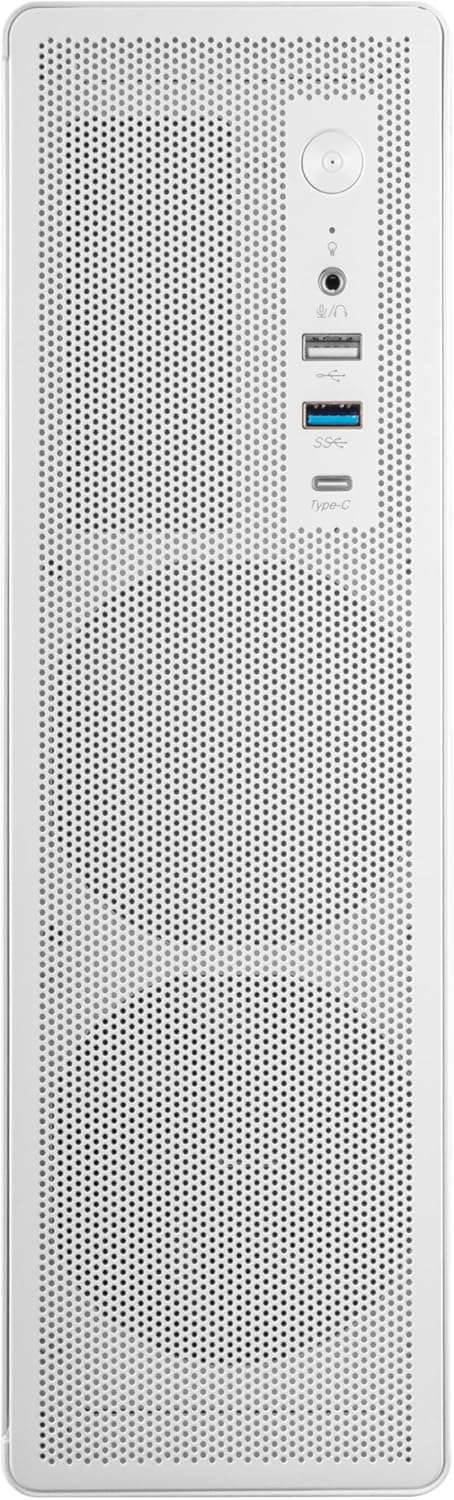
Figure 2: Front Panel Connectivity

Chithunzi 3: Tsatanetsatane View of Front I/O Ports
5. Kukhazikitsa ndi Kuyika
Follow these steps to install your components into the Tacens AEROSLIM500 PC case. Ensure the system is powered off and unplugged before beginning.
5.1. Opening the Case
- Ikani chikwamacho pamalo osalala komanso okhazikika.
- Locate the thumbscrews or standard screws on the rear panel securing the side panel(s).
- Remove the screws and carefully slide the side panel(s) backward, then lift them off.

Figure 4: Case Interior View with Pre-installed Fan
5.2. Kuyika kwa bolodi la amayi
- Install the CPU, CPU cooler (ensure it fits within the 73mm height limit), and RAM onto your MicroATX or Mini-ITX motherboard before placing it in the case.
- Align the motherboard with the pre-installed standoffs inside the case.
- Secure the motherboard using the appropriate screws from the accessory kit.

Figure 5: Motherboard Mounting Area
5.3. Storage Device Installation (2.5" SSD/HDD)
- Locate the 2.5" drive bays/mounting points. The case supports up to 5 x 2.5" drives.
- Secure your 2.5" SSDs or HDDs using the provided screws.
- Connect SATA data and power cables to the drives.

Figure 6: Power Supply and Drive Bay Area
5.4. Kukhazikitsa Khadi Lokulitsa (GPU)
- Chotsani zophimba zofunikira za malo owonjezera kumbuyo kwa chikwamacho.
- Carefully insert your low-profile GPU (max 220mm length, 63mm width) into the PCIe slot on the motherboard.
- Secure the expansion card with a screw.
5.5. Connecting Front Panel Cables
Connect the front panel cables (USB-C, USB 3.0, USB 2.0, HD Audio, Power Switch, Reset Switch, Power LED, HDD LED) to their corresponding headers on your motherboard. Refer to your motherboard manual for exact header locations.
5.6. Chingwe Management
Route cables neatly to improve airflow and aesthetics. Use the provided cable ties to secure bundles of cables.
5.7. Closing the Case
- Once all components are installed and cables are managed, reattach the side panel(s).
- Secure the side panel(s) with the thumbscrews or standard screws.
6. Malangizo Ogwiritsira Ntchito
After successful assembly, connect your peripherals (monitor, keyboard, mouse) and the power cable to the integrated TFX 500W power supply.
- Yatsani: Press the power button located on the front panel to turn on your computer.
- Madoko a USB: Use the front USB-C, USB 3.0, and USB 2.0 ports for connecting external devices.
- Audio Jacks: Connect headphones or a microphone to the front audio jacks.
- Kuzimitsa Mphamvu: Shut down your computer through the operating system. For a hard shutdown, press and hold the power button for several seconds.
7. Kusamalira
Kusamalira pafupipafupi kumathandizira kuti pakhale magwiridwe antchito komanso moyo wautali wa zida zanu za PC.
- Kuyeretsa Fumbi: The mesh panels act as dust filters. Periodically clean the front and side mesh panels using compressed air or a soft brush to remove accumulated dust.
- Kuyeretsa Mkati: Every 6-12 months, open the case (after disconnecting power) and use compressed air to clean dust from internal components, especially CPU coolers and GPU fans.
- Kuyang'anira Kayendetsedwe ka Zingwe: Ensure cables remain neatly routed and do not obstruct airflow.
8. Mavuto
Ngati mukukumana ndi mavuto, onani njira zotsatirazi zodziwika bwino zothetsera mavuto.
- Palibe Mphamvu:
- Ensure the power cable is securely connected to both the wall outlet and the PC's power supply.
- Verify that the power supply switch (if present) is in the 'ON' position.
- Check all internal power connections (24-pin ATX, 8-pin CPU, GPU power) to the motherboard and components.
- Ensure the front panel power button cable is correctly connected to the motherboard header.
- Palibe Chiwonetsero:
- Confirm your monitor is powered on and connected to the correct video output on your GPU or motherboard.
- Reseat your GPU and RAM modules.
- Phokoso Lambiri:
- Check if any cables are obstructing fan blades.
- Clean dust from fans (CPU, GPU, case fans, PSU fan).
- Ensure all screws are tightened to prevent vibrations.
- Front Panel Ports Not Working:
- Verify that the USB and audio cables from the front panel are correctly connected to the motherboard headers.
9. Zofotokozera
| Mtundu | Tacens |
| Dzina lachitsanzo | AEROSLIM500 |
| Kugwirizana kwa boardboard | Micro ATX, Mini ITX |
| Mtundu wa Mlandu | Compact Desktop / Mini-Tower |
| Mtundu | Choyera |
| Zakuthupi | Chitsulo |
| Magetsi | Integrated TFX 500W |
| Njira Yozizirira | Air (Pre-installed 90mm FDB front fan) |
| CPU Cooler Height Limit | Mpaka 73mm |
| GPU Length Limit | Up to 220mm (low-profile kokha) |
| GPU Width Limit | Mpaka 63mm |
| Drive Bays | 5 x 2.5" SSD/HDD |
| Mipata Yokulitsa | 3 (MicroATX), 1-2 (Mini-ITX) |
| Madoko Akutsogolo a I / O | 1x USB-C, 1x USB 3.0, 2x USB 2.0, HD Audio (Headphone/Microphone) |
| Kulemera kwa chinthu | 2.25 kg |
10. Chitsimikizo ndi Thandizo
Tacens products are manufactured to the highest quality standards. For information regarding warranty coverage, terms, and conditions, please refer to the warranty card included with your product or visit the official Tacens webmalo.
For technical support, troubleshooting assistance beyond this manual, or to inquire about replacement parts, please contact Tacens customer service through their official webtsamba kapena mauthenga omwe aperekedwa muzolemba zamalonda anu.
Official Tacens Webtsamba: www.tacens.com (Chidziwitso: Ichi ndi chosungira URL. Please refer to your product packaging for the correct official webmalo.)


