Mawu Oyamba
Zikomo pogulaasing the Matbip Multi-Platform Wireless Gaming Controller. This controller is designed to enhance your gaming experience across various platforms, including Nintendo Switch, Android, iOS, and PC. It features advanced functions such as TURBO burst, macro programming, customizable RGB lighting, and HD vibration, providing precise control and immersive feedback. Please read this manual carefully before use to ensure proper operation and to fully utilize all features.
Zathaview
Familiarize yourself with the various components and buttons of your Matbip controller.
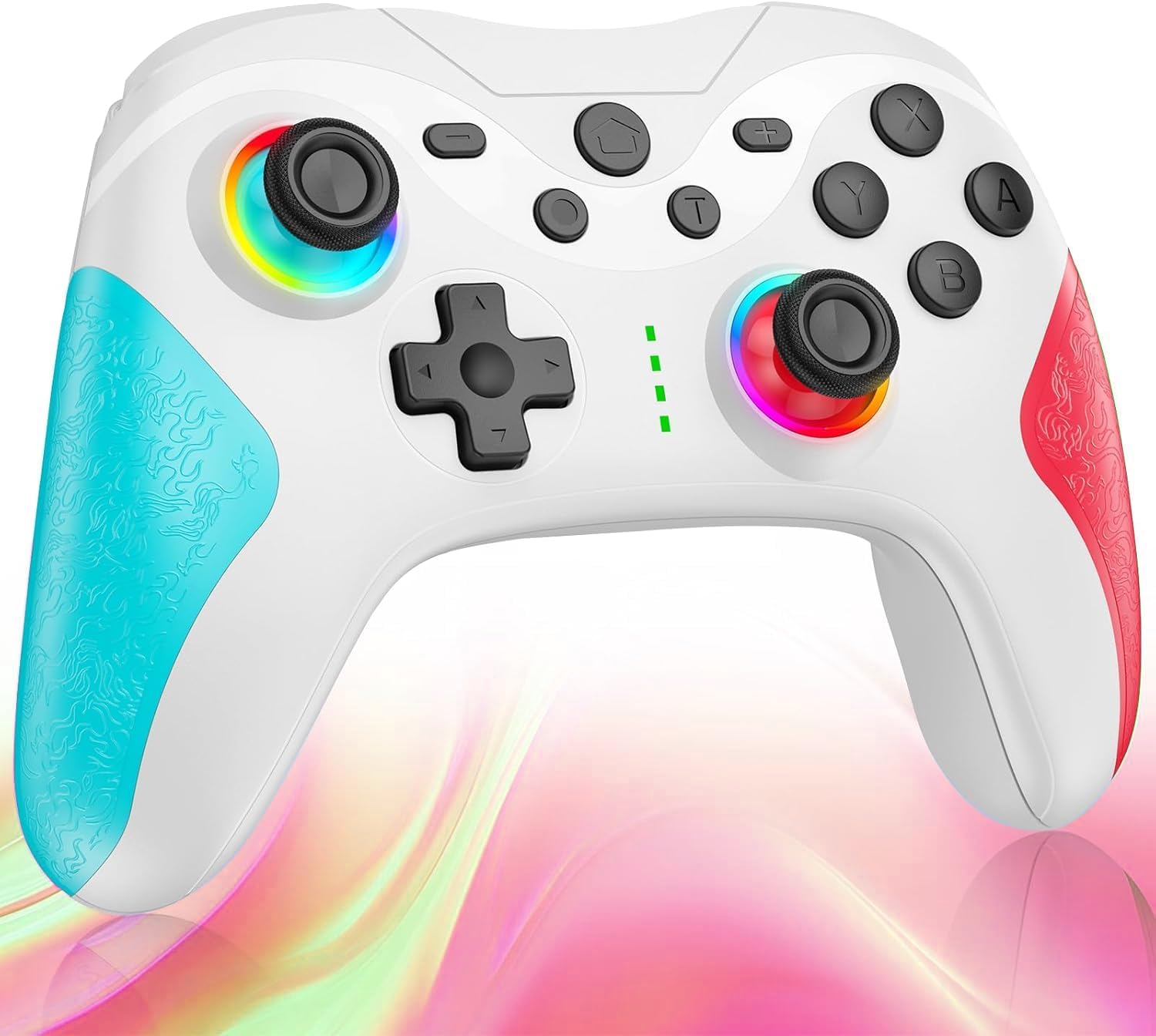
Chithunzi: Patsogolo view of the Matbip Multi-Platform Wireless Gaming Controller. It features a white body with blue textured grips on the left and red textured grips on the right. The joysticks are illuminated with a rainbow RGB light. Standard buttons (A, B, X, Y), a D-pad, and central function buttons (Home, Plus, Minus, T) are visible.
Zigawo Zofunikira:
- Zokometsera Kumanzere/Kumanja: For directional control, with customizable RGB lighting.
- D-Pad: Kuti mulowe munjira yolondola.
- Action Buttons (A/B/X/Y): Standard gaming input buttons.
- Shoulder Buttons (L/R/ZL/ZR): Top-mounted trigger and bumper buttons.
- Back Buttons: Additional programmable buttons on the rear for strategic gameplay.
- Batani Loyamba: Kubwerera ku tsamba loyambira la dongosolo.
- Mabatani Owonjezera (+) / Opanda (-): System-specific function buttons.
- T Button (TURBO): Activates and manages the TURBO burst function.
- Powotcha: Doko la USB-C pakulipiritsa.
- Zowunikira Zowunikira: Onetsani momwe kulumikizana kulili komanso mulingo wa batri.
Khazikitsa
1. Kulipira Wowongolera
Before first use, fully charge the controller. Connect the provided USB-C cable to the controller's charging port and the other end to a USB power source (e.g., console, PC, or USB wall adapter). The indicator lights will show charging status and turn off when fully charged.
2. Kulumikizana ndi Zipangizo
The controller supports Bluetooth wireless connection across multiple platforms.
Kwa Nintendo Switch:
- On the Switch HOME Menu, select Olamulira > Sinthani Grip/Order.
- Press ndi kugwira Batani lakunyumba on the Matbip controller for 3-5 seconds until the indicator lights flash rapidly.
- Once paired, the indicator light(s) on the controller will remain solid.
For Android/iOS Devices:
- Yambitsani Bluetooth pa chipangizo chanu cha Android kapena iOS.
- Press ndi kugwira Batani lakunyumba on the Matbip controller for 3-5 seconds until the indicator lights flash rapidly.
- On your device's Bluetooth settings, select the controller (e.g., "Matbip Controller") from the list of available devices to pair.
Kwa PC (Windows):
- Ensure your PC has Bluetooth enabled. Go to Zokonda > Zipangizo > Bluetooth ndi zida zina.
- Dinani Onjezani Bluetooth kapena chipangizo china > bulutufi.
- Press ndi kugwira Batani lakunyumba on the Matbip controller for 3-5 seconds until the indicator lights flash rapidly.
- Select the controller from the list of devices to pair.
Malangizo Ogwiritsira Ntchito
TURBO Burst Function:
The TURBO function allows for rapid, automatic button presses, ideal for combat games.
- To activate TURBO: Press ndi kugwira T batani, then press the desired action button (e.g., A, B, X, Y, L, R, ZL, ZR). The button will now continuously activate when held down.
- Kusintha liwiro la TURBO: Ndikugwira T batani, sunthani right joystick up or down to cycle through 3 different burst speeds.
- To deactivate TURBO: Press ndi kugwira T batani, then press the same action button again.
Macro ntchito:
Program a sequence of button presses to a single back button for complex actions.
- Specific instructions for macro programming will be detailed in the full manual. Generally, this involves entering a programming mode, pressing the sequence, and assigning it to a back button.
Kuwunikira kwa RGB Mwamakonda:
The joysticks feature 9-color RGB lighting to enhance your gaming atmosphere.
- To change RGB color/mode: Press a specific button combination (e.g., T + Left Joystick click) to cycle through different colors and lighting effects.
HD Vibration Adjustment:
Adjust the intensity of the HD vibration feedback to your preference (4 levels).
- To adjust vibration: Press a specific button combination (e.g., T + D-Pad Up/Down) to cycle through the 4 vibration levels.
Sensor ya Gyro:
The high-precision gyro sensor enables intuitive motion control in supported games.
- The gyro sensor is automatically active when connected to a compatible device (e.g., Nintendo Switch) and used in games that support motion controls.
Sleep Wake-up Function:
The controller supports waking up your Nintendo Switch console from sleep mode.
- When the Switch is in sleep mode, simply press the Batani lakunyumba on the controller to wake it up and reconnect.
Kusamalira
Proper maintenance ensures the longevity and optimal performance of your controller.
- Kuyeretsa: Gwiritsani ntchito nsalu yofewa komanso youma kuti mupukute chowongolera. Ngati dothi lolimba, pukutani pang'onoampMusagwiritse ntchito mankhwala amphamvu kapena zotsukira zowawasa.
- Posungira: Store the controller in a cool, dry place away from direct sunlight, extreme temperatures, and humidity.
- Kusamalira Battery: Avoid fully discharging the battery frequently. If storing for a long period, charge the controller to about 50% every few months.
- Pewani Madontho: Tetezani chowongolera ku madontho ndi kugundana, zomwe zingawononge zigawo zamkati.
Kusaka zolakwika
If you encounter issues with your controller, please refer to the following common solutions:
| Vuto | Njira Yotheka |
|---|---|
| Chowongolera sichikuyatsa. | Onetsetsani kuti chowongolera chayikidwa chaji. Lumikizani ku gwero lamagetsi pogwiritsa ntchito chingwe cha USB-C. |
| Controller does not pair. | Ensure Bluetooth is enabled on your device. Make sure the controller is in pairing mode (flashing lights). Try restarting both the controller and the device. |
| Input lag or disconnection. | Ensure there are no strong wireless interferences nearby. Move closer to the device. Re-pair the controller. |
| Mabatani kapena ma joystick sagwira ntchito. | Try resetting the controller (refer to the full manual for reset instructions, usually a small pinhole button). Ensure no debris is obstructing the buttons. |
| Kugwedezeka sikukugwira ntchito. | Check if vibration is enabled in the game or system settings. Adjust the vibration intensity on the controller. |
Zofotokozera
| Mbali | Tsatanetsatane |
|---|---|
| Miyeso Yazinthu | 10 x 15 x 6.5 masentimita |
| Kulemera | 300g pa |
| Kulumikizana | Bluetooth Wireless |
| Kugwirizana | Nintendo Switch, Android, iOS, PC (Windows) |
| Zapadera | TURBO Burst, Macro Function, 9-Color RGB Lighting, 4-Level HD Vibration, Gyro Sensor, Back Buttons, Sleep Wake-up |
| ASIN | B0FHWRK7CQ |
| Tsiku lotulutsa | Julayi 16, 2025 |
Chitsimikizo ndi Thandizo
Matbip is committed to providing high-quality products and customer satisfaction. This product comes with a standard manufacturer's warranty. For detailed warranty information, please refer to the documentation included with your purchase or contact Matbip customer support.
If you require further assistance, have questions, or encounter issues not covered in this manual, please contact our customer support team. A Japanese instruction manual is included with the product to ensure ease of use for first-time users.
Zambiri zamalumikizidwe: Please refer to the packaging or the official Matbip webtsamba lawebusayiti kuti mudziwe zambiri zatsopano zokhudza chithandizo cha makasitomala.


