1. Mawu Oyamba
The Insoma Smart Water Hose Timer is an automatic irrigation system controller designed for lawns, gardens, and yards. This device features two independent outlets, allowing for flexible and efficient watering schedules. It is compatible with smart home ecosystems like Alexa and Google Assistant, offering convenient control via a mobile application.
2. Zamkatimu Phukusi
Tsimikizirani kuti zinthu zonse zomwe zalembedwa pansipa zili m'phukusi lanu. Ngati zinthu zina zikusowa kapena zawonongeka, chonde funsani chithandizo cha makasitomala.

Image: Insoma Smart Water Timer package contents.
- Insoma Smart Water Hose Timer (2-Outlet)
- WiFi Hub
- Thread Sealing Tape
- Threaded Connectors (various sizes)
- Buku Logwiritsa Ntchito
3. Zamalonda Zathaview
The Insoma Smart Water Hose Timer is designed for outdoor use, featuring a durable construction and smart control capabilities. It connects to your home WiFi via a dedicated hub, enabling remote management of your irrigation system.
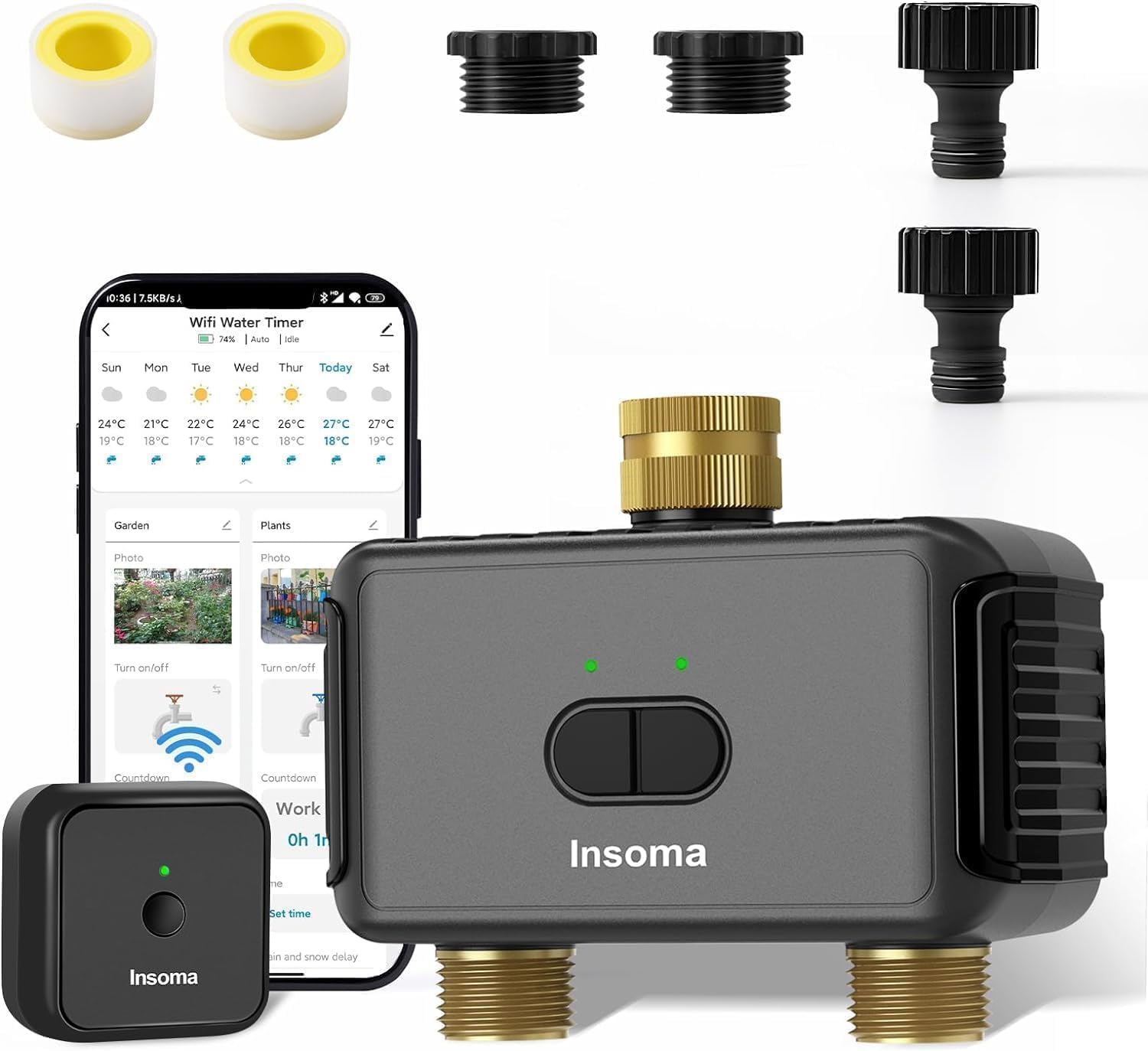
Image: Main components of the Insoma Smart Water Hose Timer system.
Zofunika Kwambiri:
- Malo Awiri: Two independent watering zones for customized irrigation.
- Smart App Control: Manage schedules and monitor watering from anywhere via the Smart Life App.
- Kuwongolera Mawu: Compatible with Alexa and Google Assistant for hands-free operation.
- Kuchedwa kwa Mvula: Pause watering schedules for 1-7 days to conserve water.
- Kutsirira Buku: Initiate immediate watering without affecting preset schedules.
- Mapangidwe Okhazikika: UV-proof, IP55 waterproof, and corrosion-proof construction.
- Dongosolo Lokulitsa: Connect up to 32 water timers with a single WiFi hub.
4. Zofotokozera
| Mbali | Tsatanetsatane |
|---|---|
| Nambala ya Model | SGW08MB-TT-NH-02-04-YS-US-H |
| Mtundu | Insoma |
| Mtundu | Dark Gray (Brass Inlet & Plastics Outlet) |
| Zakuthupi | Pulasitiki, Mkuwa |
| Miyeso Yazinthu | 7.9"D x 3.2"W x 5.4"H |
| Kulemera kwa chinthu | 1.1 mapaundi |
| Kuthamanga kwa Madzi Ogwira Ntchito | 7.26-116 PSI |
| Magetsi | 4* AAA 1.5V Alkaline batteries (not included) |
| Kulumikizana | 2.4GHz WiFi (via WiFi Hub) |
| Kuyesa Kwamadzi | IP55 |
| Kugwirizana Kwa Wothandizira Mawu | Amazon Alexa, Google Assistant |
5. Kukhazikitsa & Kuyika
Follow these steps to set up your Insoma Smart Water Hose Timer and connect it to your irrigation system.

5.1. Kukonzekera Koyamba
- Lowetsani Mabatire: Open the battery compartment on the water timer and insert 4 AAA 1.5V alkaline batteries (not included). Ensure correct polarity. The battery compartment has a built-in sealing strip for water protection.
- Power the WiFi Hub: Connect the WiFi Hub to a power source.
- Download Smart Life App: Download the "Smart Life" application from your smartphone's app store (iOS or Android).
- Pair WiFi Hub: Open the Smart Life App and follow the on-screen instructions to add and pair the WiFi Hub. Ensure your smartphone is connected to a 2.4GHz WiFi network during this process.
- Add Water Timer: Once the WiFi Hub is paired, tap 'Add New Device' within the app and select the water timer to add it to the gateway.
5.2. Kuyika Kwathupi
- Konzani Faucet: Ensure your outdoor faucet is clean and free of debris.
- Apply Thread Tape: For an optimal seal, apply the provided thread sealing tape to the threads of your outdoor faucet.
- Connect Timer: Screw the Insoma Smart Water Hose Timer onto your outdoor faucet. Hand-tighten only. The brass inlet is designed for a secure, leak-proof connection.
- Gwirizanitsani Hoses: Attach your garden hoses to the two independent outlets at the bottom of the timer.
- Yesani kulumikizana: Slowly turn on your faucet to check for any leaks. Adjust the timer's connection if necessary.
6. App Control & Features
The Insoma Smart Water Hose Timer offers a range of features accessible through the Smart Life App, providing comprehensive control over your irrigation.
Kanema: Paview of the Insoma Smart Water Timer's features, including app control, dual zones, cyclical watering, rain delay, manual watering, and notifications.
6.1. Smart App Control
Once connected to the 2.4GHz WiFi via the hub, you can manage your watering programs from anywhere using the Smart Life App. This includes setting schedules, initiating manual watering, and checking watering history.
6.2. Two Independent Watering Zones
The timer features two outlets that operate independently. Each zone can have its own distinct watering schedule, allowing you to customize irrigation for different areas of your garden or lawn. You can set up to 20 programs per outlet (40 total programs).

Image: Two independent watering zones with distinct schedule types.
6.3. Watering Schedule Types
The app supports two main types of watering schedules:
- Timed Irrigation: Set specific start times and durations for watering on selected days.
- Cyclical Irrigation: Define a cycle with a start and end time, a watering duration, and an interval time. The system will water repeatedly within this cycle, allowing soil to absorb water between sessions.
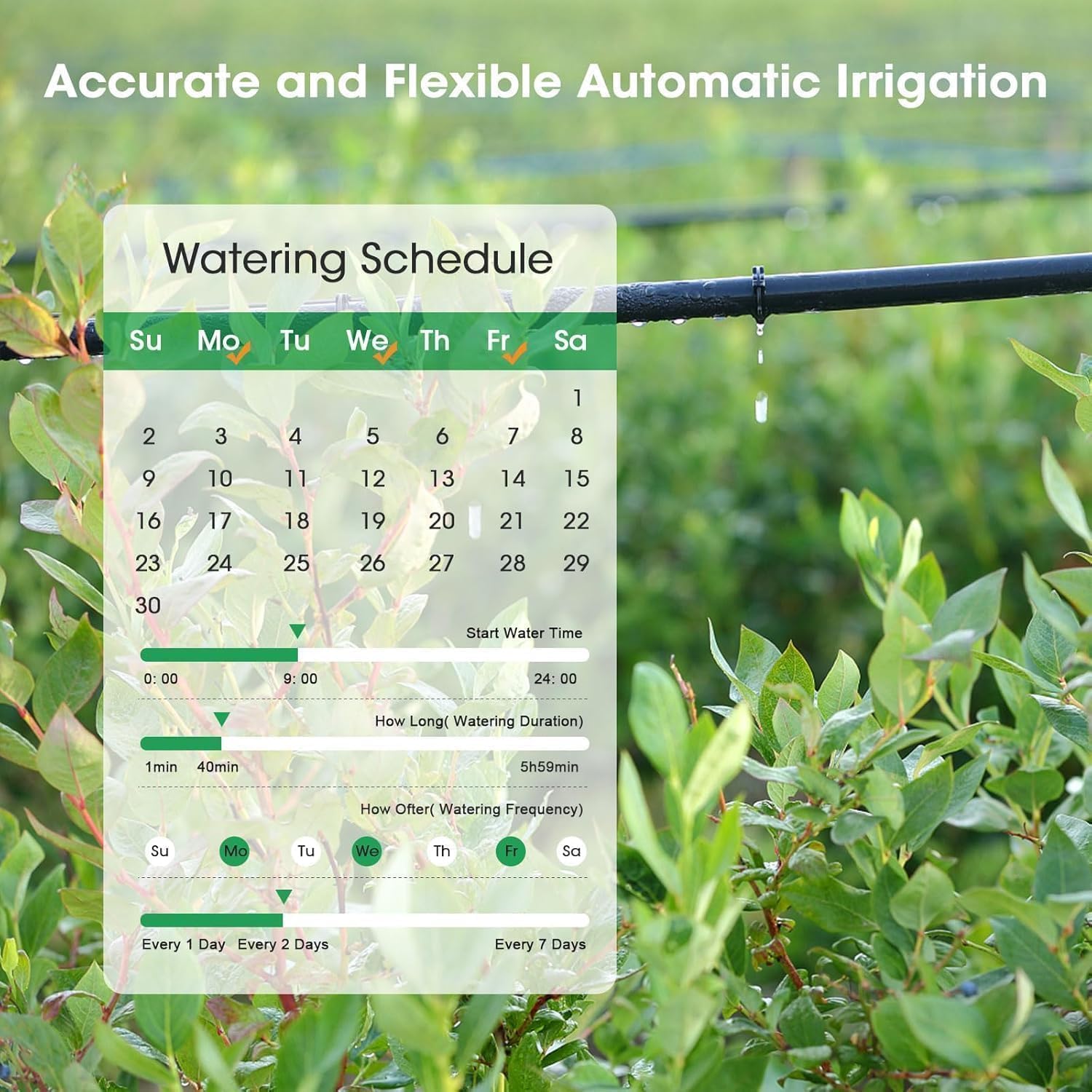
Chithunzi: Eksample of setting an accurate and flexible automatic irrigation schedule.

Image: Cyclical irrigation water-saving mode settings.
6.4. Kuthirira pamanja
You can initiate manual watering at any time directly from the app. This mode allows you to water for a custom duration (from 1 minute to 23 hours 59 minutes) without interrupting your pre-set automatic schedules.

Image: Manual watering mode in action.
6.5. Ntchito Yochedwa Mvula
To conserve water, you can activate the rain delay feature. This pauses your programmed watering schedule for 1 to 7 days. The schedule will automatically resume after the selected delay period.

Image: Save water with the rain delay setting.
6.6. Kulamulira Mawu Mwanzeru
The Insoma Smart Water Hose Timer is compatible with Amazon Alexa and Google Assistant. You can use simple voice commands to turn the watering timer on or off, providing hands-free control over your irrigation system.

Image: Voice control watering with Alexa or Google Assistant.
6.7. Extended Irrigation System
You can expand your smart irrigation system by connecting up to 32 WiFi water timers to a single WiFi hub. This allows for centralized control of multiple watering points across a larger garden or property.

Image: Building an extended smart irrigation system.
6.8. Real-Time Notifications and Watering History
The Smart Life App provides real-time notifications regarding watering events (e.g., when a zone starts or stops watering). You can also access a detailed watering history, recording the time and duration of each irrigation session, which helps in monitoring and optimizing water usage.

Image: Keep track of watering history.

Chithunzi: Eksample of watering notifications on a smartphone.
6.9. Upgraded Anti-Leak Design
The timer features an upgraded design with a brass inlet and improved thread engagement, ensuring a tighter fit on the faucet and enhanced leak-proof performance. This design contributes to the overall durability and reliability of the unit.

Image: Upgraded anti-leak design with brass swivel connector.
7. Kusamalira
Regular maintenance ensures the longevity and optimal performance of your Insoma Smart Water Hose Timer.
7.1. Kuyeretsa
- Periodically wipe the exterior of the timer with a damp nsalu yochotsa litsiro ndi zinyalala.
- Ensure the inlet and outlet connections are free from mineral buildup or blockages.
7.2. Kusintha Battery
The timer requires 4 AAA 1.5V alkaline batteries. Replace batteries when the low battery indicator appears in the app or on the device. Ensure the battery compartment seal is properly seated after replacement to maintain water resistance.
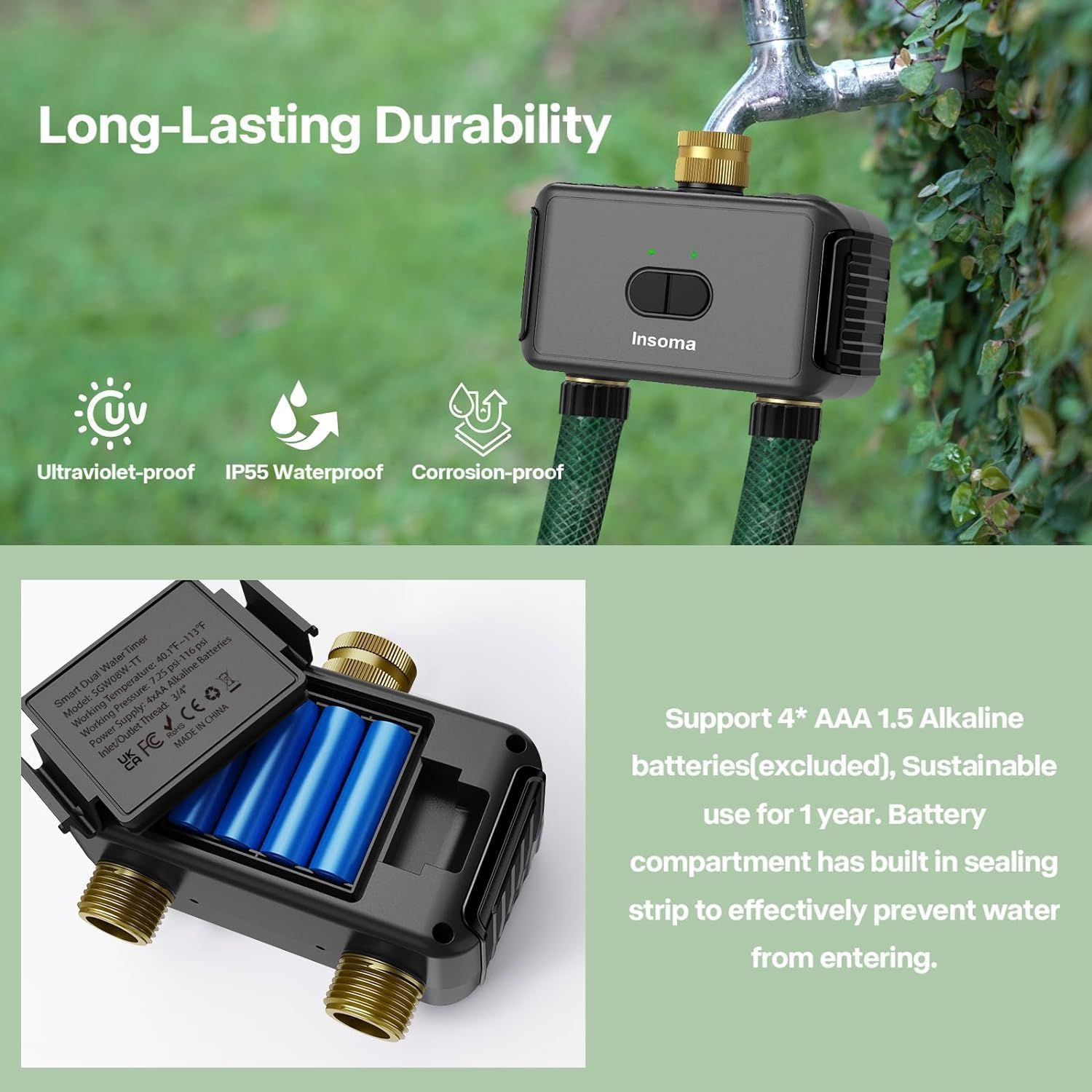
Image: Battery compartment and durability features.
7.3. Winterization
Before freezing temperatures occur, disconnect the water timer from the faucet and hoses. Remove the batteries and store the timer indoors in a dry, protected area to prevent damage from freezing water.
8. Mavuto
If you encounter issues with your Insoma Smart Water Hose Timer, refer to the following common problems and solutions.
- Palibe Madzi Oyenda:
- Onani ngati faucet ndi yotseguka kwathunthu.
- Ensure batteries are installed correctly and have sufficient charge.
- Verify that a watering schedule is active or manual watering is initiated.
- Check for blockages in the timer's inlet or outlet.
- Leaks at Connection Points:
- Ensure the timer is securely hand-tightened to the faucet.
- Re-apply thread sealing tape to the faucet threads.
- Check for damaged washers and replace if necessary.
- App Not Connecting to Timer/Hub:
- Confirm your WiFi network is 2.4GHz. The device does not support 5GHz WiFi.
- Ensure the WiFi Hub is powered on and within range of your router.
- Verify the water timer is within range of the WiFi Hub (refer to the review mentioning limited distance, ensure hub is close enough).
- Restart the WiFi Hub, water timer, and your smartphone.
- Re-pair the devices in the Smart Life App if necessary.
- Kuwongolera Mawu Sikugwira Ntchito:
- Ensure your Insoma timer is correctly linked to your Alexa or Google Assistant account in the Smart Life App.
- Yang'anani kulumikizidwa kwanu pa intaneti.
- Use the exact voice commands specified in the app or voice assistant's instructions.
9. Zambiri Zachitetezo
- Do not immerse the water timer in water. It is IP55 rated for water jets, not submersion.
- Do not use with water temperatures exceeding 120°F (49°C) or below freezing.
- Do not use with non-potable water or chemicals.
- Khalani kutali ndi ana.
- Only use alkaline batteries of the specified type (AAA). Do not mix old and new batteries or different types of batteries.
- Chotsani mabatire ngati chipangizocho sichidzagwiritsidwa ntchito kwa nthawi yayitali.
- Ensure all connections are secure to prevent water damage.
10. Chitsimikizo & Thandizo
For warranty information and customer support, please refer to the documentation included with your product or visit the official Insoma website. If you experience any issues not covered in this manual, please contact Insoma customer service for assistance.


