1. Zamalonda Zathaview
Cholembera cha ATOMSTACK R8 Laser Rotary Chuck Engraver ndi chowonjezera chogwiritsidwa ntchito m'njira zosiyanasiyana chomwe chimapangidwa kuti chiwonjezere luso lolemba la ojambula a laser oyenerera, makamaka pazinthu zosakhazikika komanso zozungulira. Chimapereka kuzungulira kolondola komanso kukhazikika, zomwe zimathandiza kujambula bwino kwambiri pamawonekedwe osiyanasiyana omwe ojambula wamba sangagwirizane nawo.

Chithunzi 1.1: Chojambula cha ATOMSTACK R8 Laser Rotary Chuck Engraver ndi zida zake.
Zofunika Kwambiri:
- Zabwino Kwambiri pa Zolembera Zosakhazikika za Silinda: Yopangidwira zinthu monga mipira, mphete, zinthu zozungulira, ndi makapu okhala ndi zogwirira, zomwe zimapereka kusintha kwa ngodya mpaka 180° ndi kuzungulira kwa 360°.
- Kulondola Kwambiri & Liwiro Lalikulu: Ili ndi mota yamphamvu kwambiri yotha kuthamanga mpaka 10000mm/Min ndi kulondola kwa 0.1mm. Chikhadabo cha mkuwa cholimba kwambiri chimatsimikizira kulimba ndi kukhazikika.
- Palibe Kukhazikitsa Kofunikira & Kosavuta Kugwiritsa Ntchito: Kapangidwe ka aluminiyamu yamphamvu kwambiri kamene kakonzedwanso kamalola kuti kagwiritsidwe ntchito nthawi yomweyo. Kusintha mtunda wa roller popanda zida.
- Kugwirizana: Yoyenera kugwiritsa ntchito ATOMSTACK P1 K2 Laser Engraver ndipo imagwirizana ndi mapulogalamu otchuka monga LaserGRBL ndi LightBurn.
- Zina mwazinthu: Imabwera ndi ma footpads anayi okwezeka a 100mm kuti igwiritsidwe ntchito ndi ojambula ogwirizana monga ATOMSTACK P1 K2.
2. Kukonzekera Guide
Gawoli likufotokoza njira zokhazikitsira ATOMSTACK R8 Laser Rotary Chuck Engraver yanu ndi makina ojambulira a laser oyenerana.
2.1 Kutsegula ndi Kuyendera Koyamba
Chotsani mosamala zinthu zonse zomwe zili m'maphukusi. Onetsetsani kuti zinthu zonse zomwe zili m'buku la mankhwala zilipo ndipo sizikuwonongeka. Ngati pali zinthu zina zomwe zikusowa kapena kuwonongeka, funsani chithandizo cha makasitomala nthawi yomweyo.
2.2 Kulumikiza R8 ndi Chojambula Chanu
- Kuyika: Ikani chuck yozungulira ya R8 pamalo okhazikika komanso osalala.
- Kusintha kwa Kutalika kwa Engraver: Ngati mukugwiritsa ntchito ndi ATOMSTACK P1 K2 Engraver, gwiritsani ntchito mapadi anayi okwezedwa a 100mm omwe ali nawo kuti mukweze makina olembera. Izi zimatsimikizira kuti makina olembera a R8 akuyenda bwino komanso kuti agwirizane bwino ndi chuck yozungulira.
- Kulumikiza kwa Terminal ya Y-axis: Lumikizani chuck yozungulira ya R8 ku makina anu ojambulira posintha terminal ya Y-axis. Izi zimathandiza chosemacho kulamulira kuzungulira kwa R8.
- Kulumikizana kwa USB: Lumikizani R8 ku kompyuta yanu kudzera pa USB. Mukalumikiza, makinawo ayenera kulowa okha mu roller processing mode.

Chithunzi 2.1: Kulumikizana kwa USB ndi mawonekedwe a pulogalamu ya mawonekedwe opangira ma roller.
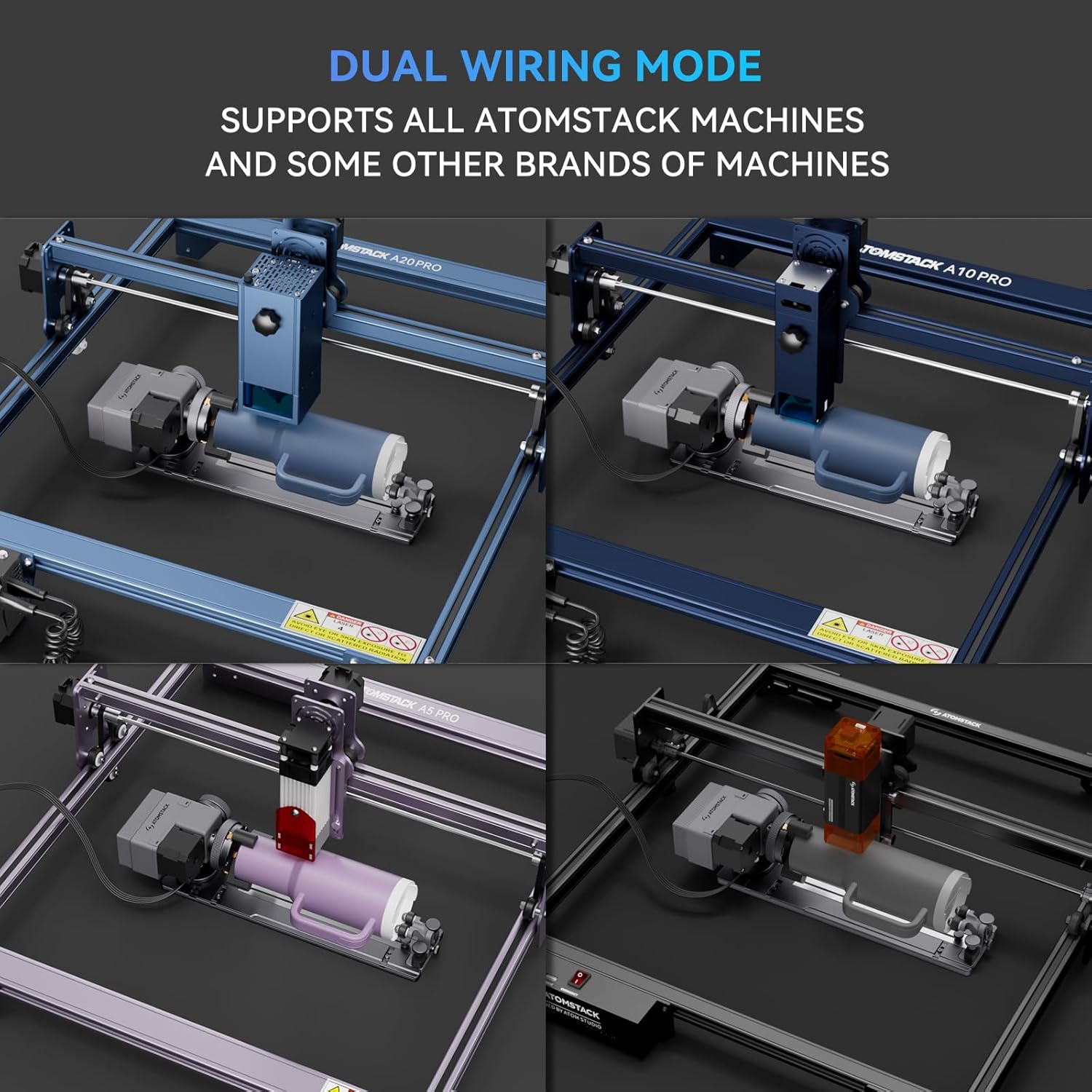
Chithunzi 2.2: R8 imathandizira njira ziwiri zolumikizira mawaya ndipo imagwirizana ndi makina osiyanasiyana a ATOMSTACK ndi mitundu ina.
3. Malangizo Ogwiritsira Ntchito
Gawoli limapereka malangizo okhudza kugwiritsa ntchito ATOMSTACK R8 pa ntchito zosiyanasiyana zosema.
3.1 mapulogalamu kasinthidwe
Musanagwiritse ntchito roller yozungulira, ndikofunikira kusintha magawo a kasinthidwe mkati mwa pulogalamu yanu yojambula laser (monga LaserGRBL, LightBurn). Onani zolemba za pulogalamu yanu kuti mupeze malangizo enieni okhazikitsa rotary axis engraving.

Chithunzi 3.1: Eksamppulogalamu yolumikizirana ndi mapulojekiti ndi makonda ojambula.
3.2 Kujambula Zinthu Zozungulira Zokhazikika
Pa zinthu monga ma tumbler, ma cani, kapena ma pen, ziyikeni bwino pa ma rollers a R8. Sinthani mtunda wa ma rollers ngati pakufunika kuti chinthucho chikhale chokhazikika komanso chozungulira bwino. Palibe zida zofunika pakusintha kumeneku.

Chithunzi 3.2: Kujambula chinthu chozungulira chokhazikika pogwiritsa ntchito chuck yozungulira ya R8.
3.3 Kujambula Zinthu Zosakhazikika ndi Zozungulira
R8 yapangidwa kuti igwire zinthu zosiyanasiyana zosakhazikika, kuphatikizapo zomwe zili ndi zogwirira, ndi zinthu zozungulira. Imapereka kusintha kwa ngodya mpaka 180° ndi kuzungulira kwa 360°. Gwiritsani ntchito zida zomwe zili mkati kuti muteteze zinthu zooneka bwino.

Chithunzi 3.3: Eksampzinthu zosazolowereka zozungulira zomwe zikujambulidwa.

Chithunzi 3.4: R8 ili ndi zida zitatu zosinthira ku zipangizo zosiyanasiyana zapadera, kuphatikizapo zinthu zokhala ndi zogwirira ndi zinthu zozungulira.
3.4 Mapulogalamu ndi Examples
R8 imakulitsa mwayi wanu wojambula kuti uphatikizepo zinthu zosiyanasiyana zapakhomo ndi mphatso zomwe mumakonda.

Chithunzi 3.5: Eksampzinthu zingapo zomwe zingajambulidwe, monga makapu, ma tumbler, zikho, mphete, ndi miphika ya maluwa.
4. Kusamalira
Kusamalira bwino kumatsimikizira kuti ATOMSTACK R8 Laser Rotary Chuck Engraver yanu imagwira ntchito bwino komanso kwa nthawi yayitali.
4.1 Kuyeretsa
- Tsukani nthawi zonse ma roller ndi nsagwada zodulira kuti muchotse fumbi, zinyalala, ndi zotsalira zolembera. Gwiritsani ntchito nsalu yofewa komanso youma.
- Kwa zotsalira zolimba, d pang'onoamp Nsalu ingagwiritsidwe ntchito, kuonetsetsa kuti chipangizocho chatsegulidwa ndipo chauma bwino musanagwiritse ntchito kachiwiri.
- Pewani kugwiritsa ntchito zotsukira zowononga kapena zosungunulira zomwe zingawononge pamwamba kapena mkati mwa zinthu.
4.2 Kuyendera
- Nthawi ndi nthawi yang'anani nsagwada ndi ma rollers a chuck kuti muwone ngati pali zizindikiro zilizonse zakuwonongeka kapena kuwonongeka.
- Onetsetsani kuti zomangira zonse ndi zomangira zili zotetezeka. Mangitsani ngati pakufunika kutero.
- Yang'anani ngati zingwe zolumikizira zaphwanyika kapena zawonongeka. Sinthani ngati pali vuto lililonse.
5. Mavuto
Gawoli likufotokoza mavuto omwe mungakumane nawo ndi ATOMSTACK R8 ndipo limapereka mayankho.
| Vuto | Chifukwa Chotheka | Yankho |
|---|---|---|
| R8 sizungulira kapena kuyankha. | Kulumikizana kolakwika kwa Y-axis terminal; USB siilumikizidwa; mapulogalamu sanakonzedwe. | Onetsetsani kuti R8 yalumikizidwa bwino ku malo olumikizira a Y-axis a wopanga makina. Tsimikizani kulumikizana kwa USB ku kompyuta. Yang'anani makonda a mapulogalamu kuti muwone ngati pali njira yozungulira. |
| Kujambula ndi kolakwika kapena kosagwirizana. | Chinthu sichinasungidwe bwino; magawo olakwika a mapulogalamu (monga masitepe pa kuzungulira); kutsetsereka kwa chinthu. | Onetsetsani kuti chinthucho chatetezedwa bwino ndi nsagwada kapena ma rollers. Sinthani mtunda wa roller kuti mugwire bwino. Tsimikizani ndikulinganiza magawo ozungulira mu pulogalamu yanu yojambulira. Tsukani ma rollers ngati atatsetsereka. |
| R8 singagwiritsidwe ntchito ndi cholembera cha ATOMSTACK P1/K2. | Kutalika kwa cholembera sikokwanira; zokwezera zosowa kapena zolakwika. | Onetsetsani kuti mapadi anayi okwezeka a 100mm aikidwa bwino pansi pa cholembera cha ATOMSTACK P1/K2 kuti apereke malo oyenera a R8. |
| Nsagwada za chuck zimakhala zolimba kapena sizikugwira bwino. | Zinyalala zosonkhanitsidwa; kusowa mafuta. | Tsukani bwino milomo ya chuck. Pakani mafuta ochepa oyenera ngati avomerezedwa ndi wopanga (onani buku lonse la malangizo okhudza mafuta). |
Ngati mukukumana ndi mavuto omwe sanatchulidwe pano, chonde onani zinthu zonse za pa intaneti kapena funsani chithandizo cha makasitomala cha ATOMSTACK.
6. Zofotokozera
| Mbali | Tsatanetsatane |
|---|---|
| Nambala ya Model | R8 |
| Miyeso Yazinthu | 15.75 x 6.3 x 5.51 mainchesi |
| Kulemera kwa chinthu | 3.12 mapaundi |
| Wopanga | Zotsatira ATOMSTACK |
| Dziko lakochokera | China |
| Zolemba Zolondola | 0.1mm (monga momwe ziwonetsero zimasonyezera) |
| Max. Kuthamanga Kwambiri | 10000mm/Mph (malinga ndi zipolopolo za mawonekedwe) |
| Kusintha kwa Angle | Kufikira 180° (monga momwe zimakhalira ndi zipolopolo za mawonekedwe) |
| Kuthekera kozungulira | 360° (monga momwe zimakhalira ndi zipolopolo za mawonekedwe) |
7. Chitsimikizo ndi Thandizo
ATOMSTACK yadzipereka kupereka chithandizo chabwino kwambiri kwa makasitomala ndi chithandizo cha zinthu zake.
- Chitsimikizo: ATOMSTACK R8 imabwera ndi chitsimikizo cha chaka chimodzi.
- Zina Zowonjezera: Zigawo zosinthira zilipo.
- Othandizira ukadaulo: Thandizo laukadaulo la moyo wonse limaperekedwa. Magulu aukadaulo ndi othandizira amapezeka maola 24 pa sabata kuti ayankhe mafunso kapena nkhawa zilizonse.
Kuti mupeze thandizo, chonde funsani chithandizo cha makasitomala cha ATOMSTACK kudzera mu njira zawo zovomerezeka kapena pitani ku webtsamba la FAQ ndi zothandizira zothandizira.


