1. Zamalonda Zathaview
The FOXBOX DM3-A GPS Smartwatch is designed for active individuals, offering robust features for sports, health monitoring, and daily connectivity. It combines a durable build with advanced technology to support your lifestyle.

Image: FOXBOX DM3-A GPS Smartwatch with both black and orange strap options.
Zofunika Kwambiri:
- 1.43-inch AMOLED Display with Always-On Function
- Integrated GPS and 6 Satellite Positioning Systems
- Bluetooth Calling and Smart Notifications
- 24/7 Health Monitoring (Heart Rate, SpO2, Sleep, Stress)
- 100+ Masewera a Masewera
- 5ATM Waterproof and IP68 Dust Resistance
- Batri Yokhalitsa 500mAh
- Built-in Barometer, Altimeter, and Compass
2. Kukonzekera Guide
2.1 Zomwe zili m'bokosi
- 1 x FOXBOX DM3-A Smartwatch
- 1 x Black Silicone Strap
- 1 x Red Silicone Strap
- 1 x Chingwe Chojambulira
- 1 x Buku Logwiritsa Ntchito
2.2 Kulipira Smartwatch
Before first use, fully charge your smartwatch. Connect the magnetic charging cable to the charging points on the back of the watch and plug the USB end into a power adapter (not included) or a computer USB port. A full charge typically takes approximately 7 hours.
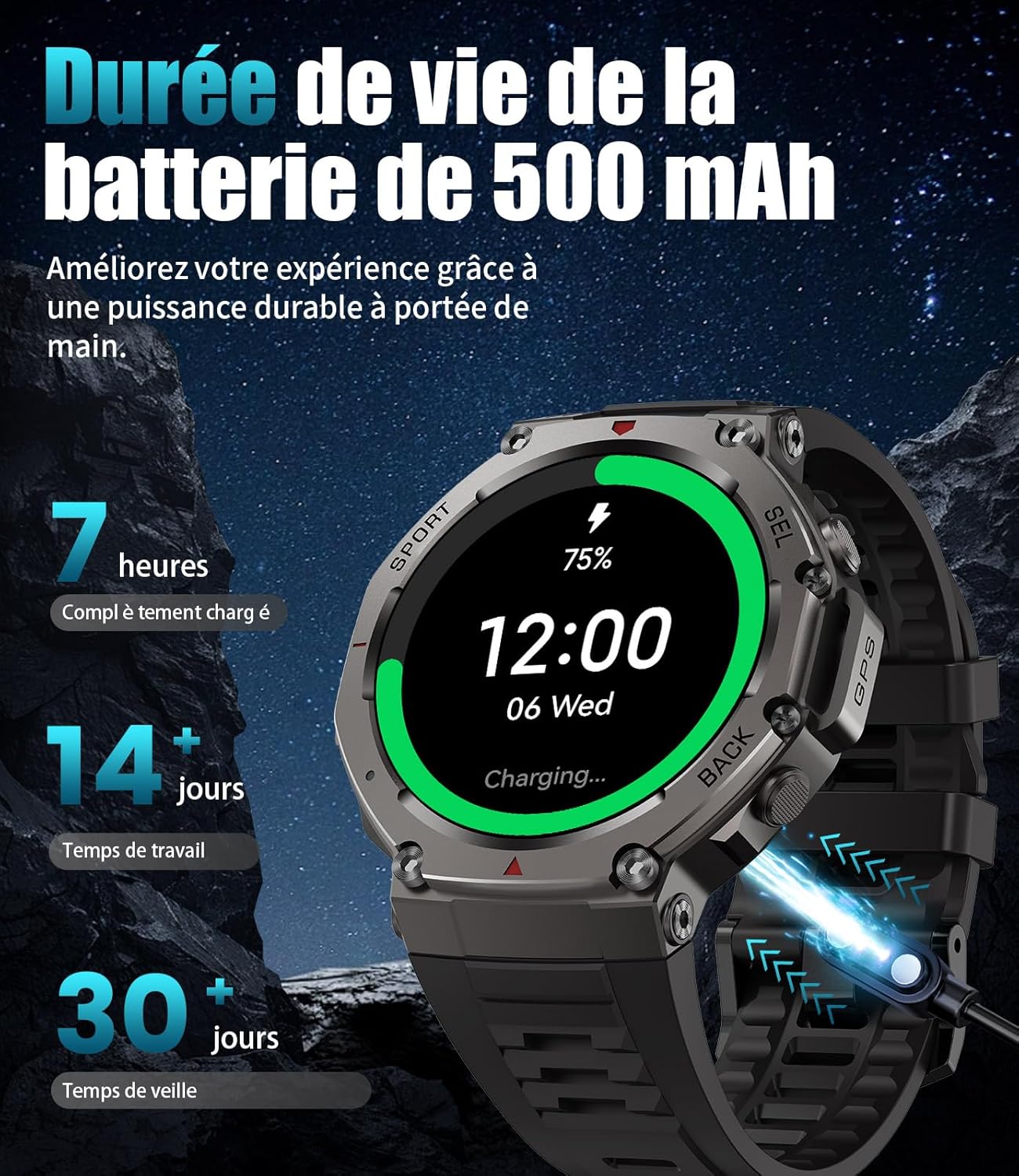
Image: The smartwatch connected to its magnetic charging cable, illustrating the charging process and battery life indicators.
2.3 Kuyika kwa App ndi Kuyanjanitsa
To unlock the full potential of your FOXBOX DM3-A, download and install the GloryFitPro app on your smartphone. The app is compatible with Android 5.0+ and iOS 12.0+.
- Tsitsani App: Scan the QR code displayed on your smartwatch screen or visit the official download link: GloryFitPro App Download.
- Yambitsani Bluetooth: Onetsetsani kuti Bluetooth yayatsidwa pa smartphone yanu.
- Open GloryFitPro: Launch the app and create an account or log in.
- Onjezani Chipangizo: In the app, navigate to the 'Device' section and select 'Add a device'. The app will search for nearby smartwatches.
- Select DM3-A: From the list of found devices, select 'DM3-A' to initiate the pairing process.
- Tsimikizirani Kuyanjanitsa: Follow the on-screen prompts on both your phone and smartwatch to confirm the pairing. Grant necessary permissions for notifications and calls.

Image: Visual guide on connecting the smartwatch to your phone using the GloryFitPro app, including QR code scanning and Bluetooth pairing steps.
3. Malangizo Ogwiritsira Ntchito
3.1 Basic Navigation
- Zenera logwira: Swipe left/right to navigate between main functions, swipe up/down for quick settings or notifications. Tap to select.
- Mabatani Ambali: The smartwatch features multiple physical buttons for quick access to specific functions (e.g., Sport mode, Back, Select). Refer to the on-screen prompts for specific button actions.
3.2 Zowonetsera
The DM3-A features a vibrant 1.43-inch AMOLED HD display, providing clear visuals and rich colors. The Always-On Display function allows you to see the time and essential information at a glance without needing to raise your wrist or tap the screen.

Image: Close-up of the smartwatch's 1.43-inch AMOLED HD display, highlighting its vibrant colors and detailed interface.
3.3 Kusintha Nkhope za Wotchi
Personalize your smartwatch with over 200 watch faces available through the GloryFitPro app. You can also create custom watch faces using your own photos.

Image: Various customizable watch faces displayed on the smartwatch, demonstrating the range of styles and information layouts available.
3.4 Kuyimba ndi Zidziwitso za Bluetooth
Make and receive calls directly from your wrist using the built-in speaker and microphone. The smartwatch also displays real-time notifications from your paired smartphone, including messages from WhatsApp, Facebook, Twitter, and SMS.

Image: A user interacting with the smartwatch to answer a call, alongside illustrations of the dial pad, contact list, and incoming call screen.
3.5 Kuyang'anira Zaumoyo
The DM3-A provides comprehensive 24/7 health monitoring, including:
- Kutsata Kugunda kwa Mtima: Continuous monitoring of your heart rate.
- Blood Oxygen (SpO2) Measurement: Real-time blood oxygen level readings.
- Sleep Analysis: Njira kugona stages (light, deep, REM) and provides insights into sleep quality.
- Kuwunika Kupsinjika: Zimakuthandizani kumvetsetsa ndikuwongolera kuchuluka kwa nkhawa zomwe muli nazo.
- Kutsata zochitika: Lembani masitepe, mtunda, ndi ma calories omwe atenthedwa.
- Zikumbutso: Hydration and movement reminders to promote healthy habits.

Image: The smartwatch displaying heart rate and blood oxygen levels, with an accompanying phone screen showing detailed health data and sleep analysis.

Image: The smartwatch displaying sleep data, with a graph illustrating sleep stages and total sleep time, emphasizing real-time sleep monitoring capabilities.
3.6 Sport Modes and GPS
With over 100 specialized sport modes, the DM3-A is your ultimate fitness companion. It accurately tracks your performance for various activities, from running and cycling to swimming and climbing. The integrated GPS and support for 6 satellite positioning systems (GPS, Glonass, BeiDou, Galileo, NavIC, QZSS) ensure precise location tracking for your outdoor adventures.

Image: The smartwatch displaying various sport modes and metrics like heart rate, speed, and duration, with examples of activities like surfing, horse riding, climbing, and running.

Image: Diagram illustrating the smartwatch's integrated GPS and its ability to connect to 6 satellite positioning systems for accurate outdoor tracking, including compass, barometric pressure, and altitude readings.

Image: The smartwatch displaying compass, altitude, and barometric pressure readings, emphasizing its utility for outdoor navigation and environmental monitoring.
3.7 Kukaniza Madzi
The FOXBOX DM3-A is 5ATM waterproof and IP68 rated, meaning it can withstand splashes, rain, and brief immersion in water. It is suitable for swimming and other water-based activities, but not for deep diving or high-pressure water activities.

Image: The smartwatch shown in various challenging environments, highlighting its 5ATM water resistance, anti-shock capabilities, and resistance to extreme temperatures.

Image: A swimmer underwater with the smartwatch, demonstrating its 5ATM water resistance and how the touchscreen automatically locks to prevent accidental touches during water activities.
4. Kusamalira
4.1 Kuyeretsa Wotchi Yanu Yanzeru
Regularly clean your smartwatch to ensure optimal performance and hygiene. Use a soft, lint-free cloth to wipe the screen and body. For stubborn dirt, slightly dampen nsalu ndi madzi. Pewani kugwiritsa ntchito mankhwala owopsa kapena zinthu zowononga.
4.2 Kusamalira Battery
Kukulitsa moyo wa batri ndi moyo wautali:
- Avoid extreme temperatures (hot or cold) when charging or storing the watch.
- Do not leave the watch fully discharged for extended periods.
- Charge the watch using the provided original charging cable.
- The 500mAh battery provides approximately 10-15 days of typical use and over 60 days in standby mode. Continuous GPS usage will reduce battery life to about 22 hours.

Image: Illustration of the smartwatch's 500mAh battery capacity, showing estimated usage times for continuous GPS, always-on display, normal use, and standby mode.
5. Mavuto
If you encounter issues with your FOXBOX DM3-A smartwatch, please refer to the following common solutions:
- Mavuto Okhudzana ndi Kulumikizana (Bluetooth):
- Ensure Bluetooth is enabled on both your phone and smartwatch.
- Make sure the smartwatch is within the Bluetooth range of your phone.
- Yambitsaninso foni yanu ndi wotchi yanu yowonera pa intaneti.
- Forget the device in your phone's Bluetooth settings and re-pair through the GloryFitPro app.
- Kusalondola kwa GPS:
- Onetsetsani kuti muli pamalo otseguka akunja omveka bwino view wa kumwamba.
- Allow the watch sufficient time to acquire a GPS signal before starting an activity.
- Ensure the GloryFitPro app is updated to the latest version.
- Sensor Malfunction (Heart Rate, SpO2, Sleep):
- Onetsetsani kuti wotchiyo yavala bwino padzanja lanu, osati yomasuka kwambiri kapena yothina kwambiri.
- Tsukani malo ojambulira kumbuyo kwa wotchi.
- Yambitsaninso smartwatch.
- Watch Not Turning On/Charging:
- Check the charging cable for damage and ensure it's properly connected to the watch and power source.
- Yesani doko lina la USB kapena adapter yamagetsi.
- Ensure the charging contacts on the watch are clean.
Ngati vutoli likupitirira, chonde funsani chithandizo cha makasitomala kuti akuthandizeni.
6. Zofotokozera
| Mbali | Kufotokozera |
|---|---|
| Mtundu | FOXBOX |
| Nambala ya Model | Chithunzi cha DM3-A |
| Onetsani | 1.43-inch AMOLED HD |
| Mphamvu ya Battery | 500mAh Lithium-polymer |
| Moyo wa Battery (Kagwiritsidwe Bwinobwino) | 10-15 masiku |
| Moyo wa Battery (Oyimilira) | Pa masiku 60 |
| Moyo wa Battery (GPS Yopitiriza) | Pafupifupi. 22 maola |
| Kukaniza Madzi | 5ATM, IP68 |
| Kulumikizana | bulutufi |
| GPS | Integrated GPS, supports 6 satellite systems |
| Kusungirako Memory | 256 MB |
| Zida Zogwirizana | Android 5.0+ / iOS 12.0+ |
| Zapadera | GPS, Phone Call, Calendar, Notification, Multisport Tracker, Barometer, Altimeter, Compass |
7. Chitsimikizo ndi Thandizo
The FOXBOX DM3-A Smartwatch comes with a 2-year wopanga chitsimikizo, covering replacement, return, or full refund in case of technical issues or defects. This warranty ensures a secure purchase and reflects our commitment to quality.
For any technical problems (e.g., Bluetooth connection errors, sensor malfunctions), strap adjustments, or general inquiries, please contact our customer service team. Our expert support is available 24/7 to provide prompt resolution.
Please refer to your purchase documentation for specific contact details or visit the official FOXBOX support page.


