1. Mawu Oyamba
This manual provides detailed instructions for the setup, operation, and maintenance of your RadioShack Y998 Bluetooth Sound Bar. Please read this manual thoroughly before using the product to ensure proper function and to prevent damage.
2. Zambiri Zachitetezo
- Musayike mawu omveka pa mvula, chinyezi, kapena kutentha kwambiri.
- Osatsegula casing. Bweretsani ntchito zonse kwa anthu oyenerera.
- Onetsetsani kuti pali mpweya wabwino wozungulira chipindacho.
- Gwiritsani ntchito adaputala yamagetsi yomwe mwapatsidwa.
- Khalani kutali ndi ana.
- Chotsani chipangizocho panthawi yamphezi kapena chikagwiritsidwa ntchito kwa nthawi yaitali.
3. Zamkatimu Phukusi
Onetsetsani kuti zinthu zonse zomwe zili pansipa zili mu phukusili:
- RadioShack Y998 Bluetooth Sound Bar
- Kuwongolera Kwakutali
- Adapter yamagetsi
- Chingwe cha AUX (3.5mm)
- AV Cable (RCA)
- Buku Lachidziwitso (chikalata ichi)
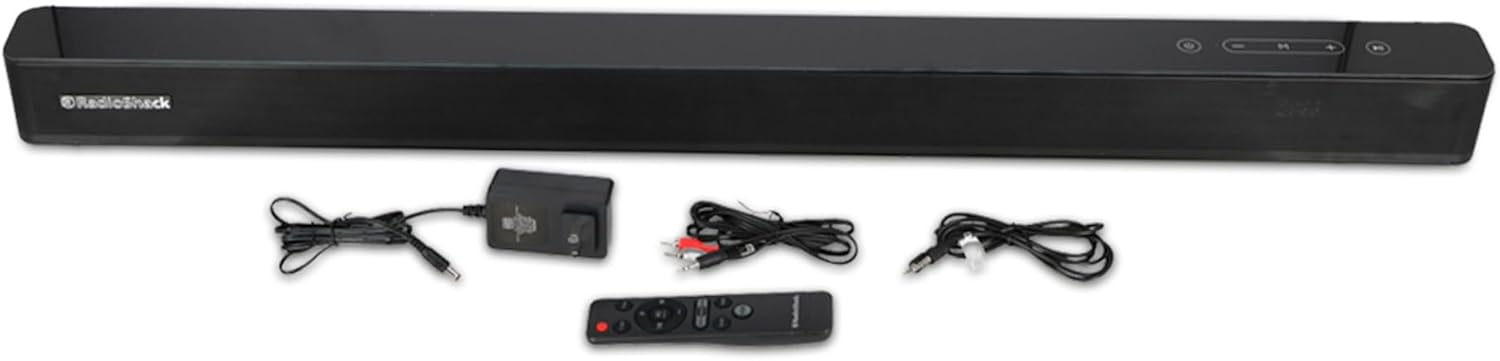
Image 3.1: RadioShack Y998 Sound Bar with remote control, power adapter, AUX cable, and AV cable.
4. Zamalonda Zathaview
4.1 Kutsogolo View

Image 4.1: The front panel of the sound bar, featuring the RadioShack logo on the left side.
4.2 Zowongolera Zapamwamba za Panel

Image 4.2: Close-up of the top panel buttons, including Power, Volume Down, Mode, Volume Up, and Play/Pause.
- Batani Lamphamvu (⑂): Press to turn the sound bar on or off.
- Volume Down Button (-): Dinani kuti muchepetse voliyumu.
- Batani la Mode (M): Press to cycle through input sources (Bluetooth, AUX, AV, Optical, Coaxial, HDMI ARC).
- Volume Up Button (+): Dinani kuti muwonjezere voliyumu.
- Batani la Sewerani/Imitsani (⏸): In Bluetooth mode, press to play or pause audio.
4.3 Malumikizidwe a gulu lakumbuyo

Image 4.3: Close-up of the rear panel showing DC IN, OPTICAL, COAXIAL, AUX IN, and HDMI ARC ports.
- DC IN: Connect the power adapter here.
- OPTIKANA: Digital audio input for connecting to TVs or other devices with an optical output.
- ZOKHUDZA: Digital audio input for connecting to TVs or other devices with a coaxial output.
- AUX MU: 3.5mm analog audio input for connecting to devices with a headphone jack.
- HDMI ARC: HDMI Audio Return Channel input for connecting to compatible TVs.
4.4 Kutumiza Kakutali

Image 4.4: The sound bar positioned next to its remote control.
The remote control provides full functionality for the sound bar. Insert two AAA batteries (not included) into the remote control before use. Point the remote control towards the front of the sound bar for optimal response.
5. Kukhazikitsa
5.1 Kuyika
Place the sound bar on a stable, flat surface, preferably directly below your television. Ensure there is adequate space around the sound bar for proper ventilation and to avoid obstructing the sound output.
5.2 Mphamvu yolumikizira
- Connect the power adapter cable to the DC IN port on the rear of the sound bar.
- Lumikizani mbali ina ya adaputala yamagetsi pakhoma.
- The sound bar will enter standby mode.
5.3 Kulumikiza Magwero a Audio
Sankhani imodzi mwa njira zotsatirazi kuti mulumikizane ndi gwero lanu lomvera:
5.3.1 Kulumikizana kwa Bluetooth
- Mphamvu pa soundbar.
- Press the 'M' (Mode) button on the sound bar or the remote control until "BT" (Bluetooth) mode is selected. The indicator light will flash.
- Yambitsani Bluetooth pazida zanu (foni yam'manja, piritsi, kompyuta).
- Saka "RadioShack Y998" in your device's Bluetooth settings and select it to pair.
- Once paired, the indicator light on the sound bar will stop flashing and remain solid. You can now play audio from your device.
Kulumikiza kwa 5.3.2 AUX
- Connect one end of the provided 3.5mm AUX cable to the AUX IN port on the sound bar.
- Connect the other end of the AUX cable to the headphone jack or AUX output of your audio device.
- Press the 'M' (Mode) button on the sound bar or remote control until "AUX" mode is selected.
5.3.3 AV (RCA) Connection
- Connect the provided AV (RCA) cable to the corresponding RCA input ports on the sound bar.
- Connect the other end of the AV cable to the RCA audio output ports of your television or audio device.
- Press the 'M' (Mode) button on the sound bar or remote control until "AV" mode is selected.
5.3.4 Optical/Coaxial/HDMI ARC Connection
For digital audio connections, use an optical, coaxial, or HDMI ARC cable (not included) to connect your TV or other compatible device to the respective port on the sound bar. Select the corresponding input mode using the 'M' (Mode) button on the sound bar or remote control.
6. Malangizo Ogwiritsira Ntchito
6.1 Kuyatsa/Kuzimitsa
Dinani batani la Mphamvu (⑂) on the sound bar or the remote control to turn the unit on or off.
6.2 Kusankha Mode
Press the 'M' (Mode) button on the sound bar or the remote control repeatedly to cycle through the available input sources: Bluetooth, AUX, AV, Optical, Coaxial, and HDMI ARC.
6.3 Kuwongolera Voliyumu
Gwiritsani ntchito Volume Up (+) ndi Volume Down (-) buttons on the sound bar or the remote control to adjust the audio volume.
6.4 Kusewera kwa Bluetooth
Once connected via Bluetooth, use the Play/Pause button (⏸) on the sound bar or remote control to control audio playback. You can also control playback directly from your paired device.
7. Kusamalira
- Kuyeretsa: Disconnect the power before cleaning. Use a soft, dry cloth to wipe the surface of the sound bar. Do not use liquid cleaners or abrasive materials.
- Kusungirako: If storing the sound bar for an extended period, unplug it from the power outlet and store it in a cool, dry place, away from direct sunlight and extreme temperatures.
8. Mavuto
| Vuto | Chifukwa Chotheka | Yankho |
|---|---|---|
| Palibe mphamvu | Adapta yamagetsi sinalumikizidwe kapena kutulutsa sikukugwira ntchito. | Onetsetsani kuti adaputala yamagetsi yalumikizidwa motetezeka ku bar ya mawu komanso potulutsa magetsi. |
| Palibe phokoso | Incorrect input source selected, volume too low, or audio cable not connected properly. | Select the correct input mode. Increase the volume. Check all audio cable connections. |
| Kulumikizana kwa Bluetooth kwalephera | Sound bar not in pairing mode, device too far, or previously paired with another device. | Ensure the sound bar is in Bluetooth pairing mode. Move your device closer. Disconnect from other Bluetooth devices. |
| Kuwongolera kutali sikukugwira ntchito | Batteries are dead or inserted incorrectly, or obstruction between remote and sound bar. | Replace batteries. Ensure correct polarity. Remove any obstructions. Point remote directly at the sound bar. |
9. Zofotokozera
| Dzina lachitsanzo | Y998 |
| Mtundu | RadioShack |
| Mphamvu Zotulutsa | 80W |
| Chiwerengero cha Oyankhula | 4 |
| Mtundu wa Bluetooth | 5.0 |
| Mtundu wa Bluetooth | Mpaka 10 mita (33 mapazi) |
| Kulumikizana Technology | Bluetooth, AUX, AV (RCA), Optical, Coaxial, HDMI ARC |
| Njira Yowongolera | Remote Control, On-unit buttons |
| Gwero la Mphamvu | Cable Electric (AC Adapter) |
| Makulidwe (pafupifupi.) | 40cm (D) x 40cm (W) x 40cm (H) (Note: Original data indicates identical depth, width, and height, which is unusual for a soundbar. Dimensions are listed as provided.) |
| Mtundu | Wakuda |
10. Chitsimikizo ndi Thandizo
Specific warranty information for the RadioShack Y998 Bluetooth Sound Bar is not available in the provided product data. Please refer to the warranty card included with your purchase or contact RadioShack customer support for details regarding warranty coverage and technical assistance.


