1. Mawu Oyamba
This manual provides essential information for the safe and efficient operation of your Meizu mblu 21 smartphone. Please read it thoroughly before using the device.
The Meizu mblu 21 features a Prism Edge Design with a radiant gradient and a large immersive 6.79-inch HD display. It is equipped with a 13MP main camera and an 8MP front camera, powered by Android 14. The device includes a 4900mAh battery for extended use and supports 4G LTE connectivity, Dual-Band Wi-Fi, and Bluetooth 5.0.
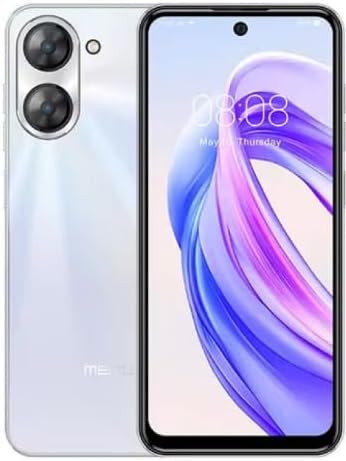
Chithunzi 1.1: Kutsogolo ndi kumbuyo view of the Meizu mblu 21 smartphone in White Diamond color.
2. Zomwe zili mu Bokosi
Onetsetsani kuti zinthu zonse zilipo mu phukusi:
- Meizu mblu 21 Smartphone
- Adapter yamagetsi
- Chingwe cha USB
- SIM Ejector Chida
- Quick Start Guide

Figure 2.1: Meizu mblu 21 smartphone alongside its power adapter.
3. Kukhazikitsa
3.1. Kuyika SIM Card ndi MicroSD Card
The Meizu mblu 21 supports Dual Nano SIM cards and a MicroSD card for expandable storage. Locate the SIM tray on the side of the device.
- Power off the device before inserting or removing SIM/MicroSD cards.
- Use the provided SIM ejector tool to open the SIM tray.
- Carefully place the Nano SIM cards and/or MicroSD card into the designated slots on the tray, ensuring correct orientation.
- Kanikizani thireyiyo pang'onopang'ono mu chipangizocho mpaka itasungunuka.
3.2. Koyamba Kuyatsa ndi Kukhazikitsa Wizard
- Dinani ndikusunga batani la Power mpaka logo ya Meizu iwonekere.
- Follow the on-screen instructions to complete the initial setup, including selecting your language, connecting to a Wi-Fi network, and setting up your Google account.
4. Kugwiritsa Ntchito Chipangizo Chanu
4.1. Kuwonetsa ndi Navigation
The 6.79-inch HD display features a 90Hz adaptive refresh rate for smooth visuals. Navigate the interface using touch gestures: tap, swipe, pinch-to-zoom.
4.2. Kamera Ntchito
The device is equipped with a 13MP main camera and an 8MP front camera. Open the Camera application to capture photos and videos.
- 13MP Smart Camera: Ideal for capturing everyday moments with sharpness and true-to-life colors.
- 8MP Front Camera: Designed for clear selfies and video calls.
4.3. Chitetezo Mbali
- Side Unlock: A fast and secure fingerprint sensor integrated into the side power button for instant access.
- Smart Face Unlock: Use the front camera to unlock your device quickly and conveniently.
4.4. Kulumikizana
Your mblu 21 supports various connectivity options:
- 4G LTE: For mobile data connectivity. In the USA, this device is compatible with T-Mobile. Outside the USA, it works with any carrier worldwide.
- Dual-Band Wi-Fi: Supports both 2.4GHz and 5GHz bands for seamless internet access.
- Bluetooth 5.0: For connecting wireless accessories with improved energy efficiency.
- VoLTE HD Calls: Enjoy sharper, clearer voice calls over LTE networks.

Figure 4.1: Key technology features of the Meizu mblu 21, including Android 14, Dual-Band Wi-Fi, Bluetooth 5.0, and VoLTE.
5. Kusamalira
5.1. Kusamalira Battery
The mblu 21 is equipped with a 4900mAh battery. To maximize battery lifespan:
- Pewani kutentha kwambiri.
- Use only the provided power adapter or certified compatible chargers.
- Pewani kuthimitsa batire pafupipafupi.

Chithunzi 5.1: Zamkati view of the Meizu mblu 21, showcasing the 4900mAh battery and internal components.
5.2. Kuyeretsa Chipangizo Chanu
Gwiritsani ntchito nsalu yofewa, yopanda lint kuyeretsa chinsalu ndi thupi la foni. Pewani kugwiritsa ntchito mankhwala owopsa kapena zinthu zowononga.
5.3. Zosintha Zapulogalamu
Regularly check for and install software updates to ensure optimal performance and security. Updates can be found in the device's settings menu.
6. Mavuto
If you encounter issues with your Meizu mblu 21, try the following solutions:
- Chipangizo sichikuyankha: Dinani ndikugwira Mphamvu batani kwa masekondi pafupifupi 10-15 kukakamiza kuyambiranso.
- Mavuto a Netiweki:
- Onetsetsani kuti SIM khadi yayikidwa bwino.
- Yatsani ndi kuzimitsa Mawonekedwe a Ndege.
- Check network settings (APN, preferred network type).
- Battery Kutha Mwachangu:
- Tsekani mapulogalamu osagwiritsidwa ntchito omwe akuyenda chakumbuyo.
- Chepetsani kuwala kwa skrini.
- Disable unnecessary features like GPS or Bluetooth when not in use.
- Mavuto Kachitidwe:
- Clear cache and data of problematic apps.
- Masulani malo osungira.
- Consider a factory reset (Note: This will erase all data on your device. Back up important data first.).
7. Zofotokozera
| Mbali | Tsatanetsatane |
|---|---|
| Dzina lachitsanzo | mblu 21 |
| Nambala ya Model | M416L |
| Opareting'i sisitimu | Android 14 |
| Kukula kwa Screen | 6.79 inchi |
| Memory Storage Kukhoza | 64 GB |
| Kukula kwa Memory kwa RAM | 4 GB |
| Mphamvu ya Battery | 4900 miliyoniamp Maola |
| Kamera Yaikulu | 13 MP |
| Kamera yakutsogolo | 8 MP |
| Wireless Carrier (USA) | T-Mobile |
| Cellular Technology | 4G LTE |
| Connectivity Technologies | 4G, Dual-Band Wi-Fi, Bluetooth 5.0 |
| Kulemera kwa chinthu | 14 pawo |
| Makulidwe a Phukusi | 7 x 4 x 2 mainchesi |
| Mtundu | White Diamond |
8. Chitsimikizo ndi Thandizo
Your Meizu mblu 21 smartphone comes with a manufacturer's warranty. Please refer to the warranty card included in your product packaging for specific terms and conditions.
For technical support, service, or further inquiries, please contact Meizu customer support through their official channels. Contact information can typically be found on the manufacturer's webtsamba kapena zolemba zamalonda.


