1. Mawu Oyamba
This manual provides essential instructions for the safe and efficient operation of your RadioShack Home Projector. Please read this manual thoroughly before using the device and retain it for future reference.
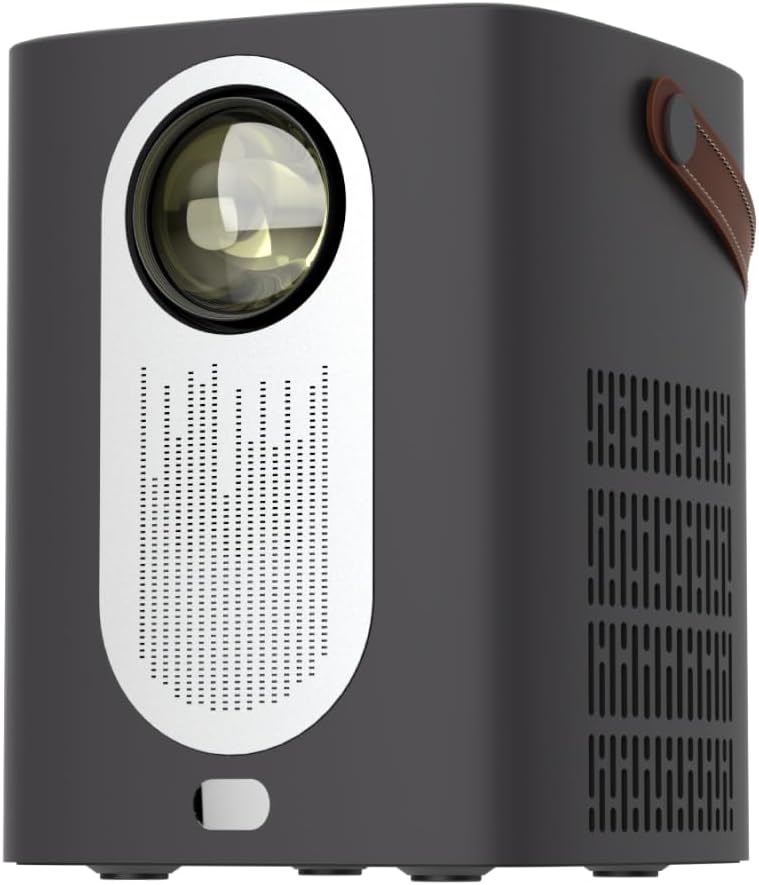
Chithunzi 1.1: Patsogolo view of the RadioShack Home Projector, showcasing lenzi yake ndi grille ya sipika.
2. Zamkatimu Phukusi
Onetsetsani kuti zinthu zonse zilipo mu phukusi:
- 1 x RadioShack Home Projector
- 1 x Kuwongolera Kwakutali
- 1 x Chingwe Chamagetsi
- 1 x Buku la ogwiritsa (chikalata ichi)

Image 2.1: Illustration of the package contents, including the projector, remote control, power cable, and user manual.
3. Zamalonda Zathaview
3.1. Zofunika Kwambiri
- Chiwonetsero Chokwezeka Kwambiri: Supports full HD resolution for clear and detailed images.
- Bright and Long-Lasting: Features impressive brightness and a durable light source.
- Kulumikizana Kosiyanasiyana: Includes Bluetooth, WiFi, Android Miracast, and iOS Cast for streaming.
- Kuwongoleredwa Viewing: Digital focus and keystone correction for optimal image alignment.
- Compact ndi Portable: Lightweight design with a handle for easy transport.
3.2. Madoko ndi Zowongolera
Familiarize yourself with the projector's input/output ports and controls.

Chithunzi 3.1: Kumbuyo view of the projector showing USB input for media playback, AV input for DVD players, and HDMI input for various devices like video game consoles, streaming sticks, cell phones, tablets, and laptops.

Chithunzi 3.2: Mbali view illustrating the compact dimensions (approximately 7 inches tall, 5.3 inches wide) and the integrated leather handle for portability.
4. Kukonzekera Guide
4.1. Mphamvu Yoyambira
- Connect the power cable to the projector and a suitable power outlet.
- Press the power button located on the top of the projector or on the remote control to turn on the device. The indicator light will illuminate.
- The RadioShack logo will appear on the projection surface, indicating successful power-on.
Video 4.1: A short demonstration showing the unboxing, connecting the power cable, powering on the projector, and the initial display of the RadioShack logo.
4.2. Placement and Focus
- Place the projector on a stable, flat surface, ensuring the lens is unobstructed.
- Adjust the distance from the projection surface (wall or screen) to achieve the desired image size.
- Use the digital focus adjustment (refer to the remote control or on-screen menu) to sharpen the image.
- Utilize keystone correction if the image appears trapezoidal, to achieve a rectangular projection.
5. Malangizo Ogwiritsira Ntchito
5.1. Zipangizo Zolumikiza
Pulojekitiyi imathandizira zolowetsa zingapo:
- HDMI: Connect devices such as laptops, gaming consoles, streaming boxes, or Blu-ray players using an HDMI cable. Select HDMI as the input source from the projector's menu.
- USB: Insert a USB drive to play compatible video or audio files. Select USB as the input source.
- ZA: Connect older devices like DVD players using an AV cable. Select AV as the input source.
- Bulutufi: Pair with Bluetooth audio devices for wireless sound output.
- WiFi / Casting: Connect to a Wi-Fi network to enable Android Miracast or iOS Cast for screen mirroring from compatible smartphones and tablets.

Image 5.1: A couple enjoying content projected by the RadioShack Home Projector, demonstrating its use in a home cinema setting.
5.2. Kutali Ntchito Nchito
The included remote control allows for convenient operation:
- Mphamvu: Yatsani / kuzimitsa projekiti.
- Gwero: Select input sources (HDMI, USB, AV, etc.).
- Kuyenda: Arrow keys to navigate menus, OK button to confirm.
- Voliyumu: Sinthani mulingo wotulutsa mawu.
- Kuyikira Kwambiri/Mwala Wofunika: Access digital focus and keystone correction settings.

Image 5.2: The RadioShack Home Projector placed on a table next to its remote control, ready for use.
6. Kusamalira
- Kuyeretsa Lens: Gwiritsani ntchito nsalu yofewa, yopanda lint yomwe imapangidwira magalasi owoneka bwino kuti mupukute pang'ono magalasi a projector. Pewani zinthu zowononga kapena mankhwala owopsa.
- Kuyeretsa Kunja: Pukuta kunja kwa pulojekitiyo ndi nsalu yofewa, youma. Osagwiritsa ntchito zotsukira zamadzimadzi mwachindunji pa chipangizocho.
- Mpweya wabwino: Ensure the projector's ventilation openings are clear of dust and obstructions to prevent overheating.
- Posungira: Mukapanda kugwiritsa ntchito kwa nthawi yayitali, sungani pulojekitiyo pamalo ozizira, owuma, kutali ndi dzuwa komanso kutentha kwambiri.
7. Mavuto
| Vuto | Chifukwa Chotheka | Yankho |
|---|---|---|
| Palibe chithunzi chowonetsedwa | Power cable disconnected; incorrect input source selected; lens cap on. | Check power connection; select correct input source (HDMI, USB, AV); remove lens cap. |
| Chithunzichi sichimadziwika | Kuyikirako sikunasinthidwe; Pulojekitala ili pafupi kwambiri/kutali ndi zenera. | Adjust digital focus; reposition projector for optimal distance. |
| Palibe phokoso | Volume too low; external audio device not connected/paired; incorrect audio output selected. | Increase volume; ensure Bluetooth device is paired or wired audio is connected; check audio output settings. |
| Kuwongolera kutali sikukugwira ntchito | Batteries depleted; obstruction between remote and projector. | Replace remote control batteries; ensure clear line of sight to the projector's IR receiver. |
8. Zofotokozera
- Mtundu: RadioShack
- Chitsanzo: Home Projector (ASIN: B0DP1GFG9L)
- Kuwonetseratu: 1280 x 720 (Imathandizira Full HD)
- Kulumikizana Technology: AV, HDMI, USB, Bluetooth, WiFi (Android Miracast, iOS Cast)
- Zapadera: Portable, Digital Focus, Keystone Correction
- Kugwiritsa Ntchito Kovomerezeka: Cinema Yanyumba
- Makulidwe a Zamalonda: 5.31 x 5.31 x 7.09 mainchesi
- Kulemera kwa chinthu: 3.91 mapaundi

Image 8.1: The projector displaying content, highlighting its support for full HD resolution and high-quality sound.
9. Chitsimikizo ndi Thandizo
For warranty information and technical support, please refer to the official RadioShack webtsamba kapena funsani makasitomala awo. Sungani lisiti yanu yogulira ngati umboni wogula.
Thandizo Lapaintaneti: www.radioshack.com


