1. Mawu Oyamba
The NEDIS WIFICI12CWT SmartLife Indoor Wi-Fi Camera is designed for home surveillance, offering 3MP 1296p Full HD video quality. It features infrared night vision, intelligent motion detection, and two-way audio communication. This camera is compatible with Onvif standards and integrates seamlessly with the SmartLife application for remote access and control. Video recordings can be stored on a microSD card (up to 128 GB) or via an optional cloud storage service. This manual provides essential information for the proper installation, operation, and maintenance of your camera.
2. Zomwe zili mu Bokosi
- 1x NEDIS WIFICI12CWT Camera
- 1 x Adapter yamagetsi
- 1 x Chingwe cha USB Type-C
- 1x Buku la Malangizo
3. Zamalonda Zathaview
Familiarize yourself with the components of your NEDIS WIFICI12CWT camera.

This image displays the front of the NEDIS WIFICI12CWT camera, highlighting its key functionalities such as Wi-Fi connectivity, control via a mobile application, voice control compatibility, infrared night vision, and 3MP Full HD resolution for clear video.
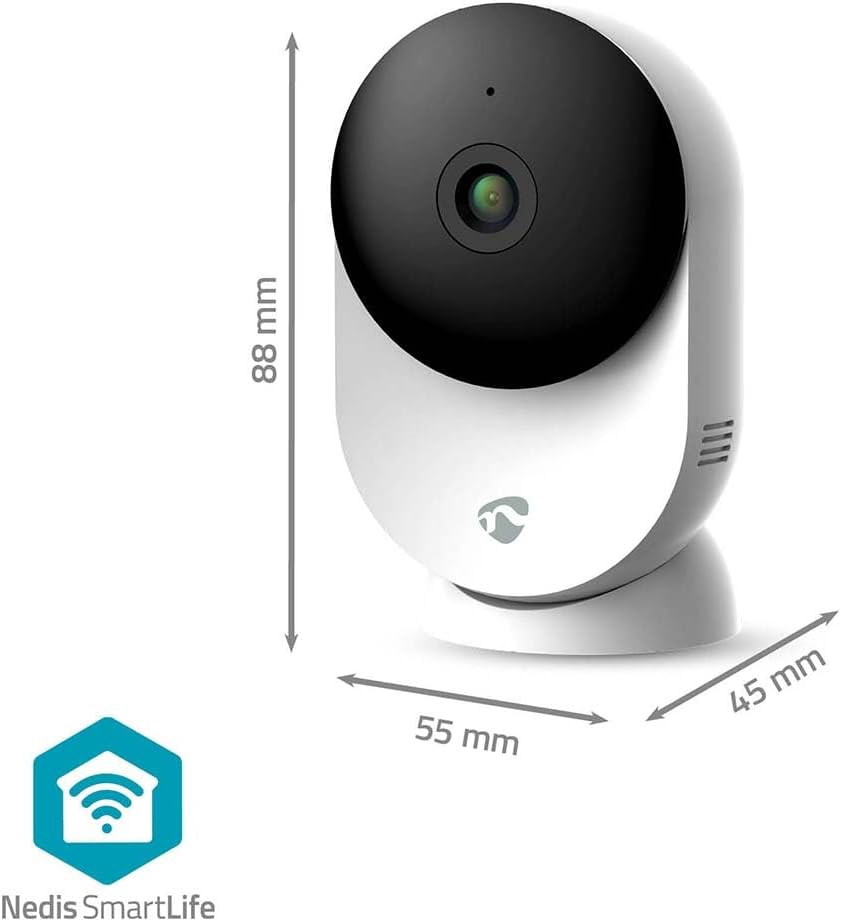
Chithunzichi chimapereka chidziwitso view of the NEDIS WIFICI12CWT camera along with its physical dimensions: 88 mm in height, 55 mm in width, and 45 mm in depth, aiding in placement planning.

Kumbuyo view of the camera is shown, highlighting the speaker grille for two-way audio and the 'PUSH' button, which typically serves as a reset or pairing button.
Zigawo Zofunikira:
- Kamera Kamera: Amajambula vidiyo footage.
- Chizindikiro cha LED: Shows camera status (e.g., power, connection).
- Maikolofoni: For audio input and two-way communication.
- Wolankhula: For audio output and two-way communication.
- Power Port (USB Type-C): Imalumikizana ndi adaputala yamagetsi.
- Bwezerani Batani: Imagwiritsidwa ntchito pokonzanso fakitale kapena pairing mode.
- MicroSD Card Slot: Kuti musunge makanema am'deralo.
4. Kukhazikitsa
Follow these steps to set up your NEDIS WIFICI12CWT camera:
- Tsitsani SmartLife App: Saka "SmartLife" in your mobile device's app store (iOS or Android) and install it.
- Pangani akaunti: Open the SmartLife app and register for a new account or log in if you already have one.
- Mphamvu pa Kamera: Connect the USB Type-C cable to the camera's power port and plug the power adapter into an electrical outlet. The camera will power on, and the LED indicator will typically blink, indicating it's ready for pairing.
- Onjezani Chipangizo: In the SmartLife app, tap the "+" icon (usually in the top right corner) to add a new device. Select "Security & Video Surveillance" then "Smart Camera (Wi-Fi)" or similar.
- Lumikizani ku Wi-Fi: Follow the on-screen instructions in the app. Ensure your mobile device is connected to a 2.4 GHz Wi-Fi network. The camera does not support 5 GHz Wi-Fi. You may need to scan a QR code displayed on your phone with the camera lens.
- Malizitsani Kukhazikitsa: Once the camera connects successfully, you can name it and begin using it.

A user is shown interacting with the NEDIS WIFICI12CWT camera through the SmartLife mobile application on a smartphone, illustrating the remote viewing capability and ease of control.
5. Kugwiritsa ntchito Kamera
Khalani ndi moyo View:
Tsegulani pulogalamu ya SmartLife ndikusankha kamera yanu pamndandanda wa zida kuti mupeze makanema amoyo. view your space in real-time from anywhere.
Kuzindikira Zoyenda:
The camera features intelligent motion detection. When motion is detected, the camera can send instant notifications to your smartphone via the SmartLife app. You can adjust sensitivity settings within the app.
Masomphenya a Usiku:
Equipped with infrared LEDs, the camera automatically switches to night vision mode in low-light conditions, providing clear black-and-white video up to 10 meters.
Audio Wanjira ziwiri:
Use the built-in microphone and speaker for two-way communication. Tap the microphone icon in the app to speak, and listen through the camera's speaker.

A couple is depicted using a tablet to monitor a baby, showcasing the camera's ability to provide live video feed and two-way audio communication, useful for calming a child or general baby surveillance.
Kujambula ndi Kusunga:
- MicroSD Card: Insert a microSD card (up to 128 GB, not included) into the designated slot for local storage of recordings. The camera supports continuous recording or event-triggered recording.
- Cloud Storage: Optional cloud storage services may be available through the SmartLife app for secure off-site storage of your video footage.
Kugwira Ntchito kwa Pan/Tilt:
The camera features motorized pan and tilt capabilities, allowing for 360° horizontal and vertical tracking. Control the camera's viewing direction directly from the SmartLife app to cover a wider area.

This image shows the camera placed in a room, with graphical overlays emphasizing its 110-degree viewing angle, intelligent movement detection, and dual-band 2.4/5 GHz Wi-Fi connectivity for flexible placement.
6. Kusamalira
Kuyeretsa:
To clean the camera, gently wipe the exterior with a soft, dry cloth. Do not use liquid cleaners or aerosols, as they may damage the device.
Zosintha za Firmware:
Periodically check the SmartLife app for available firmware updates. Keeping your camera's firmware up-to-date ensures optimal performance and security.
7. Mavuto
- Kamera siyikuyatsa: Onetsetsani kuti adaputala yamagetsi yalumikizidwa bwino ku kamera komanso pa soketi yamagetsi yogwira ntchito.
- Unable to connect to Wi-Fi:
- Verify your Wi-Fi network is 2.4 GHz. The camera does not support 5 GHz networks.
- Yang'anani mawu achinsinsi anu a Wi-Fi kuti muwone zolondola.
- Onetsetsani kuti kamera ili pakati pa rauta yanu ya Wi-Fi.
- Try resetting the camera by pressing and holding the reset button for several seconds until the LED indicator changes.
- No recording to microSD card:
- Ensure the microSD card is inserted correctly.
- Check if the microSD card is formatted correctly (usually FAT32). You may need to format it via the app.
- Verify that recording settings are enabled in the SmartLife app.
- Zithunzi zosaoneka bwino:
- Tsukani lens ya kamera ndi nsalu yofewa, youma.
- Ensure adequate lighting in the environment, or that night vision is functioning correctly in dark conditions.
- Check your internet connection speed, as a slow connection can affect streaming quality.
8. Zofotokozera
| Mbali | Kufotokozera |
|---|---|
| Dzina lachitsanzo | Chithunzi cha WIFICI12CWT |
| Kanema Kujambula Resolution | 1296p (3MP) |
| Wopanda zingwe Technology | Wi-Fi (2.4 GHz) |
| Viewngodya | 110 digiri |
| Mtundu wa Masomphenya a Usiku | 10 mita |
| Kulowetsa Mphamvu | 5 volts |
| Kugwiritsa Ntchito Mphamvu | 4.5 Watt-maola |
| Makulidwe (L x W x H) | 45 x 55 x 88 mm |
| Kulemera | 161 gm |
| Zakuthupi | Acrylonitrile Butadiene Styrene (ABS) |
| Zapadera | Two-way audio, Motion detector, Cry detection, Sound-triggered recording, HD resolution, Night vision |
| Kugwiritsa Ntchito Malo | M'nyumba |
| Zida Zogwirizana | Smartphone, Tablet |
| Mtundu Wowongolera | Android, iOS |
9. Zambiri Zachitetezo
- This product is designed for indoor use only. Do not expose it to rain or moisture.
- Use only the provided power adapter to prevent damage to the device.
- Keep the camera away from direct sunlight, heat sources, and strong magnetic fields.
- Do not attempt to disassemble or repair the camera yourself. Contact qualified service personnel for assistance.
- Sungani kutali ndi ana ndi ziweto.
10. Chitsimikizo ndi Thandizo
For warranty information and technical support, please refer to the documentation included with your product or visit the official NEDIS website. You can also contact NEDIS customer service for further assistance.


