Mawu Oyamba
The Hotmoon Cocoon Pro White Noise Sound Machine is designed to create an optimal soundscape environment for various activities such as sleep, relaxation, study, work, or soothing infants. It features a comprehensive library of 388 high-fidelity sounds, a night light, a sleeping timer, and convenient app control for personalized routines.
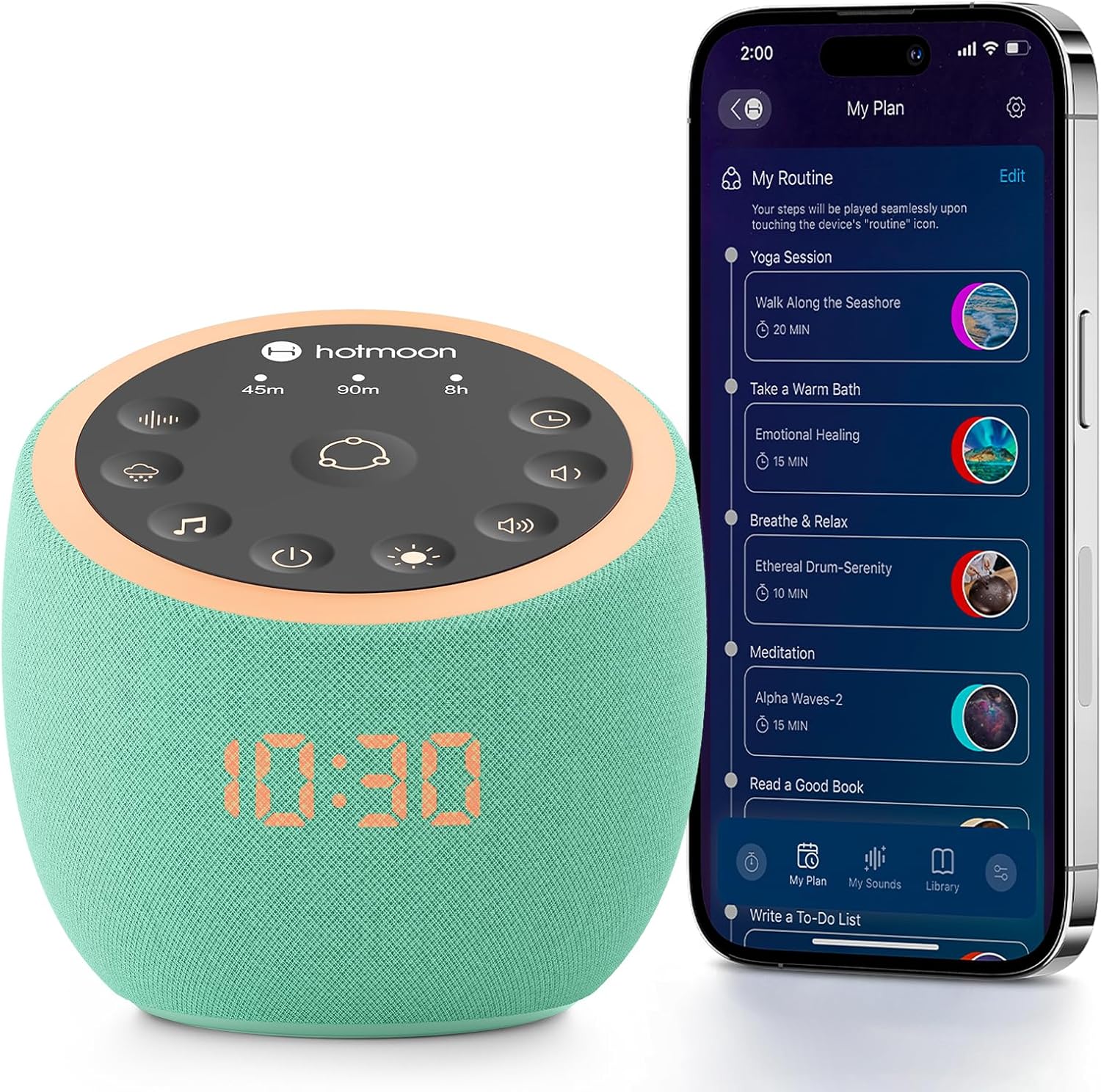
Image: The Hotmoon Cocoon Pro White Noise Sound Machine, a compact, mint-green device with a digital clock display, shown next to a smartphone illustrating its app control interface. The device features a top panel with various control icons.
Zofunika Kwambiri
- 388 High-Fidelity Sounds: Includes White noises, Fan sounds, Nature sounds, Lullabies, Alpha brainwaves, Zen sounds, Meditation melodies, High frequency sound, and more.
- Kuwongolera Mapulogalamu: Adjust settings remotely via a companion app on your smartphone.
- DIY Sound Buttons: Three customizable buttons allow personalization with 1 to 9 sounds from the professional sound library.
- Colorful Night Lights: Various professional anti-glare baby night lights for soothing sleep, with adjustable brightness and static/breath modes.
- Sleeping Timer: Set timers for 45 minutes, 90 minutes, or 8 hours.
- Alamu Yokwera: Features exclusive awakening melodies with volume fade-in. Clock brightness can be dimmed, turned off, or scheduled.
- Compact Design: Portable and suitable for travel.

Image: A visual representation highlighting the 388 sounds available on the Hotmoon Sound Machine, categorized by type, emphasizing no subscription fees.
Khazikitsa
1. Kulumikizana kwa Mphamvu
Connect the sound machine to a power source using the provided cable. The device is not battery-operated and requires continuous power.
2. Kutsitsa kwa App ndi kulumikizana
- Download the official Hotmoon companion app from your smartphone's app store.
- Yambitsani Bluetooth pa smartphone yanu.
- Open the Hotmoon app. The app will automatically detect and connect to your Cocoon Pro device via Bluetooth. No Wi-Fi password is required for initial setup.
Malangizo Ogwiritsira Ntchito
App Control
The primary method for controlling the Cocoon Pro is through its companion app. This allows for comprehensive customization and scheduling.
- Kusankha Mawu: Browse and select from 388 high-fidelity sounds categorized by Weather (e.g., Heavy Rain, Light Rain, Thunder), Nature, Noise (e.g., Warm Pink Noise, White Noise), Brainwave Music, Instrumental, Lullaby, and more.
- Kusintha kwa Voliyumu: Control the sound volume from 0-100% using a slider in the app.
- Kuwongolera Kuwala:
- Turn the night light on/off.
- Customize light color and brightness.
- Select between Static or Breath light modes.
- Routine Setup: Create personalized routines for various activities (e.g., meditation, wake-up, bedtime).
- Combine multiple sounds and light settings.
- Schedule routines to turn on/off at specific times and repeat on selected days of the week.
- DIY Sound Buttons: Assign up to 9 sounds to each of the three physical DIY buttons on the device for quick access.

Image: A smartphone screen displaying the Hotmoon app's sound library, showing various sound categories and options to customize the three physical sound buttons on the device.
Physical Button Control
The device also features intuitive physical buttons for basic control without the app.
- Routine Button (Center): Press to activate pre-set or customized routines.
- Timer Buttons (45m, 90m, 8h): Select a specific duration for sound playback.
- Mabatani Osankha Ma Sound: Cycle through different sound categories (e.g., fan, rain, meditation).
- Mabatani Owongolera Voliyumu: Adjust sound volume up or down.
- Batani Lowongolera: Turn the night light on/off and cycle through brightness levels.
- Batani Lamphamvu: Yatsani kapena kuzimitsa chipangizocho.

Image: A close-up of the Hotmoon Sound Machine's top panel, showing the illuminated touch-sensitive buttons for direct control of sounds, timers, volume, and light, enabling phone-free operation.
Kusamalira
To ensure the longevity and optimal performance of your Hotmoon Cocoon Pro:
- Sungani chipangizocho mwaukhondo pochipukuta ndi nsalu yofewa, youma.
- Pewani kugwiritsa ntchito zotsukira zamadzimadzi kapena zinthu zowononga.
- Osayika chipangizocho kumadzi kapena chinyezi chambiri.
- Sungani pamalo ozizira, owuma osagwiritsidwa ntchito.
Kusaka zolakwika
Chipangizo Sichiyatsa
- Ensure the power cable is securely connected to both the device and a working power outlet.
- Tsimikizirani kuti soketi yamagetsi ikugwira ntchito bwino poyesa ndi chipangizo china.
Nkhani Zolumikizana ndi App
- Onetsetsani kuti Bluetooth yayatsidwa pa smartphone yanu.
- Make sure the device is powered on and within Bluetooth range of your smartphone.
- Try restarting both the app and the sound machine.
Palibe Kutulutsa Mawu
- Check the volume level on both the device and within the app.
- Ensure a sound is selected and playing in the app.
Zofotokozera
| Malingaliro | Tsatanetsatane |
|---|---|
| Mtundu | Hotmoon |
| Chitsanzo | Cocoon Pro |
| Mtundu | Mint-green |
| Zakuthupi | Acrylonitrile Butadiene Styrene (ABS) |
| Makulidwe a Phukusi | 4.92 x 4.92 x 4.52 mainchesi; 15.04 ku |
| Mabatire | 1 Lithium Metal batteries required. (included) - Note: Device is not battery operated, this likely refers to a small internal battery for clock/memory. |
| Wopanga | Hotmoon |
| Tsiku Loyamba Kupezeka | Juni 25, 2025 |