1. Mawu Oyamba
This manual provides essential instructions for the safe and efficient use of your Meizu Note 21 Pro smartphone. Please read this manual thoroughly before operating the device and retain it for future reference.
2. Zomwe zili mu Bokosi
- Meizu Note 21 Pro Smartphone
- Adapter yamagetsi
- (Other accessories such as USB cable, SIM ejector tool, and documentation may vary by region.)
3. Mapangidwe a Chipangizo
Familiarize yourself with the physical components of your Meizu Note 21 Pro.
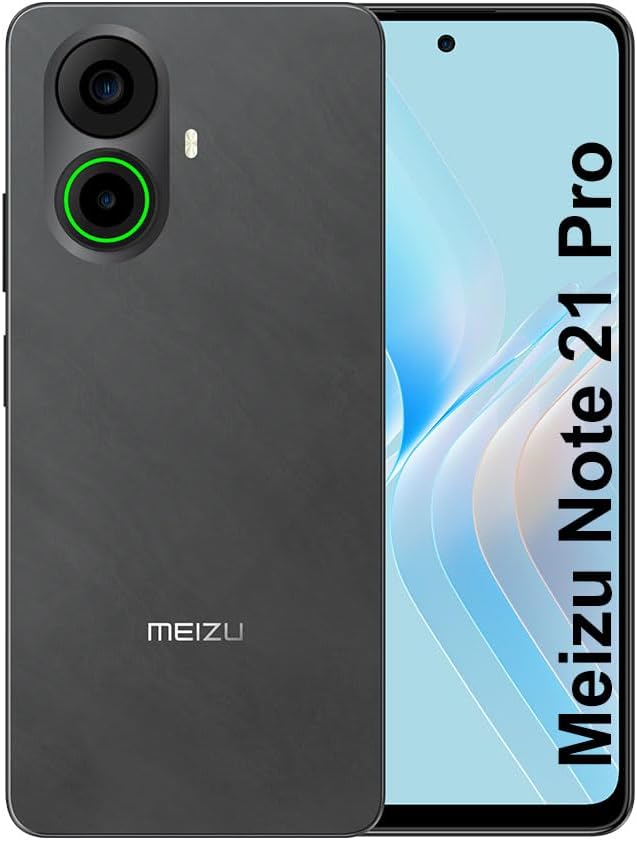
Chithunzi 3.1: Kutsogolo ndi kumbuyo view of the Meizu Note 21 Pro. The front displays the screen with a punch-hole camera. The rear shows the dual camera module with a green accent ring on one lens, a flash, and the "MEIZU" logo at the bottom.
- Chiwonetsero Chakutsogolo: 6.78-inch FHD+ screen with a 120Hz refresh rate.
- Kamera yakutsogolo: Ili pakati pa chiwonetserocho.
- Makamera Akumbuyo: Dual camera system, including a 64MP main camera.
- Sensor ya Zidindo Zam'mbali: Integrated for secure access.
- Doko la USB: Kwa kulipiritsa ndi kusamutsa deta.
- 3.5mm Audio Jack: Za mahedifoni.
- SIM/MicroSD Card Tray: Supports Dual Nano SIM and MicroSD cards.
4. Kukhazikitsa
4.1. Kuyika SIM ndi MicroSD Cards
- Pezani thireyi ya SIM khadi pambali pa chipangizo chanu.
- Lowetsani chida cha SIM ejector mu dzenje laling'ono pafupi ndi thireyi ndikukankhira modekha mpaka thireyi ituluke.
- Place your Nano SIM card(s) and/or MicroSD card into the designated slots on the tray. Ensure the gold contacts face downwards.
- Mosamala lowetsani thireyi mu chipangizocho mpaka itadina pamalo ake.
4.2. Koyamba Kuyatsa ndi Kukhazikitsa
- Press and hold the Power button until the Meizu logo appears.
- Tsatirani zomwe zili pazenera kuti musankhe chilankhulo chanu, kulumikizana ndi netiweki ya Wi-Fi, ndikukhazikitsa akaunti yanu ya Google.
- During setup, you will be guided to configure security features such as a PIN, pattern, or password.
4.3. Fingerprint Recognition Setup
- Yendetsani ku Zokonda > Chitetezo & zachinsinsi > Kutsegula kwa Zidindo Zala.
- Follow the on-screen instructions to register your fingerprint by repeatedly touching the side-mounted sensor.
- Ensure your finger covers the entire sensor area during registration for optimal performance.
5. Kugwiritsa Ntchito Chipangizo Chanu
5.1. Kuwonetsa ndi Navigation
- The 6.78-inch FHD+ display operates at a 120Hz refresh rate for smooth visuals.
- Navigate the Android 14 operating system using touch gestures: tap, swipe, pinch-to-zoom.
- Access quick settings by swiping down from the top of the screen.
5.2. Kamera Ntchito
- Tsegulani pulogalamu ya Kamera kuchokera pazenera lakunyumba kapena chojambula cha pulogalamu.
- The rear camera system features a 64MP main sensor for high-resolution photos and a 2MP depth-of-field camera for portrait effects.
- The 13MP front-facing camera is suitable for selfies and video calls.
- Tap on the screen to focus, and use the on-screen shutter button to capture images. Explore various modes like Portrait, Night, and Pro within the camera app.
5.3. Magwiridwe ndi Kusunga
- The MediaTek G99 Octa Core processor ensures efficient performance for applications and multitasking.
- The device comes with 256GB of internal storage and 8GB of RAM.
- Storage can be expanded using a MicroSD card (sold separately).
5.4. Battery ndi Charging
- The Meizu Note 21 Pro is equipped with a 5000mAh battery.
- Use the provided Power Adapter for 30W fast charging.
- To charge, connect the USB cable to the phone's USB port and the power adapter, then plug the adapter into a wall outlet.
5.5. Kulumikizana
- 4G LTE: Supports various LTE FDD and TDD bands for cellular data. Note: This international version works on T-Mobile in the USA and globally with other carriers.
- Wi-Fi 5: Lumikizani kumanetiweki opanda zingwe kuti mupeze intaneti.
- Bulutufi: Pair with wireless accessories like headphones and speakers.
- NFC: For contactless payments and quick pairing with compatible devices.
- GPS: Kwa ntchito zamalo ndikuyenda.
6. Kusamalira
- Kuyeretsa: Gwiritsani ntchito nsalu yofewa, yopanda lint kuyeretsa chophimba ndi thupi la chipangizocho. Pewani mankhwala owopsa kapena zinthu zowononga.
- Kusamalira Battery: Avoid extreme temperatures. Do not fully discharge the battery frequently. For optimal battery longevity, keep the charge between 20% and 80%.
- Zosintha pa Mapulogalamu: Yang'anani pafupipafupi ndikuyika zosintha zamakina kuti muwonetsetse kuti zikuyenda bwino komanso chitetezo. Pitani ku Zokonda > Dongosolo > Kusintha kwadongosolo.
7. Mavuto
| Nkhani | Njira Yotheka |
|---|---|
| Chipangizo sichimayatsidwa | Ensure the battery is charged. Connect the device to the power adapter and try again. If unresponsive, press and hold the Power button for 10-15 seconds to force a restart. |
| Netiweki yosamveka bwino | Check if the SIM card is correctly inserted. Move to an area with better network coverage. Restart the device. Verify with your carrier that your plan is active. |
| Mapulogalamu amachedwa kapena akuwonongeka | Close background applications. Clear app cache (Zokonda > Mapulogalamu > sankhani pulogalamu > Kusungirako & cache > Chotsani posungira). Restart the device. Ensure sufficient storage space. |
| Sensa ya zala sikugwira ntchito | Ensure your finger and the sensor are clean and dry. Re-register your fingerprint in settings. |
8. Zofotokozera
- Chitsanzo: Meizu Note 21 Pro
- Opareting'i sisitimu: Android 14
- Purosesa: MediaTek G99 Octa Core (2.2GHz)
- Onetsani: 6.78 inches FHD+ (1080 x 2160 resolution), 120Hz Refresh Rate
- RAM: 8 GB
- Zosungira Zamkati: 256 GB
- Kamera yakumbuyo: 64MP Main + 2MP Depth
- Kamera yakutsogolo: 13MP
- Batri: 5000mAh, 30W Kuthamanga Mwachangu
- Kulumikizana: 4G LTE (FDD:1,2,3,4,5,7,8,12,17,18,19,20,26,28,66; TDD:38,40,41), 3G WCDMA, 2G Quad Band, Wi-Fi 5, Bluetooth, NFC, GPS
- Audio Jack: 3.5 mm
- Makulidwe: 6.64 x 2.96 x 0.33 mainchesi
- Kulemera kwake: 1.1 mapaundi
9. Chitsimikizo ndi Thandizo
For warranty information and technical support, please refer to the warranty card included with your product or visit the official Meizu webmalo. Sungani umboni wanu wogula kuti mutenge chitsimikizo.
For further assistance, you may contact Meizu customer service through their official channels.


