1. Mawu Oyamba
The Mastech MS8250D is a high-performance digital multimeter designed for accurate measurement of AC/DC voltage, AC/DC current, resistance, capacitance, frequency, and temperature. It features a 6600-count display, auto/manual ranging, True RMS, Non-Contact Voltage (NCV) detection, diode and continuity testing, and a USB interface for PC connectivity. This manual provides detailed instructions for safe and effective use of the device.
Zofunika Kwambiri:
- 6600-count digital display
- Automatic and Manual Ranging
- Muyezo weniweni wa RMS
- Zosagwirizana ndi Voltage (NCV) kuzindikira
- Diode and Continuity Tester (buzzer < 50Ω)
- MAX/MIN value recording
- Ntchito ya Data Hold
- Onetsani Backlight
- Auto Power Off
- Mulingo wofananira
- Low Battery Chizindikiro
- USB Interface for Windows OS
2. Zambiri Zachitetezo
CHENJEZO: To avoid electric shock or personal injury, and to avoid damage to the meter or to the equipment under test, read all safety information carefully before using the meter. This device complies with CE, RoHS, and UL safety standards.
- Always ensure the test leads are in good condition and properly connected.
- Osagwiritsa ntchito kuposa voliyumu yovoteratage, monga zasonyezedwa pa mita, pakati pa matheminali kapena pakati pa materminal ndi nthaka.
- Samalani mukamagwira ntchito ndi voltagndi pamwamba pa 30V AC RMS, 42V pachimake, kapena 60V DC. Voltagndi chiwopsezo chowopsa.
- Before measuring current, ensure the circuit is de-energized and the meter is connected in series.
- Always disconnect the test leads from the circuit before changing functions or ranges.
- Do not use the meter if it appears damaged or if the case is open.
- Replace the battery as soon as the low battery indicator appears to ensure accurate readings.
- Adhere to the specified measurement categories (CAT III 1000V / CAT IV 600V) for safe operation.
3. Zamalonda Zathaview
Familiarize yourself with the components of your Mastech MS8250D Digital Multimeter.

Chithunzi 3.1: Patsogolo view of the Mastech MS8250D Digital Multimeter, showing the display, function dial, and input jacks. The display shows "1.987 V", indicating a voltage measurement. The function dial is set to T-RMS. Input jacks are labeled for µA mA, A, VΩHz%, and COM.
Zopangira Zazikulu:
- Chiwonetsero cha LCD: Imawonetsa miyeso, mayunitsi, ndi zizindikiro zogwirira ntchito.
- Kuyimba ntchito: Amagwiritsidwa ntchito posankha ntchito yoyezera yomwe mukufuna (mwachitsanzo, Voltage, Current, Resistance, Diode, Continuity, Temperature).
- Mabatani ogwira ntchito:
- GWIRITSANI: Imayimitsa kuwerenga kwa chiwonetsero chaposachedwa.
- Osiyanasiyana: Switches between auto and manual ranging.
- REL: Activates relative measurement mode.
- MAX / mphindi: Lembani mfundo zazikulu komanso zochepa.
- FUNC: Selects sub-functions within a dial position (e.g., AC/DC, Diode/Continuity).
- T-RMS: (Indicated on dial) True RMS measurement.
- NCV: Zosagwirizana ndi Voltagndi kuzindikira.
- Backlight Button: Activates display backlight.
- Ma Jacks Olowetsa:
- COM: Common terminal for all measurements (negative lead).
- VΩHz%: Zolowetsa za voltage, resistance, frequency, capacitance, and diode/continuity measurements (positive lead).
- µA mA: Input for microampere and milliampere current measurements (positive lead). Fused for protection.
- A: Lowetsani kwa ampere current measurements (positive lead). Fused for protection.
Zophatikiza:
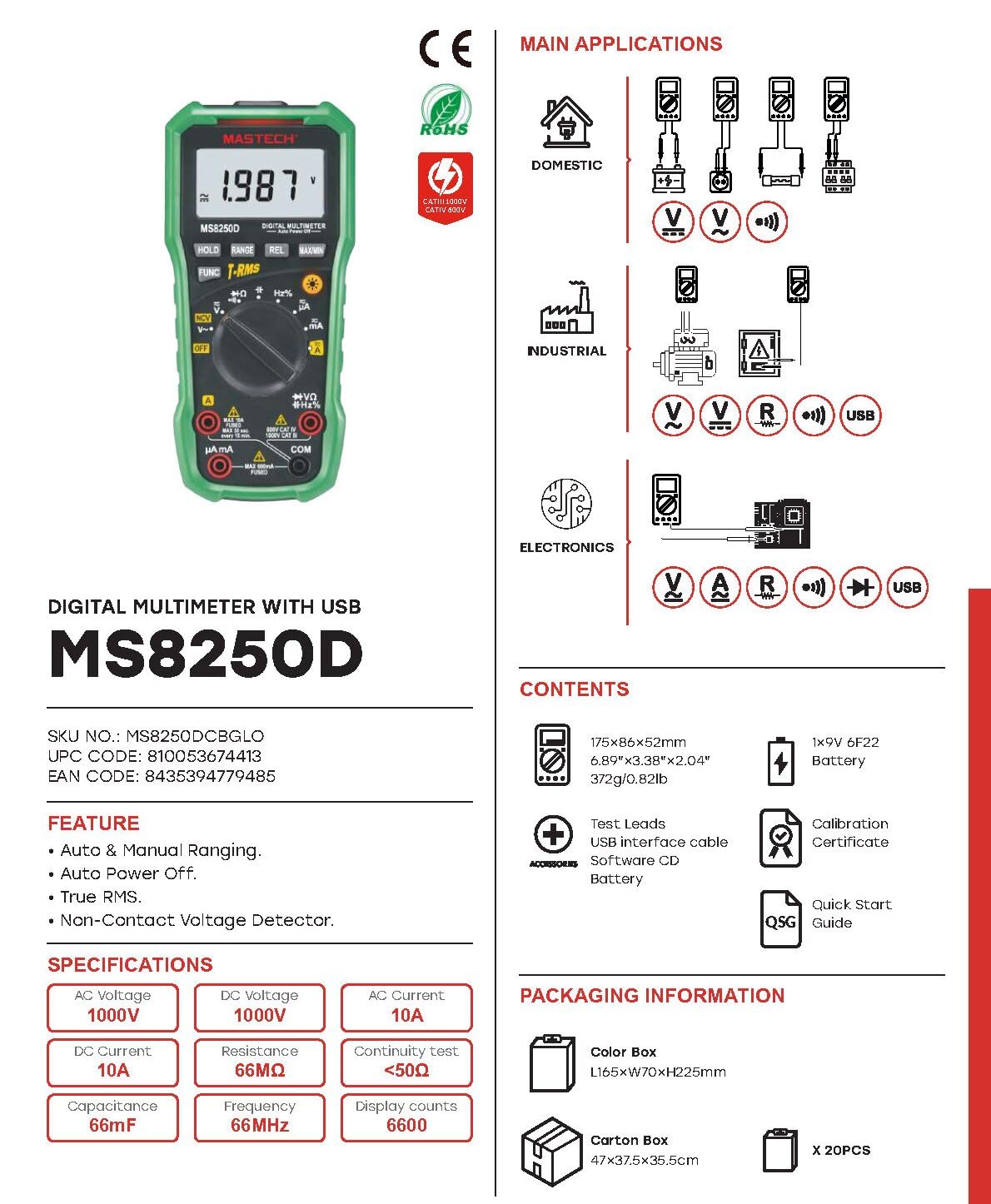
Chithunzi 3.2: Diagram showing the Mastech MS8250D Multimeter and its included accessories. The image also illustrates typical applications in domestic, industrial, and electronics settings.
- Mastech MS8250D Digital Multimeter
- Mayeso Otsogolera (Ofiira ndi Akuda)
- 1x 9V 6F22 Battery (pre-installed or included separately)
- Chingwe cha USB Interface
- Software CD (for Windows OS)
- Satifiketi ya Calibration
- Mayendedwe Oyamba Mwachangu
4. Kukhazikitsa
4.1 Kuyika kwa Battery
The MS8250D requires one 9V 6F22 battery for operation. Two LR44 batteries are also mentioned in specifications, likely for a different internal component or an error in data. For the main power, use the 9V battery.
- Onetsetsani kuti multimeter yazimitsa.
- Pezani chivundikiro cha chipinda cha batri kumbuyo kwa mita.
- Use a screwdriver to loosen the screw(s) securing the cover.
- Chotsani chophimba.
- Connect the 9V battery to the battery clips, observing correct polarity (+ and -).
- Ikani batire mu chipinda.
- Bwezerani chivundikiro cha chipinda cha batri ndikuchitchinjiriza ndi zomangira.
Zindikirani: The meter also uses 2 LR44 batteries, which are typically included and pre-installed for specific functions like the backlight or non-contact voltage detection. Refer to the quick-start guide for specific details on these smaller batteries if replacement is needed.
4.2 Kulumikiza Zotsogolera Zoyesa
Nthawi zonse lumikizani chingwe chakuda choyesera ku COM jack. Lumikizani chingwe chofiira choyesera ku jack yoyenera kutengera mtundu wa muyeso:
- Za Voltage, Resistance, Capacitance, Frequency, Diode, and Continuity measurements: Connect the red lead to the VΩHz% jack.
- For Current measurements (µA or mA): Connect the red lead to the µA mA jack.
- For High Current measurements (A): Connect the red lead to the A jack.
Ensure the test leads are fully inserted into the jacks.
5. Malangizo Ogwiritsira Ntchito
5.1 Kuyatsa/Kuzimitsa
To turn the meter ON, rotate the function dial from the "OFF" position to any desired measurement function. To turn the meter OFF, rotate the function dial back to the "OFF" position.
The meter features an Auto Power Off function to conserve battery life. It will automatically power off after a period of inactivity. To disable or re-enable this feature, refer to the quick-start guide or the full user manual provided on the software CD.
5.2 Auto Ranging and Manual Ranging
The MS8250D defaults to Magalimoto Okhazikika, which automatically selects the best measurement range. Press the KUSINTHA batani kuti musinthe Kuyenda pamanja. In manual ranging, each press of the KUSINTHA button cycles through available ranges. To return to auto ranging, press and hold the KUSINTHA batani.
5.3 Kuyeza AC/DC Voltagndi (V)
- Khazikitsani kuyimba kwa ntchito ku V~ (AC Voltage) kapena V- (DC Voltage) udindo.
- Lumikizani mayeso akuda akutsogolera ku COM jack and the red test lead to the VΩHz% jack.
- Connect the test probes across the circuit or component to be measured.
- Werengani voltage value on the display. The meter will automatically detect AC or DC if the dial is set to the combined V position, or you can use the ZOSANGALATSA button to toggle between AC and DC if available on your model.
5.4 Measuring AC/DC Current (A, mA, µA)
CHENJEZO: Never connect the meter in parallel to a voltage source when measuring current. This can blow the fuse or damage the meter.
- ZIMItsani mphamvu kudera.
- Khazikitsani kuyimba kwa ntchito ku A~ (AC Current), A- (DC Current), mA~, mA-, µA~, kapena µA- udindo.
- Lumikizani mayeso akuda akutsogolera ku COM jack.
- Lumikizani mayeso ofiyira kutsogolera A jack for high current, or µA mA jack for low current.
- Open the circuit where the current is to be measured and connect the meter in series with the load.
- Ikani mphamvu pa dera.
- Read the current value on the display. Use the ZOSANGALATSA batani kuti musinthe pakati pa AC ndi DC ngati pakufunika.
5.5 Kuyesa Kukaniza (Ω)
- Khazikitsani kuyimba kwa ntchito ku Ω udindo.
- Lumikizani mayeso akuda akutsogolera ku COM jack and the red test lead to the VΩHz% jack.
- Ensure the circuit or component under test is de-energized.
- Lumikizani ma probe oyesera kudutsa gawo lonselo.
- Werengani mtengo wotsutsa pachionetsero.
5.6 Diode Test and Continuity Test
- Khazikitsani kuyimba kwa ntchito ku Diode/Continuity position (often shared with resistance or capacitance).
- Lumikizani mayeso akuda akutsogolera ku COM jack and the red test lead to the VΩHz% jack.
- Gwiritsani ntchito ZOSANGALATSA button to select between Diode Test and Continuity Test.
- Kuyesa Diode: Lumikizani chofufutira chofiira ku anode ndi chofufutira chakuda ku cathode ya diode. Chowonetseracho chidzawonetsa vol yamtsogolotage drop (typically 0.5V to 0.8V for silicon diodes). Reversing the probes should show "OL" (Open Loop).
- Kwa Mayeso Opitiliza: Connect the probes across the circuit or component. If resistance is less than approximately 50Ω, the buzzer will sound, indicating continuity.
5.7 Measuring Capacitance (F)
- Khazikitsani kuyimba kwa ntchito ku Kuthekera position (often shared with resistance or diode).
- Lumikizani mayeso akuda akutsogolera ku COM jack and the red test lead to the VΩHz% jack.
- Ensure the capacitor is fully discharged before testing to avoid damage to the meter.
- Lumikizani ma probe oyesera kudutsa ma capacitor terminals.
- Werengani kuchuluka kwa capacitance pachionetsero.
5.8 Measuring Frequency (Hz) and Duty Cycle (%)
- Khazikitsani kuyimba kwa ntchito ku Hz% position (often shared with voltagndi).
- Lumikizani mayeso akuda akutsogolera ku COM jack and the red test lead to the VΩHz% jack.
- Lumikizani ma probe oyesera kudutsa gwero la chizindikiro.
- The display will show the frequency. Press the ZOSANGALATSA button to toggle to Duty Cycle measurement if available.
5.9 Osalumikizana Voltage (NCV) Kuzindikira
- Khazikitsani kuyimba kwa ntchito ku NCV udindo.
- Hold the meter with the NCV sensor (usually at the top of the meter) near a live AC voltagndi gwero.
- The meter will indicate the presence of AC voltage through an audible beep and/or visual indicator (e.g., LED).
5.10 USB Interface (Windows OS)
The MS8250D includes a USB interface for connecting to a computer running Windows OS. This allows for data logging and real-time monitoring of measurements. Install the provided software from the CD and follow the on-screen instructions for driver installation and software usage.
6. Kusamalira
6.1 Kuyeretsa
Pukutani mlandu wa mita ndi malondaamp cloth and a mild detergent. Do not use abrasives or solvents. Ensure the meter is completely dry before use.
6.2 Kusintha kwa Battery
When the low battery indicator appears on the display, replace the 9V battery immediately to ensure accurate readings. Follow the steps in Section 4.1 Battery Installation.
6.3 Kusintha kwa Fuse
If the meter fails to measure current, the fuse may be blown. Fuses are located inside the meter. To replace a fuse:
- Ensure the meter is turned OFF and all test leads are disconnected.
- Open the battery compartment cover (and potentially the main case, depending on design).
- Carefully remove the old fuse.
- Replace with a fuse of the exact same type and rating (e.g., F600mA/250V for mA/µA range, F10A/250V for A range). Refer to the meter's internal markings or the full manual for specific fuse ratings.
- Reassemble the meter, ensuring all screws are tightened.
CHENJEZO: Never use a fuse with a different rating or bypass the fuse. This can damage the meter and pose a serious safety hazard.
7. Mavuto
| Vuto | Chifukwa Chotheka | Yankho |
|---|---|---|
| Chida choyezera sichikugwira ntchito. | Batire yakufa. | Bwezerani batiri la 9V. |
| "OL" (Overload) displayed. | Muyeso umaposa mphamvu yayikulu ya mtunda wosankhidwa kapena mita. | Switch to a higher range (if in manual ranging) or ensure the measurement is within the meter's limits. |
| No current reading. | Blown fuse; incorrect lead connection; open circuit. | Check and replace fuse if necessary. Ensure leads are connected correctly (in series). Verify circuit continuity. |
| Kuwerenga molakwika. | Low battery; poor lead contact; external interference. | Replace battery. Ensure leads are firmly connected. Move away from strong electromagnetic fields. |
| Display shows "USB" but no PC connection. | Drivers not installed; incorrect software settings. | Install drivers from the provided CD. Refer to software manual for connection instructions. |
8. Zofotokozera
The following table details the technical specifications of the Mastech MS8250D Digital Multimeter.

Chithunzi 8.1: Detailed specifications table for the Mastech MS8250D, outlining ranges, resolutions, and accuracies for various measurement functions.
| Ntchito | Mtundu | Kusamvana | Kulondola |
|---|---|---|---|
| DC Voltage | |||
| 660mV | 0.1mV | ±(0.8%+3) | |
| 6.6V/66V/660V/1000V | 1mV/10mV/0.1V/1V | ±(0.5%+5) | |
| AC Voltage (RMS yeniyeni) | |||
| 660mV | 0.1mV | ±(1.5%+5) | |
| 6.6V / 66V | 1mV/10mV | ±(1.2%+5) | |
| 660V / 1000V | 0.1V / 1V | ±(1.0%+3) | |
| DC Tsopano | |||
| 660µA/6600µA/66mA/660mA | 0.1µA/1µA/10µA/0.1mA | ±(1.0%+5) | |
| 10A | 10mA pa | ±(2.0%+5) | |
| AC Yapano (RMS Yeniyeni) | |||
| 660µA/6600µA/66mA/660mA | 0.1µA/1µA/0.01mA/0.1mA | ±(1.5%+5) | |
| 10A | 10mA pa | ±(3.0%+5) | |
| Kukaniza | |||
| 660Ω / 6.6kΩ / 66kΩ / 660kΩ / 6.6MΩ | 0.1Ω / 1Ω / 10Ω / 100Ω / 1kΩ | ±(0.8%+5) | |
| 66MΩ | Zamgululi | ±(1.5%+5) | |
| Kuthekera | |||
| 6.6nF/66nF/660nF/6.6µF/66µF | 1pF/10pF/0.1nF/1nF/10nF | ±(4.0%+5) | |
| 600µf | 1µf | ±(3.0%+5) | |
| 6.6mF/66mF | 1µF/10µF | ±(4.0%+5) | |
| pafupipafupi | |||
| 66Hz/660Hz/6.6kHz/66kHz | 0.01Hz / 0.1Hz / 1Hz / 10Hz | ±(1.5%+5) | |
| 660kHz/6.6MHz/66MHz | 0.1kHz/1kHz/10kHz | ±(1.5%+5) | |
| Duty Cycle | |||
| 0.1% ~ 99.9% | 0.1% | ±(2.0%+5) | |
Zofotokozera:
- Onetsani: 6600 Chiwerengero
- Gwero la Mphamvu: 1x 9V 6F22 Battery (main power), 2x LR44 batteries (auxiliary, e.g., backlight)
- Kuzimitsa Pagalimoto: Inde
- RMS yeniyeni: Inde
- Zosagwirizana ndi Voltage (NCV) Detector: Inde
- Diode Open Voltage: 3.2V
- Chojambulira Chopitilira: <50Ω
- MAX / mphindi: Inde
- Data Hold: Inde
- Chiwonetsero cha Battery Yochepa: Inde
- Onetsani Backlight: Inde
- Chiyankhulo cha USB: Yes (Windows OS)
- Mayeso achitetezo: CAT III 1000V / CAT IV 600V
- Muyezo Wolondola: 0.4% (general, specific accuracies per function in table)
- Opaleshoni Voltage (Mphindi): 3.2 volts
- Kutentha Kwambiri: 50 digiri Celsius
- Makulidwe (L x W x H): 20 x 15 x 25 masentimita
- Kulemera kwa chinthu: 1kg pa
- Zofunika: Acrylonitrile Butadiene Styrene (ABS)
- Mtundu: Buluu
- Wopanga: Malingaliro a kampani MASTECH
- Dziko lakochokera: Taiwan
- Zitsimikizo: CE, RoHS, UL
9. Chitsimikizo ndi Thandizo
Mastech products are designed for reliability and durability. For specific warranty information, please refer to the warranty card included with your product or contact Mastech customer support directly. Typically, Mastech offers a limited warranty against defects in materials and workmanship.
For technical support, troubleshooting assistance, or warranty claims, please contact your authorized Mastech dealer or visit the official Mastech webwebusayiti kuti mudziwe zambiri.
Nthawi ya Kupezeka kwa Gawo la EU: 1 Chaka


