Mawu Oyamba
Thank you for choosing the ACS APG8201 PINhandy 1 OTP Generator. This device is designed to provide secure One-Time Passwords (OTPs) for enhanced authentication in various applications. This manual provides essential information for the proper setup, operation, and maintenance of your OTP generator. Please read this manual thoroughly before using the device to ensure optimal performance and safety.
Zambiri Zachitetezo
- Sungani chipangizocho kutali ndi madzi ndi chinyezi chochuluka.
- Osaika chipangizocho ku kutentha kwambiri kapena kuwala kwa dzuwa.
- Pewani kugwetsa kapena kuyika chipangizocho kuti chiwonongeke kwambiri.
- Musayese kumasula kapena kukonza chipangizocho nokha. Onani kwa ogwira ntchito oyenerera.
- Tayani chipangizocho ndi batire yake motsatira malamulo am'deralo.
Zamkatimu Phukusi
Please check the package contents upon unboxing. If any items are missing or damaged, contact your vendor immediately.
- 1 x ACS APG8201 PINhandy 1 OTP Generator
- 1 x USB Cable (for power/connection)
- 1 x Quick Start Guide (this document serves as the full manual)
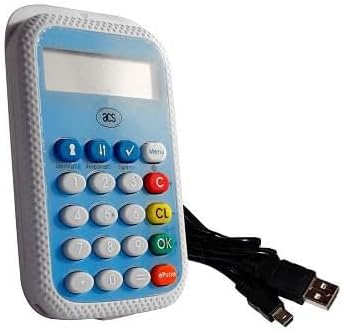
Image: The ACS APG8201 PINhandy 1 OTP Generator, a compact device featuring a display screen, a numeric keypad, and function buttons. A USB cable is shown connected to the device.
Khazikitsa
Mphamvu Yoyamba
- Connect the provided USB cable to the micro-USB port on the OTP generator.
- Connect the other end of the USB cable to a powered USB port on a computer or a USB wall adapter.
- The device display should light up, indicating it is receiving power.
Driver Installation (if applicable)
For certain applications, a driver may be required for the device to communicate with your computer. Refer to the software documentation provided by your service provider for driver installation instructions. Typically, modern operating systems may automatically install necessary drivers.
Malangizo Ogwiritsira Ntchito
Generating an OTP
- Onetsetsani kuti chipangizochi chayatsidwa.
- Press the designated OTP generation button (often labeled "OK" or a specific function key, refer to your service provider's instructions for the exact button).
- If prompted, enter your PIN using the numeric keypad. Press "OK" to confirm.
- The display will show the generated One-Time Password.
- Enter this OTP into the required application or website within the specified time limit.
Kuwongolera PIN
PIN management functions (e.g., changing PIN) are typically initiated through the service provider's application or website, which then interacts with the device. Follow the on-screen prompts from your service provider.
Kusamalira
Kuyeretsa Chipangizo
- Gwiritsani ntchito nsalu yofewa, youma, yopanda ulusi kuti muyeretse kunja kwa chipangizocho.
- Osagwiritsa ntchito zotsukira abrasive, solvents, kapena aerosol sprays.
- Pewani kulowetsa chinyezi m'mipata iliyonse.
Kusungirako
When not in use, store the device in a cool, dry place, away from direct sunlight and extreme temperatures.
Kusaka zolakwika
| Vuto | Chifukwa Chotheka | Yankho |
|---|---|---|
| Chipangizo sichimayatsidwa. | No power supply or faulty USB cable. | Ensure USB cable is securely connected to a powered USB port. Try a different USB port or cable. |
| OTP not accepted. | Incorrect PIN, time synchronization issue, or expired OTP. | Verify the PIN entered. Ensure your system's time is synchronized. Generate a new OTP. Contact your service provider for time synchronization issues. |
| Display is blank or unreadable. | Device malfunction or low power. | Ensure adequate power supply. If problem persists, contact support. |
Zofotokozera
| Mbali | Tsatanetsatane |
|---|---|
| Chitsanzo | APG8201-CAC |
| Mtundu | Mtengo wa ACS |
| Kulumikizana | USB |
| Ntchito | One-Time Password (OTP) Generation |
| Makulidwe | (Refer to product packaging or official ACS website for exact dimensions) |
| Kutentha kwa Ntchito | (Refer to product packaging or official ACS webtsamba) |
Chitsimikizo ndi Thandizo
ACS products typically come with a standard manufacturer's warranty. For specific warranty terms and conditions, please refer to the warranty card included with your product or visit the official ACS website. For technical support, product inquiries, or warranty claims, please contact your point of purchase or visit the official ACS support portal.
Official ACS Webtsamba: www.acs.com.hk
Note: Support contact information may vary by region.


