1. Mawu Oyamba
The HIKMICRO ECO-V Handheld Thermography Camera is a versatile thermal imaging device designed for various professional applications. It offers thermal, bi-spectrum image fusion, and visible light modes to meet diverse business needs. This manual provides essential information for the safe and effective operation of your ECO-V camera.
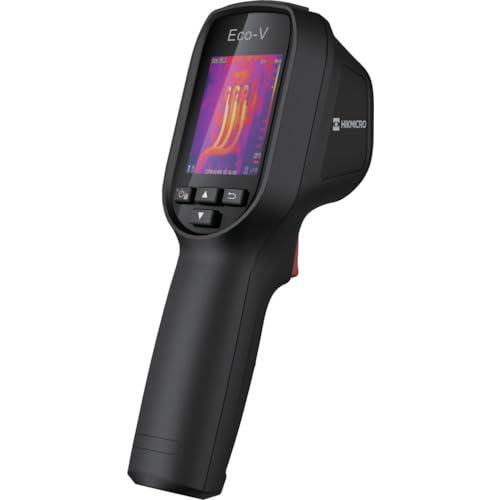
Figure 1: HIKMICRO ECO-V Handheld Thermography Camera
2. Zambiri Zachitetezo
Chonde werengani ndikumvetsetsa machenjezo onse achitetezo ndi malangizo musanagwiritse ntchito mankhwalawa. Kulephera kutsatira malangizo awa kungayambitse kugwedezeka kwamagetsi, moto, kapena kuvulala kwambiri.
General Safety Precautions
- Osagwiritsa ntchito chipangizocho pamalo ophulika, monga ngati pali zinthu zamadzimadzi zoyaka, mpweya, kapena fumbi.
- Sungani chipangizocho kutali ndi madzi ndi zakumwa zina.
- Osayesa kutsegula kapena kusintha chipangizochi. Bweretsani ntchito zonse kwa ogwira ntchito oyenerera.
- Use only HIKMICRO-approved accessories.
- Avoid direct exposure of the thermal lens to strong light sources (e.g., sun, laser) as this may damage the detector.
Chitetezo cha Battery
- The device contains a built-in Lithium-ion battery. Do not expose the battery to excessive heat, direct sunlight, or fire.
- Do not puncture, open, or disassemble the battery.
- Charge the battery only with the provided USB cable and a compatible power adapter.
- Tayani mabatire motsatira malamulo a m'deralo.
3. Zamkatimu Phukusi
The HIKMICRO ECO-V package includes the following items:
- HIKMICRO Handheld Thermography Camera ECO-V
- Chingwe cha Mtundu wa USB
- Quick Start Guide (not explicitly mentioned but standard)
- Calibration Certificate (not explicitly mentioned but standard)
Video 3.1: Unboxing the HIKMICRO M-Series (similar to ECO-V, showing typical package contents and device appearance).
4. Chipangizo Overview
Familiarize yourself with the physical components and interface of your HIKMICRO ECO-V camera.
Maonekedwe ndi Chiyankhulo
The ECO-V features a compact, ergonomic design for comfortable handheld use. Key components include the thermal lens, optical lens, laser indicator, white light, trigger button, navigation buttons, and a 2.4-inch display.
Video 4.1: This video demonstrates the physical appearance and interface of a HIKMICRO M-Series camera, which shares similar design elements and interface components with the ECO-V.
5. Kukhazikitsa
5.1 Kulipira Chipangizo
Before initial use, fully charge the device's built-in Lithium-ion battery.
- Connect the provided USB Type-C cable to the device's USB port.
- Connect the other end of the USB cable to a compatible power adapter (5V2A recommended) and plug it into a power outlet.
- The charging indicator will show red during charging and turn green when fully charged.
Video 5.1: This HIKMICRO ECO operation video demonstrates the charging process for the device.
5.2 Kuyatsa/Kuzimitsa
To power on the device, press and hold the power button for more than 6 seconds. To power off, press and hold the power button again until the device shuts down.
Video 5.2: This HIKMICRO ECO operation video demonstrates how to power on the device.
6. Malangizo Ogwiritsira Ntchito
This section covers the basic and advanced operational features of your ECO-V camera.
6.1 Image Capture and Display
To capture a thermal image, aim the camera at the target and press the trigger button. The captured image will be saved to the internal EMMC storage. To view saved images, navigate to the 'Albums' section in the menu.
Video 6.1: This HIKMICRO ECO operation video demonstrates image capture and viewing saved snapshots.
6.2 Zida Zoyezera
The ECO-V provides various measurement tools to analyze thermal images:
- Hot Spot: Automatically identifies and displays the highest temperature point.
- Cold Spot: Automatically identifies and displays the lowest temperature point.
- Malo apakati: Imawonetsa kutentha pakati pa sikirini.
Video 6.2: This HIKMICRO ECO operation video demonstrates the use of measurement tools like hot, cold, and center spots.
6.3 SuperIR Image Enhancement
SuperIR technology enhances the thermal image resolution, providing more detail for analysis. You can enable or disable this feature in the settings menu.
Video 6.3: This HIKMICRO ECO operation video demonstrates how to enable and use the SuperIR image enhancement feature.
6.4 Zithunzi Zithunzi
The ECO-V supports multiple image modes for different inspection needs:
- Kutentha: Displays only the thermal image.
- Fusion: Blends the thermal and visible light images for enhanced detail.
- PIP (Chithunzi-pa-Chithunzi): Overlays a smaller thermal image on a visible light image.
- Optical: Displays only the visible light image.
Video 6.4: This HIKMICRO B10S product video demonstrates switching between different image modes, including Thermal, Fusion, PIP, and Optical.
6.5 Parallax Correction
When using fusion modes, adjust the parallax correction based on the distance to the target to ensure accurate alignment between thermal and visible images.
Video 6.5: This HIKMICRO B10S product video demonstrates how to adjust parallax correction for accurate image fusion.
6.6 Palette Adjustment
Select from various color palettes (e.g., White Hot, Black Hot, Rainbow, Ironbow) to visualize temperature differences more effectively. This can be adjusted in the settings menu.
Video 6.6: This HIKMICRO B10S product video demonstrates how to adjust color palettes.
6.7 Emissivity and Distance Settings
For accurate temperature measurements, it is crucial to set the correct emissivity value for the target material and the distance to the target. Refer to the general emissivity reference table in the specifications section.
Video 6.7: This HIKMICRO ECO operation video demonstrates setting emissivity and distance for accurate temperature readings.
6.8 Laser Pointer
The built-in laser pointer helps to precisely identify the measurement target. It can be enabled or disabled in the settings menu.
Video 6.8: This HIKMICRO ECO operation video demonstrates how to enable and use the laser pointer.
6.9 Alamu Yakutentha Kwambiri
Set a high temperature alarm threshold to be notified when temperatures exceed a predefined limit. This feature is useful for identifying potential overheating issues.
Video 6.9: This HIKMICRO B10S product video demonstrates how to set a high temperature alarm.
6.10 Hotspot Connection
The ECO-V can connect to a mobile device via Wi-Fi hotspot for live viewing and data transfer. Enable the Wi-Fi hotspot function in the device settings and connect your mobile device.
Video 6.10: This HIKMICRO M-Series video demonstrates how to establish a hotspot connection with a mobile device.
6.11 HIKMICRO Viewer App Connection
Download the HIKMICRO Viewer app on your mobile device to access live view, manage images and videos, and generate reports. Connect the device to your phone via Wi-Fi.
Video 6.11: This HIKMICRO Pocket series video demonstrates connecting the device to the HIKMICRO Viewer app for various functions.
7. Kusamalira
7.1 Kuyeretsa
- Pukuta thupi la chipangizocho ndi chofewa, damp nsalu. Osagwiritsa ntchito zotsukira abrasive kapena solvents.
- Gently clean the lenses with a lens cleaning cloth. Avoid touching the lens surface with bare hands.
7.2 Kusungirako
- Sungani chipangizocho pamalo ozizira, owuma, kutali ndi dzuwa komanso kutentha kwambiri.
- Ngati mukusunga kwa nthawi yayitali, onetsetsani kuti batire ili ndi charger pang'ono (pafupifupi 50%) ndikuwonjezeranso miyezi ingapo iliyonse kuti batire ikhale yathanzi.
8. Mavuto
If you encounter issues with your HIKMICRO ECO-V, refer to the following common problems and solutions:
| Vuto | Chifukwa Chotheka | Yankho |
|---|---|---|
| Chipangizo sichimayatsidwa | Batri yochepa; Chida sichikugwira ntchito bwino | Charge the battery; Contact support |
| Kuwerengera kutentha kolakwika | Incorrect emissivity/distance settings; Dirty lens | Adjust emissivity/distance; Clean the lens |
| Cannot connect to Wi-Fi hotspot | Incorrect password; Hotspot not enabled | Verify password; Enable hotspot in settings |
9. Zofotokozera
Detailed technical specifications for the HIKMICRO ECO-V camera:
| Mbali | Kufotokozera |
|---|---|
| Chitsanzo | ECO-V |
| Measurement Temperature Range | -20 ° C mpaka 550 ° C |
| Minimum Temperature Display | 0.1°C |
| Munda wa View (FOV) | 50 × 50 ° |
| Kusintha kwa Malo (IFOV) | 8.89md |
| Operating Temperature Range | -10 ° C mpaka 50 ° C |
| Kusungirako Kutentha Kusiyanasiyana | -40 ° C mpaka 70 ° C |
| Kukula Kwawonetsero | 2.4 mu |
| Gwero la Mphamvu | Batire ya Lithium-ion yomangidwa |
| Nthawi Yogwiritsa Ntchito Battery | 8 maola |
| Wifi | Sakupezeka |
| Mlingo wa Chitetezo | IP54 |
| Chiyankhulo | USB Type-C |
| Pixel Pitch | 12μm |
| Measuring Wavelength | 7.5-14μm |
| Mtengo wa NETD | <40 mK (@ 25°C, F#=1.0) |
| Kutalika kwa Focal | 1.35 mm |
| Pobowo | F1.0 |
| Kutalika Kwambiri Kwambiri | 0.1m (0.33ft) |
| Mtengo wa chimango | 25Hz pa |
| Njira Yoganizira | Zopanda kuganizira |
| Kujambula Media | EMMC (4GB) |
| Kukhoza Kusunga Zithunzi | 30,000 zithunzi |
| Chithunzi File Mtundu | BMP (includes measurement data) |
| Thermal Image Resolution | 96×96 (9,216 pixels) |
| Visible Image Resolution | 640 × 480 |
| Kulondola | ±2°C or ±2% (whichever is greater), when ambient temperature is 15°C to 35°C and target temperature is 0°C or above. |
| Zipangizo | Polycarbonate, ABS utomoni |
| Kulemera | 360g pa |
General Emissivity Reference
| Zakuthupi | Zosangalatsa |
|---|---|
| Khungu la Munthu | 0.98 |
| PCB | 0.91 |
| Simenti Konkire | 0.95 |
| Zoumba | 0.92 |
| Mpira | 0.95 |
| Penta | 0.93 |
| Wood | 0.85 |
| Njerwa | 0.96 |
| Mchenga | 0.90 |
| Nthaka | 0.92 |
| Thonje | 0.98 |
| Makatoni | 0.90 |
| White Paper | 0.96 |
| Madzi | 0.96 |
10. Chitsimikizo ndi Thandizo
HIKMICRO products are covered by a limited warranty. For detailed warranty terms and conditions, please refer to the official HIKMICRO webwebusayiti kapena funsani wofalitsa wakomweko.
Thandizo la Makasitomala
If you require technical assistance, troubleshooting, or have questions about your ECO-V camera, please contact HIKMICRO customer support through their official webtsamba lanu kapena zidziwitso zoperekedwa pamapaketi azinthu zanu.


