1. Mawu Oyamba
This manual provides detailed instructions for the installation, operation, and maintenance of your TELESIN Handlebar Mount. This versatile mount is designed to securely attach action cameras and smartphones to various tubular structures, such as bicycle handlebars, motorcycle rearview mirrors, and other poles, enabling stable recording of your activities.
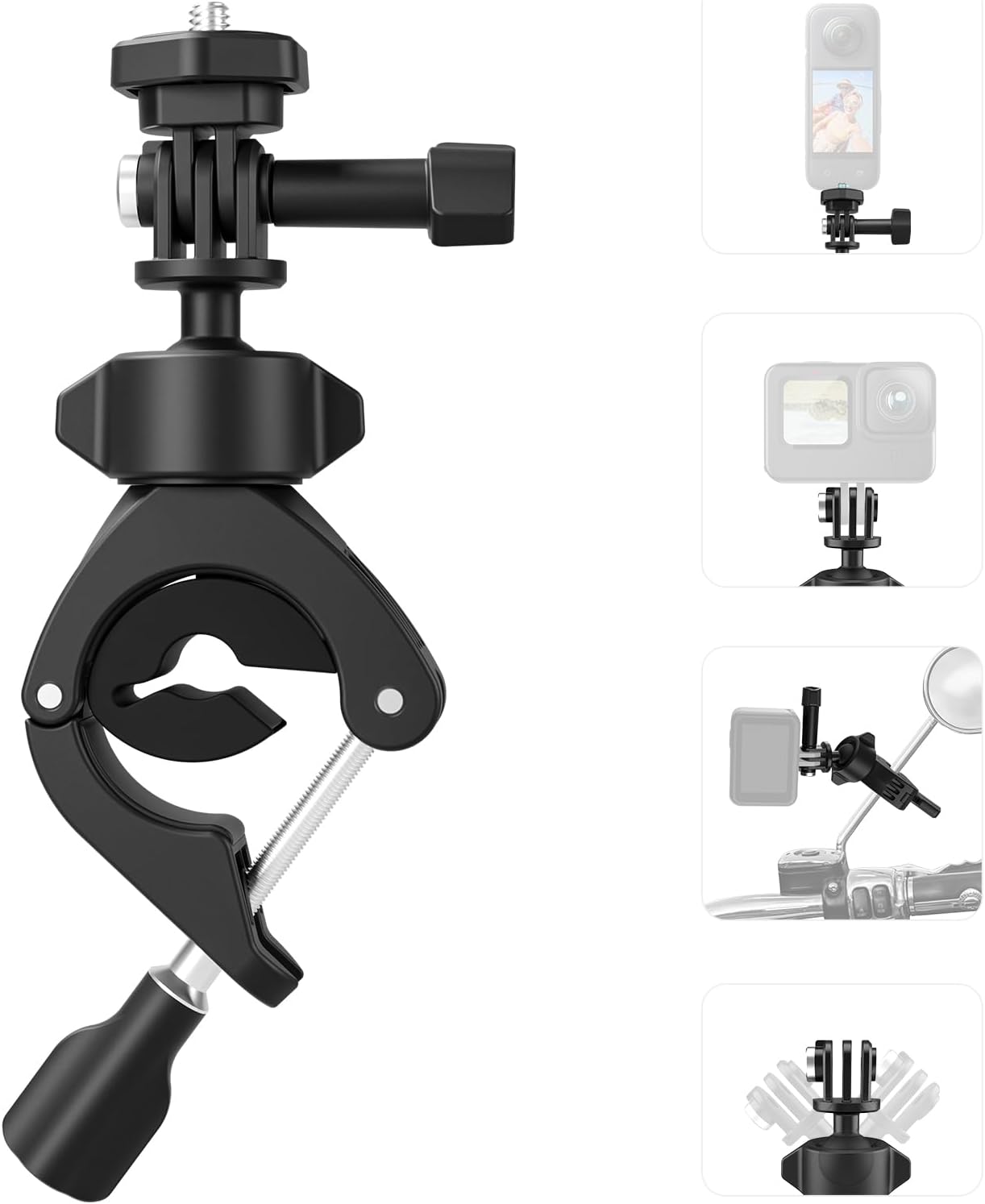
Chithunzi 1.1: TELESIN Handlebar Mount. This image displays the complete handlebar mount assembly, including the clamp, ball head, and camera adapters.
2. Zamkatimu Phukusi
Chonde onetsetsani kuti zinthu zonse zomwe zalembedwa pansipa zilipo mu phukusi lanu:
- 1x Handlebar Tube Mount
- 1x Adapter for GoPro (Two-leg Adapter)
- 1x Adapter for Insta360 (1/4" Thread Screw Adapter)
- 1x Locking Screw
- 1x kumbuyoview Mirror Soft Cushion (Silicone Gasket)
3. Zambiri Zachitetezo
To ensure safe operation and prevent damage to your equipment or injury, please observe the following:
- Ensure the mount is securely fastened to the desired surface before attaching any camera or device.
- Regularly check the tightness of all screws and connections, especially after prolonged use or exposure to vibrations.
- Do not overtighten screws, as this may damage the mount or the mounting surface.
- Avoid mounting in locations where it obstructs your view or interferes with the safe operation of your vehicle.
- This mount is designed for action cameras and lightweight devices. Do not exceed the recommended weight capacity.
4. Unsembe Guide
Follow these steps to properly install your TELESIN Handlebar Mount:
- Determine Clamping Diameter:
Identify the diameter of the tube or bar where you intend to mount the device. The mount supports a clamping range of 22-38mm. For smaller diameters (9-15mm), use the included silicone gasket (rearview mirror soft cushion) inside the clamp nsagwada.

Chithunzi 4.1: Clamping Diameter Options. This image illustrates how the mount adapts to different tube diameters, showing both small (9-16mm with cushion) and large (22-38mm without cushion) diameter clampndi.
- Kuteteza Clamp:
Tsegulani clamp by unscrewing the locking knob. Position the clamp around the desired tube. If necessary, insert the silicone gasket for a snug fit on smaller tubes. Tighten the locking knob until the clamp is firmly secured and does not move.

Chithunzi 4.2: Installation Steps. This image provides a visual guide for the installation process, including checking diameter, securing the clamp, attaching the adapter, and adjusting the ball head.
- Attach Camera Adapter:
Select the appropriate adapter for your camera:
- For GoPro and similar action cameras, use the three-prong adapter.
- For Insta360 cameras or smartphones (with a separate phone holder, not included), use the 1/4" thread screw adapter.
Attach the chosen adapter to the ball head of the mount and secure it with the provided locking screw.

Chithunzi 4.3: Camera Adapter Options. This image shows the two types of adapters included: a three-prong adapter for sports cameras and a 1/4" screw adapter for Insta360 and smartphones (with a phone holder).
- Kwezani Chipangizo Chanu:
Attach your action camera or phone holder (with phone) to the installed adapter. Ensure it is securely fastened.
5. Malangizo Ogwiritsira Ntchito
The TELESIN Handlebar Mount features a 360° rotating ball head for flexible camera positioning.
- Kusintha ngodya ya kamera:
Loosen the knob on the ball head to allow for rotation and tilting. Adjust your camera to the desired angle and perspective. Once the desired position is achieved, tighten the knob firmly to lock the ball head in place.

Chithunzi 5.1: 360° Ball Mount. This image demonstrates the 360-degree rotation capability of the ball head, allowing for precise angle adjustments.
- Kuonetsetsa Kukhazikika:
Always ensure the ball head knob is fully tightened to prevent unwanted movement or vibration during recording, especially in dynamic environments like cycling or motorcycling.
6. Kusamalira
Proper maintenance will extend the lifespan of your TELESIN Handlebar Mount:
- Kuyeretsa: Pukutani phirilo ndi chofewa, damp nsalu yochotsa fumbi ndi litsiro. Pewani kugwiritsa ntchito mankhwala owopsa kapena zotsukira.
- Kuyendera: Periodically inspect the mount for any signs of wear, damage, or loose components. Pay attention to the clamping mechanism and the ball head.
- Posungira: Store the mount in a clean, dry place when not in use.
- Kulimbana ndi Corrosion: The mount features corrosion-resistant stainless steel components for durability.

Chithunzi 6.1: Quality Details. This image highlights key features such as the soft cushion for rearview mirror mounting and corrosion-resistant stainless steel components.
7. Mavuto
If you encounter issues with your TELESIN Handlebar Mount, refer to the following common problems and solutions:
| Vuto | Chifukwa Chotheka | Yankho |
|---|---|---|
| Mount feels loose or slips on the bar. | Clamp not tightened sufficiently; incorrect use of silicone gasket; bar diameter too small. | Ensure the locking knob is fully tightened. If the bar is thin, use the silicone gasket to achieve a secure fit. Verify the bar diameter is within the supported range (9-38mm). |
| Camera angle shifts during use. | Ball head knob not tightened enough; excessive vibration. | Firmly tighten the ball head knob after adjusting the angle. For high-vibration environments, periodically check and re-tighten the knob. |
| Difficulty attaching camera to adapter. | Incorrect adapter used; adapter screw not aligned. | Ensure you are using the correct adapter (three-prong for GoPro, 1/4" screw for Insta360/phone holder). Align the screw carefully before tightening. |
8. Zofotokozera
| Mtundu | TELESIN |
| Nambala ya Model | 73a9facd-58c8-4b38-952f-4d43620333ee |
| Kulemera kwa chinthu | 4.6 pawo |
| Makulidwe a Phukusi | 6.02 x 2.83 x 1.38 mainchesi |
| Clampndi Range | 9-15mm (with cushion), 22-38mm (without cushion) |
| Zapadera | Adjustable, Hand Free, Lightweight, Rotatable, Shock Resistant |
| Zida Zogwirizana | DJI Osmo Pocket 3, Osmo Action 4/5 Pro, iPhone/Android (with phone holder), Akaso Brave 8/7, Akaso EK 7000, Insta360 X5/X4/X3, GoPro Hero 13/12/11/10/9/8/7 |
| Mtundu Wokwera | Handlebar |
9. Chitsimikizo ndi Thandizo
TELESIN provides a warranty for its products. If you encounter any issues or are dissatisfied with your TELESIN product for any reason, please contact our online customer support for assistance.
We are committed to resolving your problems quickly and efficiently and take full responsibility for the quality of our products.
For customer support, please refer to the contact information provided on the TELESIN official webtsamba kapena zolemba zanu zogula.


