1. Mawu Oyamba
Bukuli limapereka malangizo atsatanetsatane okhudza momwe makina anu olembera laser a ATOMSTACK A12 Pro agwirira ntchito bwino komanso mosamala. Chonde werengani bukuli bwino musanagwiritse ntchito kuti muwonetsetse kuti mwakhazikitsa bwino, kugwiritsa ntchito, komanso kukonza. Sungani bukuli kuti mudzagwiritse ntchito mtsogolo.
Machenjezo a Chitetezo:
- Nthawi zonse valani zoteteza maso ku UV-filtering mukamagwiritsa ntchito laser engraver.
- Onetsetsani kuti mpweya wabwino umatulutsa utsi ndi utsi wopangidwa pojambula/kudula.
- Musasiye makina osayang'aniridwa panthawi ya ntchito.
- Sungani zinthu zoyaka moto kutali ndi malo ogwirira ntchito.
- Dziwani bwino malo oimitsa batani ladzidzidzi.
2. Zamkatimu Phukusi
Onetsetsani kuti zonse zomwe zalembedwa pansipa zikuphatikizidwa mu phukusi lanu:
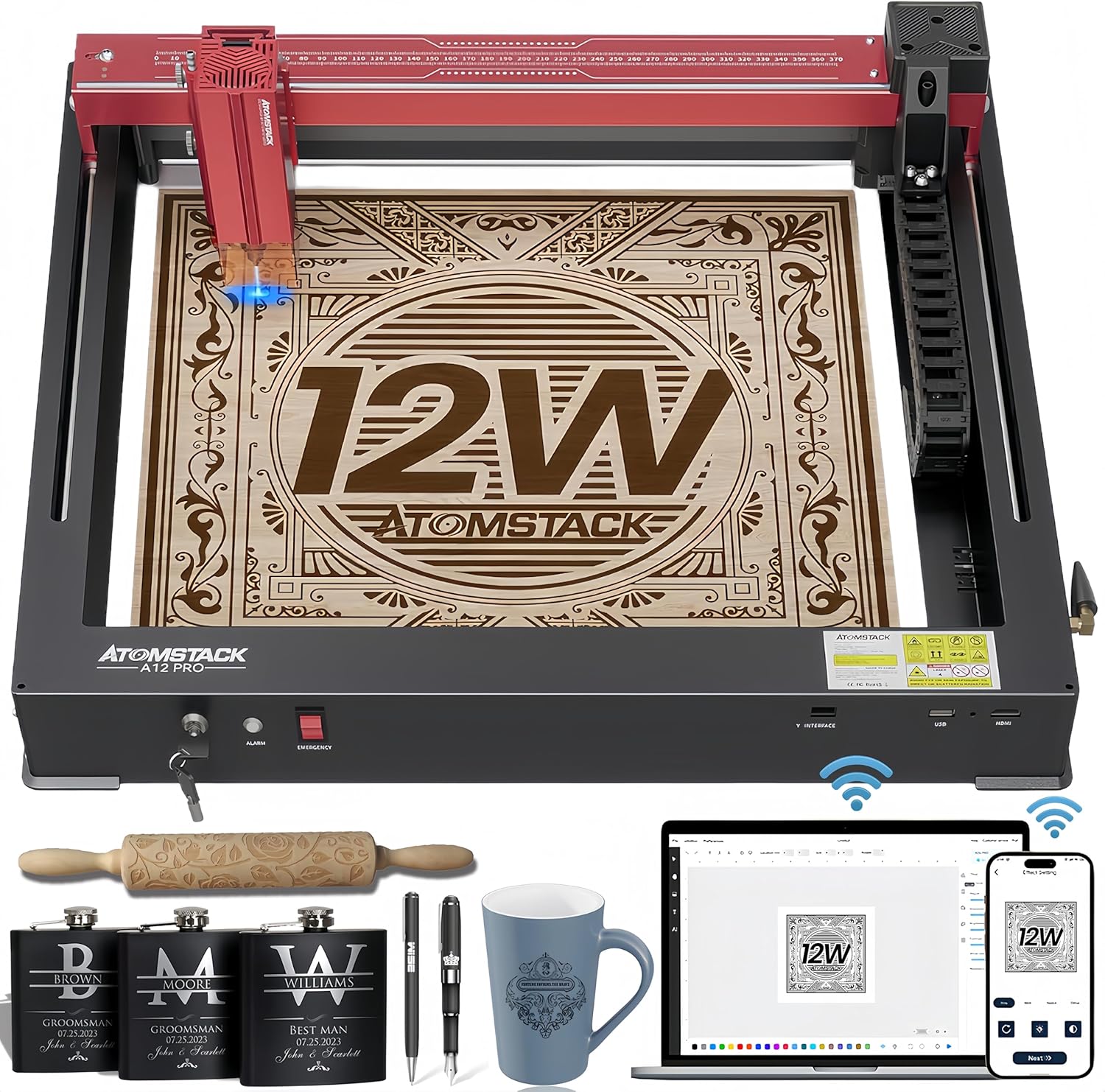
Chithunzi 2.1: Makina Opangira Laser a ATOMSTACK A12 Pro ndi zowonjezera zomwe zili mkati mwake.
- Makina Olembera a Laser a ATOMSTACK A12 Pro (Chimango cha Unibody)
- Laser Head
- Adaputala Yamagetsi (24V, 5A)
- Chingwe Chamagetsi
- Chingwe cha USB (Mtundu-C)
- Magalasi a maso (oteteza maso ku UV-sefa)
- Lenzi Yokhazikika Yoyang'ana
- Buku Logwiritsa Ntchito
- Zipangizo (Wrench ya hexagon ya H3 yokhala ngati L, zomangira za M4 chala chachikulu)
- Flash Drive
- WiFi Antenna
- Hosi ya silikoni (payipi ya mpweya)
- Nangula Waya
- Chingwe Clamp
- Nsalu yopanda ma lint 100*30
- Slider
- Sinthani Key
3. Kukonzekera Guide
ATOMSTACK A12 Pro ili ndi kapangidwe ka unibody kuti ikhale yochepa kwambiri. Tsatirani njira izi kuti muyambe:
- Unboxing: Chotsani makinawo mosamala ndi zowonjezera zonse kuchokera mu phukusi. Makinawo amakonzedwa kale ndipo amatumizidwa ngati chinthu chimodzi.

Chithunzi 3.1: ATOMSTACK A12 Pro yakonzeka kugwiritsidwa ntchito nthawi yomweyo ndi kapangidwe kake ka unibody.
- Ikani Slider: Lumikizani gawo lotsetsereka ku chitsulo choyikidwa pa makinawo. Limangeni ndi zomangira zomwe zaperekedwa.
- Ikani Mutu wa Laser: Ikani mutu wa laser pa chotsitsira. Onetsetsani kuti walumikizidwa bwino.
- Ikani Antena ya WiFi: Ikani antenna ya WiFi mu doko lake lomwe lili kumbali ya makina.
- Ikani Ma Tubing ndi X-axis Link Lines: Lumikizani machubu ndi mizere yolumikizira ya X-axis monga momwe zasonyezedwera pachithunzichi kuti muwonetsetse kuti chingwecho chikugwiritsidwa ntchito bwino.
- Lumikizani Mphamvu ndi USB: Lumikizani adaputala yamagetsi mu makina ndi soketi yamagetsi. Lumikizani chingwe cha USB kuchokera ku makinawo ku kompyuta yanu.
- Yatsani: Ikani kiyi yosinthira ndikuyiyika pamalo a ON. Makinawa tsopano akonzeka kukhazikitsidwa kwa mapulogalamu.
Kanema 3.1: Buku lotsogolera mwatsatanetsatane momwe mungayikitsire ndikukhazikitsa chojambula cha laser cha ATOMSTACK.
4. Malangizo Ogwiritsira Ntchito
4.1 Kulamulira Mapulogalamu
ATOMSTACK A12 Pro imathandizira njira zingapo zowongolera:
- Mapulogalamu a PC a ATOMSTACK: Mapulogalamu apadera osavuta kugwiritsa ntchito, abwino kwa oyamba kumene.
- Kuwala ndi LaserGRBL: Mapulogalamu apakompyuta achikhalidwe kwa ogwiritsa ntchito apamwamba.
- Pulogalamu ya Foni ya ATOMSTACK: Ikupezeka pa Android ndi Apple App Stores kuti igwiritsidwe ntchito poyang'anira WiFi kudzera pa foni yam'manja.

Chithunzi 4.1: Kuthaview za njira zosiyanasiyana zowongolera mapulogalamu ndi mapulogalamu a laser engraver.
4.2 Njira Yojambulira
- Kuyika Zinthu: Ikani zinthu zanu pa bedi lolembera.
- Kusintha kwa Kuyikira Kwambiri: Gwiritsani ntchito kapangidwe kake kokhazikika kuti muzitha kuyang'ana mwachangu komanso molondola mkati mwa masekondi pafupifupi 10.
- Malo Oimika Mtanda: Gwiritsani ntchito mawonekedwe atsopano a cross laser positioning kuti muwone bwino malo a laser, kuonetsetsa kuti ikugwirizana bwino kuti ijambulidwe komanso kuti ikhale yosavuta kusintha mopingasa.
- Zokonda pa Mapulogalamu: Sinthani magawo ojambulira (liwiro, mphamvu, mapasi) mu pulogalamu yomwe mwasankha kutengera zomwe zili mkati mwake.
- Yambani Engraving: Yambani njira yojambulira kuchokera ku pulogalamuyo.

Chithunzi 4.2: Dongosolo loyika zinthu pamalo amodzi limathandiza kulumikiza zinthu ndikuzikokera m'mbali kuti zilembedwe bwino molunjika.
5. Makhalidwe ndi Mphamvu
- Unibody Design: Kapangidwe kolimba ka aluminiyamu yonse, kopanda kuyika ndipo kokonzedwa kale.
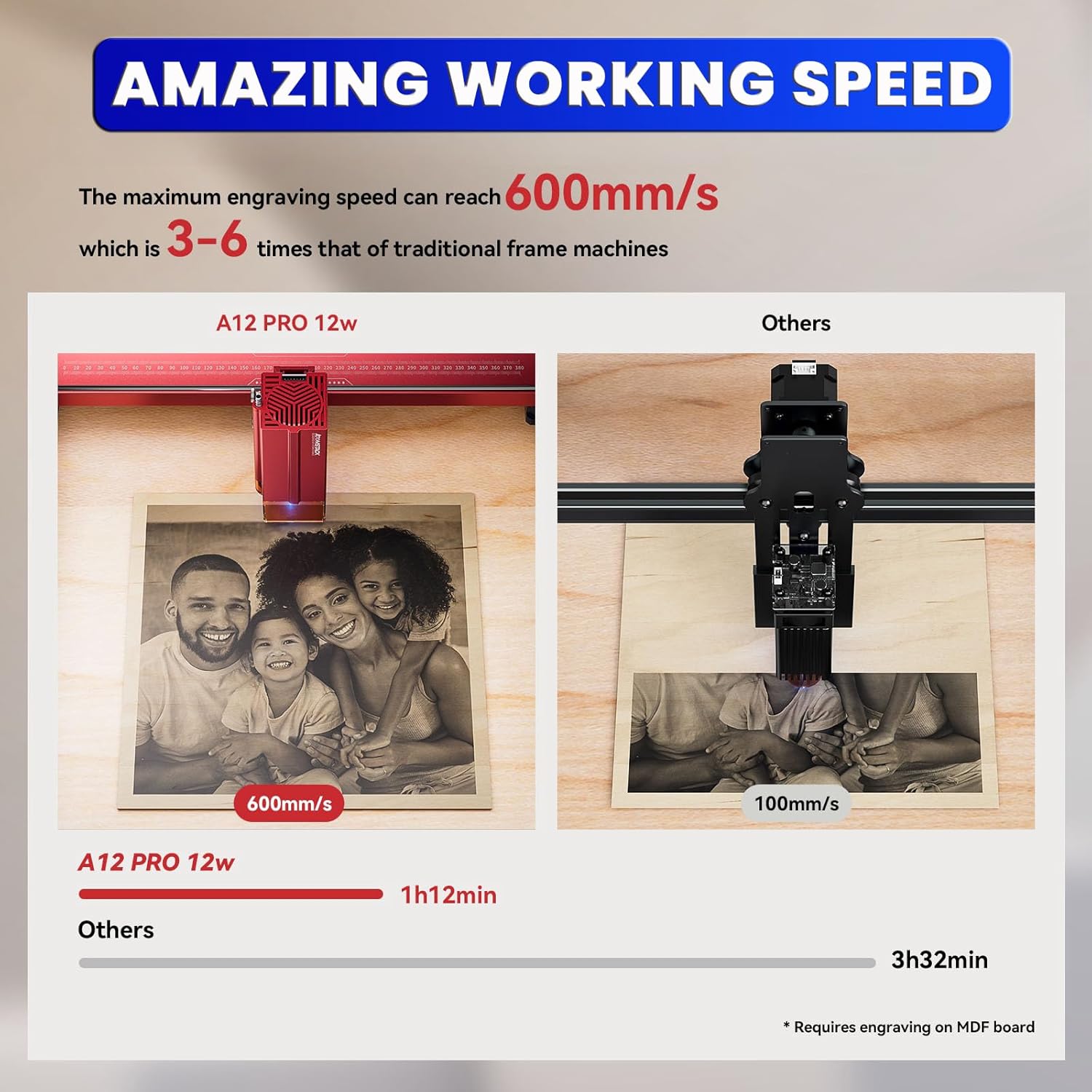
- Kuthamanga Kwambiri & Kulondola Kwambiri: Kapangidwe katsopano ka njanji yowongolera mizere iwiri ndi bolodi la mama lothamanga kwambiri limalola kujambula liwiro mpaka 600mm/s, mofulumira katatu mpaka kasanu ndi kamodzi kuposa makina achikhalidwe a chimango. Kulondola mkati mwa mainchesi 0.004.
- Laser Yamphamvu: Laser ya diode ya 12000mW (Laser Class 4) yokhala ndi mphamvu ya makina a 50W komanso 0.05*0.06mm ultra-fine laser spot focus.
- Kudula Kokulirapo: Ikhoza kudula matabwa a 8mm, acrylic wakuda wa 5mm, ndi chitsulo chosapanga dzimbiri cha 0.02mm kamodzi kokha.
- Kugwirizana kwa Zinthu Zosiyanasiyana: Amalemba ndi kudula zinthu zosiyanasiyana kuphatikizapo matabwa, acrylic, chitsulo, galasi, zoumbaumba, chikopa, mapepala, makatoni, ndi zina zambiri.
- Kubwezeretsa Kulephera kwa Mphamvu Mwachangu: Imakumbukira malo ojambulira ndipo imayambiranso mwachangu kuchokera pamalo oimikapo, kuonetsetsa kuti kupanga kosalekeza komanso kusunga zinthu.
- Chitetezo Chowonjezera: Yokhala ndi ma switch a 4-way limit, chitetezo cha maso chosefera UV, chowunikira mafunde chozungulira chokhala ndi alamu ya madigiri 15, ndi batani loyimitsa mwadzidzidzi.

Chithunzi 5.1: Kuyerekeza komwe kukuwonetsa liwiro lojambula la A12 Pro mwachangu kwambiri.
Chithunzi 5.2: Chikuwonetsa makulidwe apamwamba kwambiri odulira zinthu zosiyanasiyana pogwiritsa ntchito A12 Pro.

Chithunzi 5.3: Eksampzinthu zosiyanasiyana zomwe zingajambulidwe kapena kudulidwa ndi makina.
6. Kusamalira
- Kuyeretsa Magalasi: Tsukani lenzi ya laser nthawi zonse ndi nsalu yopanda ulusi kuti mugwire bwino ntchito komanso kupewa kusonkhanitsa zinyalala.
- Mafuta a Sitima: Nthawi ndi nthawi ikani mafuta pang'ono pazitsulo zowongolera kuti muwonetsetse kuti mutu wa laser ukuyenda bwino.
- Kuchotsa Zinyalala: Sungani bedi lolembera ndi malo ozungulira kuti musakhale ndi zinyalala ndi fumbi. Gwiritsani ntchito chopukutira mpweya kapena burashi kuti muchotse tinthu tating'onoting'ono.
- Zosintha za Firmware: Chongani ATOMSTACK yovomerezeka webPitani patsamba lanu nthawi ndi nthawi kuti mudziwe zosintha za firmware kuti muwonetsetse kuti makina anu ali ndi zinthu zaposachedwa komanso kukonza zolakwika.
7. Mavuto
| Vuto | Chifukwa Chotheka | Yankho |
|---|---|---|
| Makina osayatsa | Chingwe chamagetsi chatseguka; Kuyimitsa kwadzidzidzi kwagwira ntchito; Kiyi sinatembenuzidwe. | Chongani kulumikizana kwa magetsi; Chotsani kuyimitsa kwadzidzidzi; Yatsani batani ku ON. |
| Laser sikuwombera/kutulutsa kofooka | Lenzi yakuda; Kuyang'ana molakwika; Kukhazikitsa mphamvu zochepa mu pulogalamu. | Yeretsani lenzi ya laser; Sinthani kulunjika; Wonjezerani mphamvu. |
| Zojambulazo ndi zopotoka/zolakwika | Malamba/zingwe zotayirira; Kusuntha zinthu; Makonzedwe olakwika a mapulogalamu. | Yang'anani ndi kulimbitsa malamba/zingwe; Chitani zinthu motetezeka; Tsimikizani makonda a mapulogalamu. |
| Mapulogalamu sakulumikizana ndi makina | Vuto la chingwe cha USB; Dalaivala sanayikidwe; Doko lolakwika la COM. | Yesani madoko/chingwe chosiyana cha USB; Ikani madalaivala; Sankhani madoko oyenera a COM mu pulogalamu. |
8. Zofotokozera
- Makulidwe a Zamalonda: 23.22 x 23.22 x 7.08 mainchesi
- Kulemera kwa chinthu: 18.74 mapaundi
- Laser Output Mphamvu: 12000mW (12W)
- Mphamvu ya Makina: 50W
- Laser Spot Kukula: 0.05 * 0.06mm
- Liwiro Losema: Kufikira 600mm / s
- Kulondola: Mkati mwa mainchesi 0.004
- Kulumikizana: USB, WiFi (kudzera pa Mobile APP)
- Mapulogalamu Othandizira: Mapulogalamu a PC a ATOMSTACK, LightBurn, LaserGRBL
- Wopanga: Malingaliro a kampani Shenzhen AtomStack Technologies Co., Ltd.
- Dziko lakochokera: China
9. Chitsimikizo ndi Thandizo
Makina anu a ATOMSTACK A12 Pro Laser Engraving amabwera ndi chitsimikizo chokhazikika cha wopanga. Kuti mudziwe zambiri za chitsimikizo, chithandizo chaukadaulo, kapena mafunso okhudza ntchito, chonde onani khadi la chitsimikizo lomwe lili mu phukusi lanu kapena pitani ku ATOMSTACK yovomerezeka. webmalo.
Magulu athu aukadaulo ndi othandizira alipo maola 24 pa sabata kuti ayankhe mafunso kapena nkhawa zilizonse zomwe mungakhale nazo.


