1. Mawu Oyamba
The TRIGKEY Key Mini N150 is a compact and efficient mini PC designed for various computing tasks, including office work, 4K video playback, web browsing, and educational use. It features an Intel Alder Lake N150 processor, DDR5 memory, and SSD storage, offering stable performance in a small form factor.
2. Zomwe zili mu Bokosi
Onetsetsani kuti zinthu zonse zilipo mu phukusi:
- 1 x TRIGKEY Mini PC
- 1 x Adapter Mphamvu
- 1 x HDMI Chingwe
- 1 x Buku Logwiritsa Ntchito

This image displays the contents of the TRIGKEY Key Mini N150 package, including the mini PC unit, power adapter, HDMI cable, and the user manual.
3. Zamalonda Zathaview
3.1. External Features and Ports
The Key Mini N150 features a sleek and compact design, making it suitable for various environments. The front and rear panels provide essential connectivity options.

This image illustrates the front and rear interfaces of the mini PC. The front includes a power button, USB-C (data), and USB 3.2 ports. The rear panel features DC IN, two HDMI ports, multiple USB 3.2 ports, a 3.5mm audio jack, a CLR CMOS button, and a 2.5G LAN port.
3.2. Zigawo Zamkati
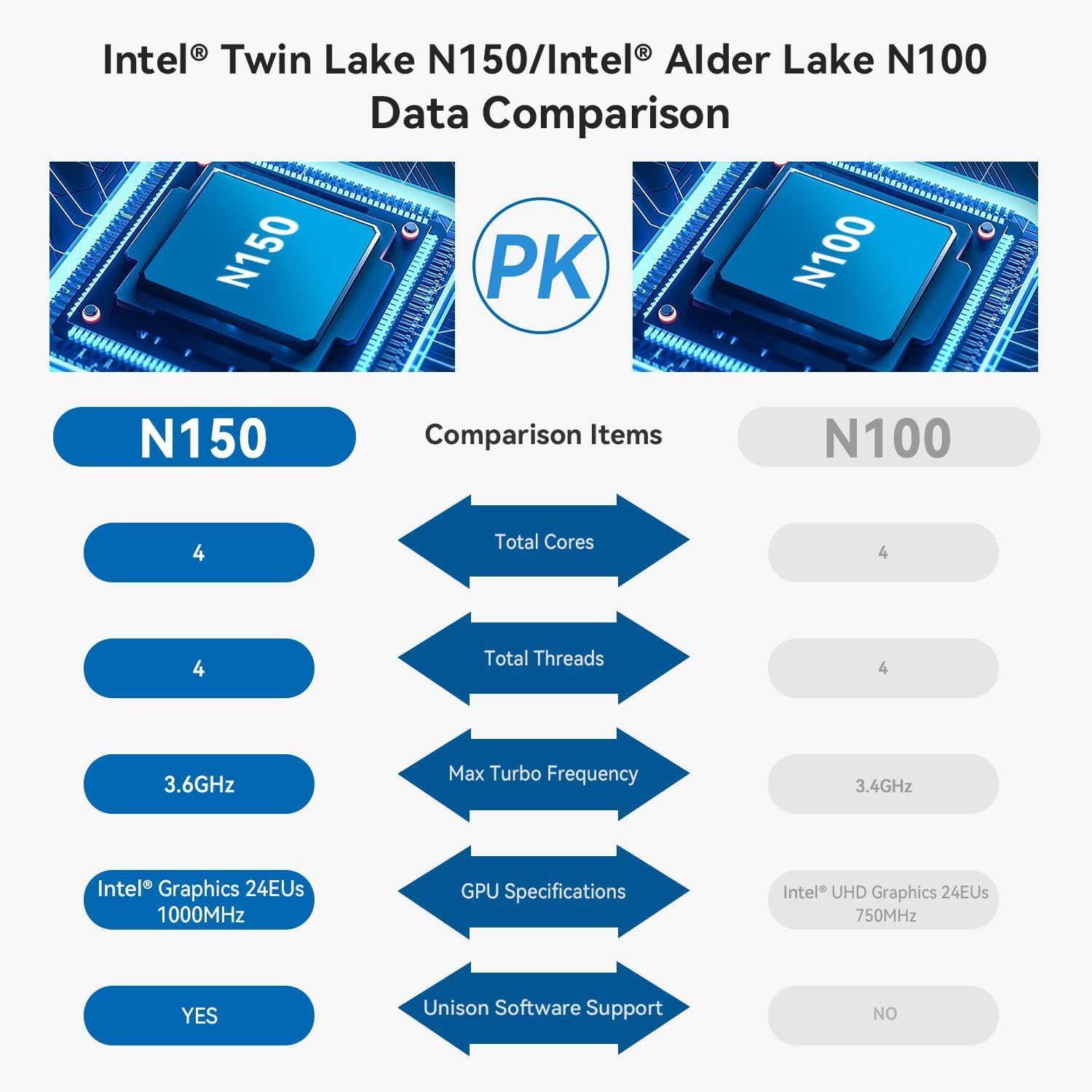
The mini PC is equipped with an Intel Twin Lake N150 Processor, 16GB DDR5 4800MHz RAM, and a 500GB SSD. It supports dual M.2 PCIe 3.0 SSDs for expanded storage.

Chithunzichi chimapereka zamkati view of the mini PC, highlighting the DDR5 SODIMM memory module and the two M.2 SSD slots, one M.2 PCIe 3.0 x4 and one M.2 PCIe 3.0 x1.
3.3. Kuzizira System
An innovative airflow design with a dust filter ensures stable operation and quiet performance by efficiently dissipating heat.

This image shows the underside of the mini PC, illustrating the new airflow design with a visible cooling fan and dust filter, designed for stable and quiet operation.
3.4. Kanema Wamalonda Wathaview
This official TRIGKEY video provides a visual overview of the Key Mini N150, showcasing its compact design, internal components, and key features like the Intel Twin Lake N150 processor and DDR5 memory.
4. Malangizo Kukhazikitsa
4.1. Kulumikiza Zozungulira
- Lumikizani Monitor (ma): Use the provided HDMI cable to connect your monitor(s) to the HDMI ports on the rear of the mini PC. The device supports dual 4K@60Hz displays.
- Lumikizani Kiyibodi ndi Mouse: Plug your USB keyboard and mouse into any available USB 3.2 ports.
- Lumikizani ku Netiweki (Mwasankha): For a wired connection, plug an Ethernet cable into the 2.5G LAN port. For wireless, ensure your Wi-Fi network is available during initial setup.
4.2. Kuyatsa
- Lumikizani Adapter Yamagetsi: Plug the power adapter into the DC IN port on the rear of the mini PC, then connect it to a power outlet.
- Yatsani: Press the power button located on the front panel of the mini PC. The power indicator light will illuminate.
4.3. Initial Operating System Setup
Upon first boot, the operating system (WOS) will guide you through the initial setup process. Follow the on-screen instructions to configure language, region, network, and user accounts.
5. Malangizo Ogwiritsira Ntchito
5.1. Basic Operation
- Yatsani/Zimitsa: Press the power button to turn on the PC. To turn off, use the operating system's shutdown function. A short press of the power button can put the PC to sleep.
- Yambitsaninso: Use the operating system's restart function.
5.2. Dual Display Setup
The Key Mini N150 supports connecting two monitors simultaneously via its two HDMI ports for extended desktop or mirrored display modes. Configure display settings within your operating system.
5.3. Kulumikizana kwa Network
- Wired (2.5G LAN): Connect an Ethernet cable to the LAN port for high-speed internet access.
- Wireless (Wi-Fi 6): The integrated Intel AX101 Wi-Fi 6 module provides fast and stable wireless connectivity. Access Wi-Fi settings in your operating system to connect to available networks.
5.4. Bluetooth Devices
The mini PC includes Bluetooth 5.2 for connecting wireless peripherals such as keyboards, mice, headphones, and speakers. Pair devices through the Bluetooth settings in your operating system.
5.5. Intel Unison App Integration
Utilize the Intel Unison App to seamlessly connect your PC with mobile devices. This allows for features such as viewing photo galleries, transferring files, extending your PC screen to a tablet, making/receiving phone calls, and managing notifications.
This image illustrates the capabilities of the Intel Unison App, enabling users to connect their PC and mobile devices for features like photo viewkulira, file transfer, screen extension, calls, and notifications.
6. Zofotokozera
| Mbali | Kufotokozera |
|---|---|
| Purosesa | Intel Alder Lake N150 (4C/4T, up to 3.6GHz) |
| Zithunzi za Coprocessor | Intel Graphics 24EUs 1000MHz |
| Ram | 16GB DDR5 4800MHz |
| Kusungirako | 500GB SSD (supports dual M.2 PCIe 3.0 SSDs) |
| Max Screen Resolution | 3840 x 2160 mapikiselo (4K) |
| Onetsani Zotuluka | 2 x HDMI (Max 4K 60Hz) |
| Kulumikizana Opanda zingwe | WiFi 6 (Intel AX101), Bluetooth 5.2 |
| LAN | 2.5Gbps Efaneti |
| Madoko a USB | 4 x USB 3.2 (10Gbps), 1 x USB-C (Data 10Gbps) |
| Audio Jack | 1 x 3.5mm Audio Jack |
| Opareting'i sisitimu | WOS |
| Kulemera kwa chinthu | 1.81 mapaundi |
| Makulidwe | 6.06 x 5.98 x 3.03 mainchesi |
| Mtundu | Wakuda |
7. Kusamalira
7.1. Kuyeretsa
To maintain optimal performance and longevity, regularly clean the exterior of the mini PC with a soft, dry cloth. Ensure the ventilation openings are free from dust and obstructions. Do not use liquid cleaners directly on the device.
7.2. Kukulitsa Kusungirako
The Key Mini N150 supports dual M.2 PCIe 3.0 SSDs. To expand storage, you can install an additional M.2 2280 SSD in the available slot. Refer to the detailed instructions for opening the chassis and installing components if you are comfortable with hardware modifications. It is recommended to back up data before any hardware changes.
7.3. Zosintha Zapulogalamu
Regularly update your operating system and drivers to ensure system stability, security, and optimal performance. Check for updates through your operating system's settings.
8. Mavuto
8.1. Palibe Mphamvu
- Onetsetsani kuti adaputala yamagetsi yalumikizidwa bwino ku PC yaying'ono komanso malo otulutsira magetsi omwe akugwira ntchito.
- Tsimikizirani kuti cholumikizira magetsi chikugwira ntchito polumikiza chipangizo china.
- Yesani adaputala yamagetsi ina ngati ilipo ndipo ikugwirizana nayo.
8.2. Palibe Zowonetsera
- Check that the HDMI cable is securely connected to both the mini PC and the monitor.
- Ensure the monitor is powered on and set to the correct input source (HDMI 1, HDMI 2, etc.).
- Test with a different HDMI cable or monitor if possible.
8.3. Mavuto a Network Connectivity
- Chingwe: Check the Ethernet cable connection. Verify your router/modem is working correctly.
- Opanda zingwe: Ensure Wi-Fi is enabled in the operating system. Check if the correct Wi-Fi network is selected and the password is entered correctly. Restart your router/modem.
8.4. System Unresponsive / Boot Issues
- Perform a hard shutdown by pressing and holding the power button for 5-10 seconds. Then restart the PC.
- CLR CMOS: If experiencing persistent boot issues or BIOS configuration problems, locate the CLR CMOS button on the rear panel. With the PC powered off and disconnected from power, press this button (often requires a paperclip) to reset BIOS settings to default. Reconnect power and attempt to boot.
9. Chitsimikizo ndi Thandizo
TRIGKEY provides comprehensive support for its products:
- Chitsimikizo: 1-year worry-free warranty.
- Othandizira ukadaulo: Thandizo laukadaulo la moyo wonse.
- Thandizo lamakasitomala: 24-hour customer service.
For any questions or assistance, please contact TRIGKEY customer service. Refer to the official TRIGKEY webwebusayiti kuti mudziwe zambiri zaposachedwa.


