1. Mawu Oyamba
This manual provides comprehensive instructions for the safe and effective use of your SuperFire X60-T High Lumens Rechargeable LED Flashlight. Please read this manual thoroughly before operating the device and retain it for future reference.
2. Zinthu Zogulitsa
- High Powered Illumination: Equipped with upgraded super bright LED chips (36W), delivering a maximum of 10000 lumens in turbo mode with a maximum beam distance of 350 meters (1148 feet).
- Mitundu Yosiyanasiyana Yowunikira: Features 5 distinct lighting modes: High, Medium, Strobe, SOS, and Turbo, allowing adaptation to various lighting requirements.
- Zoomable Focus: The flashlight offers a telescopic focusing design; zoom in for a wide floodlight covering 56 square meters, or zoom out for a narrow spotlight capable of illuminating over 350 meters.
- Durable & Waterproof Construction: Constructed from aviation-grade aluminum, ensuring heavy-duty performance and resistance to extreme conditions. It boasts an IP44 waterproof rating, suitable for use in heavy rain and snow.
- Type-C Rechargeable: Utilizes an upgraded high-capacity battery, providing approximately 6 hours of operation in high mode and 15 hours in low mode. Fast-charging via a Type-C port takes 4-6 hours for a full charge, compatible with laptops, power banks, and adapters.
- Mapangidwe Onyamula: Compact size (15.8 cm / 6.22 in L x 4.1 cm / 1.61 in W) with an integrated clip for easy storage and carrying in pockets or backpacks.
- Mphamvu ya Bank Power: Can function as a portable power bank to charge smartphones or tablets in emergency situations.
3. Zamkatimu Phukusi
Chonde onetsetsani kuti zinthu zonse zilipo ndipo zili bwino mukatsegula phukusi:
- SuperFire X60-T Flashlight
- USB-C Charging Chingwe
- Belt Clip (pre-attached or included separately)
- Buku la ogwiritsa (chikalatachi)
4. Kukhazikitsa
4.1 Kulipira Koyamba
Before first use, fully charge the flashlight. The charging port is a Type-C port located on the side of the flashlight, typically protected by a rubber cover.
- Locate the Type-C charging port on the flashlight.
- Gently lift the rubber cover to expose the port.
- Connect the provided USB-C charging cable to the flashlight's port.
- Lumikizani mbali ina ya chingwe cha USB-C ku gwero lamagetsi logwirizana ndi USB (monga adapter yapakhoma, doko la USB la pakompyuta, banki yamagetsi).
- The indicator light on the flashlight will show charging status. It typically glows red while charging and turns blue when fully charged.
- Charging usually takes 4-6 hours for a full charge.
- Once fully charged, disconnect the cable and securely close the rubber cover to maintain water resistance.
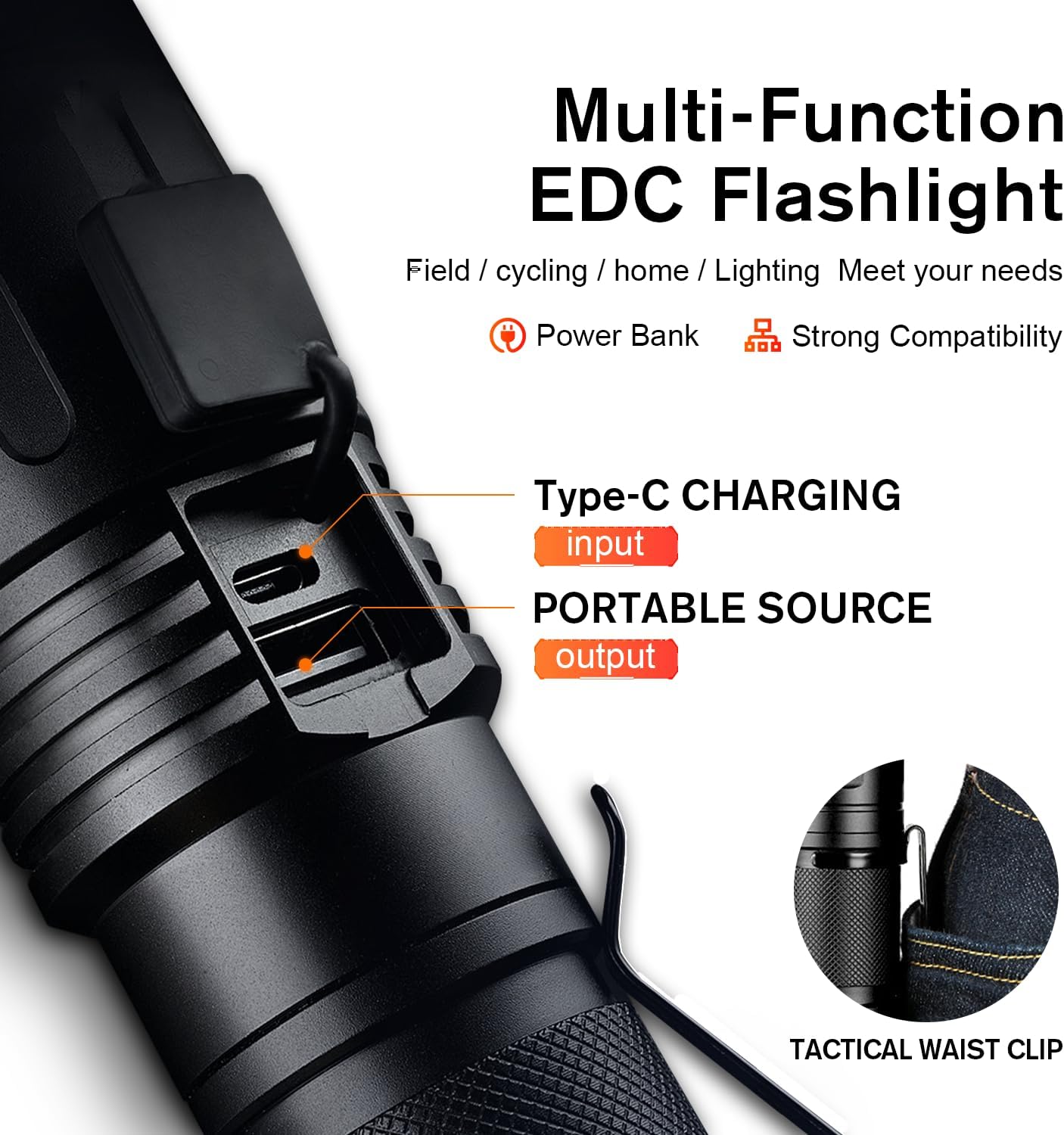
Figure 1: Type-C Charging Port and Tactical Waist Clip. The image displays a close-up of the flashlight's body, highlighting the Type-C input and USB output ports, along with a visual of the tactical waist clip.
5. Malangizo Ogwiritsira Ntchito
5.1 Kuyatsa/Kuzimitsa
Dinani batani lamphamvu lomwe lili m'mbali mwa tochi kuti muyatse kapena kuyimitsa.
5.2 Changing Lighting Modes
With the flashlight powered on, short press the power button repeatedly to cycle through the 5 lighting modes:
- Pamwamba: Maximum brightness for general illumination.
- Zapakati: Moderate brightness for extended battery life.
- Pansi: Minimal brightness for close-range tasks or preserving night vision.
- Chovala: Rapid flashing light for signaling or disorientation.
- SOS: International Morse code signal for emergencies (three short, three long, three short flashes).
- Turbo: (If applicable, usually a double-click from off or on) Provides the absolute maximum lumen output for a short burst. Refer to product specifications for activation.

Figure 2: Five Lighting Modes. This image illustrates the different light output levels and special modes (Strobe, SOS) of the flashlight in various outdoor scenarios.
5.3 Kugwira Ntchito kwa Zoom
The SuperFire X60-T features a telescopic focusing design to adjust the beam from a wide floodlight to a narrow spotlight.
- To adjust the beam, gently slide the head of the flashlight forward or backward.
- Sliding the head forward will narrow the beam, creating a focused spotlight for long-distance illumination.
- Sliding the head backward will widen the beam, creating a broad floodlight for illuminating a larger area.

Figure 3: Telescopic Focusing. The image shows the flashlight's zoomable design, illustrating the wide beam (floodlight) and narrow beam (spotlight) capabilities.
5.4 Kugwiritsa Ntchito Monga Power Bank
The flashlight can serve as a portable power bank to charge other devices.
- Locate the USB output port, usually next to the Type-C input port, under the same rubber cover.
- Connect your device's charging cable (e.g., smartphone, tablet) to the USB output port on the flashlight.
- Tochi iyamba kuchajitsa chipangizo chanu. Yang'anirani chizindikiro cha kuchajitsa cha chipangizo chanu.
- Chotsani kulumikizana pamene chaji yatha kapena batire ya tochi ikachepa.
6. Kusamalira
- Kuyeretsa: Pukutani tochi ndi chofewa, damp nsalu. Osagwiritsa ntchito zotsukira abrasive kapena solvents.
- Posungira: Store the flashlight in a cool, dry place away from direct sunlight and extreme temperatures. If storing for extended periods, charge the battery every 3-6 months to maintain its lifespan.
- Kukanika kwa Madzi: Ensure the rubber cover for the charging ports is always securely closed to maintain the IP44 water resistance rating. Avoid submerging the flashlight in water.
- Kusamalira Battery: Use only the provided charging cable or a compatible Type-C cable. Do not attempt to replace the internal battery.
7. Mavuto
| Vuto | Chifukwa Chotheka | Yankho |
|---|---|---|
| Tochi siyiyatsa. | Battery yatha. | Charge the flashlight fully using the provided Type-C cable. |
| Kutulutsa kwa kuwala ndikocheperako. | Batire yochepa kapena mode yolakwika. | Charge the battery. Cycle through modes to ensure High or Turbo mode is selected. |
| Tochi siili kuchaji. | Cable or adapter issue; port not connected properly. | Ensure the Type-C cable is securely connected to both the flashlight and the power source. Try a different USB port or adapter. |
| Zoom function is stiff. | Dust or debris in the mechanism. | Gently clean the sliding mechanism. Avoid forcing the zoom. |
8. Zofotokozera
| Mbali | Tsatanetsatane |
|---|---|
| Chitsanzo | X60-T |
| Mtundu | SuperFire |
| Mtundu Wowala | LED |
| Kuwala (Max) | 10000 Lumens (Turbo Mode) / 2100 Lumens (Standard) |
| Beam Distance (Max) | 350 mita (1148 mapazi) |
| Gwero la Mphamvu | Mphamvu ya Battery (1 Lithium Ion batire ikuphatikizidwa) |
| Kulipira Port | Mtundu-C |
| Nthawi yolipira | 4-6 maola |
| Runtime (High Mode) | 6 maola |
| Nthawi Yogwirira Ntchito (Mawonekedwe Otsika) | 15 maola |
| Zakuthupi | Aviation-grade Aluminium |
| Madzi Resistance Level | IP44 (yopanda madzi) |
| Miyeso Yazinthu | 2.1"D x 2.1"W x 6.7"H (15.8 cm L x 4.1 cm W) |
| Kulemera kwa chinthu | 1.01 mapaundi |
| Zapadera | Adjustable Focus, Durable, High Power, Portable, Weatherproof, Power Bank Functionality |

Figure 4: Size and Performance Comparison. This image provides a visual comparison of the X60-T's size relative to a smartphone and another model (X60), along with a table detailing their respective runtimes and lumen outputs.
9. Chitsimikizo & Thandizo
For warranty information, technical support, or any inquiries regarding your SuperFire X60-T flashlight, please refer to the contact information provided on the product packaging or visit the official SuperFire webmalo. Sungani risiti yanu yogulira ngati umboni wa kugula kwa madandaulo a chitsimikizo.


