1. Mawu Oyamba
The Solid State Logic PureDrive Octo is an 8-channel microphone preamplifier designed for professional audio recording and production environments. It integrates SSL's renowned PURE and DRIVE modes, offering versatile tonal characteristics, along with advanced digital connectivity and an onboard USB interface. This manual provides comprehensive instructions for the setup, operation, and maintenance of your PureDrive Octo unit.
The PureDrive Octo features four mic preamp input impedance options, allowing for exploration of various tonal possibilities and optimal matching with different microphone types. Each channel includes independent +48V phantom power, polarity inversion, and a High Pass Filter, making it a highly capable and feature-rich outboard microphone preampwopititsa patsogolo ntchito.
2. Zofunika Kwambiri
- 8 channel high-performance PureDrive mic preamps.
- +48V phantom power, polarity invert, and 3rd order hi-pass filter per channel.
- 31-step Trim control with precise 1 dB increments for signal level adjustment and gain stagndi.
- Line inputs via TRS Jack or dedicated D-Sub connectivity.
- Four mic preamp input impedance options to explore new tonal possibilities from dynamic and ribbon microphones.
- PURE and DRIVE modes, including a new 'Asymmetric' DRIVE option.
- Advanced digital connectivity (ADAT, AES/EBU).
- Onboard USB audio interface.
3. Zamalonda Zathaview
Front Panel

This image displays the front panel of the PureDrive Octo. It features eight identical input channels, each with dedicated controls for Gain, Trim, and various processing options. On the right, digital metering and A/D conversion controls are visible.
Kumbuyo Panel
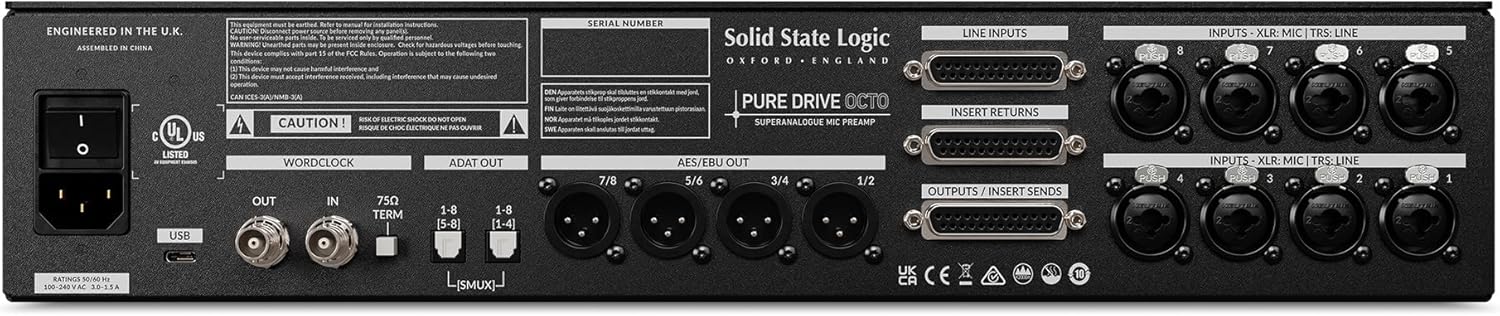
The rear panel provides all input and output connections. This includes XLR/TRS combo jacks for microphone/line inputs, D-Sub connectors for line inputs and outputs/sends, ADAT and AES/EBU digital outputs, Wordclock I/O, and a USB port for computer connectivity. The power inlet is located on the far left.
4. Kukonzekera Guide
4.1 Kutsegula ndi Kuyika
- Carefully remove the PureDrive Octo from its packaging.
- Place the unit in a well-ventilated area, preferably in a standard 19-inch equipment rack. Ensure adequate airflow around the unit to prevent overheating.
- Pewani kuika chipangizocho pafupi ndi kumene kumatentha kapena padzuwa.
4.2 Kulumikizana kwa Mphamvu
- Onetsetsani kuti chosinthira magetsi chamagetsi chili pamalo OZIMA.
- Connect the supplied AC power cable to the IEC inlet on the rear panel of the PureDrive Octo.
- Plug the other end of the power cable into a grounded AC outlet.
4.3 Kulumikizana kwa Audio
- Zolowetsa Maikolofoni: Connect microphones to the XLR inputs on the rear panel (Channels 1-8).
- Zolowetsa Mzere: Connect line-level sources using TRS jacks or the dedicated D-Sub connectors on the rear panel.
- Zotulutsa Pakompyuta: Connect the ADAT OUT ports to your audio interface or digital mixer for multi-channel digital audio. Use AES/EBU outputs for stereo digital audio.
- Kulumikizana kwa USB: Connect the USB port on the rear panel to your computer for use as an audio interface. Install necessary drivers if prompted by your operating system.
- Wotchi ya Mawu: For synchronization with other digital audio devices, connect a Wordclock cable to the WORDCLOCK IN/OUT ports.
5. Malangizo Ogwiritsira Ntchito
5.1 Kuyatsa/Kuzimitsa
- To power on, flip the power switch on the rear panel to the ON position.
- Kuti muzimitse, tembenuzirani chosinthira magetsi kuti CHOZIMITSA.
5.2 Channel Controls (Per Channel)
- GAIN Knob: Adjusts the input gain for the microphone preamplifier. Use this to set the primary signal level.
- TRIM Knob: Provides fine-tuning of the output level in 1 dB increments. This allows for precise level matching and can be used to drive the signal into the DRIVE circuit.
- +48V Button: Engages phantom power for condenser microphones. Ensure the microphone is connected before activating.
- POLARITY Button: Inverts the phase of the input signal. Useful for correcting phase issues when using multiple microphones.
- HPF Button: Activates a High Pass Filter to reduce unwanted low-frequency rumble or proximity effect.
- Z.D. (Impedance) Button: Cycles through four input impedance options. Experiment with different settings to find the optimal tonal response for your microphone.
- PURE/DRIVE Button: Toggles between the PURE and DRIVE preamp modes.
- PURE Mode: Provides a clean, transparent, and linear ampkumangirira.
- DRIVE Mode: Introduces harmonic saturation and warmth. The PureDrive Octo also features an 'Asymmetric' DRIVE option for unique tonal shaping.
5.3 A/D Conversion and Digital Output Controls
- RATE Knob: Amasankha sample rate for the A/D converters (e.g., 44.1kHz, 48kHz, 88.2kHz, 96kHz).
- Batani la CLOCK: Selects the clock source (Internal, Wordclock, USB).
- Kuyeza: The front panel features LED meters for each channel, providing visual feedback on input levels.
6. Kusamalira
- Kuyeretsa: Gwiritsani ntchito nsalu yofewa komanso youma kuti muyeretse kunja kwa chipangizocho. Pewani zotsukira kapena zosungunulira.
- Mpweya wabwino: Onetsetsani kuti malo opumira mpweya sakutsekedwa kuti asatenthe kwambiri.
- Posungira: When not in use for extended periods, store the unit in a cool, dry environment, away from dust and extreme temperatures.
7. Mavuto
- Palibe Mphamvu:
- Check if the power cable is securely connected to both the unit and the AC outlet.
- Onetsetsani kuti chotulutsa magetsi chikugwira ntchito.
- Palibe Zotulutsa Zomvera:
- Ensure all audio cables are correctly connected to the inputs and outputs.
- Check the GAIN and TRIM settings on the relevant channels.
- Verify that the correct input source is selected on your receiving device (audio interface, mixer).
- If using digital outputs (ADAT, AES/EBU, USB), ensure sample rates and clocking are correctly synchronized between devices.
- Mauthenga Osokoneza:
- Reduce the GAIN or TRIM level to prevent clipping.
- Check the input level of your microphone or line source.
- Ensure the PURE/DRIVE mode is set as desired; DRIVE mode intentionally adds harmonic distortion.
8. Zofotokozera
| Malingaliro | Mtengo |
|---|---|
| Kulemera kwa chinthu | 19.51 mapaundi |
| Miyeso Yazinthu | 22 x 18 x 9 mainchesi |
| Nambala ya Model | 729745x2 pa |
| Dzina Lamtundu | Wakuda |
| Zida Zogwirizana | Maikolofoni |
| Mtundu Wolumikizira | XLR |
| Gwero la Mphamvu | Corded Electric |
9. Chitsimikizo ndi Thandizo
For information regarding warranty coverage, technical support, or service, please contact Solid State Logic directly through their official website or authorized distributors. Keep your proof of purchase for warranty claims.
Official Solid State Logic Webtsamba: www.solidstatelogic.com


