1. Mawu Oyamba
Chida Chowonjezera cha Malo Opangira Zinthu cha ATOMSTACK AE85 chapangidwa kuti chikulitse kwambiri malo ogwirira ntchito a cholembera chanu cha laser cha ATOMSTACK chogwirizana. Chida ichi chimakupatsani mwayi wowonjezera malo anu olembera ndi kudula kukhala 850 x 800 mm, zomwe zimapangitsa kuti ntchito zazikulu ndi kukonza zinthu zikhale zosavuta.
Bukuli limapereka chidziwitso chofunikira chokhudza kukhazikitsa, kugwiritsa ntchito, kukonza, ndi zofunikira za AE85 Extension Kit kuti zitsimikizire kuti zikugwira ntchito bwino komanso kuti zikhale ndi moyo wautali.
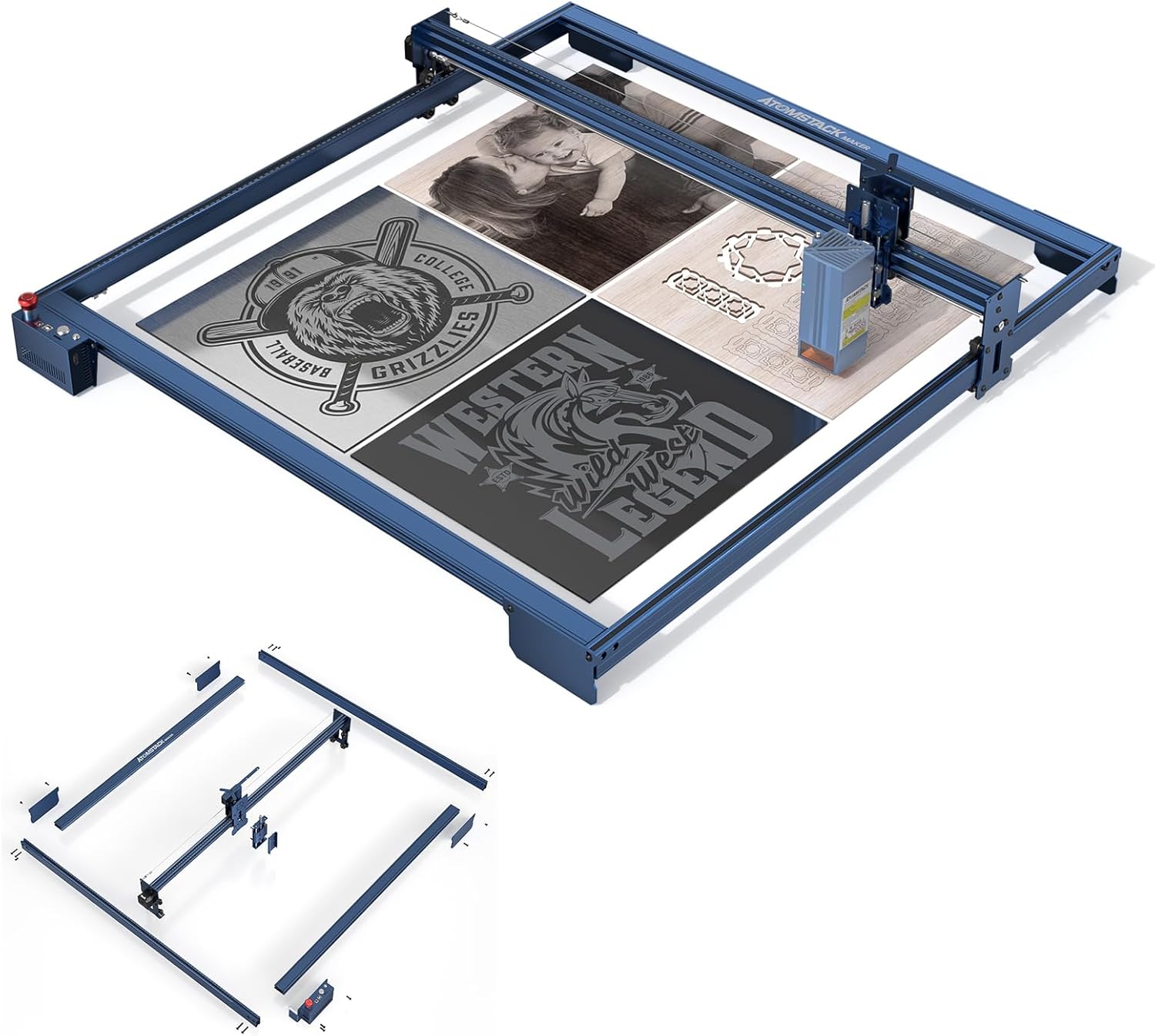
Chithunzi 1.1: Chida Chowonjezera cha ATOMSTACK AE85, chowonetsedwaasing luso lake lokulitsa zojambula ndi ma s osiyanasiyanaampndi ma project.
2. Zinthu Zogulitsa
Chida Chowonjezera cha AE85 chili ndi zinthu zingapo zofunika zomwe zimapangidwira kuti muwonjezere luso lanu lojambula pogwiritsa ntchito laser:
- Malo Okulitsa Zojambulajambula: Imakulitsa mosavuta kukula kwa zojambulazo kufika pa 850 x 800 mm, kuwonjezeka kwa 315% kuchokera ku madera wamba a 410 x 400 mm, popanda kufunikira zowonjezera zina.
- Katswiri Woyambirira Wolondola Kwambirifile: Amagwiritsa ntchito original metal profileKufananiza mtundu ndi khalidwe la makina ojambula a ATOMSTACK X-series, kuonetsetsa kuti zinthu zikuyenda bwino komanso molondola.
- Kuyang'ana Kwambiri kwa Z-Axis: Ili ndi njira yatsopano yozungulira yowongolera kutalika mwachangu komanso molondola, yokhala ndi mzere wozungulira wowala kawiri komanso kapangidwe kolondola ka ma slider anayi.
- Kapangidwe Kokhazikika ka Aluminiyamu Yonse: Yopangidwa ndi aluminiyamu yolimba kwambirifile, yoyesedwa bwino kuti isunge kulondola ndi kukhazikika komweko monga makina oyambirira akamalemba ndi kudula.
- Ntchito Zosiyanasiyana: Malo akuluakulu ogwirira ntchito amalola kuti nthawi imodzi muzitha kujambula ndi kudula zinthu zosiyanasiyana, zomwe zimapangitsa kuti ntchito igwire bwino ntchito komanso kukulitsa mwayi wopanga zinthu zatsopano.

Chithunzi 2.1: Kuthaview za zinthu zofunika kwambiri za AE85 Extension Kit.

Chithunzi 2.2: Tsatanetsatane view ya dongosolo lozungulira la Z-axis.

Chithunzi 2.3: Chithunzi cha stable full aluminiyamu profile ndi ma rollers olondola.

Chithunzi 2.4: Ma module osinthika komanso osinthika kwambiri ndi ma module osiyanasiyana a laser.
3. Ma Model ndi Ma Module Ogwirizana
Chida Chowonjezera cha ATOMSTACK AE85 chimagwirizana ndi zojambula zosiyanasiyana za laser za ATOMSTACK ndi ma module:
Ma Model Oyenera Ojambula:
- ATOMSTACK A40 PRO, X40 PRO, S40 PRO
- ATOMSTACK A30 PRO, X30 PRO, S30 PRO
- ATOMSTACK A20 PRO, X20 PRO, S20 PRO, A20
- ATOMSTACK A10 PRO, S10 PRO, A10
- ATOMSTACK A5 M30, A5 M40, A5 Pro+, A5 M50 Pro, A5 M50
- ATOMSTACK X7 Pro, X7
- ATOMSTACK P7 M30, P7 M40, P9 M50
Ma Module Ogwiritsidwa Ntchito a Laser:
- Chithunzi cha M40
- Chithunzi cha M50
- Chithunzi cha M100
- Chithunzi cha M150
4. Kukhazikitsa ndi Kuyika
Chida Chowonjezera cha AE85 chili ndi kapangidwe kake ka modular kuti chikhale chosavuta kuyika. Tsatirani njira izi kuti musonkhanitse ndikulumikiza zida zowonjezera ndi cholembera chanu cha laser cha ATOMSTACK chomwe chilipo. Onani chida choyikira chomwe chilipo komanso buku la malangizo ogwiritsa ntchito kuti mupeze malangizo atsatanetsatane, sitepe ndi sitepe okhudzana ndi chitsanzo chanu cholembera.
4.1. Zamkatimu Phukusi:
Musanayambe kukhazikitsa, onetsetsani kuti zigawo zonse zilipo:
- Ma Shaft Owonjezera a 2 x Y-axis
- Ma Shaft Owonjezera a X-axis atatu
- Lamba Wofanana wa 1 x 2.8m
- 1 x Z-axis Regulator
- 1 x Chingwe
- 3 x Zothandizira Mapazi
- 1 x Bokosi Lolamulira (lokhala ndi chingwe chowonjezera)
- Ma Slide awiri a Laser Backplane
- 1 x Chingwe Cholumikizira Waya
- Chingwe Cholumikizira cha 1 x Motherboard
- 10 x Matayala
- 1 x Buku Logwiritsa Ntchito
- 1 x Chida Chokhazikitsira
4.2. Masitepe Opangira (Zambiri):
- Kusokoneza: Chotsani mosamala chimango choyambirira cha cholembera chanu cha laser cha ATOMSTACK motsatira malangizo ake enieni.
- Kukula kwa Chimango: Sinthani X ndi Y axis pro yoyambirirafilendi ma shaft owonjezera ataliatali omwe ali mu setiyi. Onetsetsani kuti maulumikizidwe onse ndi otetezeka komanso ogwirizana.
- Kuyika Lamba: Ikani lamba watsopano wa 2.8m wogwirizana, kuonetsetsa kuti walumikizidwa bwino ndikudutsa m'mapuleti.
- Z-axis Regulator & Bracket: Ikani chowongolera cha Z-axis ndi bracket ku kabati ya laser module motsatira malangizo atsatanetsatane.
- Bokosi Lolamulira & Ma waya: Lumikizani bokosi lowongolera lotambasuka ndi chingwe cholumikizira cha bolodi la amayi. Gwiritsani ntchito zomangira za chingwe zomwe zaperekedwa ndi bulaketi yomangira kuti muzisamalira bwino zingwezo.
- Zothandizira Mapazi: Mangani zothandizira mapazi kuti muwonetsetse kuti chimango chotambasuka chili chokhazikika komanso cholunjika.
- Macheke Omaliza: Musanayatse magetsi, yang'anani kawiri maulumikizidwe onse, mphamvu ya lamba, ndikuwonetsetsa kuti gawo la laser likuyenda momasuka motsatira ma axel onse awiri.

Chithunzi 4.1: Zigawo zozungulira kuti zikhale zosavuta kuyika.
5. Kugwiritsa Ntchito Cholembera Chotambasulidwa
Chida Chowonjezera cha AE85 chikayikidwa bwino, chojambula chanu cha laser cha ATOMSTACK chidzakhala ndi malo ogwirira ntchito akuluakulu kwambiri. Gawoli limapereka malangizo ambiri okhudza kugwiritsa ntchito makina anu owonjezera.
5.1. Kugwiritsa Ntchito Malo Okulirapo:
- Kukonzekera kwa Mapulogalamu: Onetsetsani kuti pulogalamu yanu yojambulira (monga LightBurn, LaserGRBL) yakonzedwa kuti izitha kuzindikira miyeso yatsopano, yayikulu yogwirira ntchito (850 x 800 mm). Izi ndizofunikira kwambiri pakukulitsa ndi kuyika bwino ntchito.
- Kuyika Zinthu: Tengani advantagMalo ochulukirapo ojambulira kapena kudula zinthu zazikulu, kapena kukonza zinthu zingapo zazing'ono m'gulu limodzi. Mangani zinthu zanu bwino kuti zisasunthike panthawi yogwira ntchito.
- Kusintha kwa Z-Axis: Gwiritsani ntchito Z-axis rotary focus kuti musinthe kutalika kwa laser module molondola, makamaka mukamagwiritsa ntchito zipangizo za makulidwe osiyanasiyana.

Chithunzi 5.1: Kuyerekeza kooneka bwino kwa kukula kwa malo ojambulira.

Chithunzi 5.2: Eksample ya pulojekiti yayikulu yojambula yomwe yathandizidwa ndi malo okulirapo.
5.2. Chitetezo:
Nthawi zonse tsatirani malangizo achitetezo omwe aperekedwa ndi cholembera chanu choyambirira cha laser. Mukamagwiritsa ntchito zida zowonjezera:
- Valani magalasi oteteza a laser oyenera.
- Onetsetsani kuti mpweya wabwino ukugwira bwino ntchito yanu.
- Osasiya makina osayang'aniridwa panthawi yogwira ntchito.
- Sungani zinthu zomwe zingayaka moto kutali ndi malo ojambulira.
6. Kusamalira
Kusamalira nthawi zonse kumatsimikizira kuti ATOMSTACK AE85 Extension Kit yanu ndi laser engraver yanu zimakhala ndi moyo wautali komanso ntchito yabwino. Chitani izi nthawi ndi nthawi:
- Ma Sitima Oyera ndi Mawilo: Tsukani zitsulo zoyendetsera ndi mawilo nthawi zonse kuti muchotse fumbi ndi zinyalala, zomwe zingasokoneze kuyenda bwino komanso kulondola. Gwiritsani ntchito nsalu yofewa komanso youma.
- Kuvuta kwa Lamba: Yang'anani mphamvu ya lamba wolumikizana. Iyenera kukhala yolimba koma yosalimba kwambiri. Sinthani ngati pakufunika kutero kuti mupewe kudumpha kapena kusweka kwambiri.
- Zomangira Zazigawo: Nthawi ndi nthawi fufuzani zomangira zonse ndi zomangira pa chimango ndi mbali zoyenda. Limbitsani zolumikizira zilizonse zotayirira kuti kapangidwe kake kakhale kolimba komanso kolondola.
- Kuwongolera Ma Chingwe: Onetsetsani kuti zingwe zonse zili bwino ndipo sizikusokoneza zinthu zoyenda. Sinthani zingwe zilizonse zosweka kapena zowonongeka.
7. Mavuto
Gawoli likufotokoza mavuto omwe mungakumane nawo ndi AE85 Extension Kit. Kuti mudziwe zambiri zokhudza mavuto okhudzana ndi gawo la laser kapena mapulogalamu, onani buku lanu loyambirira la wojambula.
7.1. Mavuto ndi Mayankho Ofala:
- Kujambula/Kudula Mosafanana:
- Onani ngati chimango chili cholunjika komanso chokhazikika. Sinthani zothandizira mapazi ngati pakufunika kutero.
- Onetsetsani kuti maulumikizidwe onse a chimango ali olimba kwambiri.
- Yang'anani lamba wolumikizana bwino kuti muwone ngati akukoka bwino ndipo onetsetsani kuti sakutsetsereka.
- Kusuntha kwa Chibwibwi/Kukana:
- Tsukani zitsulo zowongolera ndi mawilo kuti muchotse zopinga kapena zinyalala zilizonse.
- Onetsetsani kuti makina a Z-axis akuyenda bwino popanda kumangirira.
- Mapulogalamu Osazindikira Malo Atsopano:
- Sinthani pamanja miyeso ya malo ogwirira ntchito mu makonda anu a pulogalamu yojambulira (monga LightBurn, LaserGRBL) kufika pa 850 x 800 mm.
- Yambitsaninso pulogalamuyo ndi cholembera.
8. Zofotokozera
Mafotokozedwe ofunikira aukadaulo a ATOMSTACK AE85 Engraving Area Extension Kit:
| Kufotokozera | Mtengo |
|---|---|
| Mtundu | Zotsatira ATOMSTACK |
| Kukula kwa Zojambula Zokulirapo | 800x850 mm |
| Product Net Weight | 8kg pa |
| Phukusi Kulemera | 8.5kg pa |
| Miyeso Yodziyimira Payokha ya Phukusi | 1195 x 385 x 13 mm |
9. Chitsimikizo ndi Thandizo
Kuti mudziwe zambiri zokhudza chitsimikizo ndi chithandizo chaukadaulo cha ATOMSTACK AE85 Extension Kit yanu, chonde onani zolemba zomwe zaperekedwa ndi kugula kwanu koyambirira kapena funsani wogulitsa mwachindunji. Malinga ndi zomwe zalembedwa, pali ndondomeko yobwezera ya masiku 30 kuti mubwezeredwe ndalama/kubweza.
Kuti mupeze thandizo lina, mutha kupitanso ku ATOMSTACK yovomerezeka. webtsamba kapena funsani njira zawo zothandizira makasitomala.


