1. Mawu Oyamba
The eppfun AK8675B Pro is a versatile Bluetooth 5.2 audio adapter designed to function as both a transmitter (TX) and a receiver (RX). It features advanced Qualcomm QCC3040 chip technology, supporting various aptX codecs including aptX-Adaptive, aptX HD, and aptX Low Latency, ensuring high-quality audio with minimal delay. This device allows you to wirelessly stream audio from non-Bluetooth devices (like TVs or PCs) to Bluetooth headphones/speakers, or from Bluetooth-enabled devices (like smartphones) to wired audio systems.
2. Zamkatimu Phukusi
Onetsetsani kuti zonse zomwe zalembedwa pansipa zikuphatikizidwa mu phukusi lanu:
- eppfun AK8675B Pro Bluetooth Transmitter/Receiver
- USB-C Charging Chingwe
- Chingwe cha Audio cha 3.5mm AUX
- Optical Fiber Audio Cable
- Buku la ogwiritsa (chikalatachi)

Image: Contents of the eppfun AK8675B Pro package, including the device, various cables, and the user manual.
3. Zamalonda Zathaview ndi Controls
Dziwani bwino zida ndi zowongolera za chipangizochi:

Image: Diagram of the eppfun AK8675B Pro device with key interfaces and buttons labeled.
- A: Bulu lamphamvu - Press and hold to turn the device on or off.
- B: RX/TX Mode Switching - Slide switch to select Transmitter (TX) or Receiver (RX) mode.
- C: Pairing Button - Press to initiate Bluetooth pairing mode.
- D: AUX 3.5mm Interface - For connecting audio devices via a 3.5mm audio cable.
- E: Volume Adjusting - Buttons to increase or decrease audio volume.
- F: One Click Mute, Double Click Audio Decoding Switch - Single press for mute/unmute; double press to cycle through audio decoding options.
- G: USB Charging - USB-C port for charging the device.
- H: Optical Interface - For connecting audio devices via an optical fiber cable.
4. Setup and Operation Modes
The AK8675B Pro operates in two primary modes: Transmitter (TX) and Receiver (RX). Select the appropriate mode using the RX/TX mode switching slider (B).

Image: Comparison of Transmitter and Receiver modes, showing usage time, compatible codecs, and simultaneous linking capabilities.
4.1. Transmitter Mode (TX)
In TX mode, the device transmits audio from a non-Bluetooth source (e.g., TV, PC) to Bluetooth-enabled headphones or speakers.
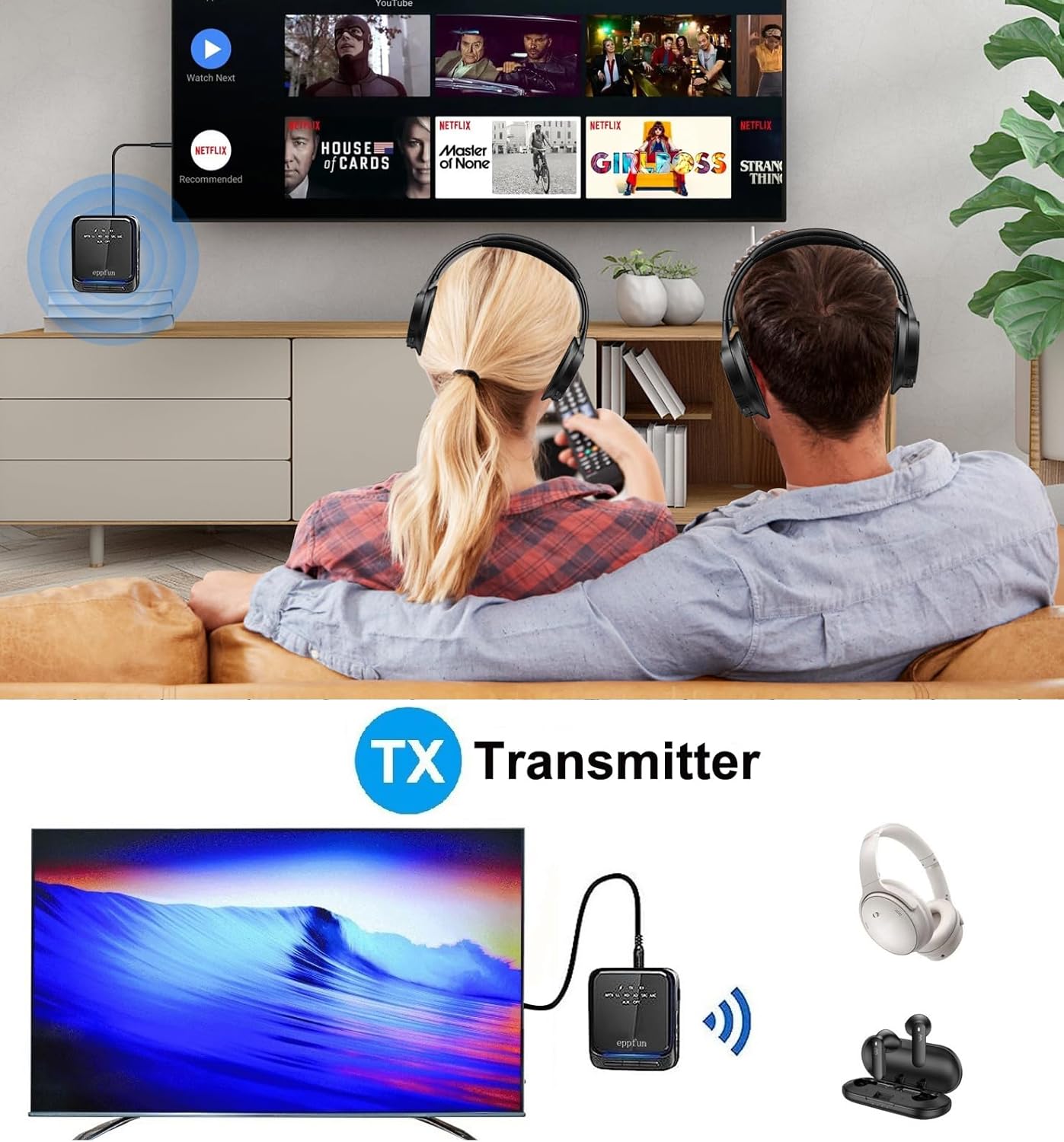
Image: An illustration of the eppfun AK8675B Pro connected to a TV, transmitting audio wirelessly to two pairs of Bluetooth headphones.
- Slide the mode switch (B) to TX.
- Connect the AK8675B Pro to your audio source (e.g., TV, PC) using either the 3.5mm AUX cable (D) or the Optical Fiber cable (H).
- Turn on the AK8675B Pro by pressing and holding the Power Button (A).
- Put your Bluetooth headphones or speakers into pairing mode.
- Press the Pairing Button (C) on the AK8675B Pro to initiate pairing. The LED indicator will show pairing status.
- Once connected, audio from your source will stream wirelessly to your Bluetooth device(s).
TX Mode Features:
- Ma Codecs Ogwirizana: aptX, aptX-Adaptive, aptX LL (Low Latency), aptX HD, SBC.
- Maola Ogwira Ntchito: Pafupifupi maola 12 pamalipiro athunthu.
- Kulumikizana Kwapawiri: Supports connecting two Bluetooth headphones/earbuds simultaneously with aptX LL technology.
4.2. Receiver Mode (RX)
In RX mode, the device receives audio wirelessly from a Bluetooth-enabled source (e.g., smartphone, tablet) and outputs it to a wired audio system (e.g., wired headphones, speakers).

Image: An illustration of the eppfun AK8675B Pro connected to wired speakers, receiving audio wirelessly from a smartphone.
- Slide the mode switch (B) to RX.
- Connect the AK8675B Pro to your wired audio output device (e.g., speakers, wired headphones) using the 3.5mm AUX cable (D).
- Turn on the AK8675B Pro by pressing and holding the Power Button (A).
- Enable Bluetooth on your smartphone or other Bluetooth audio source and search for available devices.
- Select "eppfun AK8675B Pro" from the list of available Bluetooth devices to pair. The LED indicator will confirm connection.
- Once connected, audio from your Bluetooth source will play through your wired audio system.
RX Mode Features:
- Ma Codecs Ogwirizana: aptX, aptX-Adaptive, aptX HD, SBC, AAC.
- Maola Ogwira Ntchito: Pafupifupi maola 20 pamalipiro athunthu.
5. Kulipiritsa Chipangizo
To charge the eppfun AK8675B Pro:
- Connect the supplied USB-C cable to the USB Charging port (G) on the device.
- Connect the other end of the USB-C cable to a standard USB power adapter (not included) or a computer's USB port.
- The LED indicator will show the charging status. A full charge typically takes about 2 hours.
Note: The device cannot be used while it is charging.
6. Kusamalira
To ensure the longevity and optimal performance of your eppfun AK8675B Pro:
- Sungani chipangizocho chili chouma. Pewani kukhudzidwa ndi chinyezi, mvula, kapena zakumwa.
- Tsukani chipangizocho ndi nsalu yofewa, youma. Osagwiritsa ntchito mankhwala ankhanza kapena zotsukira abrasive.
- Sungani chipangizocho pamalo ozizira, owuma pamene sichikugwiritsidwa ntchito.
- Pewani kutentha kwambiri.
- Musayese kusokoneza kapena kusintha chipangizocho, chifukwa izi zidzasokoneza chitsimikizo ndipo zikhoza kuwononga.
7. Mavuto
If you encounter issues with your AK8675B Pro, refer to the following common solutions:
- Chipangizo sichidzayatsa:
- Onetsetsani kuti chipangizocho chili ndi chaji yokwanira. Lumikizani ku gwero lamagetsi pogwiritsa ntchito chingwe cha USB-C.
- Press and hold the Power Button (A) for a few seconds.
- Cannot pair with a Bluetooth device:
- Ensure the AK8675B Pro is in the correct mode (TX for transmitting, RX for receiving).
- Make sure both devices are in pairing mode and within the 10-meter communication range.
- Clear previous pairing records on both the AK8675B Pro and your Bluetooth device, then attempt to pair again.
- Restart both the AK8675B Pro and your Bluetooth device.
- No audio output/input:
- Check all cable connections (3.5mm AUX or Optical Fiber) to ensure they are secure and in the correct ports.
- Verify that the volume on both the AK8675B Pro (E) and the connected audio device is not muted or set too low.
- Ensure the correct audio input/output is selected on your source device (e.g., TV audio settings).
- Confirm that the AK8675B Pro is successfully paired and connected to the desired Bluetooth device.
- Audio delay or poor quality:
- Ensure both the AK8675B Pro and your connected Bluetooth device support aptX Low Latency (aptX LL) for minimal delay, especially in TX mode.
- Reduce the distance between the AK8675B Pro and the connected Bluetooth device, and remove any obstacles.
- Yang'anani ngati zipangizo zina zopanda zingwe zingasokonezeke.
8. Zofotokozera
| Mbali | Kufotokozera |
|---|---|
| Dzina lachitsanzo | AK8675B Pro |
| Mtundu wa Bluetooth | 5.2 |
| Chipset ya Bluetooth | Qualcomm QCC3040 |
| Supported Codecs (TX) | aptX, aptX-Adaptive, aptX LL, aptX HD, SBC |
| Supported Codecs (RX) | aptX, aptX-Adaptive, aptX HD, SBC, AAC |
| Frequency Band | 2.402GHz - 2.480GHz |
| Kutalikirana | Mpaka 10 mita (33 mapazi) |
| TX Mode Yogwira Ntchito Nthawi | Pafupifupi. 12 maola |
| Nthawi Yogwira Ntchito ya RX Mode | Pafupifupi. 20 maola |
| Nthawi yolipira | Pafupifupi. 2 maola |
| Kulipira Port | USB-C |
| Kutulutsa Kwamawu / Kutulutsa | 3.5mm AUX, Optical TOSLINK |
| Mtundu Wabatiri | Lithium-Ion (yophatikizidwa) |
| Miyeso Yazinthu | 75mm x 66mm x 18mm (pafupifupi.) |
| Kulemera kwa katundu | 60.5 g (pafupifupi) |
9. Chitsimikizo ndi Thandizo
eppfun products are designed for reliability and performance. For warranty information and technical support, please refer to the official eppfun webkapena funsani wogulitsa wanu. Sungani risiti yanu yogulira ngati umboni wa kugula kwa chitsimikizo.