1. Mawu Oyamba
This manual provides detailed instructions for the installation, configuration, and operation of the Grandstream GWN7003 11-Port Wired Gigabit VPN Router. The GWN7003 is designed to establish robust wired, wireless, and VPN networks for various environments, offering advanced features for network management and security.
2. Zamalonda Zathaview
2.1 Zofunika Kwambiri
- 1x GbE RJ45 port with IEEE 802.3af/at PoE Input.
- 2x GbE RJ45 ports with 48V Passive PoE output or IEEE802.3af.
- Multiple Gigabit RJ45 ports and Gigabit SFP ports for flexible connectivity.
- Integrated VPN support for secure remote access to corporate networks.
- Built-in firewall for enhanced network security.
- Multi-WAN capabilities for load balancing and failover.
2.2 Kapangidwe ka Gulu Loyang'ana Kutsogolo
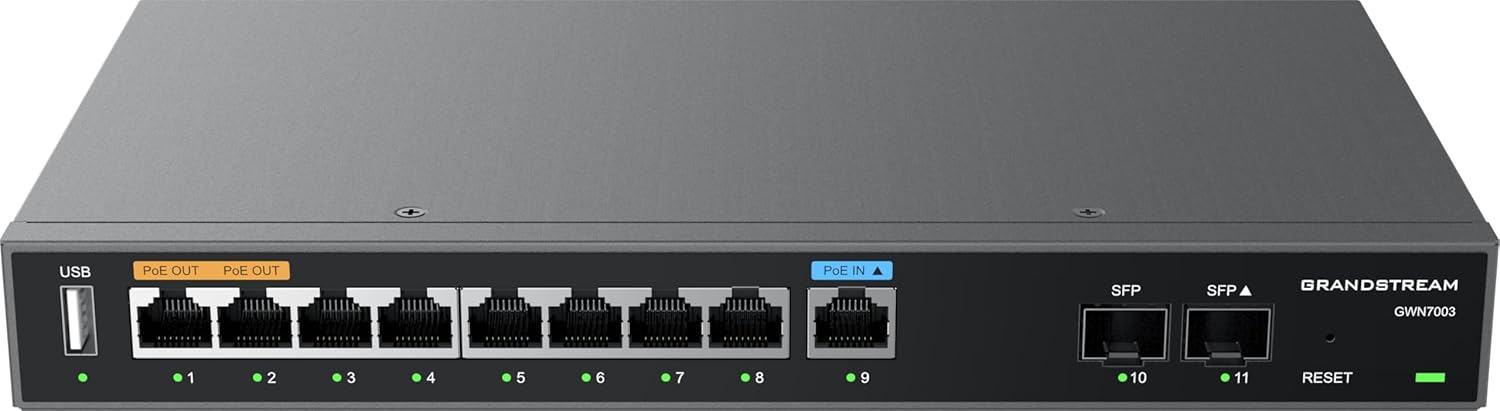
Chithunzi 1: Patsogolo view of the Grandstream GWN7003 router, showing the USB port, PoE OUT ports, PoE IN port, standard Ethernet ports, SFP ports, and reset button.
- Doko la USB: For future use or external storage.
- PoE OUT Ports (Orange): Provide Power over Ethernet to compatible devices.
- PoE IN Port (Blue): Receives Power over Ethernet to power the router itself.
- Madoko a Efaneti (1-9): Standard Gigabit Ethernet ports for network connections.
- SFP Ports (10-11): Gigabit SFP ports for fiber optic connections.
- Bwezerani Batani: Amagwiritsidwa ntchito kubwezeretsa chipangizocho kukhala chokhazikika pa fakitale.
- Zizindikiro za LED: Indicate port status (link/activity) and device power.
2.3 Pamwamba View

Chithunzi 2: Pamwamba view of the Grandstream GWN7003 router, showcasing its compact and durable metal casing.
3. Kukonzekera Guide
3.1 Zamkatimu Phukusi
Musanayambe, onetsetsani kuti zinthu zonse zilipo:
- Grandstream GWN7003 Router
- Power Adapter (if not using PoE IN)
- Ethernet Cable
- Quick unsembe Guide
3.2 Kuyika Kwathupi
- Kulumikiza Mphamvu: Connect the provided power adapter to the router's power input port, or connect an 802.3af/at compliant PoE source to the PoE IN port (blue).
- Kulumikizana kwa WAN: Connect your internet service provider's modem or main network cable to one of the WAN-configured Gigabit Ethernet ports. The GWN7003 supports multiple WAN ports for redundancy or load balancing.
- Kulumikizana kwa LAN: Connect your local network devices (computers, switches, access points) to the available LAN Gigabit Ethernet ports. Use the PoE OUT ports (orange) for devices requiring Power over Ethernet.
- SFP Connections (Optional): If using fiber optic connections, insert compatible SFP modules into the SFP ports and connect fiber cables.
3.3 Initial Access to Web Chiyankhulo
- Onetsetsani kuti kompyuta yanu yalumikizidwa ku imodzi mwa madoko a LAN a rauta.
- Tsegulani a web msakatuli (monga, Chrome, Firefox).
- Enter the default IP address of the router in the address bar. The default IP address is typically
192.168.1.1. Refer to the Quick Installation Guide for the exact default IP. - Lowetsani dzina lolowera ndi mawu achinsinsi (nthawi zambiri
adminfor both, or as specified in the guide). - Follow the on-screen wizard for initial configuration, including changing the default password for security.
4. Malangizo Ogwiritsira Ntchito
4.1 Kusintha Kwapaintaneti
The web interface allows for comprehensive network configuration:
- Zokonda za WAN: Configure internet connection type (DHCP, Static IP, PPPoE).
- Zokonda pa LAN: Manage IP address range, DHCP server, and VLANs.
- Multi-WAN: Set up load balancing or failover policies for multiple internet connections.
4.2 VPN Setup
The GWN7003 supports various VPN protocols for secure remote access:
- Navigate to the VPN section in the web mawonekedwe.
- Configure VPN server or client settings based on your network requirements (e.g., OpenVPN, IPsec).
- Ensure proper firewall rules are in place to allow VPN traffic.
4.3 PoE Output Management
The router's PoE OUT ports can power compatible devices:
- Connect PoE-powered devices (e.g., IP cameras, VoIP phones, Wi-Fi access points) to the orange PoE OUT ports.
- Monitor PoE status and power consumption through the web mawonekedwe.
5. Kusamalira
5.1 Zosintha za Firmware
Regularly update the router's firmware to ensure optimal performance, security, and access to new features:
- Visit the Grandstream website for the latest firmware for the GWN7003.
- Tsitsani firmware file ku kompyuta yanu.
- Lowani pa rauta web interface and navigate to the System Maintenance or Firmware Upgrade section.
- Kwezani firmware yotsitsidwa file and follow the on-screen instructions. Do not power off the device during the update process.
5.2 Bwezeraninso Fakitale
To restore the router to its factory default settings:
- With the router powered on, press and hold the Reset button (located on the front panel) for approximately 10 seconds.
- Release the button when the LED indicators flash. The router will reboot with factory default settings.
- Alternatively, a factory reset option is available within the web interface under System Maintenance.
6. Mavuto
6.1 Palibe intaneti
- Verify that the WAN cable is securely connected to the correct port and that your modem is operational.
- Check WAN settings in the web interface to ensure they match your ISP's requirements.
- Restart both the modem and the router.
6.2 Sindingathe Kufikira Web Chiyankhulo
- Ensure your computer is connected to a LAN port and has obtained an IP address from the router (or has a static IP in the same subnet).
- Verify the router's IP address. Try
192.168.1.1. - Chotsani malo osungira a msakatuli wanu kapena yesani msakatuli wina.
- If all else fails, perform a factory reset (see Section 5.2).
6.3 PoE Devices Not Powering On
- Ensure the device connected to the PoE OUT port is PoE-compatible.
- Chongani kugwirizana chingwe.
- Verify PoE settings in the router's web mawonekedwe.
7. Zofotokozera
| Mbali | Tsatanetsatane |
|---|---|
| Chitsanzo | GWN7003 |
| Miyeso Yazinthu | 10.24 x 11.81 x 2.17 mainchesi |
| Kulemera kwa chinthu | 3.12 mapaundi |
| Kulumikizana Technology | Wired (Gigabit Ethernet, SFP) |
| Malangizo a PoE | 1x GbE RJ45 port with IEEE 802.3af/at |
| Kutulutsa Poe | 2x GbE RJ45 ports with 48V Passive PoE or IEEE802.3af |
| Mbali Yapadera | QoS, VPN Support, Multi-WAN |
| Opareting'i sisitimu | Grandstream GWN OS |
| Wopanga | Grandstream |
8. Zambiri Zachitetezo
Please read and follow these safety guidelines to prevent damage to the device or injury:
- Osayika chipangizocho kumadzi kapena chinyezi.
- Musayike chipangizocho pafupi ndi kumene kumatentha kapena padzuwa.
- Gwiritsani ntchito adaputala yamagetsi yoperekedwa ndi wopanga.
- Onetsetsani mpweya wabwino kuzungulira chipangizocho.
- Osayesa kutsegula kapena kukonza nokha chipangizocho. Bweretsani ntchito zonse kwa ogwira ntchito oyenerera.
9. Chitsimikizo ndi Thandizo
The Grandstream GWN7003 router comes with a manufacturer's warranty. For detailed warranty information, technical support, or service inquiries, please visit the official Grandstream website or contact their customer support. Keep your purchase receipt for warranty validation.


