1. Mawu Oyamba
Thank you for choosing the Nipify YHM01C Outdoor Solar Lights. This manual provides essential information for the safe and efficient installation, operation, and maintenance of your new solar lighting system. Please read these instructions carefully before use and retain them for future reference.

This image displays the complete package, including two Nipify solar light units, two separate solar panels, and two remote controls, ready for installation.
2. Zamalonda Zathaview
2.1 zigawo
The Nipify YHM01C solar light system includes the following main components:
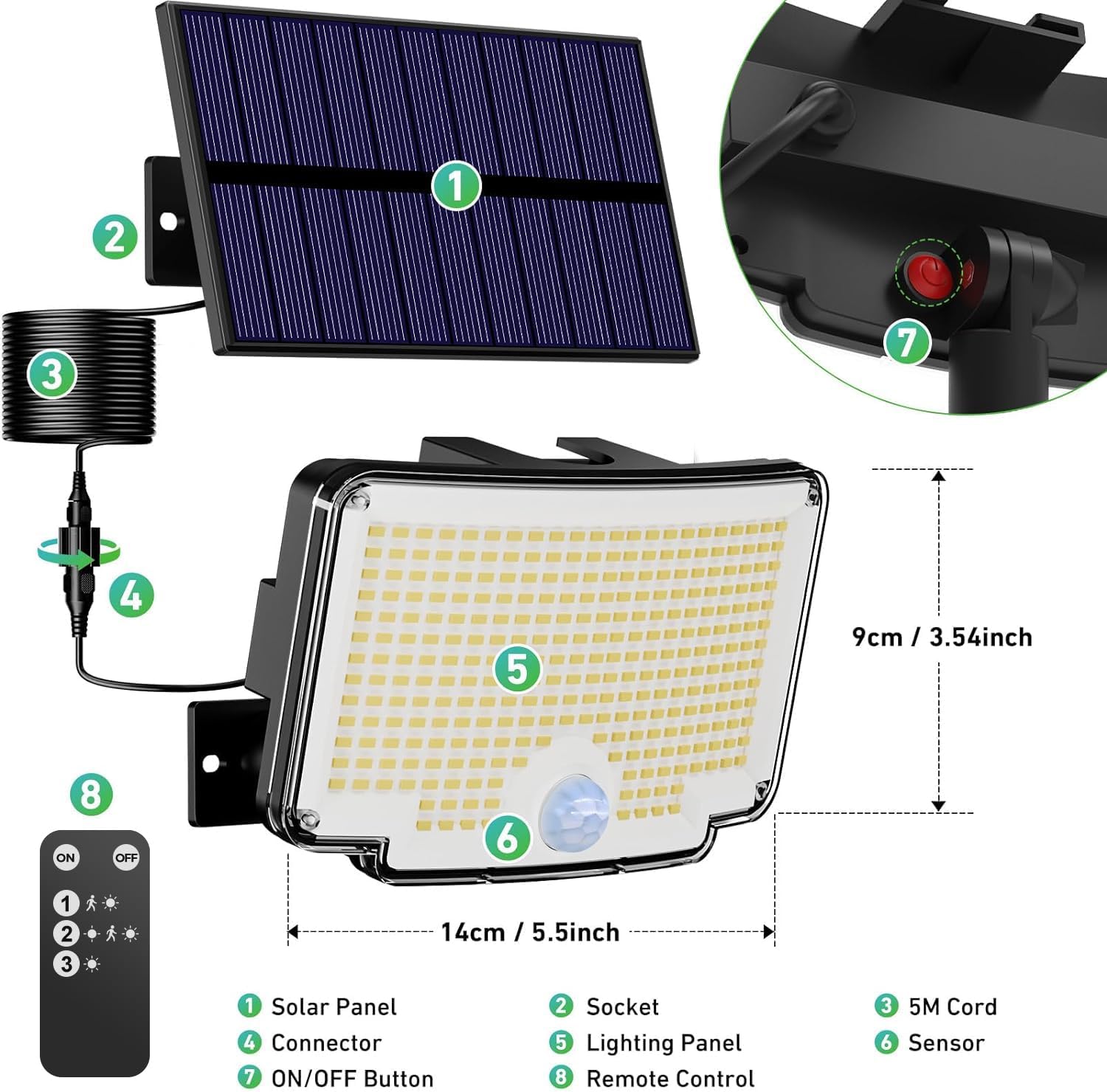
Kuphulika view diagram identifying the main components of the solar light system: (1) Solar Panel, (2) Socket, (3) 5M Cord, (4) Connector, (5) Lighting Panel, (6) Sensor, (7) ON/OFF Button, and (8) Remote Control.
- Solar Panel: Converts sunlight into electrical energy to charge the internal battery.
- Soketi: Connection point for the solar panel cable.
- 5M Cord: Provides flexibility for separating the solar panel from the light unit.
- Cholumikizira: Secures the 5M cord to the light unit.
- Lighting Panel: Houses the 310 LED chips for illumination.
- Sensola: Detects motion to activate specific lighting modes.
- ON/WOZIMA Batani: Manual power control for the light unit.
- Kuwongolera kutali: Allows convenient selection of lighting modes and power control.
2.2 Zofunika Kwambiri
- Super Bright Wide-Angle Lighting: Equipped with 310 high-quality LEDs, these lights offer super bright illumination. The arched design provides a 270° wide-angle light distribution, effectively covering a broad area.
- Separate Solar Panel: The solar panel is separate from the light unit, connected by a 5-meter cable. This allows flexible placement of the solar panel in optimal sunlight, even if the light unit needs to be installed in a shaded area for effective illumination.
- Three Lighting Modes with Remote Control: The lights feature three distinct operating modes, easily selectable via the included remote control. These modes are designed to optimize energy usage and lighting performance based on your needs.
- All-Weather Durability (IP65): Constructed from high-quality ABS material, these lights are designed for durability and resistance to various weather conditions, including cold, heat, rain, and snow (IP65 rated). They are suitable for year-round outdoor use.
- Kuyika kwa Flexible: Two installation methods are supported: integrated or separated. The separated option allows the solar panel to be mounted up to 5 meters away from the light unit. All necessary screws and mounting hardware are included for straightforward installation.
3. Kukhazikitsa ndi Kuyika
Proper installation ensures optimal performance of your solar lights. Consider the following steps:
3.1 Kusankha Malo Oyikirako
- Kuyika kwa Solar Panel: The solar panel must be installed in a location that receives direct sunlight for at least 6-8 hours daily to ensure full battery charge. Avoid areas shaded by trees, buildings, or other obstructions.
- Light Unit Placement: Position the light unit where illumination is desired. The motion sensor has a 270° detection angle and a range of 78-118 inches (2-3 meters). An ideal installation height for the light unit is 2-3 meters (approximately 6.5-10 feet) from the ground to maximize detection range and light coverage.

This image highlights the motion detection capabilities, showing a 270° detection angle and a detection range of 78-118 inches. It also indicates an ideal installation height of 2-3 meters and a remote control range of 10-16.4 feet.
3.2 Njira zoyika
Your Nipify solar lights offer two installation options:
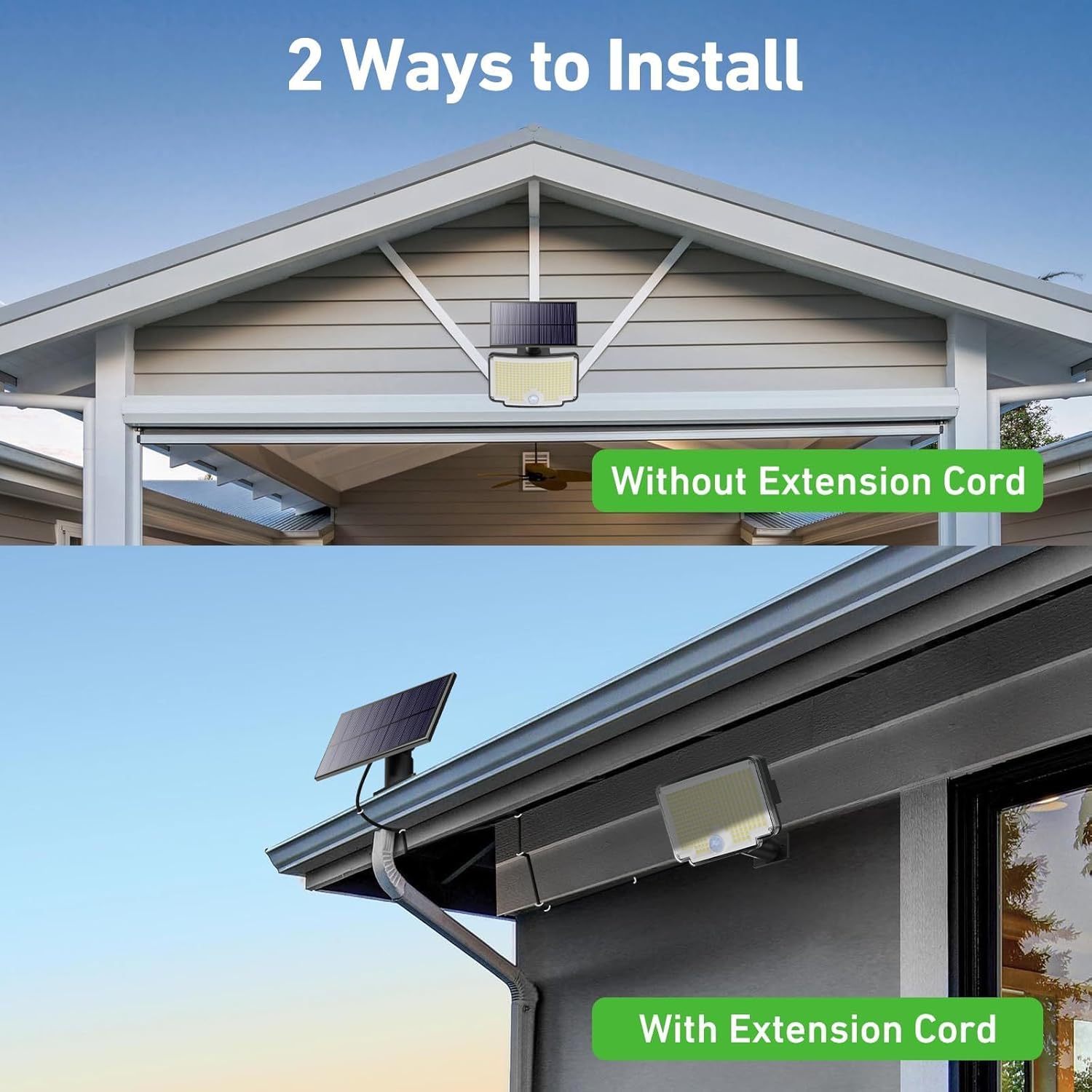
This image demonstrates the two flexible installation options: mounting the solar panel directly with the light unit (without extension cord) or separately with the 5-meter extension cord.
- Integrated Installation (Without Extension Cord):
- Mount the solar panel directly onto the light unit.
- Secure the combined unit to a wall or desired surface using the provided screws and anchors. Ensure the solar panel faces direct sunlight.
- Separated Installation (With Extension Cord):
- Mount the solar panel in a location with optimal sunlight exposure.
- Mount the light unit in the desired illumination area, which can be shaded.
- Connect the solar panel to the light unit using the 5-meter extension cable. Ensure the connection is secure.
Njira Zoyikira Zonse:
- Mark the desired drilling points on the wall.
- Boolani mabowo ndikuyika anangula pakhoma.
- Secure the mounting bracket (for the light unit and/or solar panel) with screws.
- Attach the light unit and/or solar panel to the bracket.
- If using separated installation, connect the solar panel to the light unit via the 5-meter cable.

An aesthetic image depicting two Nipify solar lights mounted on a modern house, providing bright illumination to a patio and swimming pool area during nighttime.
4. Malangizo Ogwiritsira Ntchito
Your Nipify solar lights are designed for automatic operation, but you can select different lighting modes using the included remote control.
4.1 Kutsegula koyamba
Before first use, ensure the solar panel has charged the light for at least 6-8 hours in direct sunlight. Press the ON/OFF button on the light unit or the remote control to activate the light.
4.2 Njira Zowunikira
The lights feature three distinct modes, selectable via the remote control:
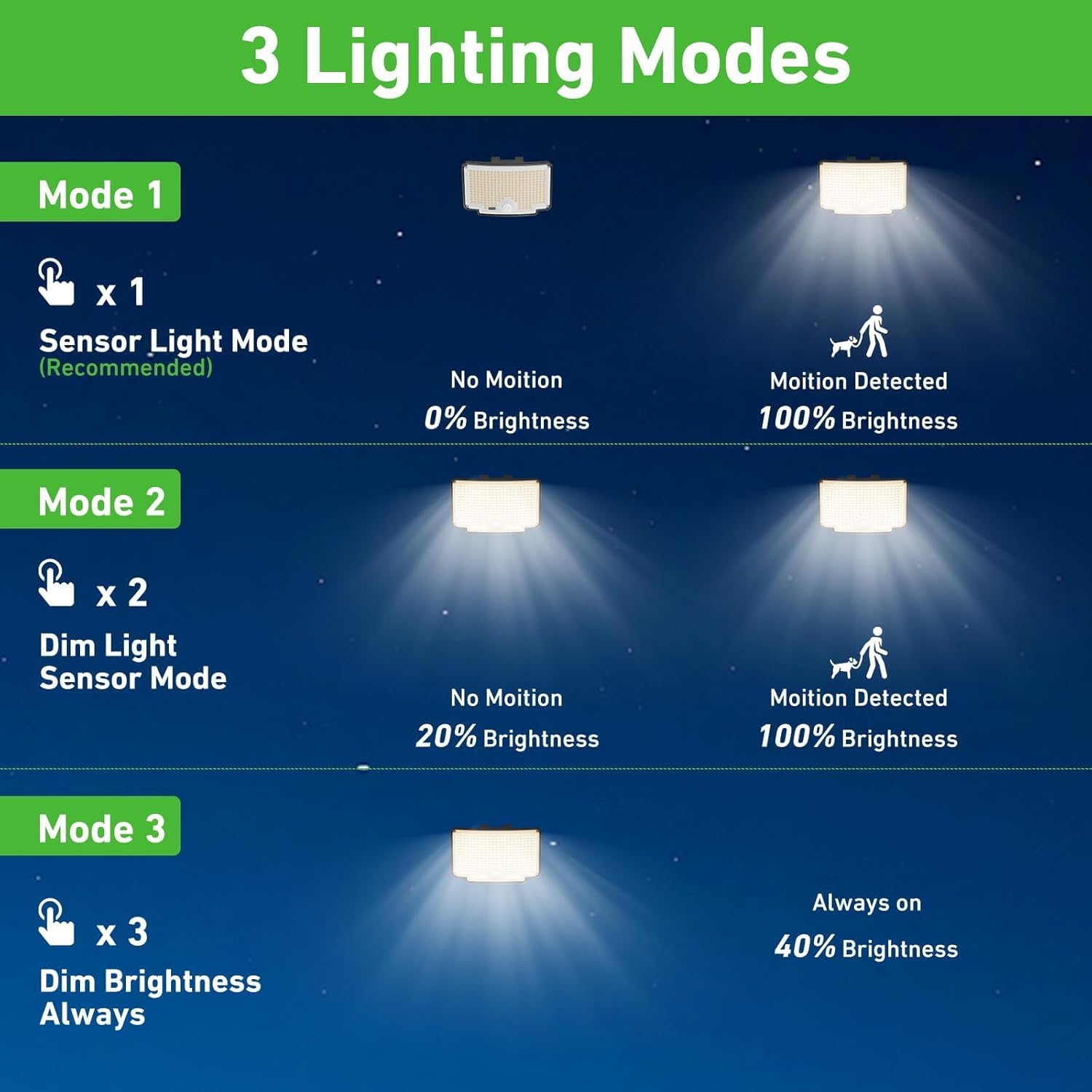
A visual guide detailing the three operational modes: Mode 1 (Sensor Light Mode), Mode 2 (Dim Light Sensor Mode), and Mode 3 (Constant Dim Brightness).
- Mode 1 (Sensor Light Mode - Recommended): The light remains off in the absence of motion. When motion is detected, the light illuminates at 100% brightness. After approximately 15-30 seconds of no motion, it turns off. This mode is energy-efficient and ideal for security lighting.
- Mode 2 (Dim Light Sensor Mode): The light stays on at a dim brightness (e.g., 20%) continuously. When motion is detected, it brightens to 100%. After approximately 15-30 seconds of no motion, it returns to dim brightness. This mode provides ambient lighting with a boost for activity.
- Mode 3 (Constant Dim Brightness): The light remains on at a constant dim brightness (e.g., 40%) throughout the night, regardless of motion. This mode is suitable for continuous ambient lighting.
4.3 Kugwiritsa Ntchito Remote Control
Remote control imakupatsani mwayi kuti:
- Turn the light ON/OFF.
- Select Mode 1, Mode 2, or Mode 3.
Ensure the remote control is pointed towards the light unit for effective communication. The remote range is approximately 10-16.4 feet (3-5 meters).
5. Kusamalira
Regular maintenance helps ensure the longevity and optimal performance of your solar lights.
- Yeretsani Solar Panel: Pukutani solar panel nthawi ndi nthawi ndi chofewa, damp nsalu yochotsa fumbi, litsiro, masamba, kapena matalala. Gulu loyera limatsimikizira kuyamwa kwa dzuwa komanso kuyendetsa bwino.
- Chigawo Chowunikira Choyera: Clean the light's surface and motion sensor regularly to ensure proper operation and light output.
- Onani Malumikizidwe: Ensure all cable connections, especially the 5-meter cord if used, remain secure and free from damage.
- Batri: The internal battery is designed for long-term use. If the light's performance significantly degrades over time, it may indicate the battery is reaching the end of its lifespan. Battery replacement should be performed by qualified personnel if possible, or consider replacing the unit.
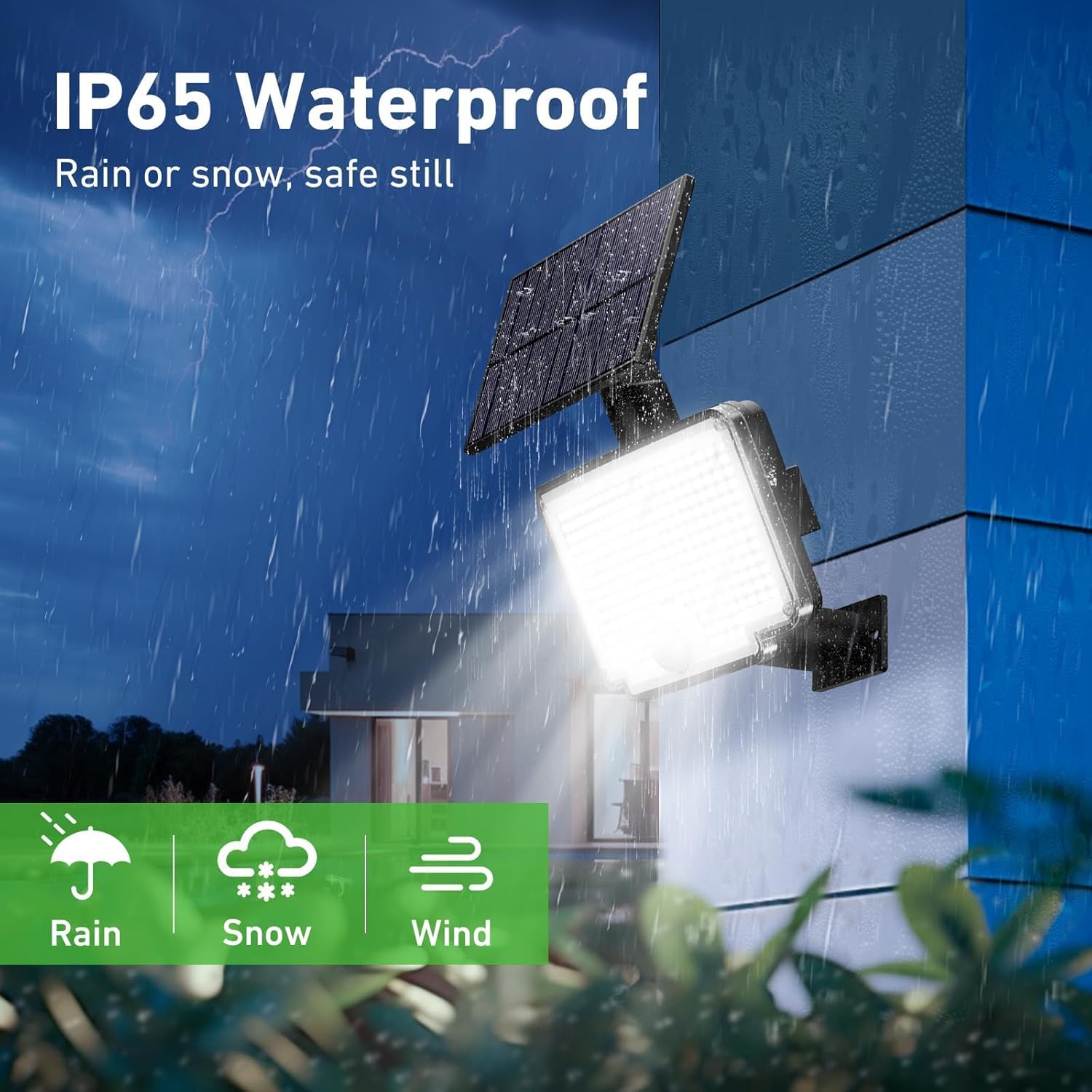
An illustration showcasing the light's IP65 waterproof rating, indicating its resilience against rain, snow, and wind, ensuring safe operation in various weather conditions.
6. Mavuto
If your solar light is not functioning as expected, try the following troubleshooting steps:
| Vuto | Chifukwa Chotheka | Yankho |
|---|---|---|
| Kuwala sikuyatsa usiku. | Kusakwanira kwa mphamvu ya dzuwa. | Ensure the solar panel is in direct sunlight for 6-8 hours daily. Clean the solar panel. |
| Light is dim or only stays on for a short time. | Batire silinaperekedwe mokwanira kapena batire yokalamba. | Relocate the solar panel for better sun exposure. Ensure no obstructions. If the battery is old, its capacity may have decreased. |
| Sensa yoyenda sikugwira ntchito kapena yofewa kwambiri. | Sensor yatsekedwa kapena yolakwika. | Ensure the sensor lens is clean and unobstructed. Verify the light is in Mode 1 or Mode 2 using the remote control. |
| Kuwongolera kutali sikukugwira ntchito. | Battery depleted or obstruction. | Replace the remote control battery. Ensure no objects are blocking the signal path between the remote and the light. |
| Water inside the light unit. | Seal compromise or extreme weather. | While rated IP65, extreme conditions can sometimes affect seals. If water ingress occurs, discontinue use and contact customer support. |
7. Zofotokozera
Below are the technical specifications for the Nipify YHM01C Outdoor Solar Lights:
| Mbali | Kufotokozera |
|---|---|
| Mtundu | Nipify |
| Nambala ya Model | YHM01C |
| Makulidwe azinthu (L x W x H) | 20 x 15 x 5 masentimita |
| Kulemera | 900g pa |
| Mtengo wa IP | IP65 |
| Chiwerengero cha ma LED | 310 |
| Mtundu | Zamakono |
| Kutentha kwamtundu | 6500 Kelvin (Woyera Wozizira) |
| Zakuthupi | Acrylonitrile Butadiene Styrene (ABS) |
| Kuphatikiza Zida | Solar Panel, Remote Control, 5m Cable |
| Max Watts | 1800 miliyoniampere-hour (mAh) (Battery Capacity) |
| Voltage | 12 Volts (DC) |
| Zapadera | Motion Detector, Separate Solar Panel, 210° Wide Angle Lighting |
| Gwero la Mphamvu | Mphamvu ya Dzuwa |
| Luminous Flux | 1000 Lumen |
8. Chitsimikizo ndi Thandizo
Specific warranty information for the Nipify YHM01C Outdoor Solar Lights is not provided in the product data. For any support inquiries, warranty claims, or technical assistance, please contact the seller or manufacturer directly through your purchase platform.