1. Mawu Oyamba
This manual provides comprehensive instructions for the Maxcom Fit FW55 Aurum Pro Smartwatch. It covers essential information regarding product setup, operation, maintenance, and troubleshooting to ensure optimal performance and user experience. Please read this manual carefully before using your device.
2. Zamkatimu Phukusi
Please verify that all items listed below are present in your product package:
- Maxcom Fit FW55 Aurum Pro Smartwatch
- Chingwe chojambulira
- Buku la ogwiritsa (chikalatachi)
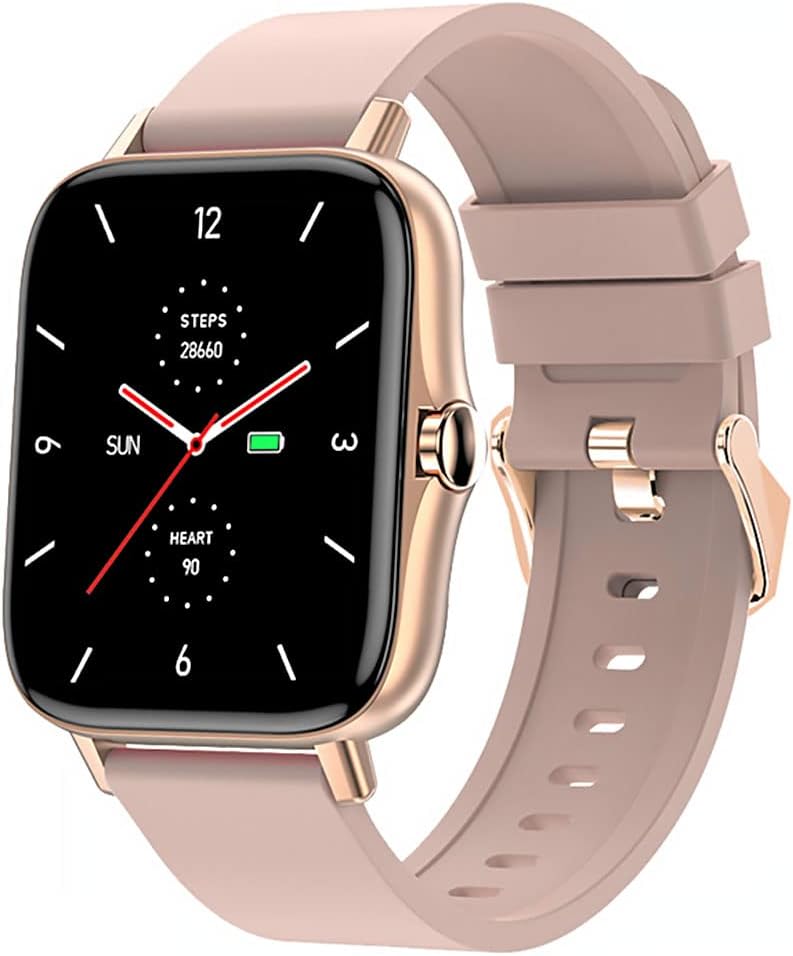
Image 1: Maxcom Fit FW55 Aurum Pro Smartwatch with a pink silicone band. The watch face displays steps, heart rate, and time.
3. Kukhazikitsa
3.1. Kulipiritsa Smartwatch
Before initial use, fully charge your Maxcom Fit FW55 Aurum Pro Smartwatch. Connect the provided charging cable to the charging port on the back of the smartwatch and plug the other end into a standard USB power adapter (not included) or a computer's USB port. The watch display will indicate charging status.
- Ensure the charging pins are clean and properly aligned with the watch's charging contacts.
- Kulipira kwathunthu kumatenga pafupifupi maola 2.
3.2. Kulumikizana ndi Smartphone Yanu
To unlock the full functionality of your smartwatch, you need to pair it with your smartphone via Bluetooth.
- Tsitsani App: Saka the official Maxcom Fit application in your smartphone's app store (iOS App Store or Google Play Store) and install it.
- Yambitsani Bluetooth: Onetsetsani kuti Bluetooth yayatsidwa pa smartphone yanu.
- Tsegulani App: Launch the Maxcom Fit application on your smartphone.
- Onjezani Chipangizo: Follow the in-app instructions to add a new device. Select "FW55 Aurum Pro" from the list of available devices.
- Tsimikizirani Kuyanjanitsa: A pairing request may appear on both your smartphone and the smartwatch. Confirm the pairing on both devices.
Once successfully paired, the smartwatch will synchronize data with your phone, and you can customize settings through the app.
4. Kugwiritsa ntchito wotchi yanzeru
4.1. Kuyatsa/Kuzimitsa
- Yatsani: Press and hold the side button for a few seconds until the Maxcom logo appears.
- Kuzimitsa Mphamvu: From the watch face, swipe down to access quick settings, or navigate to the 'Settings' menu. Select 'Power Off' and confirm. Alternatively, press and hold the side button and select 'Power Off'.
4.2. Basic Navigation
- Zenera logwira: The FW55 Aurum Pro features a 1.7-inch touch screen for intuitive interaction.
- Yendetsani Mmwamba/Pansi: Scroll through notifications, menus, or quick settings.
- Yendetsani Kumanzere/Kumanja: Access different widgets or main functions (e.g., heart rate, activity data).
- Dinani: Sankhani chinthu kapena tsimikizirani kanthu.
- Batani Lambali: Press to return to the watch face or wake the screen. A long press may access power options.
4.3. Zofunika Kwambiri
The Maxcom Fit FW55 Aurum Pro Smartwatch offers a range of features to support your daily activities and health monitoring:
- Kutsata zochitika: Monitors steps taken, distance covered, and calories burned.
- Kuwunika Mtima: Provides real-time heart rate data.
- Kuyang'anira Tulo: Tracks sleep patterns and quality.
- Zidziwitso: Receives alerts for calls, messages, and app notifications from your paired smartphone.
- GPS: Integrated GPS for accurate outdoor activity tracking.
- Mawonekedwe Osintha Mwamakonda Anu: Personalize your watch face through the companion app.

Image 2: Maxcom Fit FW55 Aurum Pro Smartwatch featuring a gold metal mesh band. The watch face displays digital time, steps, and heart rate.
5. Kusamalira
Proper care and maintenance will extend the lifespan of your smartwatch.
- Kuyeretsa: Regularly wipe the watch screen and body with a soft, dry, lint-free cloth. For stubborn dirt, slightly dampen nsalu ndi madzi. Pewani kugwiritsa ntchito mankhwala owopsa kapena zinthu zowononga.
- Kusamalira Lamba: Clean the watch strap according to its material. Silicone straps can be washed with mild soap and water. Metal straps may require specific cleaning agents.
- Pewani Zovuta Kwambiri: Do not expose the smartwatch to extreme temperatures, direct sunlight for prolonged periods, or corrosive liquids.
- Kukanika kwa Madzi: While the watch may have some water resistance, it is not suitable for diving or high-pressure water activities. Refer to the product specifications for detailed water resistance ratings.
6. Mavuto
If you encounter issues with your Maxcom Fit FW55 Aurum Pro Smartwatch, try the following solutions:
- Onerani osayatsa: Onetsetsani kuti wotchi ili ndi chaji chonse. Lumikizani ku charger kwa mphindi zosachepera 30.
- Simungagwirizane ndi foni yamakono:
- Onetsetsani kuti Bluetooth yayatsidwa pa foni yanu ndi wotchi yanu.
- Onetsetsani kuti wotchiyo ili mkati mwa Bluetooth pa foni yanu.
- Yambitsaninso foni yanu ndi wotchi yanu yowonera pa intaneti.
- Try unpairing and re-pairing the device through the app.
- Inaccurate data (steps, heart rate):
- Onetsetsani kuti wotchiyo yavala bwino padzanja lanu, pafupifupi chala chimodzi m'lifupi mwake pamwamba pa fupa ladzanja lanu.
- Yeretsani sensor kumbuyo kwa wotchi.
- Update the companion app to the latest version.
- Zidziwitso sizinalandiridwe:
- Check notification settings in the Maxcom Fit app.
- Ensure your phone's notification permissions are granted to the app.
- Verify that the watch is successfully paired and connected to your phone.
If problems persist, consult the Maxcom support webtsamba kapena kulumikizana ndi kasitomala.
7. Zofotokozera
Below are the technical specifications for the Maxcom Fit FW55 Aurum Pro Smartwatch:
| Mbali | Tsatanetsatane |
|---|---|
| Mtundu | Maxcom |
| Nambala ya Model | FW55 Aurum Pro |
| Kukula kwa Screen | 1.7 inchi |
| Kulumikizana Technology | bulutufi |
| Opanda zingwe Kulankhulana Standard | bulutufi |
| Zida Zogwirizana | Smartphone |
| GPS | Integrated GPS |
| Maonekedwe | Square |
| Omvera Otsatira | Adult Unisex |
| Kuphatikiza Zida | Charger |

Chithunzi 3: Patsogolo view of the Maxcom Fit FW55 Aurum Pro Smartwatch with a pink silicone band, highlighting the square display.
8. Chitsimikizo ndi Thandizo
For warranty information and customer support, please refer to the documentation included with your purchase or visit the official Maxcom webmalo. Sungani umboni wanu wogula kuti mutenge chitsimikizo.
For technical assistance or further inquiries, please contact Maxcom customer service through their official channels.


