Poly Edge E220 IP Desk Phone User Manual
Your guide to setting up and using your Poly Edge E220 IP Desk Phone.
1. Mawu Oyamba
The Poly Edge E220 is a versatile IP desk phone designed for modern office environments, offering advanced communication features. It supports up to 16 lines with 4-line keys and includes integrated Bluetooth for seamless mobile phone and headset pairing. This manual provides detailed instructions for setup, operation, and maintenance of your device.
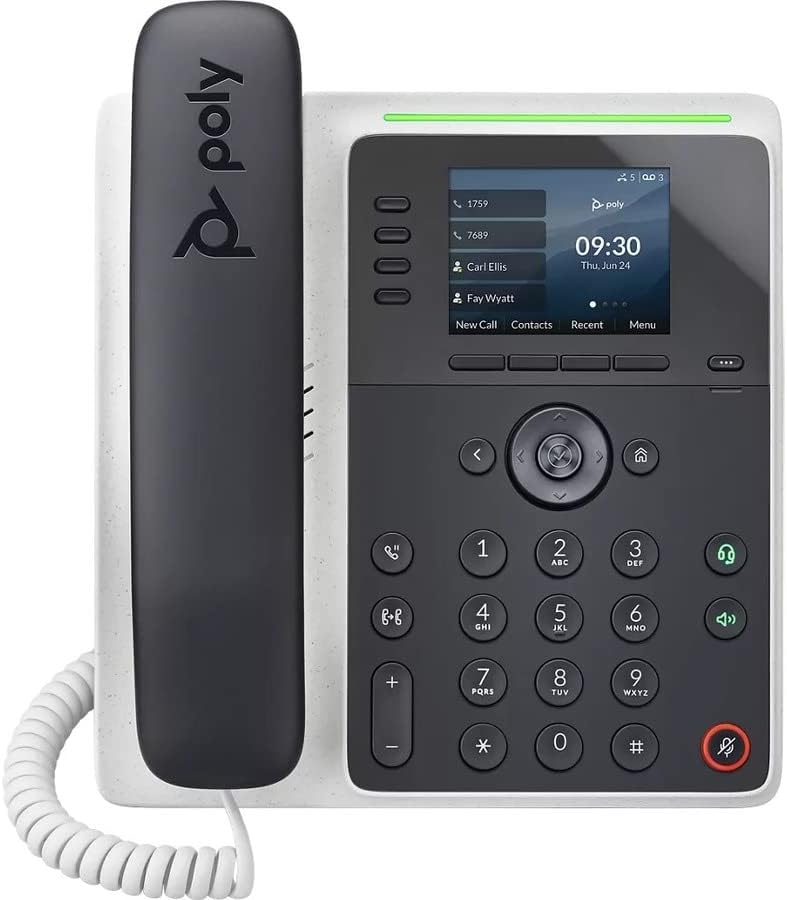
Chithunzi: Patsogolo view of the Poly Edge E220 IP Desk Phone, showcasing its display, keypad, and handset.
2. Zomwe zili mu Bokosi
Chonde onetsetsani kuti zigawo zonse zotsatirazi zikuphatikizidwa mu phukusi lanu:
- Poly Edge E220 IP Desk Phone Unit
- M'manja
- Chingwe cha Handset Coil
- Cat5E Ethernet Cable
- Integrated Wall Mount (pre-attached or separate)
- Base Stand
Note: A power supply is NOT included with this renewed product and must be acquired separately if Power over Ethernet (PoE) is not available.
3. Zinthu Zogulitsa
- 4-Line Keys: Supports up to 16 lines for flexible call management.
- Bluetooth Yophatikizika: Allows for seamless pairing with mobile phones and Bluetooth headsets.
- Chiwonetsero Chokwezeka Kwambiri: Provides clear visibility for call information and menu navigation.
- HD Voice: Delivers superior audio quality for clearer conversations.
- Multi-Line Operation: Manage multiple active calls simultaneously.
- Kukhoza Kuyimba Kwamsonkhano: Supports 3-way conferencing.
4. Kukhazikitsa ndi Kuyika
4.1 Assembling the Phone
- Attach the Base Stand: Align the tabs on the base stand with the slots on the back of the phone unit. Slide the stand into place until it clicks securely.
- Connect the Handset: Plug one end of the coil cord into the handset and the other end into the handset port on the side of the phone unit.
4.2 Kulumikiza Zingwe
Locate the ports on the back and side of the phone unit.

Chithunzi: Mbali view of the Poly Edge E220 IP Desk Phone, highlighting the various connection ports and the adjustable stand.
- Kulumikizana ndi netiweki: Connect one end of the Cat5E Ethernet cable to the LAN port on the phone and the other end to your network switch or router. If your network provides Power over Ethernet (PoE), the phone will power on automatically.
- Power Connection (if no PoE): If PoE is not available, connect an appropriate power adapter (not included) to the power port on the phone and then to a power outlet.
- Optional Headset Connection: If using a wired headset, connect it to the dedicated headset port.
4.3 Mphamvu Yoyamba Yayatsidwa
Once connected, the phone will power on and begin its boot sequence. This may take a few moments. The display will show the Poly logo, followed by network configuration and registration status. If prompted, enter your network credentials or contact your IT administrator for setup assistance.
5. Malangizo Ogwiritsira Ntchito
5.1 Kuyimba ndi Kulandila Mafoni
- Kuyimba foni: Pick up the handset, press the Speaker button, or press a line key. Dial the number and press the Dial soft key or wait for the call to connect.
- Kuyankha Kuyimba: Pick up the handset, press the Speaker button, or press the flashing line key.
- Kuthetsa Kuyimba: Replace the handset, or press the End Call soft key.

Image: A man engaged in a phone call using the Poly Edge E220 IP Desk Phone in a professional office environment.
5.2 Kugwiritsa ntchito Bluetooth
The Poly Edge E220 allows you to pair your mobile phone or Bluetooth headset for enhanced flexibility.
- Yambitsani Bluetooth: Navigate to the phone's menu, select Settings, then Bluetooth, and ensure Bluetooth is enabled.
- Kulunzanitsa Chipangizo: Put your Bluetooth device (mobile phone or headset) into pairing mode. On the phone, select 'Add New Device' or 'Scan for Devices'. Select your device from the list and follow the on-screen prompts to complete pairing.
- Kulumikizana: Once paired, your device should automatically connect when in range. You can manually connect/disconnect from the Bluetooth menu.

Image: A woman working at a desk, utilizing the Poly Edge E220 IP Desk Phone alongside her laptop, demonstrating its integration into a modern workspace.
5.3 Zapamwamba
- Gwirani: During a call, press the Hold soft key to place the call on hold. Press it again to resume.
- Kutumiza: During a call, press the Transfer soft key, dial the new number, and then press Transfer again to complete.
- Msonkhano: During an active call, press the Conference soft key, dial the number of the third party, and then press Conference again to join all parties.
- Mauthenga: Press the Voicemail button to access your voicemail messages.
6. Kusamalira
To ensure the longevity and optimal performance of your Poly Edge E220 IP Desk Phone, follow these maintenance guidelines:
- Kuyeretsa: Use a soft, dry, lint-free cloth to clean the phone's surface and display. For stubborn marks, slightly dampen the cloth with water. Avoid using harsh chemicals, abrasive cleaners, or aerosol sprays.
- Chilengedwe: Keep the phone in a dry environment, away from direct sunlight, excessive heat, and moisture.
- Kuwongolera Ma Chingwe: Ensure all cables are neatly organized and not under strain to prevent damage to ports or cables.
- Zosintha pa Mapulogalamu: Periodically check with your IT administrator for available software updates to ensure your phone has the latest features and security enhancements.
7. Mavuto
If you encounter issues with your Poly Edge E220, refer to the table below for common problems and solutions.
| Vuto | Chifukwa Chotheka | Yankho |
|---|---|---|
| Foni siikuyatsa | No power supply or PoE connection | Ensure Ethernet cable is connected to a PoE-enabled port, or connect a compatible power adapter. |
| Palibe kuyimba | Network issue or phone not registered | Check network cable connection. Verify network status on the phone display. Contact IT support if registration fails. |
| Sindingamve woyimba / Woyimba sandimva | Volume too low, faulty handset/headset, or network audio issue | Adjust volume. Test with speakerphone. Check handset/headset connection. Restart phone. |
| Chipangizo cha Bluetooth sichikugwirizana | Chipangizo sichili munjira yophatikizira kapena chakunja | Ensure Bluetooth device is in pairing mode and within range. Restart both devices. |
If the problem persists after attempting these solutions, please contact your IT department or the product support team for further assistance.
8. Zofotokozera
Key technical specifications for the Poly Edge E220 IP Desk Phone:
| Mbali | Tsatanetsatane |
|---|---|
| Miyeso Yazinthu | 12.1 x 10.3 x 3.4 mainchesi |
| Kulemera kwa chinthu | 2.55 mapaundi |
| Mtundu Wafoni | Foni ya IP yolumikizidwa |
| Gwero la Mphamvu | Corded Electric (Power Supply NOT Included) / Power over Ethernet (PoE) |
| Mtundu Woyimba | Keypad Imodzi |
| Kuyankha System Type | Digital (requires service provider support) |
| Kutha Kuyimba Misonkhano | 3-njira |
| Multiline Operation | Yes, supports up to 16 lines with 4-line keys |
| bulutufi | Integrated for mobile phone and headset pairing |
9. Chitsimikizo ndi Thandizo
As a renewed product, the Poly Edge E220 IP Desk Phone typically comes with a limited warranty provided by the refurbisher or seller. Please refer to your purchase documentation for specific warranty terms and conditions. For technical support, troubleshooting beyond this manual, or warranty claims, please contact the seller or your IT administrator.


