1. Mawu Oyamba
Thank you for choosing the WOOX R4260 Smart Wireless Outdoor Camera. This manual provides comprehensive instructions for the installation, operation, and maintenance of your device. Please read this manual carefully before use to ensure proper functionality and safety. Keep this manual for future reference.
2. Zamalonda Zathaview
2.1 Zamkatimu Phukusi
- WOOX R4260 Smart Wireless Outdoor Camera
- Wokwera Bracket
- Zokwera Zopangira ndi Mapulagi Pakhoma
- USB Charging Chingwe
- Buku Logwiritsa Ntchito
2.2 Zida za Kamera
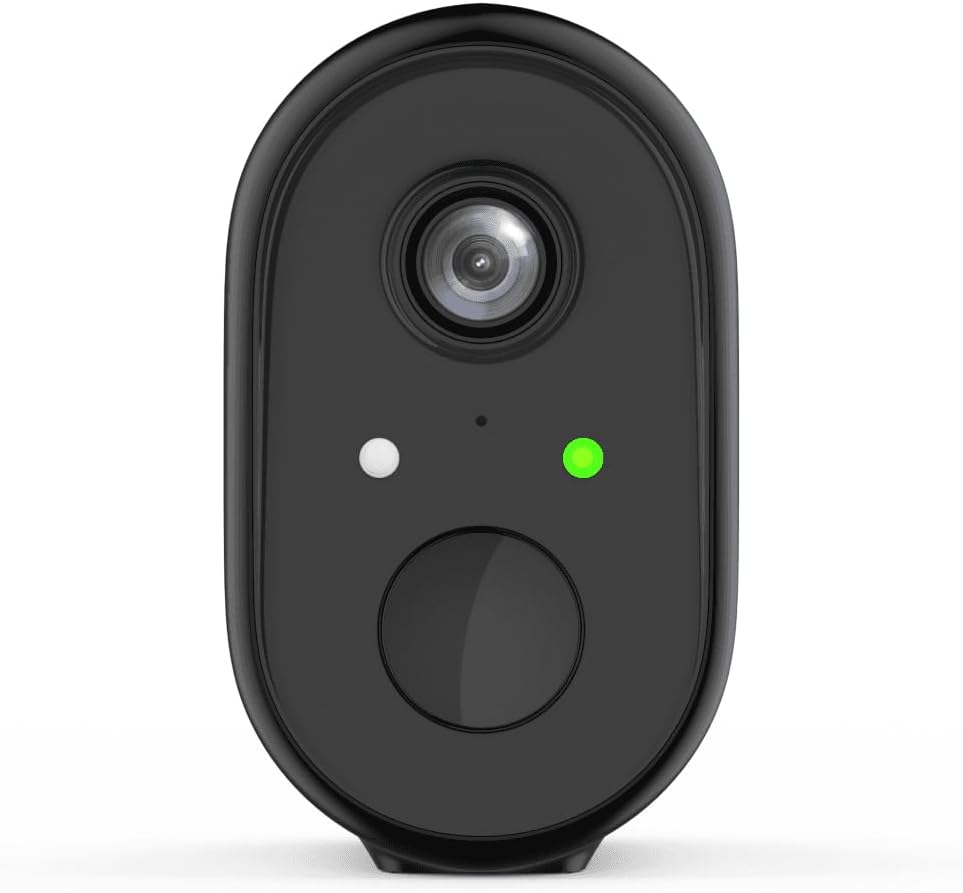
Chithunzi 1: Patsogolo view of the WOOX R4260 camera, highlighting the camera lens, status indicator LED, and the main button/microphone area.

Chithunzi 2: The WOOX R4260 camera attached to its adjustable wall mounting bracket, showing the overall design and mounting mechanism.
- Kamera Kamera: Amajambula vidiyo footage.
- Chikhalidwe cha LED: Indicates camera status (e.g., pairing mode, connected, charging).
- Maikolofoni/Sipika: Kwa njira ziwiri zoyankhulirana zomvera.
- Malo Okwera: Connects to the mounting bracket.
- USB Yoyendetsa Port: For battery charging (usually located on the back or bottom, covered by a rubber flap).
- Bwezerani Batani: Used to reset the camera to factory settings (often near the charging port or under a cover).
3. Kukhazikitsa ndi Kuyika
3.1 Kuthamangitsa Battery
Before initial use, fully charge the camera's built-in lithium-ion battery. Connect the provided USB charging cable to the camera's charging port and a standard 5V USB power adapter (not included). The status LED will indicate charging status (e.g., red for charging, green for fully charged).
3.2 Kutsitsa Mapulogalamu ndi Kupanga Akaunti
Download the "WOOX Home" app from the Apple App Store or Google Play Store. Register for a new account or log in with an existing one.
3.3 Kugwirizanitsa Kamera ndi Pulogalamuyi
- Ensure your smartphone is connected to a 2.4GHz Wi-Fi network. The WOOX R4260 camera supports 2.4GHz Wi-Fi only.
- Open the WOOX Home app and tap the "+" icon to add a new device.
- Select "Security Camera" or the specific camera model (R4260) from the device list.
- Follow the on-screen instructions in the app. This typically involves powering on the camera, pressing the reset button until the status LED blinks rapidly (indicating pairing mode), and scanning a QR code generated by the app with the camera's lens.
- Once connected, the status LED will turn solid green, and the camera will appear in your app.
Note: If pairing fails, ensure your Wi-Fi password is correct and does not exceed 20 characters, as some users have reported issues with longer passwords. Ensure the camera is within range of your Wi-Fi router.
3.4 Kuyika Kwathupi
The WOOX R4260 can be mounted on a wall, ceiling, or tree. Choose a location that provides the desired viewngodya ya ing ndipo ili mkati mwa Wi-Fi.
- Mark the drilling points for the mounting bracket.
- Boolani mabowo ndipo ikani mapulagi a pakhoma ngati atayikidwa pa miyala yamtengo wapatali.
- Mangani bulaketi yoyikira pamwamba pogwiritsa ntchito zomangira zomwe zaperekedwa.
- Gwirizanitsani kamera ku bulaketi yokwera ndikusintha ngodya ngati pakufunika.
- Ensure the camera is securely fastened and has a clear line of sight.
4. Kugwiritsa ntchito Kamera
4.1 Moyo View
Open the WOOX Home app and tap on your R4260 camera to access the live video feed. From here, you can monitor your property in real-time.
4.2 Nyimbo Zanjira ziwiri
The camera features two-way audio. In the live view, tap the microphone icon to speak through the camera's speaker, and listen to audio from the camera's microphone.
4.3 Kuzindikira Kuyenda ndi Zidziwitso
Configure motion detection settings within the WOOX Home app. You can adjust sensitivity, set detection zones, and schedule alert times. When motion is detected, the camera will record a clip and send a notification to your smartphone.
4.4 Video Recording and Storage
The camera supports local storage via a microSD card (not included) and cloud storage (subscription may be required). You can review lolembedwa footagkudzera mu gawo losewerera la pulogalamuyi.
5. Kusamalira
5.1 Kuwongolera Battery
The R4260 is powered by a rechargeable Lithium-ion battery. Monitor the battery level in the WOOX Home app and recharge the camera when the battery is low. Battery life can vary based on usage, temperature, and Wi-Fi signal strength.
5.2 Kuyeretsa
Periodically clean the camera lens with a soft, dry cloth to ensure clear image quality. Do not use harsh chemicals or abrasive materials.
5.3 Zosintha za Firmware
The WOOX Home app will notify you of available firmware updates. It is recommended to keep your camera's firmware updated to ensure optimal performance and security.
6. Mavuto
| Vuto | Njira Yotheka |
|---|---|
| Kamera yalephera kulumikiza ku Wi-Fi. |
|
| Kanema wosawoneka bwino. |
|
| Battery imatha msanga. |
|
| Palibe zidziwitso zozindikira mayendedwe. |
|
7. Zofotokozera
- Chitsanzo: R4260
- Kusintha Kwamavidiyo: 1080p ku
- Effective Video Resolution: 1080
- Kusamvana Kwabwino Kwambiri: 2 megapixels
- Kulumikizana Technology: IEEE 802.11b/g/n, 2.4GHz Wi-Fi / WLAN
- Ukadaulo Wolumikizana Opanda zingwe: WLAN
- Zapadera: Two-way audio, Motion detector
- Kagwiritsidwe: Panja
- Gwero la Mphamvu: Battery powered (2 Lithium-ion batteries included)
- Voltage: 5 volts
- Mphamvu: 5 Watts
- Viewngodya: 110 digiri
- Zofunika: Pulasitiki
- Mtundu: Wakuda
- Makulidwe (L x W x H): 11.5 x 6 x 9.5 masentimita
- Mtundu Wokwera: Wall mount, Ceiling mount, Tree mount
- Mtundu Woyika: Zolowera mkati
- Zida Zogwirizana: Smartphone
- Mtundu Wowongolera: Amazon Alexa (via WOOX Home app integration)
8. Chitsimikizo ndi Thandizo
WOOX products are designed and manufactured to the highest quality standards. For detailed warranty information and technical support, please refer to the official WOOX webtsamba kapena funsani makasitomala awo mwachindunji. Sungani lisiti yanu yogulira ngati umboni wogula.
Wopanga: WOOX


