Zathaview
The SWISSTEN Elegant Bluetooth Headphones are designed for versatile audio playback, offering high-quality sound and multiple connectivity options. These headphones feature Bluetooth wireless connectivity, an integrated FM radio tuner, a microSD card slot for direct music playback, a 3.5mm AUX audio input, and a built-in hands-free microphone. The earcups are pivotable for enhanced comfort during use.

Chithunzi 1: Patsogolo view of the SWISSTEN Elegant Bluetooth Headphones, showcasing kapangidwe kakuda kokongola ndi makutu.
Zamkatimu Phukusi
Mukatsegula phukusi, onetsetsani kuti zigawo zonse zilipo:
- SWISSTEN Elegant Bluetooth Headphones
- USB Charging Chingwe
- 3.5mm Audio Cable (AUX)
- Buku Logwiritsa Ntchito
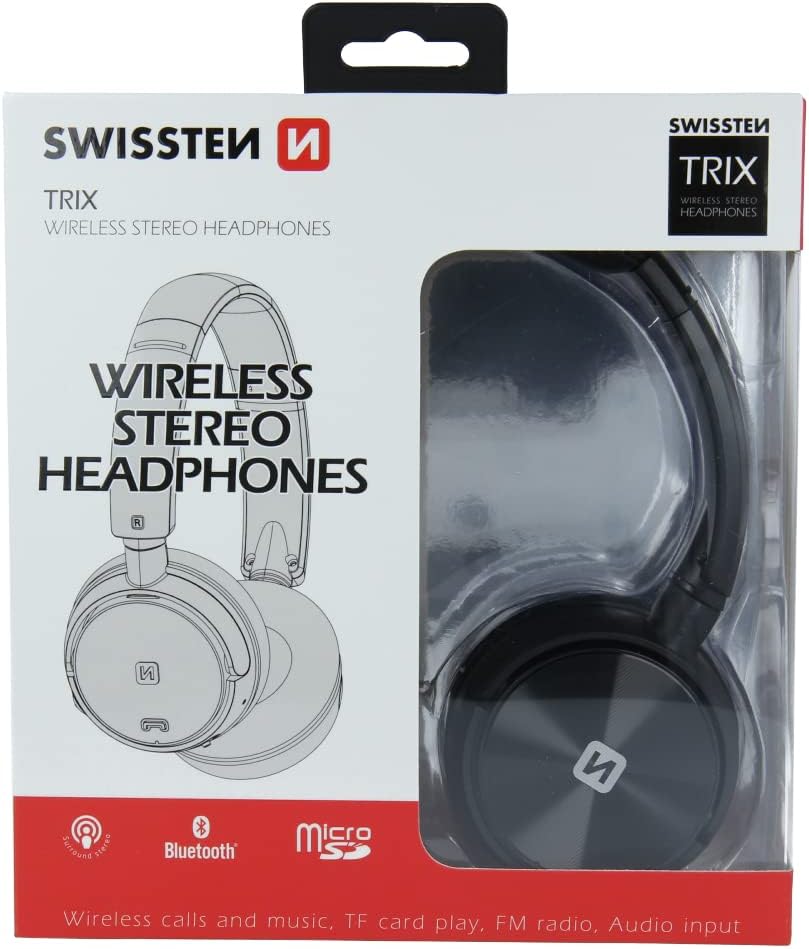
Chithunzi 2: Retail packaging of the SWISSTEN Elegant Bluetooth Headphones, showing the product and key features.
Khazikitsa
Kulipira Ma Headphones
Before first use, fully charge the headphones. Connect the supplied USB charging cable to the micro USB port on the headphones and the other end to a USB power source (e.g., computer USB port, USB wall adapter). The charging indicator light will illuminate during charging and turn off when fully charged. A full charge takes approximately 2 hours.
Kuyatsa/Kuzimitsa
- Kuyatsa: Press and hold the Power button until the indicator light flashes.
- Kuzimitsa: Press ndi kugwira Mphamvu batani mpaka chizindikiro kuwala kuzimitsa.

Chithunzi 3: Pafupi view of the headphone earcup, highlighting the control buttons, charging port, and 3.5mm audio jack.
Malangizo Ogwiritsira Ntchito
Kuyanjanitsa kwa Bluetooth
- Onetsetsani kuti mahedifoni azimitsa.
- Press and hold the Power button for approximately 5-7 seconds until the indicator light flashes blue and red alternately, indicating pairing mode.
- Pachipangizo chanu (foni yam'manja, piritsi, kompyuta), yambitsani Bluetooth ndikusaka zida zomwe zilipo.
- Select "SWISSTEN SW1010" (or similar name) from the list of found devices.
- Mukangogwirizanitsa, kuwala kosonyeza kuwala kudzawala pang'onopang'ono.
Utali wa Bluetooth ndi pafupifupi mamita 10 (mamita 33).
Music Playback (Bluetooth/MicroSD/AUX)
- Mafilimu a Bluetooth: After successful pairing, play music from your connected device. Use the headphone controls for Play/Pause, Next/Previous Track, and Volume adjustment.
- MicroSD Card Mode: Insert a microSD card (up to 32GB) with MP3, WMA, or WAV audio files into the designated slot. The headphones will automatically switch to microSD mode and begin playback.
- Njira ya AUX: Connect one end of the 3.5mm audio cable to the headphone's AUX port and the other end to your audio source. The headphones will automatically switch to AUX mode. Note: In AUX mode, controls on the headphones may be limited; control playback from your audio source.
Ntchito ya FM Radio
- Mphamvu pa mahedifoni.
- Press the Mode button (often labeled 'M' or similar) to switch to FM Radio mode.
- Dinani batani la Play/Imani kamodzi kuti muzitha kujambula zokha ndikusunga ma FM station omwe alipo.
- Use the Next/Previous Track buttons to navigate between saved stations.
The FM frequency range is 87.5-108 MHz.
Kuyimba Mopanda Mmanja
- Yankhani Kuyimba: Dinani batani la Play/Imani kamodzi.
- Malizitsani Kuyimba: Dinani batani la Play/Imani kamodzi pa nthawi yoyimba foni.
- Kanani Kuyimba: Dinani ndikugwira batani la Sewerani / Imani kwa masekondi awiri.
- Imbaninso Nambala Yomaliza: Dinani kawiri batani la Sewerani/Imitsani.

Chithunzi 4: A person wearing the SWISSTEN Elegant Bluetooth Headphones, demonstrating their comfortable fit.
Kusamalira
- Kuyeretsa: Gwiritsani ntchito nsalu yofewa, youma kuyeretsa mahedifoni. Osagwiritsa ntchito zotsukira abrasive kapena solvents.
- Posungira: Sungani mahedifoni pamalo ozizira, owuma kutali ndi dzuwa komanso kutentha kwambiri.
- Kusamalira Battery: Kuti batire lizigwira ntchito nthawi yayitali, pewani kutulutsa batire yonse pafupipafupi. Yatsani mahedifoni nthawi zonse, ngakhale simukugwiritsa ntchito kwa nthawi yayitali.
- Kuwonekera pamadzi: Mahedifoni awa si oteteza madzi. Pewani kukhudzana ndi madzi kapena chinyezi chochuluka.
Kusaka zolakwika
| Vuto | Chifukwa Chotheka | Yankho |
|---|---|---|
| Zomverera m'makutu siziyatsa. | Batire yotsika. | Limbani mahedifoni mokwanira. |
| Sitingathe kulunzanitsa kudzera pa Bluetooth. | Zomvera m'makutu zomwe sizili munjira yophatikizira; chipangizo Bluetooth kuzimitsa; kutali kwambiri ndi chipangizo. | Ensure headphones are in pairing mode (flashing blue/red). Turn on Bluetooth on your device. Move headphones closer to the device (within 10m). |
| Palibe phokoso. | Volume too low; incorrect mode selected; AUX cable not fully inserted. | Increase volume on headphones and connected device. Ensure correct mode (Bluetooth, MicroSD, AUX, FM) is selected. Re-insert AUX cable firmly. |
| Kulandila kwawayilesi koyipa kwa FM. | Chizindikiro chofooka; kusokoneza. | Move to an area with better signal. Re-scan stations. |
Zofotokozera
| Mbali | Tsatanetsatane |
|---|---|
| Nambala ya Model | SW1010 |
| Mtundu wa Bluetooth | V4.2 |
| Anathandiza Bluetooth ovomerezafiles | A2DP, AVRCP |
| Supported Audio Formats (MicroSD) | MP3 (8-320 Kbps), WMA (5-320 Kbps), WAV (16-1536 Kbps) |
| FM Radio Frequency Range | 87.5-108 MHz |
| Spika Diameter | 40 mm |
| Kusokoneza | 32 uwu |
| Kumverera | 108 +/- 3 dB |
| Kuyankha pafupipafupi | 20 - 20,000 Hz |
| Ntchito Range | 10 m |
| Nthawi yolipira | 2 maola |
| Nthawi Yogwira Ntchito | 6 - 8 maola |
| Kulumikizana | Wireless Bluetooth, 3.5mm Jack |
| Zapadera | Microphone included, FM Radio, MicroSD slot |
| Fomu Factor | Over-Ear (Supra-Auriculaire) |
| Zakuthupi | Faux Leather (Simili cuir) |
Chitsimikizo ndi Thandizo
For warranty information and technical support, please refer to the official SWISSTEN webtsamba kapena funsani wogulitsa wanu. Sungani umboni wanu wogula kuti mutenge chitsimikizo.
Wopanga: SWISSTEN
ASIN: B0BC9F9LWM


