1. Mawu Oyamba
This manual provides detailed instructions for the safe and efficient operation of your Pyle PWMA1299A 12-inch Portable Wireless Bluetooth Speaker System. Please read this manual thoroughly before using the device and retain it for future reference. This system is designed for versatile audio playback and amplification, featuring Bluetooth connectivity, USB/Micro SD card readers, FM radio, and microphone inputs.
2. Malangizo a Chitetezo
- Osayika gawoli ku mvula kapena chinyezi kuti mupewe ngozi zamoto kapena zoopsa.
- Do not open the cabinet. There are no user-serviceable parts inside. Refer all servicing to qualified personnel.
- Onetsetsani mpweya wabwino. Musatseke mipata ya mpweya wabwino.
- Avoid placing the unit near heat sources such as radiators, heat registers, stoves, or other apparatus that produce heat.
- Tetezani chingwe chamagetsi kuti chisayendetsedwe kapena kukanikizidwa, makamaka pamapulagi, zotengera zosavuta, komanso pomwe amatuluka pazida.
- Chotsani zida panthawi yamphezi kapena ngati simunagwiritse ntchito kwa nthawi yayitali.
- Gwiritsani ntchito zomata / zowonjezera zokha zomwe wopanga anena.
- Dispose of batteries properly. Do not expose batteries to excessive heat.
3. Zamkatimu Phukusi
Onetsetsani kuti zinthu zonse zilipo mu phukusi:
- Pyle PWMA1299A Portable PA Speaker System
- (2) Ma maikolofoni Opanda zingwe
- Chingwe Chamagetsi
- Kuwongolera Kwakutali

Image: The Pyle PWMA1299A speaker system, shown with its included two wireless handheld microphones and remote control. The speaker features a retractable handle and wheels for portability.
4. Zinthu Zogulitsa
- Compact and Portable Design: Features a convenient carry handle and rolling wheels for easy transport.
- Kukhamukira kwa Bluetooth Opanda zingwe: Connects to smartphones, tablets, laptops, and other Bluetooth-enabled devices.
- Battery Yomangidwanso: Provides up to 3+ hours of operation on a single charge.
- Wailesi ya FM: Integrated FM tuner with a digital LED display.
- USB Flash & Micro SD Memory Card Readers: Supports MP3 digital audio file kusewera.
- Audio Recording Function: Allows recording audio directly to USB/Micro SD.
- Zolowetsa Maikolofoni: Includes 1/4'' microphone input and support for two wireless microphones.
- Aux (3.5mm) Input Jack: Polumikiza zida zomvera zakunja.
- Full Range Stereo Sound: Equipped with a 12'' mid-range speaker and a 3'' tweeter for clear audio.
- Adjustable Audio Controls: Features Echo, Bass, and Volume adjustments.
- Karaoke Microphone Talk-Over Mode: Automatically lowers background music when microphone is in use.

Chithunzi: Kuphulika view of the speaker's internal components, highlighting the 12-inch mid-range speaker and the 3-inch tweeter, which contribute to the system's sound reproduction.
5. Kukhazikitsa
5.1 Kulipira Koyamba
Before first use, fully charge the speaker's built-in rechargeable battery. Connect the power cable to the AC input on the rear panel of the speaker and plug it into a standard wall outlet (120/240V). The charging indicator light will illuminate. Charging typically takes several hours. Once fully charged, the indicator may change color or turn off, depending on the model. A full charge provides approximately 3+ hours of battery life.

Image: The rear control panel of the Pyle speaker, showing various inputs and controls, including the power input for charging the internal battery.
5.2 Kuyatsa/Kuzimitsa
Locate the power switch on the rear panel of the speaker. Flip the switch to the "ON" position to power on the unit. The digital LED display will light up. To power off, flip the switch to the "OFF" position. It is recommended to turn off the power with the ON/OFF switch when not in use to prevent battery damage from standby mode.
6. Malangizo Ogwiritsira Ntchito
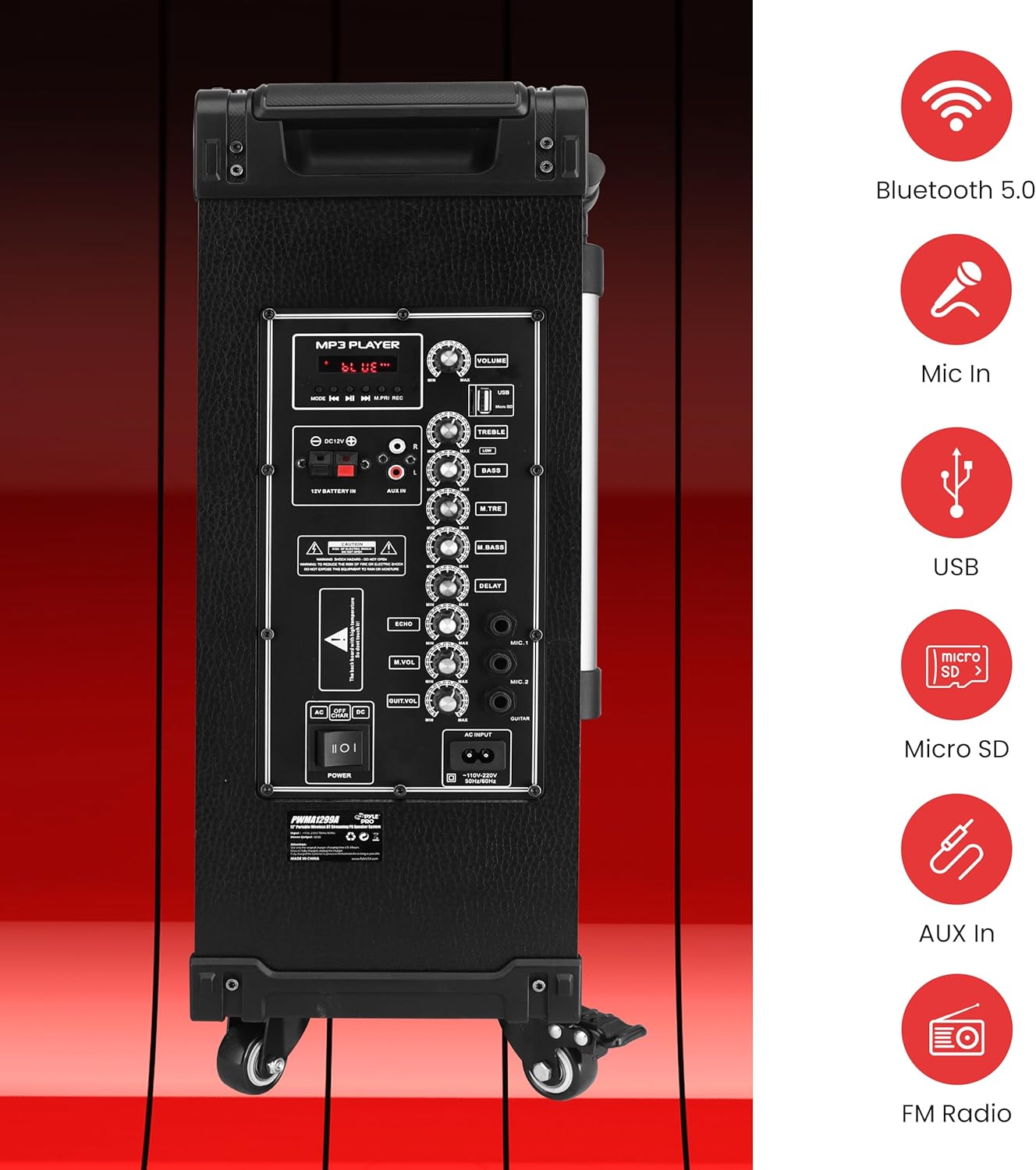
Chithunzi: Mwatsatanetsatane view of the speaker's rear control panel, illustrating the layout of the MP3 player section, volume and tone controls, microphone inputs, and auxiliary connections.
6.1 Kulumikizana kwa Bluetooth
- Mphamvu pa wokamba nkhani.
- Press the "MODE" button on the control panel or remote control until "BLUE" appears on the digital LED display, indicating Bluetooth mode.
- Pachipangizo chanu cholumikizidwa ndi Bluetooth (foni yam'manja, piritsi, ndi zina zambiri), yatsani Bluetooth ndikufufuza zida zomwe zilipo.
- Select "PYLE" from the list of devices.
- Once paired, the speaker will emit a confirmation tone, and you can begin streaming audio wirelessly. The Bluetooth wireless range is approximately 33+ feet.
The Pyle speaker supports Bluetooth version 5.0 for stable wireless connections.
Kusewerera kwa USB/Micro SD kwa 6.2
- Ikani USB flash drive kapena Micro SD card mu malo ogwirizana pa control panel.
- The speaker will automatically switch to USB/SD mode and begin playing MP3 files. If it does not switch automatically, press the "MODE" button to select USB/SD mode.
- Use the playback controls (Play/Pause, Next, Previous) on the control panel or remote control to manage your music.
6.3 Wailesi ya FM
- Press the "MODE" button until "FM" appears on the digital LED display.
- Press and hold the Play/Pause button to initiate an automatic scan for FM stations. The speaker will save all found stations.
- Use the Next/Previous buttons to navigate through the saved FM stations.
6.4 Kugwiritsa Ntchito Maikolofoni
The system includes two wireless handheld microphones and a 1/4'' wired microphone input.
- Maikolofoni Opanda zingwe: Ensure the wireless microphones have fresh 'AA' batteries (2 per microphone). Power on the microphones. They should automatically connect to the speaker.
- Maikolofoni Yawaya: Plug a 1/4'' microphone into the "MIC IN" jack on the control panel.
- Adjust the "MIC VOL" knob to control the microphone volume.
- Use the "ECHO", "M.BASS" (Mic Bass), and "M.TRE" (Mic Treble) knobs to fine-tune the microphone's sound.
- The Karaoke Microphone Talk-Over Mode automatically lowers background music when you speak into the microphone.
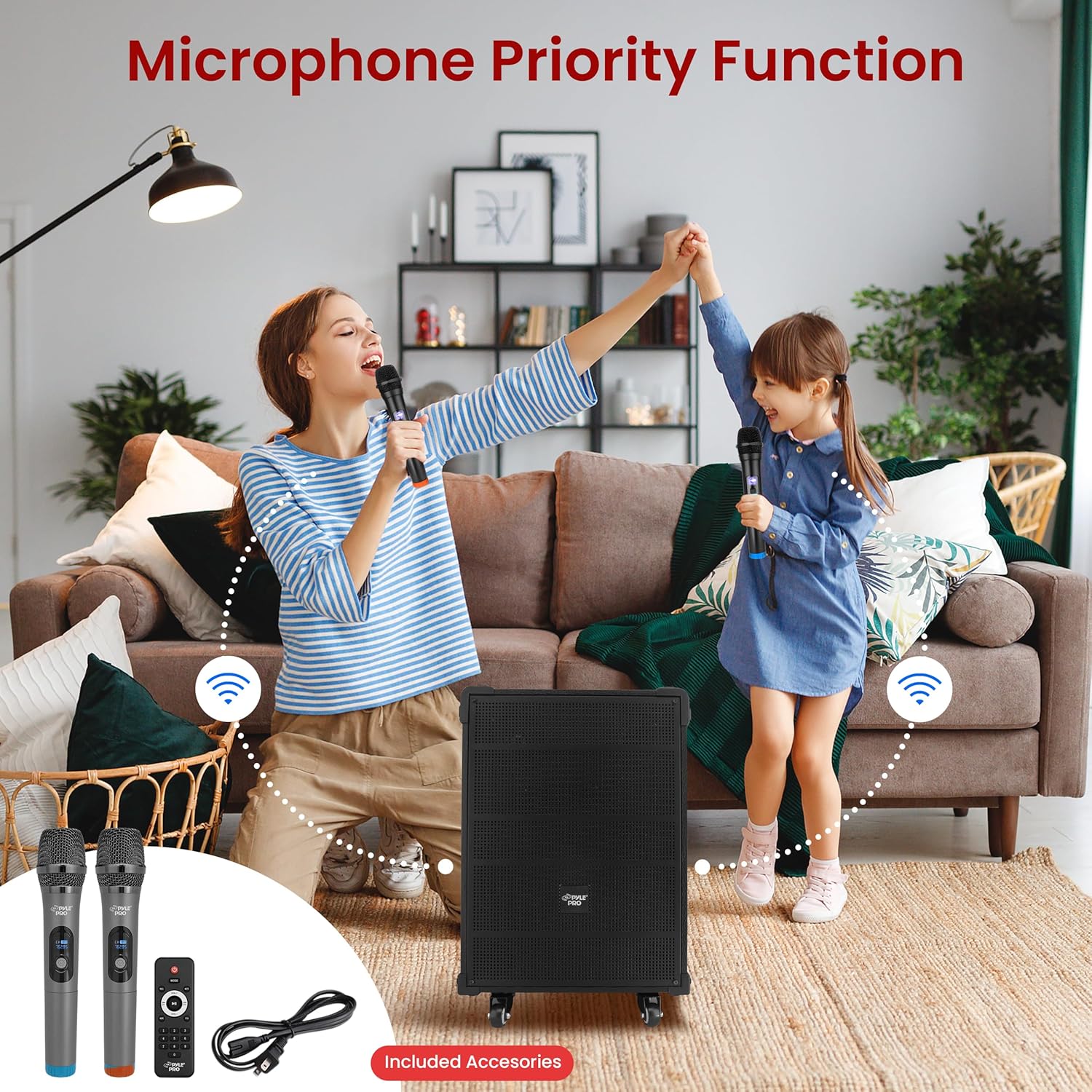
Image: Two individuals using the wireless microphones with the Pyle speaker system, demonstrating its use for vocal performances or public speaking.
6.5 Audio Recording Function
To record audio from the microphone or auxiliary input directly to a USB drive or Micro SD card:
- Ensure a USB drive or Micro SD card is inserted into the speaker.
- Connect your microphone or auxiliary device.
- Press the "REC" button on the control panel or remote control to start recording.
- Press "REC" again to stop recording. The recorded file will be saved to the USB drive or Micro SD card.
6.6 Aux (3.5mm) Input
Connect external audio devices (e.g., MP3 players, CD players) using a 3.5mm audio cable to the "AUX IN" jack on the control panel. Press the "MODE" button to select AUX input mode.
6.7 Control Panel Yathaview
The rear control panel features various knobs and buttons for adjusting audio settings:
- VOLUMI: Master volume control for overall sound output.
- KUKHALA: Amasintha momwe mawu amayankhidwira pafupipafupi.
- BASS: Amasintha mayankho otsika.
- ECHO: Imawongolera mphamvu ya echo ya maikolofoni.
- MIC VOL: Adjusts the volume of connected microphones.
- M.BASS: Adjusts the bass for microphones.
- M.TRE: Adjusts the treble for microphones.
- KUCHEDWA: Controls the delay effect for microphones.
7. Kusamalira
- Kuyeretsa: Gwiritsani ntchito nsalu yofewa komanso youma kuti muyeretse kunja kwa sipika. Musagwiritse ntchito zotsukira kapena zosungunulira.
- Kusamalira Battery: To prolong battery life, fully charge the unit before storing it for extended periods. Avoid completely draining the battery frequently.
- Posungira: Sungani cholankhulira pamalo ozizira, ouma kutali ndi kuwala kwa dzuwa ndi kutentha kwambiri.
8. Mavuto
| Vuto | Chifukwa Chotheka | Yankho |
|---|---|---|
| Palibe mphamvu | Battery is depleted; Power cable not connected; Power switch is off. | Charge the battery; Ensure power cable is securely connected and plugged into a live outlet; Turn the power switch to "ON". |
| Palibe kutulutsa mawu | Volume is too low; Incorrect input mode selected; Audio cable not connected properly. | Increase the master volume; Press "MODE" to select the correct input (Bluetooth, USB, SD, FM, AUX); Check audio cable connections. |
| Bluetooth sikulumikizana | Speaker not in Bluetooth mode; Device too far; Device already connected to another speaker. | Ensure speaker is in Bluetooth mode ("BLUE" on display); Move device closer to speaker; Disconnect from other Bluetooth devices. |
| Maikolofoni sikugwira ntchito | Microphone volume too low; Wireless microphone batteries depleted; Wired microphone not connected. | Increase "MIC VOL" knob; Replace 'AA' batteries in wireless microphones; Ensure wired microphone is securely plugged into "MIC IN". |
If you experience issues with charging, ensure the power cable is firmly connected to both the speaker and a working power outlet. If the issue persists, consult the support section.
Video: This video demonstrates the Pyle 12'' Portable Wireless Bluetooth Speaker system, showcasing its features and portability. It provides a visual overview of the product's design and functionality.
9. Zofotokozera
| Mbali | Tsatanetsatane |
|---|---|
| Nambala ya Model | PWMA1299A |
| MAX Power Output | 800 Watt |
| Sound System | 12'' Mid-Range Speaker + 3'' Tweeter |
| Kusokoneza | 4 ohm |
| Chiwerengero cha S/N | 60db |
| Mtundu wa Bluetooth | 5.0 |
| Bluetooth Wireless Range | 33'+ Ft. |
| Battery Yomangidwanso | 12V/7AH Lead-Acid Battery |
| Moyo wa Battery | Mpaka 3+ Maola |
| Magetsi | 120/240V |
| Mic Nominal Current Drain | <100mAh |
| Microphone Battery Requirement | (2) x 'AA' Batteries (Each) |
| Makulidwe azinthu (L x W x H) | mainchesi 18.50'' x 11.22'' x 25.59'' |
| Kulemera kwa chinthu | 28.3 mapaundi |
| UPC | 842893147017 |
10. Chitsimikizo ndi Thandizo
Pyle products are designed for reliability and performance. For warranty information, technical support, or service inquiries, please refer to the official Pyle webtsamba kapena funsani dipatimenti yawo yothandizira makasitomala. Sungani risiti yanu yogulira ngati umboni wa kugula kwa madandaulo a chitsimikizo.
Kuti mumve zambiri zothandizira komanso zambiri zamalonda, pitani ku Sitolo ya Pyle pa Amazon.


