1. Mawu Oyamba
This manual provides essential information for the safe and efficient operation of your WZRELB 3000W Pure Sine Wave Power Inverter. This device converts 48V DC power to 120V AC power, suitable for various applications including RVs, trucks, off-grid solar systems, and emergency household power backup. Please read this manual thoroughly before installation and use.
2. Zambiri Zachitetezo
Failure to follow these safety instructions may result in serious injury or damage to the inverter and connected equipment.
- Do not connect the inverter directly to grid power. This can cause severe damage to the inverter and pose an electrical hazard.
- Onetsetsani polarity yolondola. Reverse connection of positive and negative terminals is strictly forbidden and will damage the unit.
- Avoid overloading the inverter. For inductive loads (e.g., motors, refrigerators), select an inverter with a continuous power rating 3-7 times higher than the appliance's wattage. For refrigerators, a 10 times higher power inverter is recommended.
- Proper power-up and shut-down sequence: Turn off the load first, then turn off the inverter. When powering on, turn on the inverter first, then turn on your loads. This prevents unstable output during the initial seconds due to the soft start function.
- Use standard battery cables. Using non-standard or undersized cables may prevent the inverter from delivering full output.
- Kuyika pansi: Ensure proper grounding to protect against electrical leakage.
- Kutentha: The intelligent cooling fan activates when the internal temperature exceeds 50°C (122°F) to prevent overheating.
3. Zamkatimu Phukusi
Onetsetsani kuti zinthu zonse zilipo mu phukusi:
- WZRELB 3000W 48VDC Pure Sine Wave Power Inverter
- Inverter Connection Cables (Red and Black)
- Ma Fuse Opanda

Image: WZRELB 3000W Pure Sine Wave Power Inverter with its connection cables and spare fuses.
4. Zinthu Zogulitsa
- Pure Sine Wave Output: Delivers 3000 watts continuous, stable 120V AC power from 48V DC input, with a 6000W peak capacity. Ideal for sensitive electronics.
- Zosankha Zambiri Zotulutsa: Features two 120VAC outlets (US type), two 2.4A USB ports, and one heavy-duty 120VAC 25Amp hardwire terminal.
- Chitetezo Chokwanira: Includes protection against over voltage, voltage, overload, short circuit, over heat, reverse polarity (via fuse), and ground leakage.
- Chiwonetsero cha Digital LED: Monitors both DC input voltage ndi AC kutulutsa voltage in real-time for clear power usage tracking.
- Kuziziritsa Moyenera: Equipped with an intelligent cooling fan that activates automatically when the internal temperature reaches 50°C (122°F).
- Compact Design: Lightweight and small-sized, suitable for various installations.
5. Chithunzi cha Zamalonda ndi Zigawo
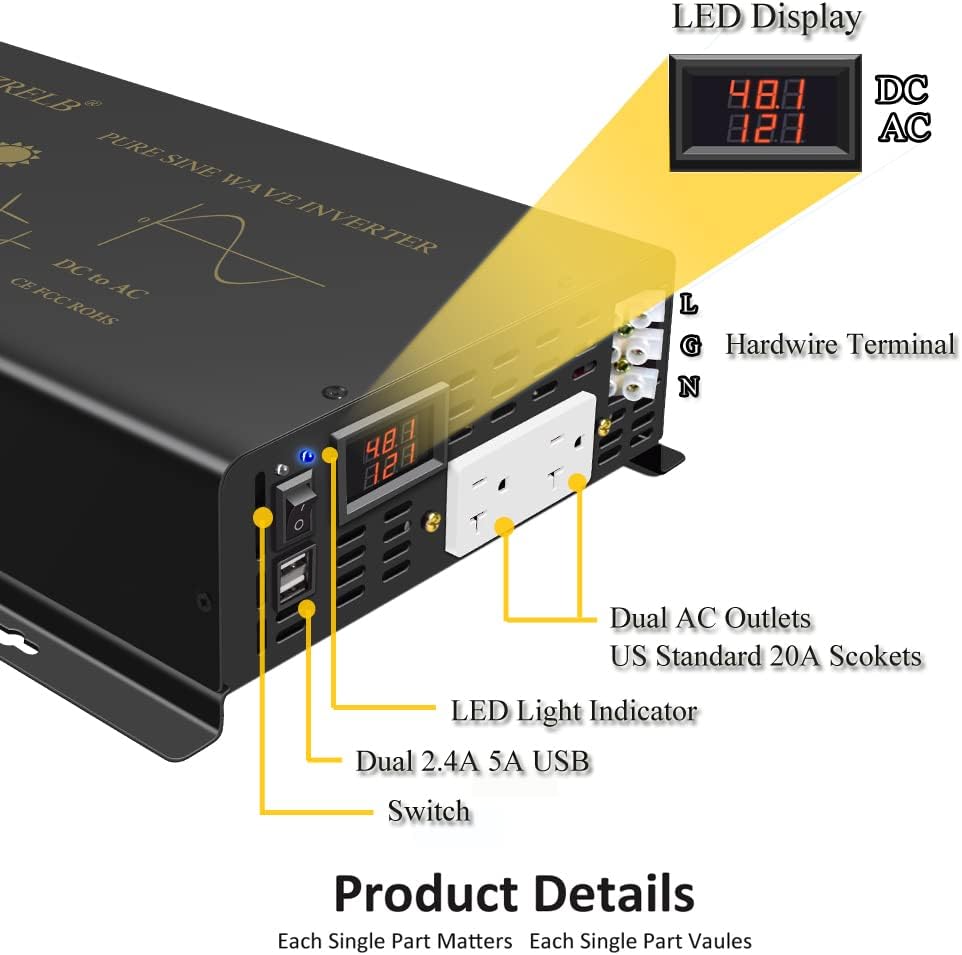
Chithunzi: Patsogolo view of the inverter highlighting the LED Display, Hardwire Terminal, Dual AC Outlets, Dual 2.4A USB Ports, Switch, and LED Light Indicator.

Image: Detailed front panel view showing the DC input volt display, 2.4A 5V USB ports, Power Switch, AC output volt display, AC output sockets (US standard 20A), and AC output wire terminal.
Zigawo Zofunikira:
- Kuwonetsera kwa LED: Shows DC input voltage ndi AC kutulutsa voltage.
- Hardwire Terminal: For direct wiring of high-power AC loads (L, N, G).
- Dual AC Outlets: Standard US 20A sockets for connecting AC appliances.
- Doko Lachiwiri la USB: 2.4A 5V for charging USB-powered devices.
- Kusintha Kwamphamvu: Imalamulira mphamvu ya inverter.
- Chizindikiro cha Kuwala kwa LED: Amapereka ndemanga pa momwe zinthu zilili.
- Mafani Ozizira: Located at the rear for heat dissipation.
6. Kuyika
Proper installation is crucial for the inverter's performance and safety. Consult a qualified electrician if you are unsure about any steps.
6.1 Kukwera
- Mount the inverter in a dry, well-ventilated area, away from direct sunlight, heat sources, and flammable materials.
- Ensure adequate clearance around the inverter for proper airflow, especially around the cooling fans.
- Securely fasten the inverter to a stable surface using appropriate mounting hardware.
6.2 DC Input Connection (48V)
- Connect the supplied red cable to the positive (+) terminal of your 48V battery bank and the positive (+) terminal on the inverter.
- Connect the supplied black cable to the negative (-) terminal of your 48V battery bank and the negative (-) terminal on the inverter.
- Ensure all connections are tight and secure to prevent loose contacts and voltage madontho.
- Zofunika: Double-check polarity before making final connections. Reverse polarity will damage the inverter.
6.3 AC Output Connection (120V)
- Malo Okhazikika: Plug your 120V AC appliances directly into the dual AC outlets.
- Hardwire Terminal: For permanent or high-power installations, connect your AC wiring to the hardwire terminal (L for Live, N for Neutral, G for Ground). Ensure correct wiring and consult local electrical codes.
7. Ntchito
7.1 Kuyambitsa Inverter
- Ensure all DC input connections are secure and correct.
- Ensure no AC loads are connected or turned on.
- Flip the power switch on the inverter to the 'ON' position. The LED display should illuminate, showing DC input voltage ndi AC kutulutsa voltage.
- Once the inverter is stable (after a few seconds), you can connect and turn on your AC loads one by one.
7.2 Shutting Down the Inverter
- Turn off all connected AC loads.
- Unplug AC appliances from the outlets or disconnect from the hardwire terminal.
- Flip the power switch on the inverter to the 'OFF' position.
8. Kusamalira
- Regularly inspect all electrical connections for tightness and corrosion.
- Keep the inverter's ventilation openings clear of dust and debris to ensure proper cooling.
- Clean the exterior of the inverter with a dry, soft cloth. Do not use liquids or abrasive cleaners.
- Check the fuses periodically. Spare fuses are provided for replacement if needed.
9. Mavuto
| Vuto | Chifukwa Chotheka | Yankho |
|---|---|---|
| Palibe Kutulutsa kwa AC | Inverter is off; Low DC input voltage; Overload; Short circuit; Blown fuse. | Turn on inverter; Check battery voltage; Reduce load; Check for short circuits; Replace fuse. |
| Nyali yofiyira ikuthwanima | Lowetsani voltage is slightly high. | Monitor input voltage; Ensure battery charging system is regulated. |
| Kutsika Voltage Alarm (43V-45V) | Mphamvu ya batritagndi low. | Recharge kapena m'malo mabatire. |
| Inverter shuts down (Low Voltage Shut Down: 41V-43V) | Mphamvu ya batritage ndi wotsika kwambiri. | Immediately recharge or replace batteries. |
| Overload Shut Down | Connected load exceeds inverter's capacity. | Reduce load; Manually restart the inverter. |
| Pa Voltage Shut Down (61.2V) | Kuyika kwa DC voltage ndiokwera kwambiri. | Check battery charging system and voltage owongolera. |
| Cooling fan not running | Normal operation if temperature is below 50°C. Fan failure if temperature is high. | No action needed if cool. If hot and fan is off, contact support. |
10. Zofotokozera
| Parameter | Mtengo |
|---|---|
| Chitsanzo | U5-300048 |
| Mphamvu Yopitiriza | 3000 Watts |
| Peak Power | 6000 Watts |
| Kulowetsa DC Voltage | 48V DC |
| DC Input Range | 42V - 60V |
| Kutulutsa kwa AC Voltage | 120V AC |
| AC Kutulutsa pafupipafupi | 60Hz pa |
| Waveform | Mafuta Oyera |
| Kuchita bwino | 85% - 90% |
| Malo ogulitsa AC | Dual US Type (20A) |
| Madoko a USB | 2 x 2.4A (5V) |
| Hardwire Terminal Capacity | 25 Amp Max |
| Kutsika Voltagndi Alamu | 43V - 45V |
| Kutsika Voltage Shut Down | 41V - 43V |
| Pa Voltage Shut Down | 61.2V |
| Kuziziritsa | Intelligent Cooling Fan (activates > 50°C) |
| Miyeso Yazinthu | 16.2 x 9.7 x 3.7 mainchesi |
| Kulemera kwa chinthu | 3.2 pawo |
| Wopanga | Yueqing Reliable Electric co.,ltd |
11. Chitsimikizo ndi Thandizo
WZRELB provides a 12 miyezi chitsimikizo for this product. For technical assistance, troubleshooting, or warranty claims, please contact customer service.
Kulumikizana ndi Makasitomala:
Imelo: info@powerreliable.com
Please have your model number (U5-300048) and purchase information ready when contacting support.


