1. Mawu Oyamba
This manual provides detailed instructions for the setup, operation, and maintenance of your ITECH Fusion 2 S Smartwatch and accompanying Wireless Headphones. The ITECH Fusion 2 S is designed to help you monitor your health and fitness goals, offering features such as heart rate tracking, step counting, sleep monitoring, and multi-sport modes. The included wireless headphones provide an integrated audio experience.
2. Zamkatimu Phukusi
Chonde tsimikizirani kuti zinthu zonse zilipo mu phukusi lanu:
- ITECH Fusion 2 S Smartwatch
- Mahedifoni opanda zingwe
- USB Charging Cable (for smartwatch)
- USB Charging Cable (for headphones)
- Buku la ogwiritsa (chikalatachi)

Image: The ITECH Fusion 2 S Smartwatch and Wireless Headphones displayed within their retail packaging.
3. Chipangizo Overview
3.1. ITECH Fusion 2 S Smartwatch

Image: The ITECH Fusion 2 S Smartwatch with a grey camouflage band shown alongside the matching wireless headphones.
The smartwatch features a touch screen display, a side button for navigation, and sensors on the rear for health monitoring. The display shows time, date, activity data, and notifications.

Image: A close-up of the ITECH Fusion 2 S Smartwatch display, highlighting features such as heart rate monitor, apps and notifications, multi-sports modes, water resistance, calorie tracker, music remote, pedometer, sleep monitor, hydration reminder, and extended 14-day battery life.
3.2. Wireless Headphones
The wireless headphones are over-ear style with cushioned earcups and an adjustable headband. Controls for audio playback and calls are located on the earcup.

Chithunzi: Mbali view of the ITECH Wireless Headphones, illustrating features like powerful sound quality, convenient controls, comfort for hours, and a go-anywhere design.

Chithunzi: Mwatsatanetsatane view of the ITECH Wireless Headphones, emphasizing noise isolating fit, built-in microphone, Bluetooth wireless technology, and up to 8 hours of playback.

Image: A diagram of the ITECH Wireless Headphones highlighting the flexible headband, comfortable ear cushion, foldable design, and convenient controls, along with key technical specifications.
4. Kukhazikitsa
4.1. Kulipiritsa Zipangizo Zanu
Before first use, fully charge both your smartwatch and wireless headphones.
- Smartwatch: Connect the USB charging cable to the charging port on the back of the smartwatch and to a USB power source. The battery icon on the screen will indicate charging status.
- Wireless Headphones: Connect the USB charging cable to the charging port on the headphones and to a USB power source. An indicator light will show charging status and turn off when fully charged.
4.2. Kuyatsa/Kuzimitsa
- Smartwatch: To power on, press and hold the side button until the screen illuminates. To power off, navigate to the 'Settings' menu on the smartwatch, then select 'Power Off'.
- Wireless Headphones: To power on, press and hold the power button until the indicator light flashes. To power off, press and hold the power button again until the indicator light turns off.
4.3. Pairing the Smartwatch with Your Smartphone
The ITECH Fusion 2 S Smartwatch is compatible with both iPhone and Android devices.
- Koperani ndi iTECH Wearables app kuchokera ku Apple App Store kapena Google Play Store.
- Onetsetsani kuti Bluetooth yayatsidwa pa smartphone yanu.
- Open the iTECH Wearables app and follow the on-screen instructions to create an account and pair your smartwatch.
- The app will guide you through connecting the smartwatch via Bluetooth. Confirm the pairing request on both your phone and smartwatch.
4.4. Pairing the Wireless Headphones
- Onetsetsani kuti mahedifoni azimitsa.
- Dinani ndikugwira batani lamphamvu mpaka kuwala kowunikira kukuwalira mwachangu, kuwonetsa njira yophatikizira.
- On your smartphone or other Bluetooth-enabled device, go to Bluetooth settings and search for available devices.
- Select "ITECH Headphones" (or similar name) from the list to connect. The indicator light will change to a steady blue when successfully paired.
5. Kugwiritsa ntchito wotchi yanzeru
5.1. Kuyenda
- Zenera logwira: Yendetsani kumanzere/kumanja, mmwamba/pansi kuti muyende m'mamenyu ndi zinthu zina. Dinani kuti musankhe.
- Batani Lambali: Dinani kuti mubwerere ku chinsalu chakunyumba kapena kudzutsa chipangizocho.
5.2. Nkhope za Wotchi
Customize your smartwatch display by changing watch faces. On the home screen, press and hold the display, then swipe left or right to browse available watch faces. Tap to select your preferred design.
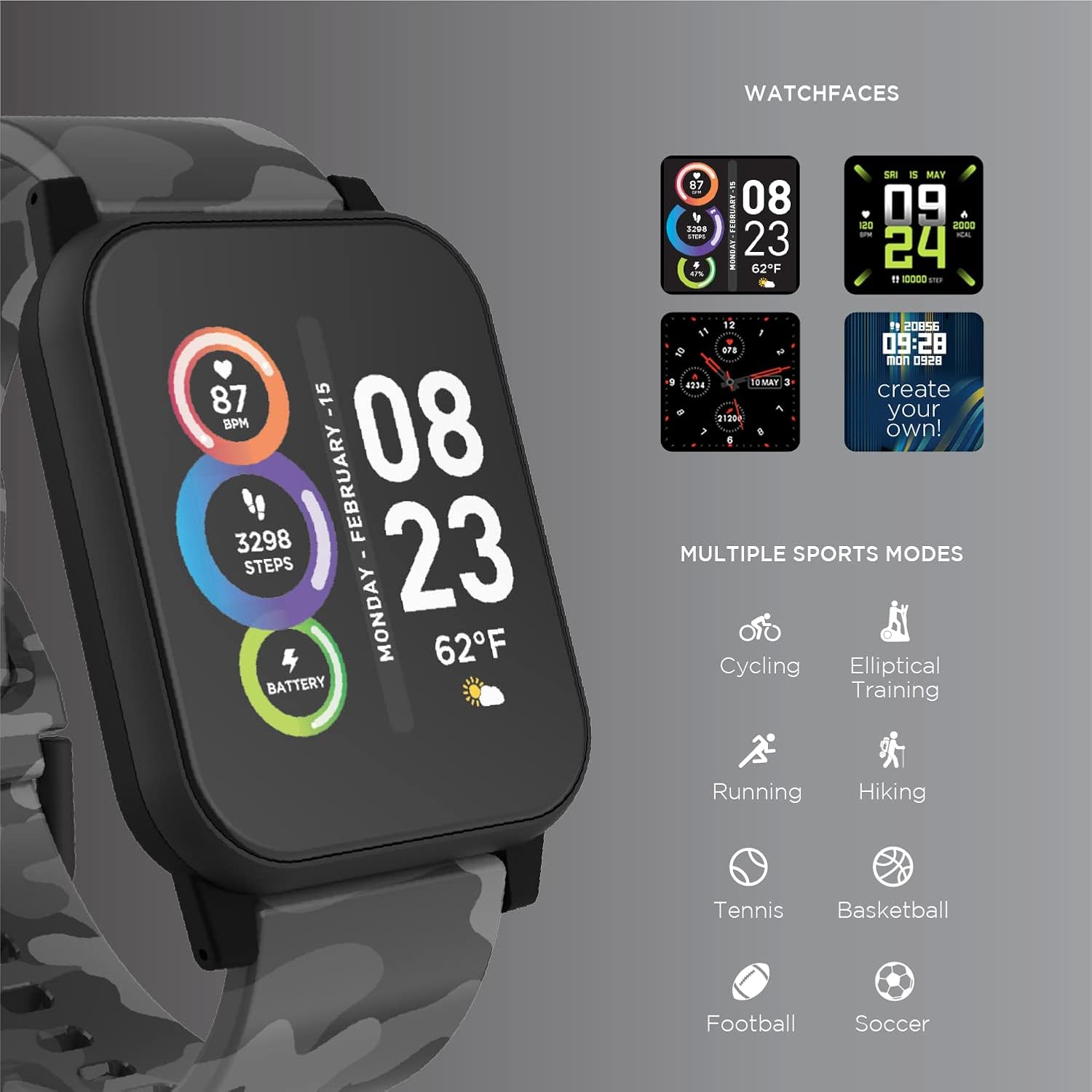
Image: The ITECH Fusion 2 S Smartwatch display showing various customizable watch faces and icons representing multiple sports modes including cycling, elliptical training, running, hiking, tennis, basketball, football, and soccer.
5.3. Zinthu Zazikulu
- Chowunikira pamtima: Access the heart rate feature on your smartwatch to measure your heart rate using the built-in optical sensor. Ensure the watch is snug on your wrist for accurate readings.
- Step Counter (Pedometer): The smartwatch automatically tracks your daily steps, distance, and calories burned. View your progress on the device or in the iTECH Wearables app.
- Zowunikira Kugona: Wear your smartwatch to bed to track your sleep patterns, including light and deep sleep stages. Data is synchronized with the app for detailed analysis.
- Multi-Sport Modes: Select from various sports modes (e.g., running, cycling, hiking) to track specific workout data, including duration, distance, and calories.
- Zidziwitso za Mauthenga: Receive notifications for calls, texts, and app alerts directly on your smartwatch when connected to your smartphone.
- Kalori Tracker: Monitors calories burned throughout the day based on your activity level.
- Chikumbutso cha Hydration: Set reminders to drink water at regular intervals through the app.
- Nyimbo Zakutali: Control music playback on your smartphone directly from your smartwatch (play, pause, skip tracks).
5.4. Kuphatikiza Mapulogalamu
Kuti mumve zambiri view of your health and fitness data, regularly sync your smartwatch with the iTECH Wearables app. The app allows you to set goals, view historical data, customize settings, and manage notifications.
6. Operating the Wireless Headphones
6.1. Amawongolera
The headphones feature intuitive controls for media playback and call management:
- Batani Lamphamvu: Press and hold to power on/off. Short press for play/pause.
- Mabatani a Voliyumu: Dinani '+' kuti muwonjezere voliyumu, '-' kuti muchepetse voliyumu.
- Kuwongolera: Press and hold '+' for next track, '-' for previous track.
- Kuwongolera Kuyimba: Short press power button to answer/end calls. Press and hold to reject calls.
6.2. Audio Mbali
- Ubwino Wamawu Wamphamvu: Designed to deliver clear and rich audio.
- Phokoso Losiyanitsa Loyenera: The over-ear design helps to reduce external noise for an immersive listening experience.
- Maikolofoni Omangidwa: Imalola kuyimba popanda kugwiritsa ntchito manja.
6.3. Moyo wa Battery
The wireless headphones provide up to 8 hours of playback on a single charge, depending on usage and volume levels.

Image: A person wearing the ITECH Fusion 2 S Smartwatch on their wrist and the matching wireless headphones, demonstrating typical use.
7. Kusamalira
7.1. Kuyeretsa
- Smartwatch: Wipe the screen and band with a soft, damp, nsalu zopanda lint. Pewani mankhwala owopsa kapena zinthu zowononga.
- Zomverera m'makutu: Gently wipe earcups and headband with a soft, dry cloth. Do not immerse in water.
7.2. Water Resistance (Smartwatch)
The ITECH Fusion 2 S Smartwatch is IP67 water resistant. This means it is protected against dust and can withstand immersion in water up to 1 meter for up to 30 minutes. It is suitable for daily use and light splashes, but not recommended for swimming, showering, or prolonged water immersion.
7.3. Kusungirako
Store your devices in a cool, dry place away from direct sunlight and extreme temperatures when not in use.
8. Mavuto
If you encounter issues with your ITECH Fusion 2 S devices, please refer to the following common solutions:
- Chipangizo sichikuyatsa: Ensure the device is fully charged. Try connecting it to a different USB power source.
- Smartwatch not pairing with phone: Ensure Bluetooth is enabled on your phone and the smartwatch is within range. Restart both devices and try pairing again through the iTECH Wearables app.
- Mahedifoni osalumikizana: Ensure headphones are in pairing mode (rapidly flashing indicator light). Check your device's Bluetooth settings and try reconnecting.
- Inaccurate heart rate/step readings: Ensure the smartwatch is worn snugly on your wrist, not too tight or too loose. Clean the sensor on the back of the watch.
- Zidziwitso sizikuwoneka: Check app permissions on your smartphone to ensure the iTECH Wearables app has access to notifications. Verify notification settings within the app.
- Audio issues with headphones: Ensure headphones are fully charged and properly paired. Check volume levels on both the headphones and the connected device.
If problems persist, consider performing a factory reset (refer to the smartwatch settings menu or contact customer support for headphones). For further assistance, please contact Itech customer support.
9. Zofotokozera
| Mbali | Tsatanetsatane |
|---|---|
| Miyeso Yazinthu | 22.86 x 5.08 x 22.86 masentimita; 621 g pa |
| Nambala Yachitsanzo Yachinthu | Chithunzi cha 900366B-40-G57 |
| Opareting'i sisitimu | Android (Compatible with iPhone and Android) |
| Zapadera | Heart Rate Monitor, Step Counter, Sleep Monitor, Message Notifications, Multi-Sport Modes |
| Kulumikizana Technology | USB |
| Opanda zingwe Kulankhulana Standard | bulutufi |
| Mapangidwe a Battery Cell | Lithium Ion |
| GPS | Zoona |
| Smartwatch Shape | Square |
| Smartwatch Screen Size | 1.3 inchi |
| Mtundu | Itech |
| Dzina lachitsanzo | Fusion 2 Bundle |
| Kukaniza Madzi | IP67 |
| Headphones Playback Time | Mpaka maola 8 |
| Headphones Driver Diameter | 40 mm |
| Headphones Connection Type | Bluetooth® 5.0 |
| Zomverera m'makutu Impedans | 32 Ohms ± 15% |
| Kuyankha Kwakumutu kwa Mahedifoni | 20Hz - 20KHz |
10. Chitsimikizo ndi Thandizo
Your ITECH Fusion 2 S Smartwatch and Wireless Headphones are covered by a manufacturer's warranty. Please refer to the warranty card included in your package or visit the official Itech webmalo kuti mudziwe zambiri za chitsimikizo ndi zikhalidwe.
For technical support, troubleshooting assistance, or warranty claims, please contact Itech customer service through their official webtsamba kapena mauthenga omwe aperekedwa muzolemba zamalonda anu.


