1. Mawu Oyamba
The ARCADE1UP Adjustable Height Stool (Joust) is designed to provide a comfortable and themed seating solution for your Arcade1Up game cabinet. This officially licensed stool features iconic Joust artwork and is built for durability and user comfort during extended gaming sessions. Its adjustable height feature makes it versatile for various arcade setups.

Image: The ARCADE1UP Joust Adjustable Height Stool, showcasing its design and chrome legs.
2. Zambiri Zachitetezo
Please read and understand all safety instructions before assembling or using the stool. Failure to follow these instructions may result in injury or damage to the product.
- Ensure the stool is used on a stable, level surface to prevent tipping.
- Do not overload the stool beyond its maximum weight capacity.
- Sungani manja ndi zala zanu kutali ndi zinthu zosuntha mukasintha kutalika.
- Nthawi ndi nthawi yang'anani mabolts ndi zomangira zonse kuti muwonetsetse kuti ndi zolimba komanso zotetezeka.
- Keep away from open flames or excessive heat.
3. Zamkatimu Phukusi
Onetsetsani kuti zigawo zonse zilipo musanayambe msonkhano:
- 1 x Stool Seat (Joust themed)
- 1 x Set of Chrome Legs (Base)
- 4 x Leg Extenders (for taller height setting)
- 1 x Hardware Pack (screws, washers, Allen wrench)
- 1 x Malangizo Mapepala
4. Kukhazikitsa
Malangizo a Msonkhano
Assembly is straightforward and typically takes minimal time. Follow these steps:
- Carefully unbox all components and lay them out on a soft, clean surface to prevent scratches.
- Attach the chrome legs to the underside of the stool seat using the provided screws and Allen wrench. Ensure all screws are tightened securely.
- For the 21.5-inch height setting, no leg extenders are needed.
- For the 29.5-inch height setting, insert the four leg extenders into the bottom of each chrome leg. Ensure they click into place or are secured as per the specific hardware provided.
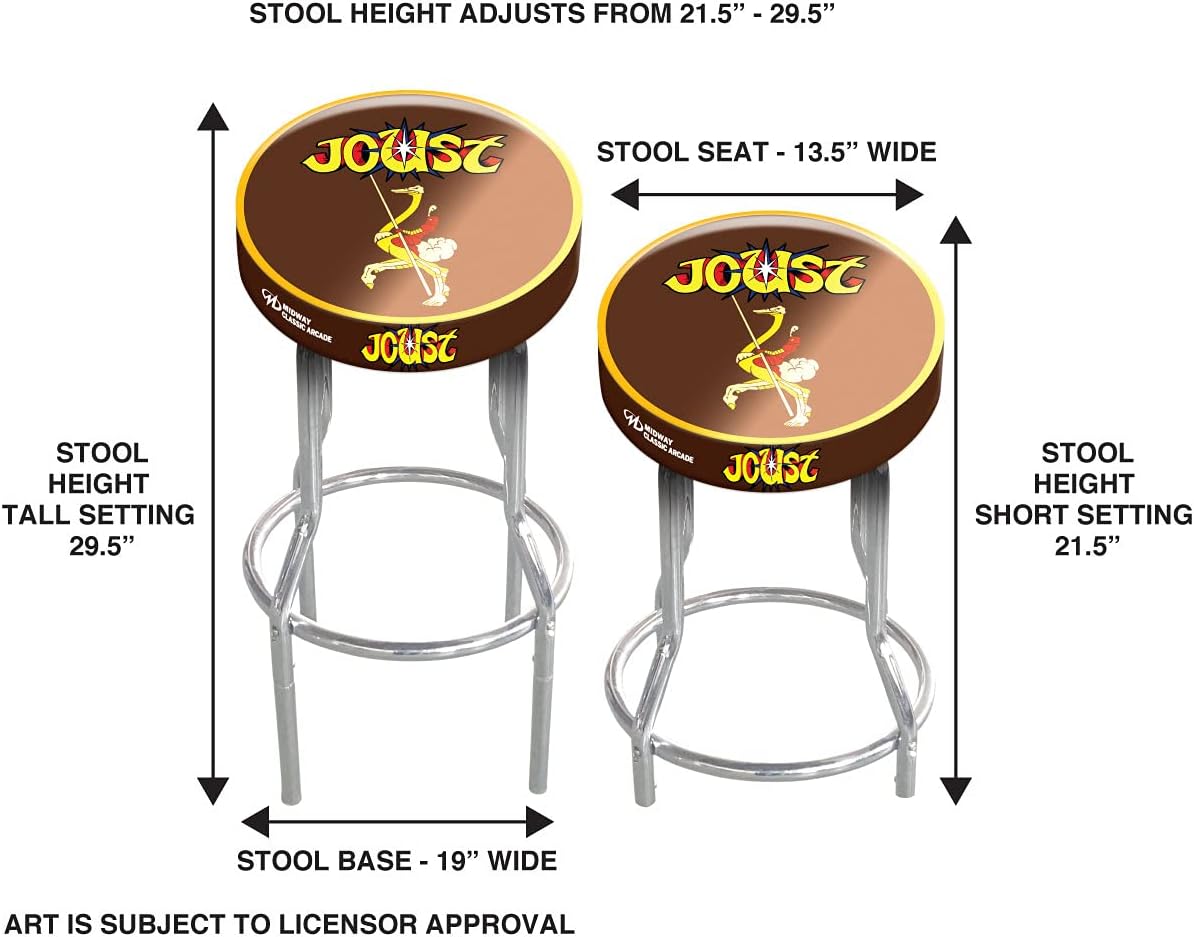
Image: Diagram illustrating the two adjustable height settings of the stool (21.5 inches and 29.5 inches).
5. Malangizo Ogwiritsira Ntchito
The ARCADE1UP stool is designed for simple use. Once assembled to your desired height, it provides stable seating. To switch between heights, you will need to remove or attach the leg extenders as described in the assembly section. The stool does not swivel.

Image: Close-up of the Joust themed stool seat, highlighting the detailed artwork.
6. Kusamalira
To ensure the longevity and appearance of your ARCADE1UP stool, follow these simple maintenance guidelines:
- Kuyeretsa: Wipe the stool with a dry cloth to remove dust and light dirt. For more stubborn marks on the vinyl seat, use a damp cloth with mild soap and water, then dry thoroughly. Avoid abrasive cleaners or solvents.
- Kusamalira Chrome: The chrome legs can be cleaned with a soft, dry cloth. For smudges or fingerprints, a chrome cleaner can be used sparingly, followed by buffing to a shine.
- Kuwunika pafupipafupi: Periodically inspect all connections and fasteners to ensure they remain tight. Re-tighten if necessary.
7. Mavuto
If you encounter any issues with your ARCADE1UP stool, consider the following common solutions:
- Stool feels wobbly: Ensure all assembly screws are fully tightened. Check that the stool is on a flat, level surface. If using leg extenders, ensure they are fully inserted and seated correctly.
- Kuvuta kusintha kutalika: Ensure no debris is obstructing the leg extender insertion points. Apply gentle, even pressure when inserting or removing extenders.
- Scratches on chrome: Minor scratches can sometimes be buffed out with a specialized chrome polish. For deeper scratches, professional repair may be required.
If problems persist, please refer to the Warranty and Support section.
8. Zofotokozera
| Mbali | Tsatanetsatane |
|---|---|
| Miyeso Yazinthu | 13.5"D x 13.5"W x 29.5"H |
| Mtundu | Joust |
| Mtundu | ARCADE1UP |
| Mtundu | Zokongoletsa |
| Kumaliza Mipando | Chrome |
| Leg Style | Molunjika |
| Malangizo Osamalira Zamankhwala | Pukuta ndi Nsalu Yowuma |
| Msonkhano Wofunika | No (referring to complex assembly, simple assembly is required) |
| Nambala ya Zidutswa | 1 |
| Nambala Yazinthu | 1 |
| Kulemera kwa chinthu | 10.66 mapaundi |
| Wopanga | ARCADE1UP |
| Dziko lakochokera | China |
9. Chitsimikizo ndi Thandizo
For warranty information or technical support regarding your ARCADE1UP Adjustable Height Stool, please contact ARCADE1UP directly through their official website or customer service channels. Keep your proof of purchase for any warranty claims.

Image: The official ARCADE1UP logo.


