1. Mawu Oyamba
This manual provides comprehensive instructions for the installation, programming, and operation of the Finder 12.A4.8.230.0010 NFC Weekly Time Clock. This electronic astronomical time switch features a weekly program, an analog output, and can be programmed via a joystick or an NFC-enabled smartphone using the Finder Toolbox app.
2. Zambiri Zachitetezo
Please read these safety instructions carefully before installation and operation. Failure to follow these instructions may result in electric shock, fire, or damage to the device.
- Kukhazikitsa kuyenera kuchitidwa ndi katswiri wamagetsi wodziwa bwino ntchito motsatira malamulo a mawaya am'deralo.
- Onetsetsani kuti magetsi atsekedwa musanayambe ntchito iliyonse yokhazikitsa kapena kukonza.
- Musayike chipangizocho pamalo onyowa, kutentha kwambiri, kapena pamalo owononga.
- Chipangizocho chimapangidwira kuti chigwiritsidwe ntchito m'nyumba basi.
3. Zamalonda Zathaview
The Finder 12.A4.8.230.0010 is an electronic time switch designed for DIN rail mounting. It offers precise time control with a weekly program and astronomical function.

Chithunzi 1: Patsogolo view of the Finder 12.A4.8.230.0010 Time Clock, showing the LCD display, joystick, and NFC symbol.
Zofunika Kwambiri:
- Weekly program for flexible scheduling.
- 1 analog output: 0-10 V or PWM.
- 1 changeover contact for 16 A / 250 V AC (AC1).
- Wonjezerani voltage: 110-230 V AC/DC.
- LCD display for clear information.
- Programming via joystick or NFC-enabled smartphone with Finder Toolbox app (Android and iOS).
- Astronomical time control: automatic switching at sunrise and sunset based on postcode or coordinates.
- Adjustable time offset for sunrise/sunset.
4. Kukhazikitsa ndi Kuyika
This device is designed for DIN rail mounting. Follow these steps for proper installation:
- Kuyimitsa Mphamvu: Ensure the main power supply to the installation area is completely disconnected before proceeding.
- Kukwera: Mount the time switch securely onto a standard DIN rail.
- Wiring: Connect the power supply (110-230 V AC/DC) to terminals A1 and A2. Connect the load to the changeover contact terminals (NO, NC, COM) and the analog output (W, O, Y) as required. Refer to the wiring diagram below.
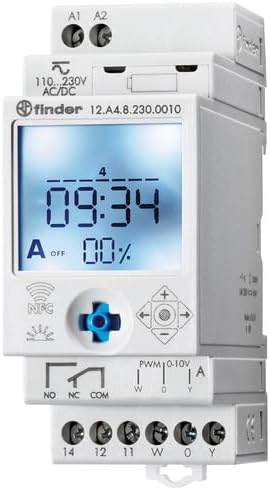
Chithunzi 2: Tsatanetsatane view of the wiring terminals for power input (A1, A2), relay output (NO, NC, COM), and analog output (W, O, Y).
Zindikirani: The device features safe separation between the power supply and contacts.
5. Malangizo Ogwiritsira Ntchito
5.1 Mphamvu Yoyamba
Once wired, restore power. The LCD display will illuminate. You may need to set the current date and time if it's the first use or after a prolonged power outage.
5.2 Programming via Joystick
The integrated joystick allows for direct programming on the device:
- Kuyenda: Use the joystick to move through menu options (up, down, left, right).
- Selection/Confirmation: Press the joystick inwards to select an option or confirm a setting.
- Follow the on-screen prompts to set the current time, date, weekly program, and astronomical functions.
5.3 Programming via NFC (Finder Toolbox App)
For maximum flexibility, program the time switch using an NFC-enabled smartphone and the Finder Toolbox app:
- Tsitsani App: Download the "Finder Toolbox" app from the Google Play Store (Android) or Apple App Store (iOS).
- Create/Load Program: Open the app and create a new program or load an existing one. The app allows for detailed configuration of weekly schedules, astronomical settings, and special functions.
- Transfer Data: To transfer the program, hold your smartphone close to the NFC symbol on the time switch. The app will guide you through the data transfer process.
- Read Program: You can also read an existing program from the time switch to your smartphone for editing or backup.
5.4 Astronomical Time Control
The device can automatically switch based on sunrise and sunset times:
- Kukhazikitsa Malo: Set your location by entering a postcode or geographical coordinates in the programming menu (via joystick or app).
- Offset: You can set a selectable time offset for both sunrise and sunset times to adjust switching points.
- Astro ON/OFF: Configure specific ON/OFF times during the astronomical ON period if needed.
6. Kusamalira
The Finder 12.A4.8.230.0010 is designed for maintenance-free operation. However, periodic checks are recommended:
- Kuyeretsa: Clean the device with a dry, soft cloth. Do not use abrasive cleaners or solvents.
- Kulumikizana: Periodically check terminal connections to ensure they are secure.
- Zosintha za Firmware: Check the Finder website or app for any available firmware updates for improved functionality or bug fixes.
7. Mavuto
| Vuto | Chifukwa Chotheka | Yankho |
|---|---|---|
| Chipangizo sichikuyatsa. | Palibe magetsi kapena mawaya olakwika. | Check power connections (A1, A2) and ensure power is supplied. Verify wiring against the diagram. |
| Program not executing. | Incorrect program settings or manual override active. | Review program settings via joystick or app. Check for any active manual override functions. Ensure current date/time is correct. |
| NFC transfer fails. | Smartphone not NFC-enabled, app not open, or poor contact. | Ensure your smartphone has NFC enabled. Open the Finder Toolbox app. Hold the phone directly over the NFC symbol on the device. |
| Astronomical function inaccurate. | Incorrect location (postcode/coordinates) or time zone setting. | Verify the entered postcode or coordinates. Check the time zone setting. |
If the problem persists, please contact Finder technical support.
8. Mafotokozedwe aukadaulo
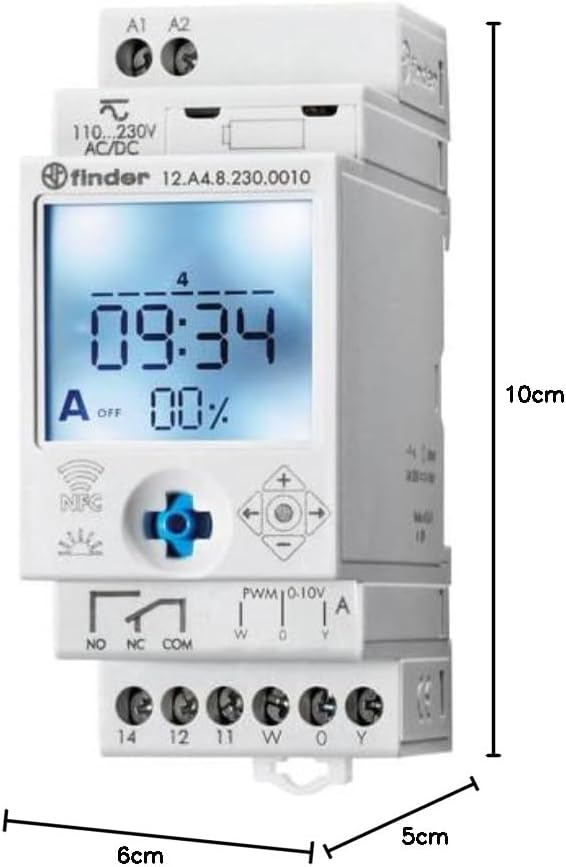
Figure 3: Dimensions of the Finder 12.A4.8.230.0010 Time Clock, showing approximate measurements of 10cm height, 6cm width, and 5cm depth.
| Mbali | Tsatanetsatane |
|---|---|
| Mtundu | Wopeza |
| Nambala ya Model | 12.A4.8.230.0010 |
| Makulidwe (H x W x D) | 10 x 6 x 5 masentimita |
| Kulemera | 70g pa |
| Wonjezerani Voltage | 110-230 V AC / DC |
| Linanena bungwe Contact | 1 changeover contact, 16 A / 250 V AC (AC1) |
| Kutulutsa kwa Analogi | 0-10 V or PWM |
| Contact Material | AgSnO2 |
| Max. Inrush Current | 120 A kwa 5 ms |
| Min. Switching Time | 1 miniti |
| Max. Switching Power (230 V AC1) | 4000 VA |
| Kulowetsa kwa Anthu | Buttons (Joystick) |
| Mabatire Amafunika | Ayi |
| Yogwirizana ndi | Power supplies/ballasts with 0-10 V or PWM inputs, or Slave dimmers Type 15.11 |
9. Chitsimikizo ndi Thandizo
For warranty information and technical support, please refer to the official Finder webwebusayiti kapena funsani wofalitsa wakomweko. Sungani risiti yanu yogulira ngati umboni wogula.
Wopanga: Wopeza
Product on Amazon.es since: Meyi 24, 2021


