1. Mawu Oyamba
This instruction manual provides essential information for the safe and effective installation, operation, and maintenance of the OONO Rotary Switch, Model SW-DFS2-2 (Type A). This 4-position, 3-speed selector switch is designed for various applications, including fan and heater speed control. Please read this manual thoroughly before use and retain it for future reference.
2. Zamalonda Zathaview ndi Features
The OONO Rotary Switch is a robust component designed for reliable performance in controlling multi-speed devices. Each package contains two complete switch sets.

Figure 2.1: OONO Rotary Switch (Type A) with knob and nut.
This image displays two complete OONO Rotary Switch units. Each unit consists of a black square switch body, a threaded shaft, a black rotary knob with a white indicator line, and a silver hexagonal mounting nut. The switch body shows regulatory markings.
- Kuchuluka: Supplied as a pack of 2 sets.
- Kagwiritsidwe ntchito: 4-Position, 3-Speed rotary switch.
- Mtengo wamagetsi: 13A at 120VAC, 10A at 250VAC.
- Zitsimikizo: UL, TUV, CQC certified for safety and quality.
- Step Angle: 45 degrees, providing distinct rotational positions.
- Knob Diameter: 40 mm.
- Moyo Wogwira Ntchito: Rated for 10,000 cycles.
- Mtundu wa Actuator: Rotary.
- Mtundu Wokwerera: Screw terminals for secure wiring.
- Zambiri Zothandizira: Mkuwa.
3. Zambiri Zachitetezo
CHENJEZO: Electrical components can cause injury or death. Always follow safety precautions.
- Always disconnect power to the circuit before installing, servicing, or removing the switch.
- Installation should be performed by a qualified electrician or technician familiar with electrical wiring and safety standards.
- Ensure the switch's electrical ratings (13A 120VAC, 10A 250VAC) are compatible with your application's voltage and current requirements. Exceeding these ratings can lead to overheating, switch failure, and fire hazards.
- Use appropriate wire gauges for the current load. Inadequate wiring can lead to overheating and potential fire.
- Do not operate the switch if it appears damaged or if any wiring is exposed.
- Ana azikhala kutali ndi kukhazikitsa magetsi.
4. Kukhazikitsa ndi Kuyika
Proper installation is crucial for the safe and correct operation of the rotary switch.
- Kuyimitsa Mphamvu: Ensure all power to the appliance or circuit where the switch will be installed is completely disconnected at the main breaker or fuse box. Verify with a voltagndi tester.
- Kukwera:
- Drill or prepare a mounting hole of appropriate diameter for the switch's threaded shaft. Refer to the technical drawing (Figure 4.1) for precise dimensions.
- Insert the switch shaft through the mounting hole.
- Secure the switch in place using the provided hexagonal nut on the front side of the panel. Tighten firmly but do not overtighten.
- Kulumikiza kwa Wiring:
The switch features screw terminals for electrical connections. Refer to the terminal markings (1, 2, 3, L) on the back of the switch and the wiring diagram in Figure 4.1 for correct connections. The switch is a 4-way circuit type.

Chithunzi 4.1: Kumbuyo view of the switch with terminal markings.
This image shows the back of the OONO Rotary Switch, highlighting the four screw terminals labeled 1, 2, 3, and L. Also visible are the electrical ratings (10(3)A-250V AC) and certification logos (TUV, CQC, RoHS).

Figure 4.2: Technical drawing and wiring diagram.
This detailed technical drawing provides precise dimensions for the switch components, including the shaft and body. It also includes a schematic wiring diagram illustrating the connections for the 4-position, 3-speed functionality, and a table of electrical specifications and notes.
- Strip approximately 6-8mm of insulation from the ends of the wires.
- Insert each wire into its corresponding terminal and tighten the screw securely to ensure a good electrical connection. Avoid loose connections, which can cause arcing and overheating.
- Ensure no bare wire strands are exposed outside the terminals.
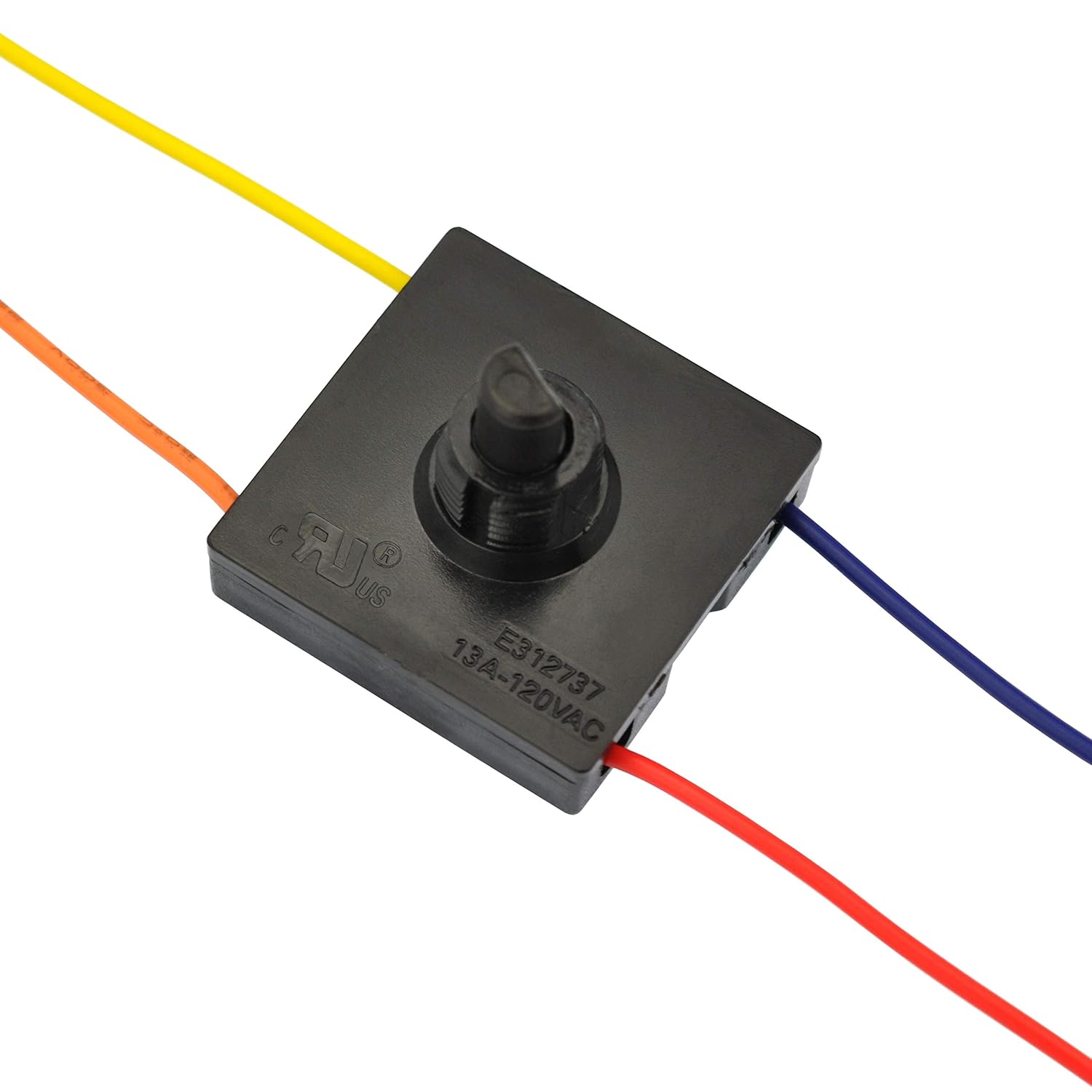
Chithunzi 4.3: Eksample of wired switch terminals.
This image shows the OONO Rotary Switch with four different colored wires (red, yellow, blue, orange) securely connected to its screw terminals, demonstrating a typical wiring configuration.
- Knob Attachment: Once the switch is mounted and wired, push the 40mm diameter knob onto the switch shaft. Ensure it is fully seated and aligns with the desired "OFF" position.
- Kubwezeretsa Mphamvu: Pambuyo potsimikizira kuti maulumikizano onse ali otetezeka komanso olondola, bwezeretsani mphamvu kudera.
5. Malangizo Ogwiritsira Ntchito
The OONO Rotary Switch operates manually, providing four distinct positions for controlling a 3-speed appliance.
- Yatsani/Zimitsa: Rotate the knob to the "OFF" position to turn off the connected appliance.
- Kusankha Liwiro: Rotate the knob clockwise or counter-clockwise to select the desired speed setting (Speed 1, Speed 2, Speed 3). Each rotation will click into a new position due to the 45-degree step angle.
- The specific function of each speed setting (e.g., low, medium, high) depends on the appliance to which the switch is connected.
6. Kusamalira
The OONO Rotary Switch is designed for durability with a rated life of 10,000 cycles. Minimal maintenance is required.
- Kuyeretsa: Ensure the switch and surrounding area are kept clean and free from dust and debris. Use a dry cloth for cleaning. Do not use liquid cleaners directly on the switch.
- Kuyendera: Periodically inspect the switch for any signs of physical damage, loose connections, or discoloration (which could indicate overheating). If any issues are found, disconnect power immediately and address the problem.
- Zachilengedwe: Ensure the switch is not exposed to excessive moisture, extreme temperatures, or corrosive environments, which can shorten its lifespan.
7. Mavuto
If you encounter issues with your OONO Rotary Switch, consider the following troubleshooting steps:
- Appliance Not Turning On/Off:
- Check if the main power supply to the appliance is active.
- Ensure the switch knob is rotated to an "ON" position (Speed 1, 2, or 3).
- Disconnect power and inspect the wiring connections at the switch terminals. Ensure they are secure and correctly wired according to the diagram (Figure 4.2).
- Check for continuity across the switch terminals in different positions using a multimeter (only by qualified personnel with power disconnected).
- Incorrect Speed Selection or Only Some Speeds Work:
- This often indicates incorrect wiring. Disconnect power and carefully re-check the wiring against the technical diagram (Figure 4.2). Ensure each speed wire from the appliance is connected to the correct terminal on the switch.
- Verify the appliance itself is capable of all speeds.
- Switch Feels Loose or Damaged:
- Disconnect power immediately.
- Inspect the mounting nut for tightness.
- If the internal mechanism feels faulty or the switch is physically damaged, it should be replaced. Do not attempt to repair internal electrical components.
- Kutentha Kwambiri kapena Kuwotcha Fungo:
- IMMEDIATELY DISCONNECT POWER. This is a serious safety hazard.
- This can be caused by exceeding the switch's current rating, loose connections, or incorrect wiring.
- Do not restore power until the cause has been identified and rectified by a qualified professional. The switch may need replacement.
8. Zofotokozera
| Kufotokozera | Tsatanetsatane |
|---|---|
| Nambala ya Model | SW-DFS2-2 |
| Mtundu | OONO |
| Mtundu wa Actuator | Rotary |
| Operation Mode | Pamanja |
| Mtundu Wozungulira | 4-njira |
| Maudindo | 4 (Off, Speed 1, Speed 2, Speed 3) |
| Mawerengedwe Apano | 13 Amps (120VAC), 10 Amps (250VAC) |
| Opaleshoni Voltage | Up to 250 Volts |
| Contact Type | Nthawi zambiri Open |
| Mtundu wa Terminal | Sikirini |
| Mtundu Wolumikizira | Molex |
| Contact Material | Mkuwa |
| Step Angle | 45 madigiri |
| Knob Diameter | 40 mm |
| Gwiritsani Ntchito Moyo | 10,000 zozungulira |
| Makulidwe a Phukusi | 3.62 x 2.17 x 1.34 mainchesi |
| Kulemera | Ma ounces 5.93 (pa paketi ya anthu 2) |
| Wopanga | CZH-LABS |
| Tsiku Loyamba Likupezeka | Novembala 27, 2015 |
9. Chitsimikizo ndi Thandizo
Specific warranty details for the OONO Rotary Switch are not provided in the product information. For any support inquiries or warranty claims, please refer to the retailer or manufacturer (CZH-LABS) directly with your purchase information.


