Mawu Oyamba
This manual provides comprehensive instructions for the safe and efficient use of your Westcott Battery-Powered Pencil Sharpener, Model 17786. Designed for portability and convenience, this sharpener is ideal for standard pencils in various environments, including school, home, and office settings. Please read these instructions carefully before first use and retain for future reference.
Khazikitsa
Kuyika kwa Battery
- Locate the battery compartment on the bottom of the sharpener.
- Tsegulani chivundikiro cha chipinda cha batri chotsegula.
- Insert four (4) AA batteries (not included), ensuring correct polarity (+/-) as indicated inside the compartment.
- Tsekani chivundikiro cha chipinda cha batri bwinobwino.
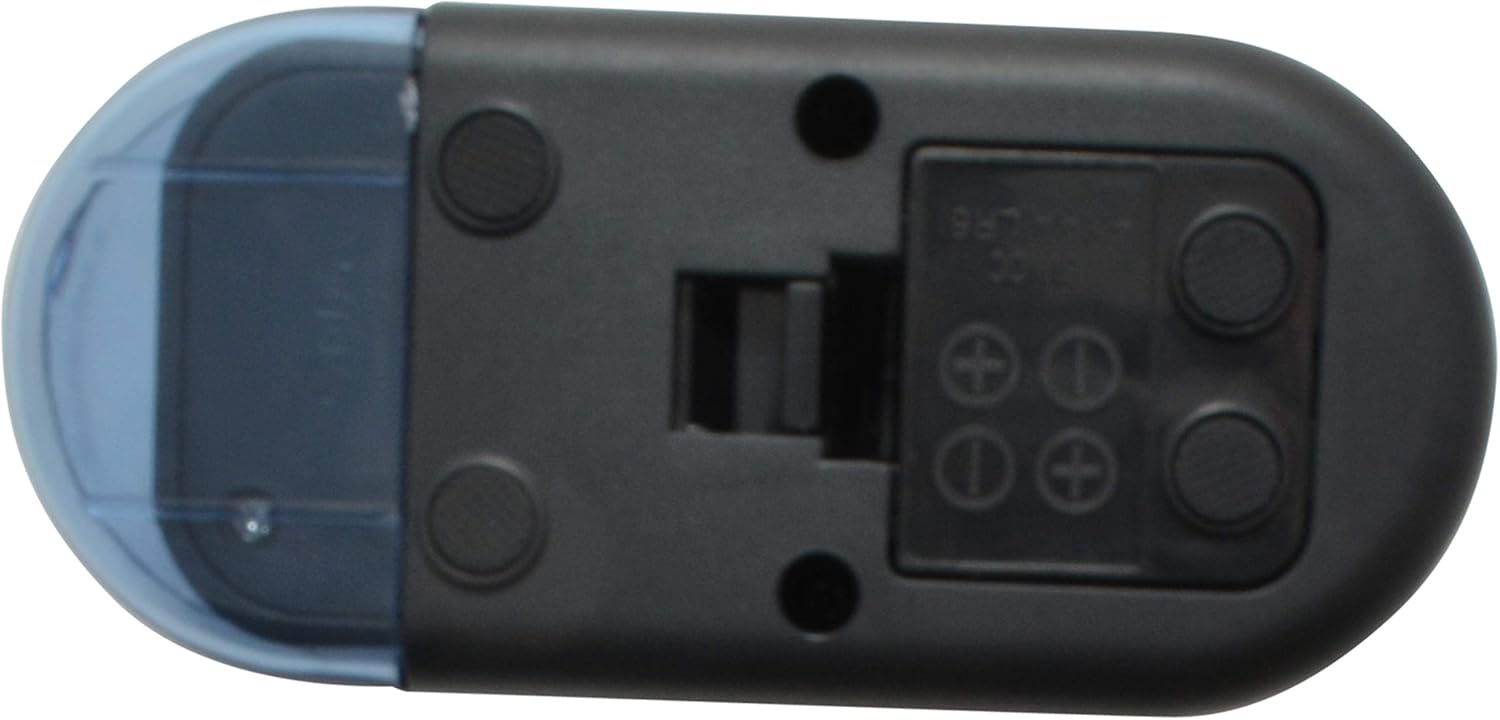
Chithunzi 1: Pansi view of the sharpener, illustrating the battery compartment for 4 AA batteries.
Malangizo Ogwiritsira Ntchito
Kunola Pensulo
- Onetsetsani kuti mabatire ayikidwa bwino.
- Hold the sharpener firmly with one hand.
- Insert the pencil gently into the sharpening hole. The motor will activate automatically.
- Apply light pressure and rotate the pencil slightly until it reaches the desired sharpness. Avoid excessive force.
- Remove the pencil. The motor will stop automatically.

Figure 2: Inserting a pencil into the sharpener for operation.
Kusamalira
Emptying Shavings and Cleaning
- Regularly check the transparent shaving receptacle. Empty it when it is approximately two-thirds full to prevent jams.
- To empty, firmly grasp the main body of the sharpener and gently pull the transparent receptacle away from the main unit.
- Dispose of pencil shavings in a waste bin.
- If necessary, use a soft brush or cloth to carefully clean any pencil dust or debris from the blade assembly. Do not touch the blade directly with your fingers.
- Reattach the shaving receptacle by aligning it with the main unit and pushing until it clicks securely into place.

Figure 3: Separating the sharpener components to empty shavings.

Chithunzi 4: View of the internal blade mechanism after removing the shaving receptacle.
Kusaka zolakwika
| Vuto | Chifukwa Chotheka | Yankho |
|---|---|---|
| Sharpener sayatsa. | Mabatire akufa kapena oyika molakwika. | Yang'anani momwe batire ilili. Sinthani ndi mabatire atsopano a AA. |
| Pencil is not sharpening effectively. | Dull blade or full shaving receptacle. | Empty the shaving receptacle. If the issue persists, the blade may be worn and require replacement (contact support). |
| Motor sounds weak or struggles. | Low battery power or excessive pressure on the pencil. | Replace batteries. Apply lighter pressure when sharpening. |
| Pencil jams in the sharpener. | Broken pencil lead or overfilled shaving receptacle. | Carefully remove the pencil. Empty the shaving receptacle. Gently clear any lead fragments from the blade area (use a small brush, not fingers). |
Zofotokozera
- Mtundu: Westcott
- Nambala Yachitsanzo: 17786
- Mtundu: Buluu
- Gwero la Mphamvu: 4 x AA Mabatire (osaphatikizidwa)
- Zofunika: Stainless Steel (blade), Durable Plastic (body)
- Zapadera: Lightweight, Portable, Travel Size, Cordless
- Omwe Akufuna: Artist, Student, Teacher, Office Use
- UPC: 073577177864
- GTIN: 073577177864
- Wopanga: Acme United Corporation
Chidziwitso cha Chitsimikizo
This Westcott Battery-Powered Pencil Sharpener, Model 17786, is covered by a 5-year wopanga chitsimikizo. This warranty covers defects in materials and workmanship under normal use. For warranty claims or detailed terms and conditions, please refer to the official Westcott webtsamba kapena kulumikizana ndi chithandizo chamakasitomala.
Thandizo
For further assistance, technical support, or to inquire about replacement parts, please visit the official Westcott website or contact their customer service department. Keep your model number (17786) and proof of purchase readily available when seeking support.
Note: Westcott is a brand of Acme United Corporation.


