1. Pamwambaview
Thank you for choosing the HONGXING HX-168AH 2.1ch Hi-Fi Stereo Audio Ampmpulumutsi. Izi amplifier is an enhanced version designed to deliver high-quality audio performance in a compact form factor. Its robust aluminum alloy body ensures efficient heat dissipation, contributing to stable and reliable operation. This manual provides essential information for setting up, operating, and maintaining your ampwopititsa patsogolo ntchito.
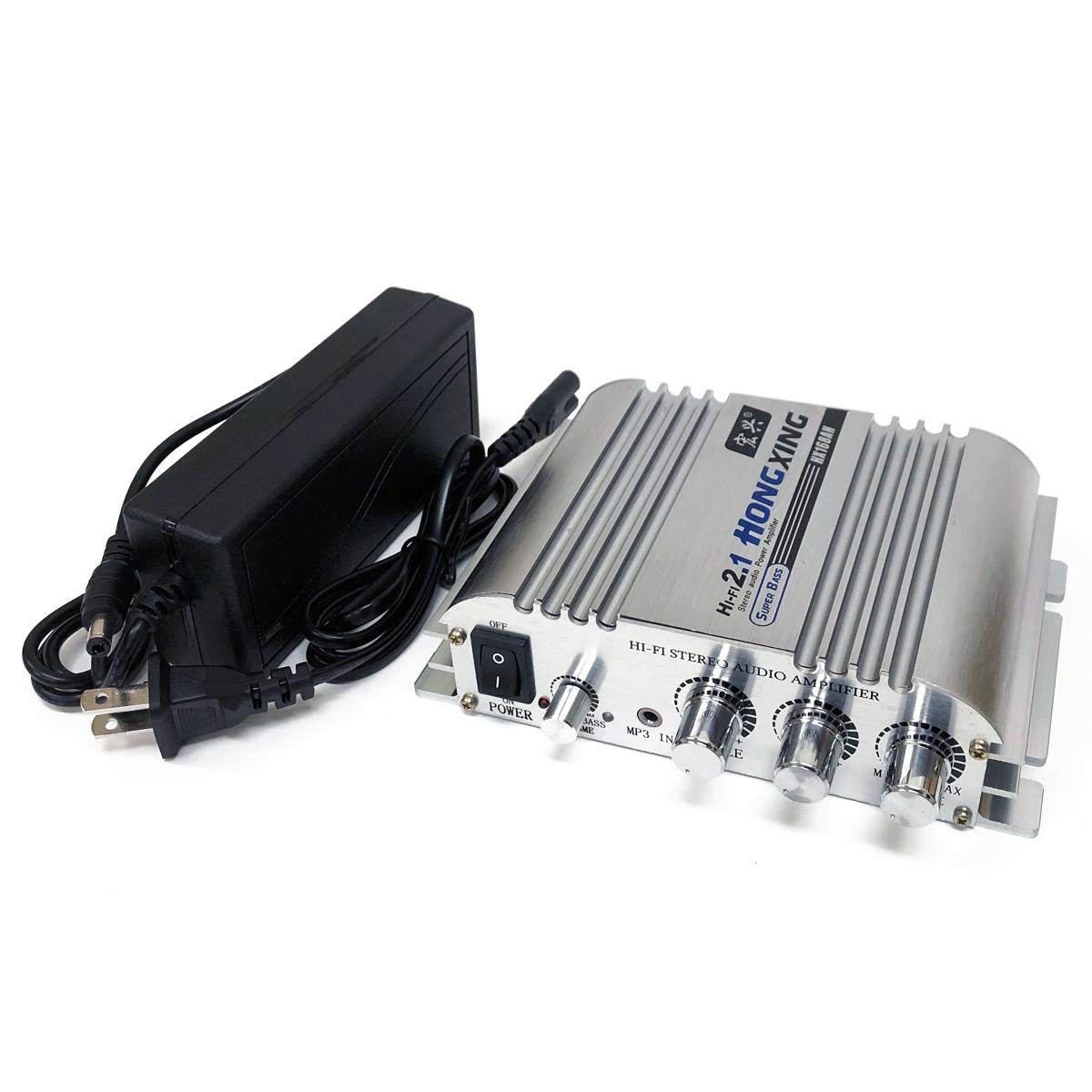
Chithunzi 1: Patsogolo view of the HONGXING HX-168AH ampwopititsa patsogolo ntchito.
2. Zinthu Zogulitsa
- Kutulutsa Kwamphamvu Kwambiri: Delivers a maximum effective output of 300W + 300W + 150W (2.1ch).
- Kumanga Kwambiri: Features a durable aluminum alloy body for excellent heat dissipation.
- Audio Wapamwamba: Advanced power circuit design and signal processing ensure clear, high-quality bass and overall sound.
- Ntchito Yokhazikika: Includes a 12V/5A AC adapter for consistent and stable performance.
- Kulumikizana Kosiyanasiyana: Supports RCA audio input and 2.1 channel speaker output, including a dedicated subwoofer output.
3. Zamkatimu Phukusi
Chonde onani phukusi lazinthu izi:
- HONGXING HX-168AH 2.1ch Hi-Fi Stereo Audio Ampwotsatsa
- 12V/5A AC Power Adapter
- Direct Connection Power Cable
Chithunzi 2: Amplifier and included accessories.
4. Ulamuliro ndi Zizindikiro
Familiarize yourself with the controls and indicators on your ampchotsitsa:

Figure 3: Labeled front and rear panels of the ampwopititsa patsogolo ntchito.
Front Panel:
- Kusintha kwa Mphamvu (KUYATSA/KUZITSA): Amatembenuza ampchotsegula kapena kutseka.
- Input Selector (RCA/BT/OFF): Switches between RCA input, Bluetooth mode, or turns the unit off.
- Kuwongolera kwa Bass: Amasintha kutulutsa kwa ma frequency otsika.
- Middle Control: Adjusts the mid-range frequency output.
- Treble Control: Amasintha kutulutsa kwa ma frequency apamwamba.
- Volume Control (MIN/MAX): Amasintha voliyumu yonse yotulutsa.
Kumbuyo Kwandalama:
- AUDIO IN (RCA L/R): Connect your audio source (e.g., CD player, computer) using RCA cables.
- LINE OUT (3.5mm AUX): Output for connecting to active devices like other amplifiers, active subwoofers, or active speakers.
- SPK OUT (L/R): Connect your passive stereo speakers. Ensure correct polarity (+/-).
- SUB OUT: Connect to an active subwoofer for enhanced bass.
- POWER (DC 12-24V): Lumikizani adaputala yamagetsi ya AC yomwe yaperekedwa.
- RF Antenna: For Bluetooth connectivity.
5. Kulumikizana
Follow these steps to connect your amplifier to your audio system:
- Lumikizani Gwero Lomvera: Use an RCA audio cable to connect your audio source (e.g., computer, smartphone with adapter) to the AUDIO IN (RCA L/R) ports on the rear panel. Ensure red connects to red (right channel) and white connects to white (left channel).
- Connect Passive Speakers: Lumikizani ma speaker anu osalankhula ku SPK OUT (L/R) terminals. Pay close attention to polarity: connect the positive (+) terminal of the ampcholumikizira cha lifier kupita ku terminal yabwino (+) ya wokamba nkhani, ndi terminal yoyipa (-) ya ampcholumikizira mawu ku terminal yotsutsa (-) ya wokamba nkhani.
- Connect Active Subwoofer (Optional): If you are using an active subwoofer, connect it to the TUMIZANI port using an appropriate cable. This will create a 2.1 channel ampLifier system.
- Lumikizani Mphamvu: Connect the provided 12V/5A AC power adapter to the POWER (DC 12-24V) input on the rear panel. If the included 5A adapter does not provide sufficient output for your setup, please use a higher output adapter (sold separately) or connect the included power cord directly to a compatible power source.
- Lumikizani Antena ya Bluetooth: If using Bluetooth, screw the provided antenna into the RF port on the rear panel and adjust its position for optimal signal reception.

Chithunzi 4: Kulumikizana kwamagulu kumbuyo.
Connection Demonstration Video (AIYIMA A01 Pro)
This video demonstrates the setup and connection methods for a similar 2.0/2.1 channel amplifier, including RCA input, speaker output, and power connection. It also highlights the internal components and tone controls.
Subwoofer and Bluetooth Connection Demonstration Video (AIYIMA A03)
This video illustrates the connection of a subwoofer amplifier to a subwoofer speaker and the process of connecting via Bluetooth for a 2.1 channel audio system.
6. Ntchito
- Yatsani: Flip the Power Switch to the 'ON' position. The power indicator will illuminate.
- Select Input Mode: Use the Input Selector switch to choose between 'RCA' for wired audio input or 'BT' for Bluetooth.
- Kuphatikiza kwa Bluetooth: If selecting 'BT' mode, the amplifier will enter pairing mode. On your mobile device, search for Bluetooth devices and select "BT HIFI AUDIO" to connect. Once connected, you can play audio from your device.
- Adjust Audio: Use the Bass, Middle, Treble, and Volume control knobs to fine-tune your sound preferences.
- Kuzimitsa Mphamvu: When finished, flip the Power Switch to the 'OFF' position.
7. Zofotokozera
Below are the technical specifications for the HONGXING HX-168AH ampchotsitsa:
| Mbali | Kufotokozera |
|---|---|
| Wopanga | HONGXING |
| Mtundu | FOCUSMART |
| Nambala ya Model | HX168A5 |
| Zofunika Zathupi | Aluminiyamu Aloyi |
| Yoyezedwa Voltage | DC 12 V |
| Rated Output (2.1ch) | 40W + 40W + 50W |
| Maximum Effective Output (2.1ch) | 300W + 300W + 150W |
| SNR | > 80dB |
| Kuyankha pafupipafupi | 20-20KHz |
| Kusokoneza | 4-8 Ω |
| Mlingo Wosokoneza | 0.4% |
| Mphamvu Yogwirira Ntchito | DC 12-15V, 2-10A |
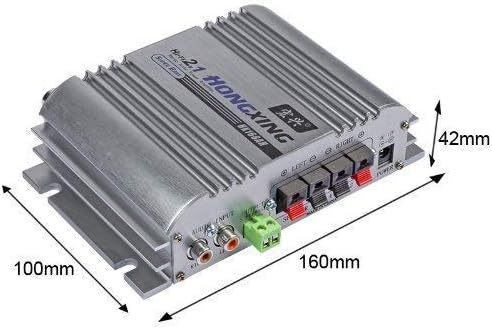
| Miyeso Yakunja | Pafupifupi. 16.1 × 13.6 × 4.8 masentimita |
| Kulemera | Pafupifupi. 395g ku |

Chithunzi 5: Ampmiyeso ya lifier.
8. Mavuto
- Palibe Mphamvu: Ensure the power adapter is securely connected to both the amplifier and a working power outlet. Check the power switch position.
- Palibe Phokoso: Verify all audio cables are correctly connected. Check the input mode selector. Ensure the volume is turned up on both the amplifier and your audio source. Confirm speakers are properly connected and functional.
- Low Output Volume/Distortion: If you experience low volume or distortion, especially at higher levels, and are using the included 5A adapter, consider using a higher output power adapter (DC 12-15V, 2-10A) to provide sufficient power.
- Mavuto okhudzana ndi Bluetooth: Onetsetsani kuti amplifier is in 'BT' mode and the antenna is properly attached. Turn off and on Bluetooth on your mobile device and try re-pairing.
9. Zambiri Zachitetezo
- Osawulula amplifier to water, moisture, or extreme temperatures.
- Onetsetsani kuti pali mpweya wokwanira wozungulira chipindacho kuti musatenthedwe.
- Use only the specified power adapter or a compatible higher-output adapter.
- Do not attempt to open or repair the unit yourself. Refer to qualified personnel for service.
- Khalani kutali ndi ana.
10. Chitsimikizo ndi Thandizo
This product is provided with this user manual for guidance. Please note that specific support for connection and handling methods beyond the scope of this manual is not provided by the manufacturer. For any issues not covered in this manual, please contact your retailer.


