Mawu Oyamba
This manual provides instructions for the ReadyWired USB Charging Cable, designed for use with the Tronsmart Element T6 Bluetooth Speaker. This cable ensures reliable power delivery and data transfer capabilities for compatible devices. It features a length of 3 feet for convenient use.
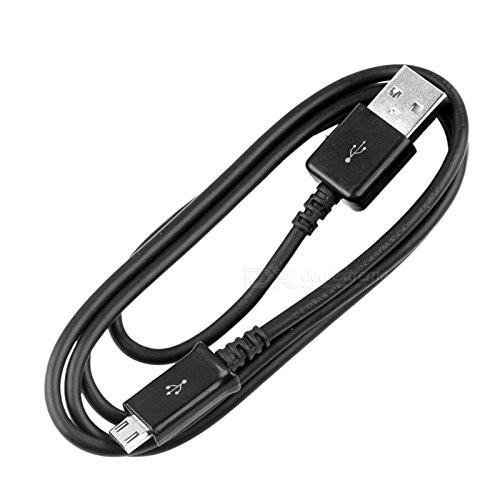
Image 1: The ReadyWired USB Charging Cable, coiled for storage, showing both USB-A and Micro-USB connectors.
Khazikitsa
- Dziwani zolumikizira: Locate the USB Type-A connector (larger, rectangular) and the Micro-USB connector (smaller, trapezoidal) on the cable.
- Lumikizani ku Gwero la Mphamvu: Insert the USB Type-A end of the cable into a compatible USB power adapter (e.g., wall charger, computer USB port, power bank). Ensure the power source provides adequate voltage ndi yapano pakulipiritsa.
- Lumikizani ku Chipangizo: Insert the Micro-USB end of the cable into the charging port of your Tronsmart Element T6 Bluetooth Speaker. Ensure the connector is inserted correctly and fully.
- Tsimikizirani kulumikizidwa: Once connected, the Tronsmart Element T6 Bluetooth Speaker should indicate that it is charging (e.g., via an LED indicator).

Chithunzi 2: Kuyandikira pafupi view of the USB Type-A and Micro-USB connectors, highlighting their distinct shapes.
Malangizo Ogwiritsira Ntchito
The ReadyWired USB Charging Cable is designed for straightforward operation:
- Kulipiritsa: When properly connected to a power source and the Tronsmart Element T6 Bluetooth Speaker, the cable facilitates the transfer of electrical power to recharge the speaker's internal battery.
- Data Transfer (if applicable): While primarily a charging cable, USB cables can also support data transfer. Refer to your Tronsmart Element T6 Bluetooth Speaker's manual to determine if it supports data transfer via its Micro-USB port and how to initiate it.
Kusamalira
- Posungira: Sungani chingwecho pamalo ozizira komanso ouma, kutali ndi dzuwa lachindunji komanso kutentha kwambiri. Pewani kupota kapena kupinda chingwecho mwamphamvu, chifukwa izi zitha kuwononga mawaya amkati.
- Kuyeretsa: If the cable or connectors become dirty, gently wipe them with a soft, dry cloth. Do not use liquid cleaners or abrasive materials.
- Kusamalira: Always grasp the connector housing when plugging or unplugging the cable, rather than pulling on the cable itself. This prevents strain on the cable-connector junction.
- Kuyendera: Periodically inspect the cable for any signs of wear, fraying, or damage to the insulation or connectors. Discontinue use if damage is observed.
Kusaka zolakwika
| Vuto | Chifukwa Chotheka | Yankho |
|---|---|---|
| Chipangizo sichikulipira. | Chingwe sichinalowetsedwe mokwanira. Mphamvu yolakwika. Chingwe chowonongeka. Device charging port issue. | Onetsetsani kuti malekezero onse a chingwe ali olumikizidwa bwino. Yesani chosinthira mphamvu cha USB chosiyana kapena doko. Inspect the cable for visible damage; replace if necessary. Test with another charging cable to rule out device issues. |
| Kuthamanga pang'onopang'ono. | Low power output from source. Background device activity. | Use a power adapter with higher current output (e.g., 2A). Close unnecessary applications on the device. |
| Cable feels hot during use. | Kuchulukirachulukira kapena dera lalifupi. Chingwe chowonongeka. | Immediately disconnect the cable from both the power source and the device. Do not use the cable again. Contact support. |
Zofotokozera
- Mtundu: ReadyWired
- Chitsanzo: USB Charging Cable B07TDVBW45
- Mtundu wa Chingwe: USB
- Mtundu Wolumikizira: USB Type A to Micro-USB
- Utali: Mapazi 3 (pafupifupi mamita awiri)
- Mtundu: Wakuda
- Zida Zogwirizana: Tronsmart Element T6 Bluetooth Speaker
Chidziwitso cha Chitsimikizo
ReadyWired products are typically covered by a limited warranty against manufacturing defects. For specific warranty terms and conditions, please refer to the packaging or contact ReadyWired customer support directly. Keep your proof of purchase for warranty claims.
Thandizo
For further assistance, technical support, or inquiries regarding your ReadyWired USB Charging Cable, please contact ReadyWired customer service.
ReadyWired Customer Service:
- Refer to the product packaging for contact details.
- Visit the official ReadyWired webtsamba lothandizira zothandizira komanso zidziwitso zolumikizana nazo.


