1. Mawu Oyamba
The Audiolab 8300XP is a high-performance stereo power amplifier designed to deliver exceptional audio fidelity and power. It can operate in stereo mode, providing 280 Watts per channel, or be bridged to deliver 480 Watts as a monoblock amplifier. This manual provides essential information for the safe and optimal use of your 8300XP ampwopititsa patsogolo ntchito.

Figure 1.1: Audiolab 8300XP Power Amplifier, front angled view. This image shows the sleek black chassis with the power button and Audiolab logo visible on the front panel.
2. Zambiri Zachitetezo
Please read all safety instructions carefully before operating the ampmpulumutsi. Sungani bukuli kuti mugwiritse ntchito mtsogolo.
- Gwero la Mphamvu: Connect the unit only to an AC power source of the type marked on the rear panel. Ensure the voltage imagwirizana ndi magetsi akudera lanu.
- Mpweya wabwino: Musatseke mipata iliyonse yolowera mpweya. Onetsetsani kuti mpweya ukuyenda bwino mozungulira chipangizocho kuti mupewe kutentha kwambiri.
- Madzi ndi Chinyezi: Osawonetsa gawo kumvula kapena chinyezi. Osayika zinthu zodzazidwa ndi zakumwa, monga miphika, pa unit.
- Kutentha: Musayike yuniti pafupi ndi magwero otentha monga ma radiator, zolembera zotenthetsera, masitovu, kapena zida zina (kuphatikiza ampLifiers) zomwe zimatulutsa kutentha.
- Kutumikira: Osayesa kugulitsa izi nokha. Tumizani mautumiki onse kwa ogwira ntchito oyenerera.
- Kuyika pansi: Ensure the power cord is properly grounded to prevent electric shock.
3. Kutsegula ndi Zamkatimu
Mosamala masulani amplifier. Retain the packing materials for future transport. Inside the box, you should find:
- Audiolab 8300XP Power Ampwotsatsa
- AC Power Chingwe
- Buku la ogwiritsa (chikalatachi)
If any items are missing or damaged, contact your dealer immediately.
4. Kulumikizana
4.1 Gulu Lakutsogolo

Figure 4.1: Audiolab 8300XP Power Ampchowotcha, kutsogolo view. This image highlights the minimalist front panel design, featuring only the power button on the right and the Audiolab logo on the bottom right.
The front panel of the 8300XP is designed for simplicity and elegance. It features:
- Batani Lamphamvu: Located on the right side, used to turn the ampchotsegula kapena kutseka.
- Chizindikiro cha Mphamvu ya LED: A small LED (typically red) indicates the power status of the unit.
4.2 Gulu lakumbuyo
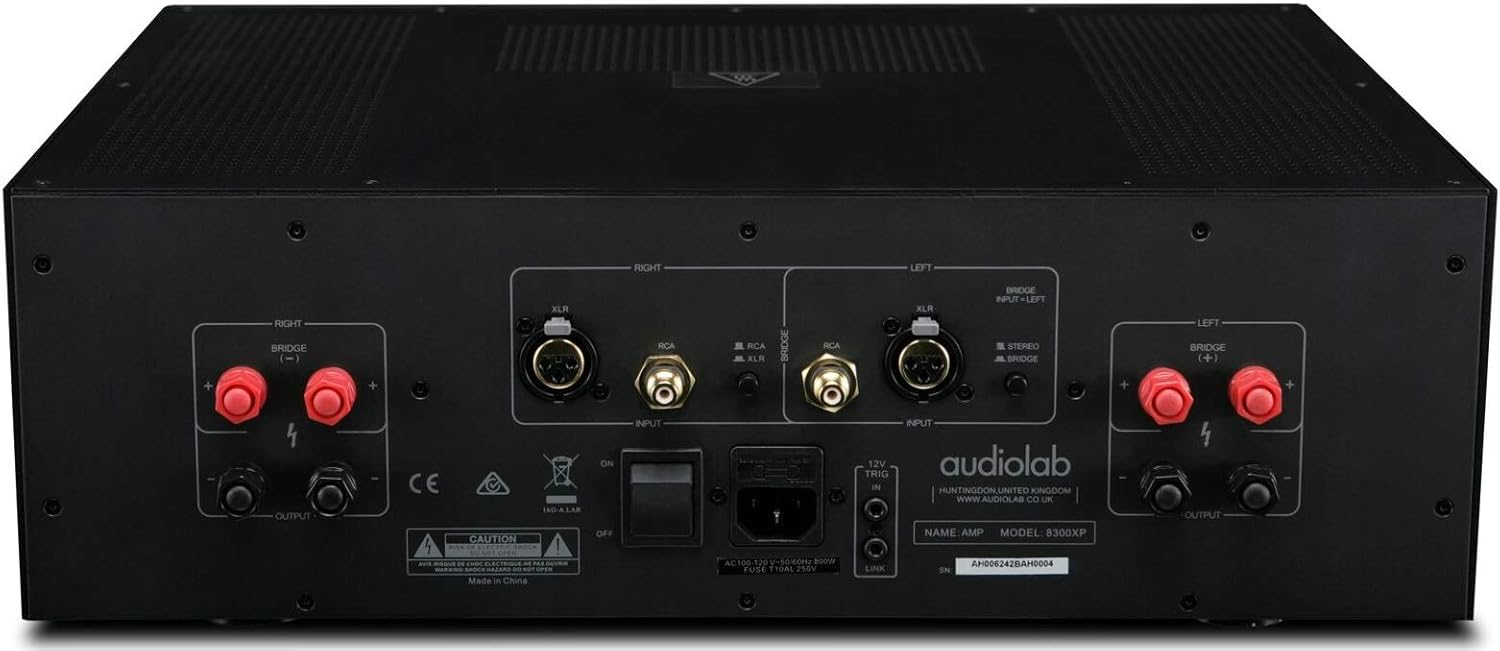
Figure 4.2: Audiolab 8300XP Power Amplifier, rear panel. This detailed view shows all input and output terminals, including XLR and RCA inputs, speaker terminals, and the power inlet.
The rear panel provides all necessary connections for integrating the 8300XP into your audio system:
- Balanced XLR Inputs (Left/Right): For connecting sources with balanced outputs, offering superior noise rejection.
- Unbalanced RCA Inputs (Left/Right): For connecting sources with unbalanced outputs.
- Speaker Outputs (Left/Right): High-quality binding posts for connecting your loudspeakers. Ensure correct polarity (+ to + and - to -).
- Bridge Mode Switch: A switch to select between Stereo and Bridged (Mono) operation. When in bridged mode, only use the designated input and speaker terminals.
- 12V Yambitsani mkati/Kutuluka: Allows for remote power control with other compatible components.
- AC Power Inlet: For connecting the supplied AC power cord.
5. Kukhazikitsa
5.1 Kuyika
Place the 8300XP on a stable, level surface away from direct sunlight, heat sources, and excessive moisture. Ensure there is adequate space around the unit for ventilation, especially above and behind it.
5.2 Kulumikiza Oyankhula
- Onetsetsani kuti amplifier is turned off and unplugged from the mains power.
- Connect your loudspeakers to the corresponding speaker output terminals on the rear panel.
- For stereo operation, connect the left speaker to the 'LEFT' terminals and the right speaker to the 'RIGHT' terminals. Ensure the positive (+) terminal on the ampLifiya imalumikiza ku terminal ya positive (+) pa sipika, komanso chimodzimodzi ndi ma terminal a negative (-).
- For bridged (mono) operation, set the 'BRIDGE' switch to 'ON'. Connect your single speaker to the designated bridged output terminals (refer to the markings on the rear panel).
5.3 Kulumikiza Magwero a Audio
- Connect your pre-amplifier or audio source to either the Balanced XLR Inputs or Unbalanced RCA Inputs. Do not use both simultaneously for the same channel.
- If using balanced connections, ensure the XLR cables are securely connected.
- If using unbalanced connections, ensure the RCA cables are securely connected.
5.4 Kulumikizana kwa Mphamvu
- Once all audio and speaker connections are made, connect the supplied AC power cord to the AC inlet on the rear panel of the ampwopititsa patsogolo ntchito.
- Plug the other end of the power cord into a suitable mains power outlet.
6. Malangizo Ogwiritsira Ntchito
6.1 Kuyatsa/Kuzimitsa
- Kuti mphamvu pa amplifier, press the Power button on the front panel. The power indicator LED will illuminate.
- Kuchotsa mphamvu amplifier, press the Power button again. The power indicator LED will turn off.
6.2 Stereo vs. Bridged Mode
The 8300XP can operate as a two-channel stereo amplifier or a single-channel monoblock amplifier (bridged mode).
- Mafilimu angaphunzitse stereo: For typical two-channel audio systems. Ensure the 'BRIDGE' switch on the rear panel is set to 'OFF'.
- Njira Yoyimitsidwa: For higher power output to a single speaker. Ensure the 'BRIDGE' switch on the rear panel is set to 'ON'. When in bridged mode, use only the designated input (typically the Left channel) and the specified bridged speaker terminals. Consult the rear panel markings for precise connections.
Caution: Ensure the amplifier is powered off before changing the Stereo/Bridge mode switch to prevent damage to the ampzowunikira kapena olankhula.
7. Kusamalira
- Kuyeretsa: Gwiritsani ntchito nsalu yofewa, youma kuyeretsa amplifier's exterior. Do not use abrasive cleaners, waxes, or solvents.
- Mpweya wabwino: Nthawi ndi nthawi onetsetsani kuti malo olowera mpweya mulibe fumbi ndi zinyalala.
- Chingwe cha Mphamvu: Inspect the power cord regularly for any signs of damage. If damaged, replace it with an approved cord of the same type.
8. Mavuto
If you experience issues with your Audiolab 8300XP, please consult the following table before contacting service personnel.
| Vuto | Chifukwa Chotheka | Yankho |
|---|---|---|
| Palibe mphamvu | Power cord not connected; Power outlet faulty; Internal fuse blown | Check power cord connection; Try a different outlet; Contact service for fuse replacement |
| Palibe phokoso | Input cables loose/incorrect; Speaker cables loose/incorrect; Source component off/faulty; Amplifier in standby mode | Check all cable connections; Ensure source is active; Press power button to exit standby |
| Phokoso losokoneza | Input signal too high; Speaker impedance mismatch; Faulty cables | Reduce source volume; Check speaker impedance (should be 4-16 ohms); Replace cables |
| Kutentha kwambiri | Insufficient ventilation; Blocked vents | Ensure adequate space around amplifier; Clear any obstructions from vents |
9. Zofotokozera
Key technical specifications for the Audiolab 8300XP Power Ampchotsitsa:
- Nambala yachitsanzo: 8300 XP
- Wopanga: Audiolab
- Voltage: 100 Volts, 12 Volts (Trigger)
- Mtundu Wokwera: Surface Mount
- Nambala Yamakanema: 2 (Sitiriyo)
- Power Output (Stereo): 280 Watts pa channel
- Power Output (Bridged Mono): 480 Watts
10. Chitsimikizo ndi Thandizo
Your Audiolab 8300XP amplifier is covered by a manufacturer's warranty. Please refer to the warranty card included with your product or visit the official Audiolab webTsamba latsatanetsatane lazidziwitso ndi zikhalidwe zakudera lanu.
For technical support, service, or further inquiries, please contact your authorized Audiolab dealer or distributor. You can also find support information on the official Audiolab webtsamba: www.audiolab.co.uk


