1. Mawu Oyamba
This manual provides comprehensive instructions for the safe and effective operation of your Nestling HK-688 Walkie Talkies. These mini 2-way radios are designed for clear communication over long distances, making them ideal for children's outdoor adventures, camping, hiking, and general play.
The Nestling HK-688 Walkie Talkies feature 22 UHF channels, a generous range, and user-friendly controls. Please read this manual thoroughly before using the device to ensure proper functionality and to maximize your experience.

Image: Three Nestling HK-688 walkie talkies in camo blue, camo pink, and camo green, displayed with their product packaging.
2. Zamalonda Zathaview
2.1 Zamkatimu Phukusi
Phukusi lokhazikika lili ndi zinthu zotsatirazi:
- 3x Nestling HK-688 Camo Kids Walkie Talkies (Camo Blue, Camo Pink, Camo Green)
- 1x Buku Logwiritsa (chikalatachi)
- Note: AAA batteries are not included and must be purchased separately.
2.2 Zofunika Kwambiri
- 22 FRS/GMRS Channels: Provides multiple communication options.
- Utali wautali: Up to 3km (1.9 miles) in typical conditions, and up to 5km (3.1 miles) in open fields.
- Lambulani Ubwino Wamawu: Ensures effective communication.
- Chiwonetsero cha LCD Backlit: Zosavuta viewing of channel, battery status, and other indicators.
- Built-in Mini LED Torch: Useful for low-light conditions.
- Automatic Channel Scan: Quickly finds active channels.
- Automatic Squelch: Reduces background noise for clearer reception.
- CTCSS 99 Sub-codes: Enhances privacy by filtering unwanted signals.
- Chenjezo: Notifies you of incoming calls.
- Chokhoma Channel: Prevents accidental channel changes.
- PTT/VOX Function: Push-to-Talk for manual transmission or Voice Operated Exchange for hands-free communication.
- Battery Save Function: Imawonjezera nthawi ya batri.
- Chidziwitso Chochepa Mphamvu: Indicates when batteries are running low.
- Voliyumu yosinthika: Control the listening level.
- Wopepuka komanso Wonyamula: Designed for easy carrying with a built-in belt clip.
- Drop Resistant Design: Enhanced durability for active use.

Image: Visual representation of the walkie talkie's dimensions and key features like drop resistance, low battery alert, flashlight, and communication range.

Image: Features of the walkie talkie, including 22 channels with privacy codes, extended range, noise reduction, drop resistance, and a built-in flashlight.
2.3 Zida Zazida

Image: Detailed diagram illustrating the various parts of the walkie talkie, including buttons, display, and audio components.
- Mlongoti: Kutumiza ndi kulandira ma sign.
- Lamp (Flashlight): Built-in LED light.
- Maikolofoni: For speaking into the device.
- Batani la PTT (Kankhani-kuti-Mulankhule): Dinani ndikugwira kuti mupereke mawu anu.
- Chiwonetsero cha LCD: Shows channel, battery level, and other indicators.
- Call Lock Button: Locks the current channel.
- Batani Loyang'anira: Allows listening to weak signals on the current channel.
- Lamp Jambulani Batani: Activates the flashlight and initiates channel scan.
- Bulu Lotsika: Navigates menus or decreases values.
- Batani la Mphamvu/Menyu: Turns the device on/off and accesses the menu.
- Wolankhula: For listening to incoming transmissions.
3. Kukhazikitsa
3.1 Kuyika kwa Battery
Each Nestling HK-688 Walkie Talkie requires 4x AAA batteries (not included).
- Release the Belt Clip: Press the lock on the top of the belt clip and lift the clip up to detach it from the radio.
- Tsegulani Battery Compartment: Locate the battery cover on the back of the walkie talkie. Gently push down on the tab and slide the cover off.
- Lowetsani Mabatire: Insert 4x AAA batteries into the compartment, ensuring correct polarity (+/-) as indicated inside the compartment.
- Tsekani Chipinda Cha Battery: Replace the battery cover and slide it until it clicks securely into place. Reattach the belt clip if desired.
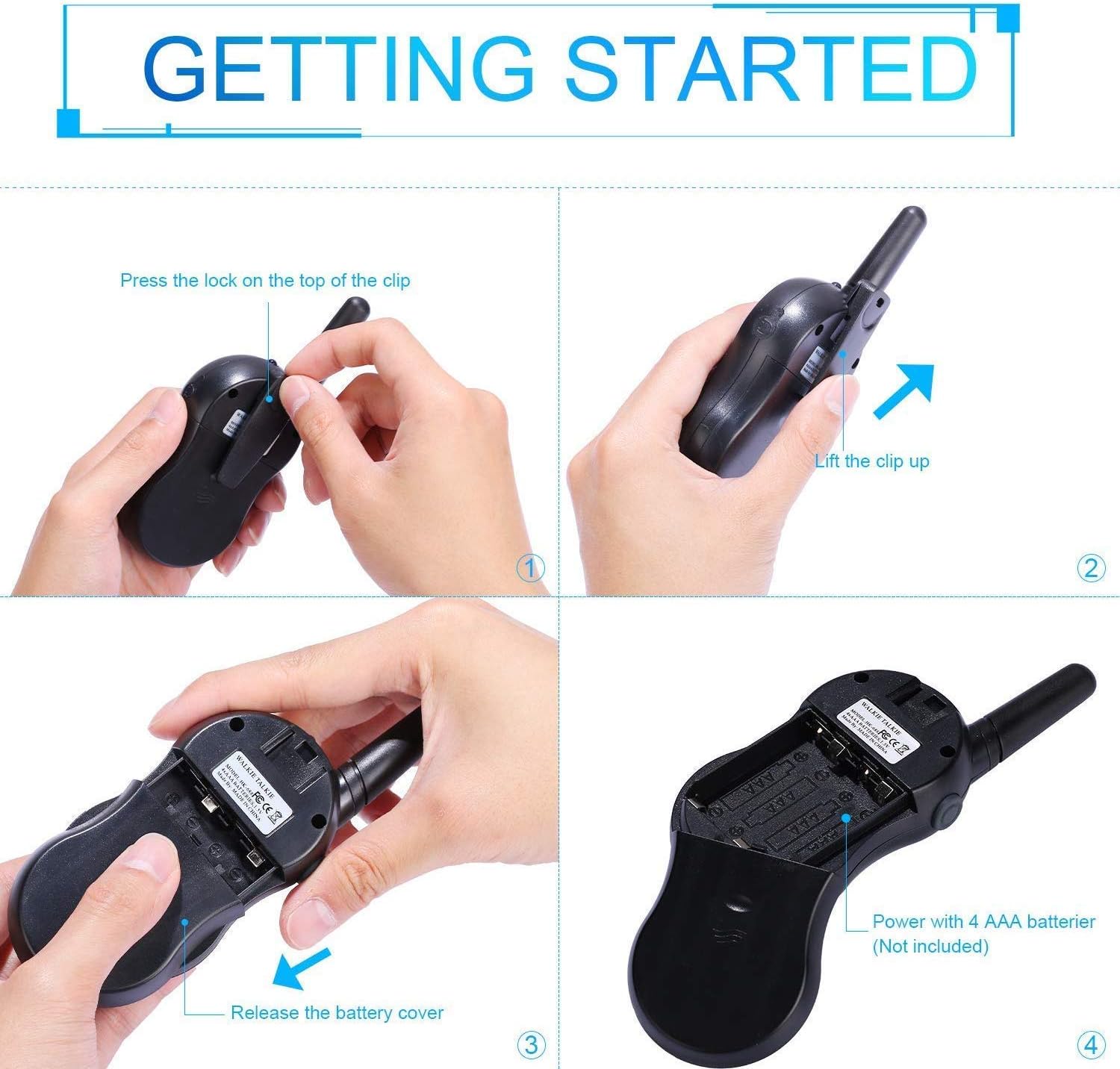
Image: Step-by-step instructions for opening the battery compartment and inserting AAA batteries into the walkie talkie.

Image: An open battery compartment of the walkie talkie, ready for battery insertion.
3.2 Kuyatsa/Kuzimitsa
To turn the walkie talkie on or off, press and hold the Mphamvu/Menyu button until the LCD screen illuminates or turns off.
4. Malangizo Ogwiritsira Ntchito
4.1 Basic Communication (Push-to-Talk)
- Sankhani Channel: Ensure all walkie talkies you wish to communicate with are set to the same channel and sub-code. Use the Up ndi Pansi mabatani osintha ma tchanelo.
- Kutumiza: Press ndi kugwira Chithunzi cha PTT button (located on the side of the radio). Speak clearly into the microphone, holding the radio approximately 2-3 inches from your mouth.
- Landirani: Tulutsani Chithunzi cha PTT button to listen for incoming transmissions.
Tip: For optimal range and clarity, avoid obstructions like buildings, dense foliage, or large metal objects. Adverse weather conditions can also affect range.
4.2 Channel Selection and Sub-codes (CTCSS/DCS)
Your walkie talkie supports 22 FRS/GMRS channels and 99 CTCSS/DCS sub-codes. Sub-codes help filter out unwanted conversations on the same channel, enhancing privacy.
- Dinani pa Menyu button once to enter channel selection mode. The channel number will flash.
- Gwiritsani ntchito Up or Pansi mabatani kuti musankhe njira yomwe mukufuna (1-22).
- Dinani pa Menyu button again to enter sub-code selection mode. The sub-code number will flash.
- Gwiritsani ntchito Up or Pansi buttons to select your desired sub-code (0-99). Setting to 0 disables the sub-code.
- Dinani pa Chithunzi cha PTT button or wait a few seconds for the setting to be saved and exit the menu.
4.3 Ntchito ya VOX (Kusinthana kwa Mawu)
The VOX function allows for hands-free communication. When activated, the radio will automatically transmit when it detects your voice.
- Dinani pa Menyu button multiple times until the VOX icon (VOX) appears on the LCD and flashes.
- Gwiritsani ntchito Up or Pansi buttons to select the VOX sensitivity level (e.g., 1-3, with 1 being most sensitive). Select "OFF" to disable VOX.
- Dinani pa Chithunzi cha PTT button or wait a few seconds to save the setting and exit.
4.4 Ntchito ya Tochi
To turn the built-in LED flashlight on or off, briefly press the Lamp button (often combined with the Scan button).
4.5 Call Alert Tone
To send a call alert tone to other radios on the same channel, briefly press the Imbani button (often represented by a musical note icon).
4.6 Channel Lock
To prevent accidental channel changes, you can lock the current channel.
- Press ndi kugwira Call Lock button (often represented by a key icon) until a key icon appears on the LCD.
- Kuti mutsegule, dinani ndikugwira Call Lock button again until the key icon disappears.

Chithunzi: Eksamples of suitable scenarios for using the walkie talkies, such as outdoor play, family activities, and leisure.

Image: Illustrations of walkie talkies being used for communication in both play and household settings.
5. Kusamalira
5.1 Kusamalira Battery
- Always use fresh, high-quality AAA batteries.
- Remove batteries from the walkie talkie if it will not be used for an extended period to prevent leakage and damage.
- Tayani mabatire ogwiritsidwa ntchito moyenera molingana ndi malamulo a komweko.
5.2 Kuyeretsa ndi Kusunga
- Clean the walkie talkie with a soft, damp nsalu. Osagwiritsa ntchito mankhwala ankhanza kapena zotsukira abrasive.
- Do not immerse the walkie talkie in water, as it is not water-resistant.
- Store the walkie talkie in a cool, dry place away from direct sunlight and extreme temperatures.
6. Mavuto
| Vuto | Chifukwa Chotheka | Yankho |
|---|---|---|
| Palibe mphamvu | Mabatire afa kapena anayikidwa molakwika. | Sinthani mabatire ndi atsopano, kuwonetsetsa kuti polarity yolondola. |
| Sitingathe kufalitsa kapena kulandira | Not on the same channel/sub-code; out of range; PTT button not pressed/released. | Ensure all radios are on the same channel and sub-code. Move closer to the other radio. Press and hold PTT to transmit, release to receive. |
| Phokoso loipa / Losasinthasintha | Out of range; obstructions; low battery; squelch setting. | Move closer. Avoid obstructions. Replace batteries. Check squelch settings. |
| Channel changes accidentally | Channel lock is not activated. | Activate the channel lock function. |
| VOX sikugwira ntchito | Kuchuluka kwa mphamvu ya VOX ndikotsika kwambiri kapena VOX yazimitsidwa. | Adjust VOX sensitivity to a higher level or ensure VOX is enabled. |
7. Zofotokozera
| Mbali | Tsatanetsatane |
|---|---|
| Mtundu | Nestling |
| Chitsanzo | HK-688 |
| Nthawi zambiri | 400-470MHz |
| Njira | 22 FRS/GMRS Channels |
| Ma sub-code | Chithunzi cha CTCSS99 |
| Kutumiza Mphamvu | <= 0.5W |
| Mtundu Wosinthira | FM-F3E |
| Mtundu | Up to 3km (1.9 miles) typical, MAX 5km (3.1 miles) in open field |
| Gulu | Auto squelch |
| Mtundu Wowonetsera | LCD Backlit |
| M'makutu Jack | Kutalika: 2.5mm / 0.1inch |
| Magetsi | 4x AAA batteries per radio (Not Included) |
| Makulidwe azinthu (H x L x D) | 14cm x 5.5cm x 3.5cm (5.5 x 2.2 x 1.4 inches) |
| Phukusi Kulemera | 370g pa |
| Mtundu | Camo Blue, Camo Pink, Camo Green |
| Madzi Resistance Level | Osamva Madzi |
8. Chitsimikizo ndi Thandizo
Nestling HK-688 Walkie Talkies come with a 12 miyezi chitsimikizo kuyambira tsiku logula.
For any support inquiries, troubleshooting assistance beyond this manual, or warranty claims, please refer to the contact information provided on the product packaging or the retailer's webmalo omwe adagulidwa.