1. Mawu Oyamba
This manual provides essential instructions for the installation, operation, and maintenance of your FSP iFP600 Uninterruptible Power Supply (UPS). Please read this manual thoroughly before installing or operating the unit to ensure proper function and safety. The FSP iFP600 is designed to provide reliable power backup and surge protection for your electronic devices.

Chithunzi 1.1: Patsogolo view of the FSP iFP600 UPS, showcasing its compact design and integrated LCD display.
2. Malangizo a Chitetezo
Please adhere to these important safety guidelines during installation, operation, and maintenance of the UPS:
- Musatsegule UPS casing. Palibe magawo omwe angagwiritsidwe ntchito mkati. Tumizani mautumiki onse kwa ogwira ntchito oyenerera.
- Do not connect appliances that could overload the UPS, such as laser printers, vacuum cleaners, or heaters.
- Ensure the UPS is connected to a grounded AC power outlet.
- Avoid placing the UPS in direct sunlight, near heat sources, or in environments with excessive dust, humidity, or corrosive substances.
- Position the UPS in a well-ventilated area to prevent overheating.
- In case of fire, use a dry chemical extinguisher. Water can be hazardous.
- The battery inside the UPS is not user-replaceable. Battery replacement should only be performed by qualified personnel.
3. Zamalonda Zathaview
The FSP iFP600 UPS provides reliable power protection for your critical electronics. It features a compact design and an intuitive LCD display for monitoring status.
3.1 Zamkatimu Phukusi
Mukatsegula phukusili, chonde onetsetsani kuti zida zonse zilipo komanso zosawonongeka:
- FSP iFP600 UPS Unit
- Buku la ogwiritsa (chikalatachi)
- Chingwe cha Mphamvu
- Chingwe cholumikizira cha USB
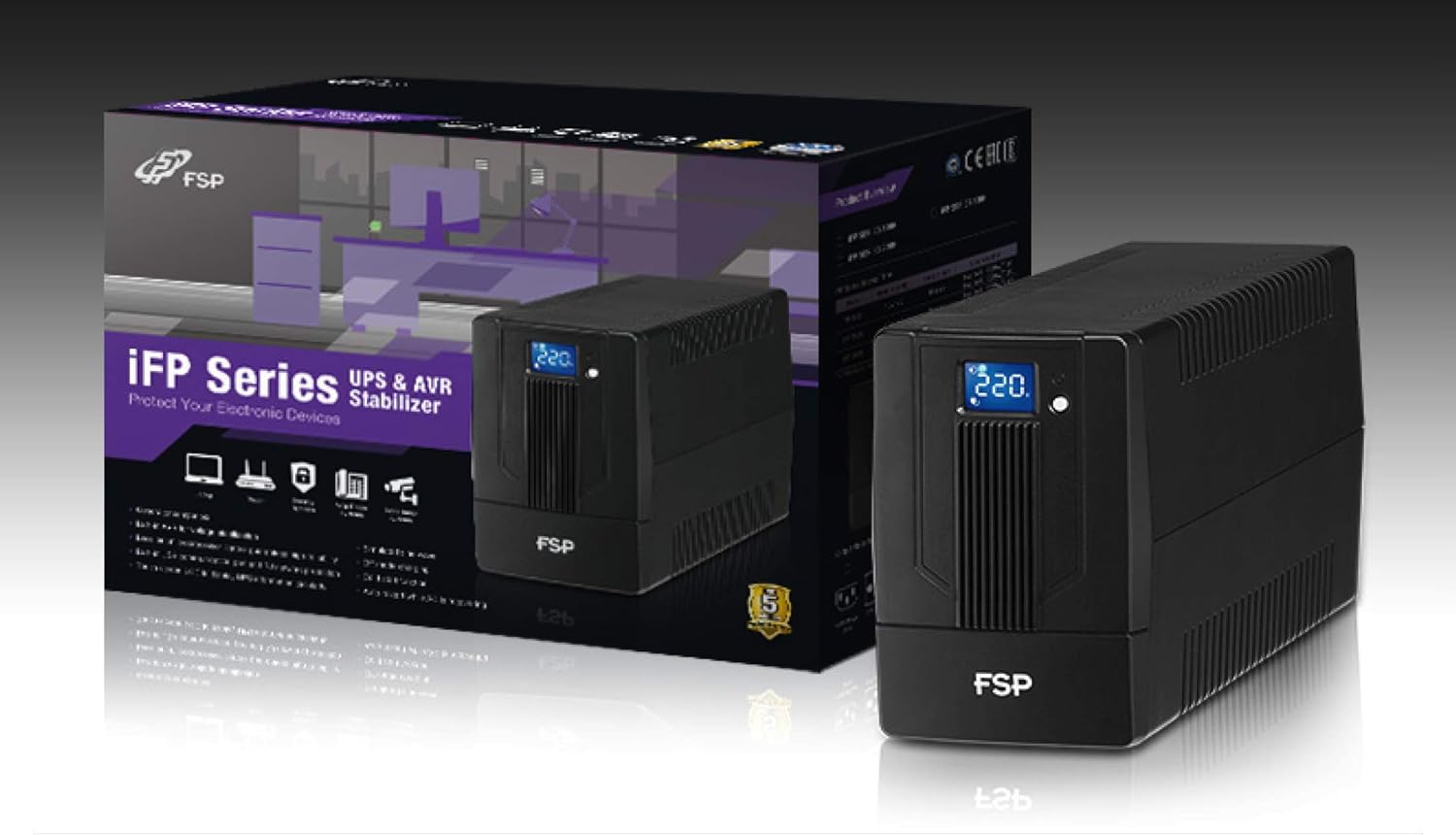
Image 3.1: The FSP iFP600 UPS shown alongside its retail packaging, illustrating the product's presentation.
3.2 Zigawo Zam'mbuyo Zamagulu
Familiarize yourself with the connections on the rear panel of the UPS:

Chithunzi 3.2: Zambiri view of the FSP iFP600 UPS rear panel, highlighting connection points.
- Malo ogulitsira: Two SCHUKO type outlets for connecting protected equipment.
- Zolowetsa za AC: Connects the UPS to the main utility power.
- Fuse/Breaker: Overcurrent protection for the UPS.
- USB Communication: Port for connecting to a computer for monitoring and management.
- Combo RJ11/RJ45 Surge Protection: Provides surge protection for telephone/network lines.
4. Kukhazikitsa ndi Kuyika
Follow these steps to set up your FSP iFP600 UPS:
- Kutulutsa: Chotsani UPS mosamala mu phukusi lake. Yang'anani ngati katundu wawonongeka.
- Kuyika: Place the UPS on a flat, stable surface in a clean, cool, and well-ventilated area. Ensure adequate clearance around the unit for airflow.
- Kulipira Koyamba: Connect the UPS to a standard grounded AC outlet using the provided power cord. Allow the unit to charge for at least 4-6 hours before initial use to ensure optimal battery performance. The UPS will charge whether it is turned on or off.
- Zida Zolumikizira: Plug your computer, monitor, and other critical electronic devices into the UPS outlets (A). Do not connect surge suppressors or power strips to the UPS outlets.
- Kulankhulana kwa USB (Mwasankha): Connect the USB cable from the UPS USB port (D) to your computer's USB port to enable power management software features (software not included, typically downloaded from manufacturer's webtsamba).
- RJ11/RJ45 Protection (Optional): For surge protection of your telephone or network line, connect the incoming line to the 'IN' port of the Combo RJ11/RJ45 (E) and connect the 'OUT' port to your device.
5. Malangizo Ogwiritsira Ntchito
5.1 Kuyatsa/Kuzimitsa
- Kuyatsa: Press and hold the power button on the front panel for approximately 2 seconds until you hear a beep and the LCD display illuminates.
- Kuzimitsa: Press and hold the power button for approximately 2 seconds until you hear a beep and the LCD display turns off.
5.2 Chidziwitso cha Kuwonetsera kwa LCD
The FSP iFP600 features an LCD display that provides real-time status information. The display is touch-sensitive for navigating information.

Image 5.1: The LCD display of the FSP iFP600 UPS, indicating voltage output and its touch-screen functionality.
The LCD display typically shows:
- Lowetsani Voltage
- Kutulutsa Voltage
- Battery Charge Level
- Mulingo Wonyamula
- Operating Mode (e.g., AC mode, Battery mode)
- Warning/Fault Indicators
5.3 Battery Mode Operation
When the utility power fails or fluctuates outside acceptable limits, the UPS will automatically switch to battery mode. During battery mode, the UPS will provide power to connected equipment from its internal battery. An audible alarm will sound to indicate battery operation.
6. Kusamalira
Proper maintenance ensures the longevity and reliability of your UPS.
- Kuyeretsa: Use a soft, dry cloth to clean the exterior of the UPS. Do not use liquid or aerosol cleaners.
- Kusamalira Battery: To maximize battery life, ensure the UPS is connected to AC power and fully charged. If the UPS is stored for an extended period, recharge it every three months to prevent battery degradation.
- Kusintha Battery: The internal battery (12V / 7Ah x1) is not user-serviceable. Battery replacement should only be performed by FSP-certified service personnel or a qualified technician. Incorrect battery replacement can pose a risk of explosion or injury.
- Posungira: Store the UPS in a cool, dry place with adequate ventilation. Ensure the battery is fully charged before storage.
7. Mavuto
Refer to the following table for common issues and their solutions. If the problem persists, contact FSP support.
| Chizindikiro | Alamu Yomveka | Chifukwa Chotheka | Yankho |
|---|---|---|---|
| UPS operating on battery power | Beeps pamphindi 10 zilizonse | Utility power failure or fluctuation | Save work and shut down equipment if power outage is prolonged. UPS will return to AC mode when power is restored. |
| Chenjezo lochepa la batri | Beps sekondi iliyonse | Mphamvu ya batri ndiyotsika kwambiri | Immediately save work and shut down connected equipment. |
| Mkhalidwe wochulukira | Beps 0.5 sekondi iliyonse | Connected equipment exceeds UPS capacity | Disconnect non-essential equipment until the alarm stops. Ensure total load is within UPS capacity. |
| UPS cholakwika | Kuyimba mosalekeza | Kulakwitsa kwamkati kapena kusagwira ntchito bwino | Turn off the UPS and disconnect it from the AC outlet. Contact FSP technical support. |
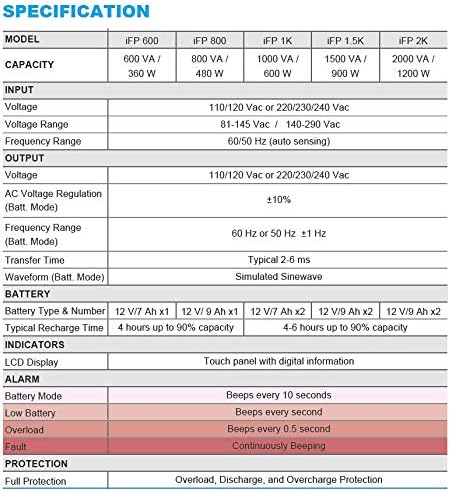
Image 7.1: Excerpt from the FSP iFP series specification table, detailing alarm indicators and their meanings.
8. Zofotokozera
Detailed technical specifications for the FSP iFP600 UPS:
| Mbali | Kufotokozera |
|---|---|
| Chitsanzo | IFP 600 |
| Mphamvu | 600 VA / 360W |
| Lowetsani Voltage | 110/120 Vac or 220/230/240 Vac |
| Lowetsani Voltage manambala | 81-145 Vac / 140-290 Vac |
| Lowetsani pafupipafupi | 60/50 Hz (zomvera zokha) |
| Kutulutsa Voltage | 110/120 Vac or 220/230/240 Vac |
| AC Voltage Regulation (Batt. Mode) | ±10% |
| Output Frequency Range (Batt. Mode) | 60 Hz or 50 Hz ±1 Hz |
| Nthawi Yosamutsa | Nthawi zambiri 2-6 ms |
| Waveform (Batt mumalowedwe) | Simulated Sinewave |
| Mtundu wa Battery & Nambala | 12V / 7Ah x1 |
| Nthawi Yowonjezera Yowonjezera | Maola 4 mpaka 90% mphamvu |
| Zizindikiro | LCD Display (Touch panel with digital information) |
| Chitetezo | Overload, Discharge, and Overcharge Protection |
| Kulemera kwa chinthu | 9.24 mapaundi (4.2kg) |
| Makulidwe a Zamalonda (LxWxH) | 11.81 x 3.98 x 5.59 mainchesi |
| Mtundu | Wakuda |
| Zakuthupi | Chitsulo |
9. Chitsimikizo ndi Thandizo
FSP products are designed for reliability and performance. For warranty information, please refer to the warranty card included with your product or visit the official FSP website. For technical support, troubleshooting assistance, or service inquiries, please contact FSP customer service through their official channels.
Mutha kupeza zambiri ndi zothandizira zothandizira pa Sitolo ya FSP pa Amazon.


