1. Mawu Oyamba
This manual provides essential information for the safe and efficient operation of your Intex SH4004 40-inch HD Ready LED Smart TV. Please read these instructions carefully before using the product and retain them for future reference. Your Intex SH4004 TV features a 40-inch HD Ready LED display, smart TV capabilities with Android OS, built-in Wi-Fi, and multiple connectivity options.
2. Zambiri Zachitetezo
Nthawi zonse tsatirani njira zodzitetezera mukamagwiritsa ntchito wailesi yakanemayi kuti muchepetse ngozi ya moto, kugwedezeka kwamagetsi, ndi kuvulala.
- Gwero la Mphamvu: Ensure the TV is connected to a power supply within the specified voltagMusamagwiritse ntchito mphamvu zambiri kuposa momwe mukufunira.
- Mpweya wabwino: Musatseke mipata ya mpweya wabwino. Lolani malo okwanira kuzungulira TV kuti mpweya uziyenda bwino kuti mupewe kutenthedwa.
- Madzi ndi Chinyezi: Osawonetsa TV kumvula kapena chinyezi. Osayika zinthu zodzazidwa ndi zakumwa, monga miphika, pa TV.
- Kuyeretsa: Chotsani TV kuchokera kumagetsi musanayeretse. Gwiritsani ntchito nsalu yofewa, youma. Osagwiritsa ntchito zotsukira zamadzimadzi kapena zotsukira aerosol.
- Kuyika: Ikani TV pamalo okhazikika, osasunthika. Pewani kuziyika padzuwa kapena pafupi ndi kumene kumatentha.
- Kutumikira: Osayesa kugulitsa izi nokha. Tumizani mautumiki onse kwa ogwira ntchito oyenerera.
3. Zamkatimu Phukusi
Onetsetsani kuti zinthu zonse zilipo mu phukusi:
- Intex SH4004 40-inch HD Ready LED Smart TV
- Kuwongolera Kwakutali
- TV Stand (2 zidutswa)
- Zopangira TV Stand
- Chingwe Chamagetsi
- Buku Logwiritsa Ntchito
4. Zamalonda Zathaview
4.1 Kutsogolo View
The front of the Intex SH4004 TV features the 40-inch LED display and the Intex brand logo at the bottom center.

Chithunzi 4.1: Patsogolo view of the Intex SH4004 Smart TV.
4.2 Kumbuyo View ndi Madoko Olumikizana
The rear panel houses various input and output ports for connecting external devices.

Chithunzi 4.2: Kumbuyo view of the Intex SH4004 Smart TV, highlighting port locations.
Madoko Opezeka:
- Madoko a HDMI (x2): For connecting set-top boxes, Blu-ray players, gaming consoles, and other HDMI-enabled devices.
- Khomo la USB (x1): For connecting USB hard drives, flash drives, and other USB devices for media playback.
- Kulowetsa kwa Antenna: For connecting an aerial for terrestrial TV channels.
- Zolowetsa Zomvera/Makanema: For connecting older devices using composite cables.
- Port ya Ethernet: Kwa intaneti yamawaya.
4.3 Makulidwe
The physical dimensions of the TV are important for placement and installation.
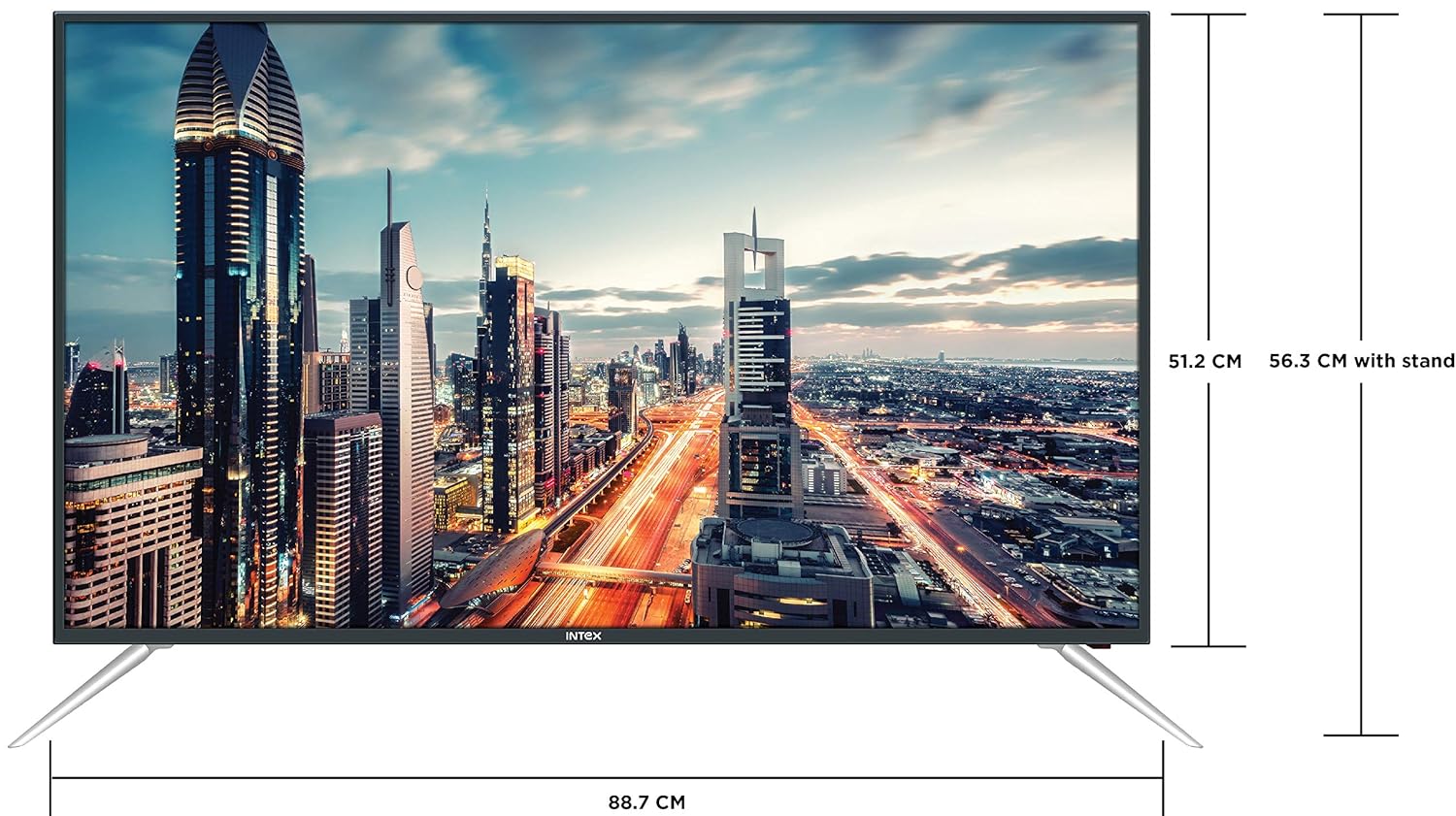
Figure 4.3: Intex SH4004 Smart TV dimensions.
- Kukula Kwazenera: 40 mainchesi (98cm)
- M'lifupi: Pafupifupi 88.7 cm
- Kutalika (popanda choyimira): Pafupifupi 51.2 cm
- Kutalika (ndi choyimira): Pafupifupi 56.3 cm
- Makulidwe a Phukusi: 102 x 60.5 x 16 masentimita
- Kulemera kwa chinthu: 10.8kg pa
5. Kukhazikitsa
5.1 Kulumikiza TV Stand
- Mosamala ikani TV yakuyang'ana pansi pamalo ofewa, oyera kuti musawonongeke pazenera.
- Align the stand pieces with the corresponding slots at the bottom of the TV.
- Mangani zidutswa zoyimilira pogwiritsa ntchito zomangira zomwe zaperekedwa. Onetsetsani kuti zalimba kwambiri.
5.2 Kukweza Khoma
If you prefer to wall mount your TV, please contact Intex support for professional installation. Refer to the Warranty and Support section for contact details. Ensure you use a compatible VESA wall mount kit (not included) and follow its instructions carefully.
5.3 Mphamvu yolumikizira
Connect the power cable to the TV's power input and then plug the other end into a wall outlet.
5.4 Kulumikiza Zida Zakunja
- HDMI: Use an HDMI cable to connect devices like set-top boxes, gaming consoles, or Blu-ray players to the HDMI ports on the TV's rear panel.
- USB: Insert USB flash drives or external hard drives into the USB port for media playback.
- Mlongoti: Connect your antenna cable to the ANTENNA IN port for receiving broadcast channels.
5.5 Wizard Yoyambira Yoyambira
Mukayatsa koyamba, TV idzakuwongolerani njira yokhazikitsira:
- Kusankha Chiyankhulo: Sankhani chilankhulo chomwe mumakonda.
- Kukhazikitsa Network: Connect to your Wi-Fi network or use a wired Ethernet connection. Enter your Wi-Fi password if prompted.
- Jambulani Channel: TV idzayang'ana njira zowulutsira zomwe zilipo.
- Nthawi: Khazikitsani nthawi yanu yapafupi.
6. Malangizo Ogwiritsira Ntchito
6.1 Ntchito Zakutali
The remote control allows you to navigate the TV's features. Common buttons include Power, Volume Up/Down, Channel Up/Down, Input Source, Menu, Navigation (Up/Down/Left/Right), OK, Back, Home, and Smart TV app shortcuts.
6.2 Ntchito Zoyambira pa TV
- Yatsani/Zimitsa: Dinani batani la Mphamvu pa remote kapena TV.
- Kusintha kwa Voliyumu: Gwiritsani ntchito mabatani a Volume Up / Down.
- Kusankha Channel: Use the Channel Up/Down buttons or enter channel numbers directly.
- Kochokera: Press the Input/Source button to switch between HDMI, USB, AV, and TV inputs.
6.3 Zinthu Za Smart TV (Android OS)
Your Intex SH4004 runs on Android OS, providing access to various smart features:
- Kulumikizana kwa Wi-Fi: Lumikizani ku netiweki yanu yakunyumba kuti mupeze intaneti.
- App Store: Download and install applications. Supported internet services include Sony, TV Store, YouTube, and Zee5.
- Kusewera Media: Play videos, music, and view photos from connected USB devices.
- Motion Sensor Gaming: The TV supports motion sensor gaming. An in-built tennis game is included for entertainment.
- Smart Power Saving: Features designed to optimize energy consumption.
- Eye Safe-T Matrix: Display technology aimed at reducing eye strain.
7. Kusamalira
7.1 Kuyeretsa TV
- Nthawi zonse chotsani TV musanayeretse.
- Gwiritsani ntchito nsalu yofewa, yowuma, yopanda lint kuti mupukute chophimba ndi kabati.
- Pa zizindikiro zokakamira pazenera, pang'ono dampen the cloth with water or a specialized screen cleaner (ensure it's suitable for LED screens) and wipe gently. Do not spray liquid directly onto the screen.
- Pewani kugwiritsa ntchito zotsukira, phula, kapena zosungunulira.
7.2 Chisamaliro Chachikulu
- Sungani TV kutali ndi kuwala kwa dzuwa ndi kutentha.
- Onetsetsani mpweya wabwino kuzungulira TV.
- Ngati TV sidzagwiritsidwa ntchito kwa nthawi yayitali, ichotseni pa soketi yamagetsi.
8. Mavuto
Before contacting support, try these basic troubleshooting steps for common issues.
| Vuto | Chifukwa Chotheka | Yankho |
|---|---|---|
| Palibe Mphamvu | Power cable disconnected; Power outlet fault. | Check power cable connection; Try a different outlet; Press power button on TV/remote. |
| Palibe Chithunzi, koma Phokoso Lilipo | Incorrect input source selected; External device issue. | Press the 'Input/Source' button to select the correct input; Check external device connections. |
| Palibe Phokoso, Koma Chithunzi Chilipo | Volume muted or too low; External audio system issue. | Unmute volume or increase level; Check audio cables to external sound system. |
| Mavuto a Wi-Fi | Incorrect password; Router too far; Router issue. | Re-enter Wi-Fi password; Move TV closer to router or use Ethernet; Restart router. |
| Kuwongolera Kwakutali Sikugwira Ntchito | Batteries depleted; Obstruction between remote and TV. | Replace remote batteries; Remove any obstructions; Point remote directly at TV sensor. |
9. Zofotokozera
Detailed technical specifications for the Intex SH4004 Smart TV.
| Mbali | Kufotokozera |
|---|---|
| Mtundu | Intex |
| Dzina lachitsanzo | SH4004 |
| Kuwonetsa Technology | LED |
| Kukula kwa Screen | 40 mainchesi (98 cm) |
| Kusamvana | HD Yokonzeka (1366 x 768 pixels) |
| Mtengo Wotsitsimutsa | 60hz pa |
| Viewngodya | 178 digiri |
| Mbali Ration | 16:9 |
| Opareting'i sisitimu | Android |
| Purosesa | 1.2GHz Quad core Mali 450 |
| Ram | 512MB |
| Memory Yamkati | 4 GB |
| Kulumikizana | 2 HDMI ports, 1 USB port, Built-In-Wifi, Ethernet |
| Kutulutsa Mawu | 20 Watts (2 speakers, Stereo) |
| Ntchito Zothandizira pa intaneti | Sony, TV Store, Youtube, Zee5 |
| Mtundu Wokwera | Wall Mount / Table Top |
| Kulemera kwa chinthu | 10.8kg pa |
10. Chitsimikizo ndi Thandizo
Zambiri za Chitsimikizo:
- The product comes with a 1-year manufacturer warranty from the date of purchase.
- An additional 2 years of extended warranty is provided by Intex.
Installation and Support:
For requesting installation, wall mounting, or a product demonstration after delivery, please contact Intex support directly.
Intex Support Contact:
- Foni: 0120-4895555
When contacting support, please provide the product's model name (SH4004) and seller's details as mentioned on your invoice.


