Mawu Oyamba
Thank you for choosing the MIFA A3 Soundbox Bluetooth Portable Speaker. This manual provides essential information for the safe and efficient use of your device. Please read it thoroughly before operating the speaker and retain it for future reference.
Zambiri Zachitetezo
- Osawonetsa wokamba nkhani ku kutentha kwakukulu, kuwala kwa dzuwa, kapena chinyezi chambiri.
- Peŵani kugwetsa kapena kuchititsa wokamba nkhani kusokoneza kwambiri.
- Do not disassemble or attempt to repair the speaker yourself. Contact qualified service personnel.
- Keep the speaker away from water and liquids, despite its waterproof rating, to prevent damage to charging ports or internal components.
- Gwiritsani ntchito chingwe ndi adaputala yochapira yokha.
Zamkatimu Phukusi
Chonde onani phukusi lazinthu izi:
- MIFA A3 Bluetooth Portable Speaker
- USB Charging Chingwe
- AUX Audio Cable
- Buku la ogwiritsa (chikalatachi)
Zathaview
The MIFA A3 speaker features intuitive touch controls and multiple connectivity options. Familiarize yourself with the speaker's layout:
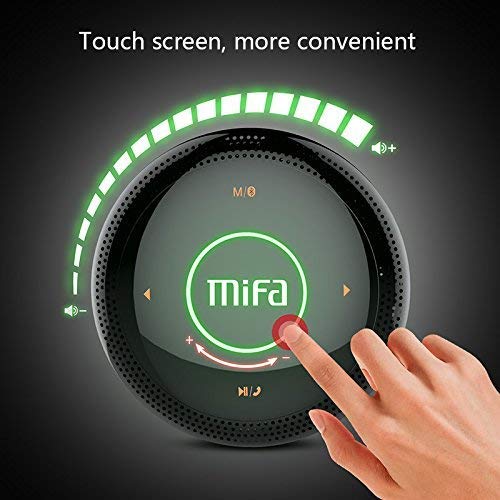
Chithunzi 1: Pamwamba view of the MIFA A3 speaker, highlighting the touch-sensitive control panel. The panel displays volume indicators, play/pause, and track navigation buttons. A central 'Mifa' logo is also visible.
- Touch Control Panel: Located on the top surface for volume adjustment, playback control, and mode selection.
- Maikolofoni: Kwa mafoni opanda manja.
- Powotcha: Chitseko cha Micro USB cholipirira.
- Zolowetsa za AUX: 3.5mm audio jack for wired connection.
- Slot ya Micro SD Card: For playing music directly from a memory card.
Khazikitsa
1. Kulipiritsa Spika
Before first use, fully charge the speaker. Connect the provided USB charging cable to the speaker's charging port and the other end to a USB power adapter (not included) or a computer's USB port.
- Kuwala kosonyeza kuti chaji idzawala ikadzachajidwa.
- The indicator will turn off or change color once fully charged.
- A full charge provides approximately 8 hours of continuous playtime.
2. Kuyatsa/Kuzimitsa
- Kuyatsa: Press and hold the Power button (usually integrated into the touch panel or a dedicated button) for 2-3 seconds until you hear an audible prompt or see an indicator light.
- Kuzimitsa: Press and hold the Power button again for 2-3 seconds.
Malangizo Ogwiritsira Ntchito
1. Kuyanjanitsa kwa Bluetooth
- Ensure the speaker is powered on and in Bluetooth pairing mode (indicated by a flashing blue light or audible prompt).
- Pachipangizo chanu (foni yam'manja, piritsi, PC), yambitsani Bluetooth ndikusaka zida zomwe zilipo.
- Select "MIFA A3" from the list of devices.
- Once paired, the speaker will provide an audible confirmation, and the indicator light will become solid blue.
- The speaker will automatically connect to the last-paired device when powered on, if that device's Bluetooth is active and within range.
2. Kulumikizana kwa AUX
For devices without Bluetooth, use the provided 3.5mm AUX audio cable:
- Connect one end of the AUX cable to the speaker's AUX input port.
- Lumikizani mbali inayo kumutu wakumutu kwa chida chanu chomvera.
- Wokamba nkhaniyo angosintha kukhala AUX mode.
3. Micro SD Card Playback
Insert a Micro SD card (up to 32GB, FAT32 format) with music files into the designated slot. The speaker will automatically detect the card and begin playback.
4. Touch Control Operations
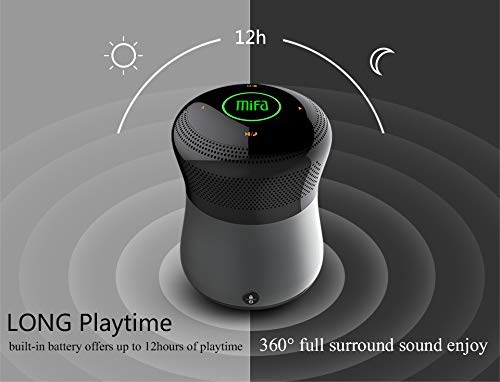
Chithunzi 2: The MIFA A3 speaker shown with an overlay indicating "LONG Playtime" (up to 12 hours) and "360° full surround sound enjoy." This image emphasizes the speaker's battery life and audio dispersion.
- Kuwongolera Voliyumu: Slide your finger clockwise on the touch panel to increase volume, counter-clockwise to decrease.
- Sewerani/Imitsani: Tap the central Play/Pause icon.
- Nyimbo Yotsatira: Tap the "Next" arrow icon.
- Njira Yakale: Tap the "Previous" arrow icon.
- Kusintha Mode: Tap the "M/O" icon to cycle between Bluetooth, AUX, and Micro SD card modes.
- Lock Batani: Press the lock icon to prevent accidental touch inputs.
5. Call Handling (Bluetooth Mode)
- Yankhani Kuyimba: Tap the Play/Pause icon when a call comes in.
- Malizitsani Kuyimba: Tap the Play/Pause icon again.
- Kanani Kuyimba: Press and hold the Play/Pause icon for 2 seconds.
Kusamalira
- Tsukani wokamba nkhani ndi nsalu yofewa, youma. Osagwiritsa ntchito zotsukira abrasive kapena solvents.
- Sungani cholankhulira pamalo ozizira, owuma, osagwiritsidwa ntchito kwa nthawi yayitali.
- Charge the battery at least once every three months to maintain battery health.
Kusaka zolakwika
| Vuto | Njira Yotheka |
|---|---|
| Sipika sayatsa. | Onetsetsani kuti batire yachajitsidwa. Lumikizani kugwero lamagetsi ndikuyesanso. |
| Sitingathe kulunzanitsa kudzera pa Bluetooth. |
|
| Palibe phokoso. |
|
| Kusamveka bwino. |
|
Zofotokozera
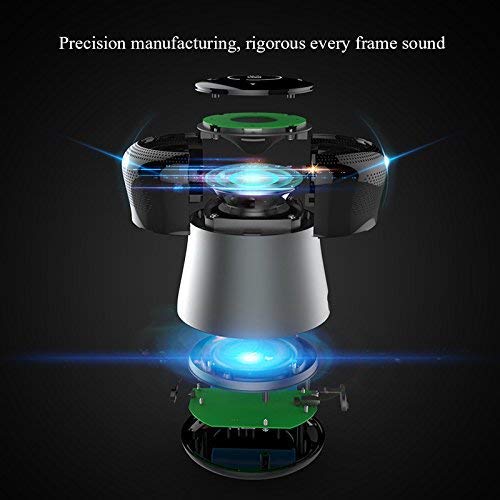
Chithunzi 3: An exploded diagram of the MIFA A3 speaker, illustrating its internal components and structural design, emphasizing precision manufacturing.
| Chitsanzo | MIFA A3 |
| Mphamvu Zotulutsa | 10W |
| Kulumikizana | Bluetooth 4.2, AUX, Micro SD Card |
| Batiri | 1800 mAh Li-ion |
| Nthawi yosewera | Mpaka maola 8 (pa 60% voliyumu) |
| Nthawi yolipira | Pafupifupi maola 3-4 |
| Maikolofoni | Zopangira mafoni opanda manja |
| Chosalowa madzi | Yes (as per product specifications, but general caution advised for ports) |
| Njira Yowongolera | Kukhudza |
| Zida Zogwirizana | Laputopu, PC, Smartphone, Tablet |
Chitsimikizo ndi Thandizo
MIFA products are designed to provide reliable performance. For warranty information or technical support, please refer to the warranty card included with your purchase or visit the official MIFA webmalo. Sungani umboni wanu wogula kuti mutenge chitsimikizo.
For further assistance, you may contact MIFA customer support through their official channels.


