Mawu Oyamba
This manual provides detailed instructions for the safe and efficient operation of your SENCOR SPT 5800 CD Player. This device combines a CD player, Bluetooth connectivity, MP3 playback via USB, AUX input, and an FM radio, offering versatile audio entertainment. Please read this manual thoroughly before using the product and retain it for future reference.
Malangizo a Chitetezo
- Osavumbulutsa chipangizocho ku mvula kapena chinyezi kuti muteteze moto kapena kugwedezeka kwamagetsi.
- Musatseke mipata yolowera mpweya. Onetsetsani kuti pali malo okwanira kuzungulira chipangizocho kuti mpweya uziyenda bwino.
- Use only the specified power source (AC 230 V / 50 Hz) or recommended batteries (8 x 1.5 V D / LR20).
- Pewani kuika yuniti pafupi ndi magwero otentha monga ma radiator, zolembera zotenthetsera, masitovu, kapena zida zina (kuphatikiza ampLifiers) zomwe zimatulutsa kutentha.
- Tetezani chingwe chamagetsi kuti chisayendetsedwe kapena kukanikizidwa, makamaka pamapulagi, zotengera zosavuta, komanso pomwe amatuluka pazida.
- Chotsani chipangizochi pa nthawi yamphezi kapena chikagwiritsidwa ntchito kwa nthawi yaitali.
- Tumizani mautumiki onse kwa ogwira ntchito oyenerera. Kutumikira kumafunika pamene chipangizocho chawonongeka mwanjira iliyonse, monga chingwe chopangira mphamvu kapena pulagi yawonongeka, madzi atayika kapena zinthu zagwera mu zipangizo, zida zakhala zikukumana ndi mvula kapena chinyezi, sizigwira ntchito bwino. , kapena wagwetsedwa.
Zogulitsa Zamankhwala
- Mphamvu Zotulutsa: 25 W RMS (2 x 12.5 W)
- Olankhula: Two 4 ohm 4" active speakers with two passive speakers for enhanced bass.
- Disco Mode: Integrated LED lights with 7 colors and selectable patterns.
- Cholinganiza: Pre-set modes including Rock, Pop, Jazz, Flat, and Classic.
- Kugwirizana Kwama Media: Supports CD-R/RW, Bluetooth, MP3, and USB devices.
- Sewero la CD: Programmable playback with memory for 20 audio CD tracks and 99 MP3 CD tracks.
- Bulutufi: Version V2.1 + EDR for wireless audio streaming.
- Kulumikizana: USB port, 3.5 mm AUX IN jack, and 3.5 mm AUX-OUT (headphone) jack.
- Wailesi ya FM: Stereo FM receiver (87.5 - 108 MHz) with digital station search, frequency display, and 30 preset channels.
- Onetsani: Backlit LCD chiwonetsero.
- Zosankha Zamagetsi: AC 230 V / 50 Hz or 8 x 1.5 V D / LR20 batteries.
Zathaview
Familiarize yourself with the main components and controls of your SENCOR SPT 5800.

Chithunzi 1: Patsogolo view of the SENCOR SPT 5800, showing the central control panel, LCD display, speakers with orange LED lighting, and the included remote control.

Chithunzi 2: Zopindika view of the SENCOR SPT 5800, highlighting the robust design and green LED speaker illumination.
Zowongolera ndi Zolumikizira
- Batani Lamphamvu: Kuyatsa kapena kuzimitsa unit.
- Chinsinsi Button: Selects input mode (CD, Bluetooth, USB, AUX, FM).
- Buku Knob: Imasintha mulingo wotulutsa mawu.
- Tuning/Skip Buttons: For radio tuning or track navigation.
- Batani la Sewerani/Imitsani: Amawongolera kusewera.
- Lekani Button: Imasiya kusewera.
- Program/Repeat Button: For programming CD tracks or repeating playback.
- Batani Lowala: Controls the disco LED lights.
- Bungwe la EQ: Imayenda kudzera mu equalizer presets.
- Doko la USB: Polumikiza zida zosungirako za USB.
- AUX IN Jack: Kulowetsa kwa 3.5mm pazida zakunja zomvera.
- AUX OUT (Headphone) Jack: Chotulutsa cha mahedifoni cha 3.5mm.
- FM mlongoti: Telescopic antenna for radio reception.
Khazikitsa
Kulumikiza Mphamvu
- Mphamvu ya AC: Connect the AC power cord to the unit's AC input and then to a standard wall outlet (AC 230 V / 50 Hz).
- Mphamvu ya Battery: For portable use, open the battery compartment on the bottom of the unit. Insert 8 x 1.5 V D / LR20 batteries, ensuring correct polarity. Close the compartment securely.
Kukhazikitsa kwa Antenna
For optimal FM radio reception, fully extend the telescopic FM antenna. Adjust its position for the best signal.
Malangizo Ogwiritsira Ntchito
General Operation
- Yatsani/Zimitsa: Dinani pa Mphamvu batani kuyatsa kapena kuzimitsa unit.
- Kusankha Kochokera: Dinani pa Gwero button repeatedly to cycle through available modes: CD, Bluetooth, USB, AUX, FM Radio. The selected mode will be displayed on the LCD.
- Kusintha kwa Voliyumu: tembenuzani Voliyumu chogwirira mozungulira wotchi kuti muwonjezere voliyumu ndi mozungulira wotchi kuti muchepetse.
Kusewera kwa CD
- Tsegulani chivundikiro cha chipinda cha CD.
- Place a CD (CD-R/RW) with the label side facing up onto the spindle.
- Tsekani chivundikiro cha chipinda cha CD.
- Dinani pa Gwero button to select CD mode. The unit will read the disc.
- Dinani pa Sewerani/Imitsani batani kuti muyambe kusewera.
- Gwiritsani ntchito Dumphani mabatani kuti muyende pakati pa nyimbo.
- Kuti mutsegule nyimbo, dinani batani Pulogalamu button during stop mode and follow the on-screen instructions.
Kuyanjanitsa kwa Bluetooth
- Dinani pa Gwero button to select Bluetooth mode. The display will show "BT" and flash, indicating it's in pairing mode.
- Enable Bluetooth on your external device (smartphone, tablet, etc.) and search for available devices.
- Select "SENCOR SPT 5800" from the list of devices.
- Once paired, the "BT" indicator will stop flashing, and you can play audio from your device through the SPT 5800.
Kusewera kwa USB
- Ikani USB flash drive yokhala ndi MP3 files ku doko la USB.
- Dinani pa Gwero button to select USB mode. The unit will automatically detect and begin playing MP3 files.
- Gwiritsani ntchito Dumphani mabatani kuti muyende pakati pa nyimbo.
Kulowetsa AUX
- Lumikizani chipangizo chakunja cha mawu (monga foni yam'manja, chosewerera MP3) ku jeke ya AUX IN pogwiritsa ntchito chingwe cha mawu cha 3.5mm (sichikuphatikizidwa).
- Dinani pa Gwero batani loti musankhe mawonekedwe a AUX.
- Sinthani kusewera ndi voliyumu kuchokera pa chipangizo chanu chakunja.
Wailesi ya FM
- Dinani pa Gwero batani kusankha FM Radio mode.
- Kulitsani antenna ya telescopic kuti mulandire bwino.
- Press ndi kugwira Kukonza buttons to automatically scan for the next available station. Briefly press to fine-tune.
- Kuti musunge siteshoni, dinani batani Pulogalamu batani, gwiritsani ntchito Dumphani mabatani kuti musankhe nambala yokonzedweratu, ndikudina Pulogalamu kachiwiri kutsimikizira.
Ntchito ya Equalizer
Dinani pa EQ button repeatedly to cycle through the available equalizer presets: Rock, Pop, Jazz, Flat, Classic. Select the one that best suits your audio preference.
Disco Light Mode
Dinani pa Kuwala button to activate or change the LED disco light patterns and colors. The unit features 7 colors and various patterns.
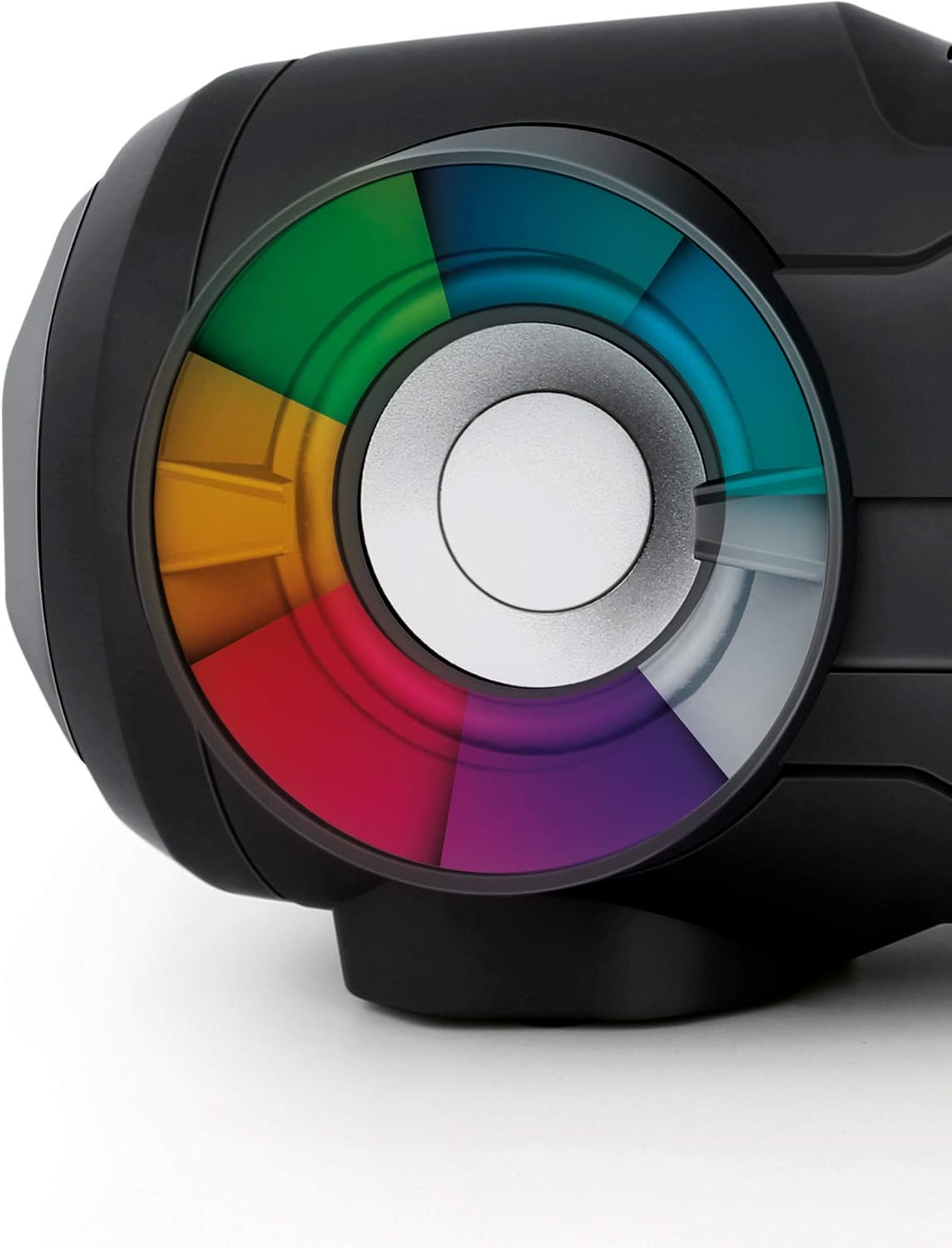
Chithunzi 3: Detail of a speaker with the multi-color LED light effect, illustrating the disco mode feature.
Kuwongolera Kwakutali
The included remote control allows for convenient operation of the SPT 5800 from a distance. Ensure the remote's battery is inserted correctly and point it towards the unit's IR receiver.
- Mphamvu: Yatsani/Kuzimitsa
- Gwero: Sankhani njira yolowera
- Vuto +/-: Sinthani mawu
- Play/Pause, Stop, Skip: Sinthani kusewera
- EQ: Change equalizer presets
- Kuwala: Control disco lights
- Chepetsa: Letsani mawu omvera
- Mabatani a Nambala: Direct track selection (CD/USB) or preset station selection (FM).
Kusamalira
- Kuyeretsa: Pukuta unit ndi nsalu yofewa, youma. Osagwiritsa ntchito zotsukira abrasive kapena solvents.
- CD Lens Care: Ngati pali vuto la kusewera ma CD, gwiritsani ntchito disc yotsukira ma CD lens yomwe ikupezeka pamsika.
- Posungira: Ngati simukugwiritsa ntchito kwa nthawi yayitali, chotsani mabatire ndikusunga chipangizocho pamalo ozizira komanso ouma.
Kusaka zolakwika
| Vuto | Chifukwa Chotheka | Yankho |
|---|---|---|
| Chigawo sichimayatsa. | No power supply; batteries depleted or incorrectly inserted. | Check AC power connection or replace/reinsert batteries. |
| Palibe phokoso. | Volume too low; incorrect source selected; headphones connected. | Increase volume; select correct source; disconnect headphones from AUX OUT. |
| CD imadumpha kapena siyimasewera. | CD is dirty, scratched, or inserted incorrectly; lens is dirty. | Clean or replace CD; reinsert correctly; use a CD lens cleaner. |
| Kuyanjana kwa Bluetooth kulephera. | Device too far; Bluetooth not enabled on external device; unit not in pairing mode. | Ensure devices are close; enable Bluetooth; select Bluetooth mode on SPT 5800. |
| Kulandila koyipa kwa FM. | Antenna not extended or positioned incorrectly; weak signal. | Kukulitsa kwathunthu ndikusintha mlongoti wa telescopic. |
Zofotokozera
- Chitsanzo: Mtengo wa SPT5800
- Mphamvu Zotulutsa: 25 W RMS (2 x 12.5 W)
- Olankhula: 2 x 4" active speakers, 2 x passive bass speakers
- Media Yothandizira: CD-R/RW, MP3 (via USB)
- Mtundu wa Bluetooth: V2.1+EDR
- Mpando Wamtundu wa FM: 87.5 - 108 MHz
- Kulumikizana: USB, AUX IN (3.5mm), AUX OUT (3.5mm headphone)
- Magetsi: AC 230 V / 50 Hz or 8 x 1.5 V D / LR20 batteries
- Kugwiritsa Ntchito Mphamvu: 48 W
- Makulidwe (W x H x D): 500 x 196 x 211 mm
- Kulemera kwake: 3.4kg pa
- Mtundu: Black/Turquoise (Note: Product color may vary, the provided product was listed as Rose, but images show Black/Turquoise. Manual refers to the general model.)
Chitsimikizo ndi Thandizo
SENCOR products are designed and manufactured to the highest quality standards. For warranty information and technical support, please refer to the warranty card included with your purchase or visit the official SENCOR webmalo. Sungani umboni wanu wogula pazolinga zilizonse za chitsimikizo.
For further assistance, please contact SENCOR customer service.


