Mawu Oyamba
Thank you for choosing the Midland MXT275 MicroMobile GMRS Radio. This 15-watt two-way radio is designed for reliable communication in various environments, including overland caravanning, off-roading, farming, and recreational outdoor activities. Featuring an integrated control microphone, detachable magnetic mount antenna, and NOAA weather alert, the MXT275 ensures you stay connected and informed. This manual provides essential information for setting up, operating, maintaining, and troubleshooting your radio.
Zomwe zili mu Bokosi
Your Midland MXT275 package includes the following components:
- Fully Integrated Control Microphone
- Chogwirizira Maikolofoni
- 12V Power Cord with Car Power Adapter
- Detachable Antenna with Magnetic Mount
- Kutsika Kwambirifile Hide Away Unit
- Flip Frame Detachable Mount with Hardware

The image displays the contents of the MXT275 box, including the main radio unit, integrated control microphone, 12V power cord, magnetic mount antenna, and mounting hardware.
Zofunika Kwambiri
- 15-Watt Two-Way Radio: Operates on GMRS (General Mobile Radio Service) frequencies with 15 high-power channels (1-7 & 15-22) for extended range communication. Includes channel scan for active channels.
- GMRS Channels: Licensed by the FCC for personal and business use, offering a range of up to several miles depending on terrain and conditions.
- 142 CTCSS/DCS Privacy Codes: Allows selection of specific codes to prevent unwanted transmissions on the same channel, enhancing communication privacy. Features silent operation to turn off all tones.
- NOAA Weather Scan + Alert: Automatically scans 10 available weather (WX) band channels and locks onto the strongest signal for severe weather updates. NOAA Weather Alert sounds an alarm for severe weather risks and broadcasts AMBER alerts.
- MicroMobile Compatibility: Compatible with all Midland FRS and GMRS walkie-talkies, ensuring connectivity with other Midland devices.
- Integrated Control Microphone: All controls are located on the microphone for easy access and operation.
- Detachable External Magnetic Mount Antenna: Provides flexible mounting options for optimal signal reception.
Khazikitsa
Proper installation is crucial for optimal performance of your MXT275 radio. The compact design allows for flexible placement of the main unit, with all controls accessible via the integrated microphone.
Masitepe oyika:
- Mount the Main Unit: Use the provided flip frame detachable mount and hardware to secure the low-profile hideaway unit in a convenient location within your vehicle. Consider under the seat, behind the dashboard, or in a console.
- Gwirizanitsani Mphamvu: Attach the 12V power cord to the main unit and plug the car power adapter into your vehicle's 12V outlet. Ensure a secure connection.
- Gwirizanitsani Antenna: Connect the detachable magnetic mount antenna to the main unit. Place the antenna on a metal surface on the exterior of your vehicle for best performance, ensuring it has a clear line of sight.
- Lumikizani Maikolofoni: Plug the integrated control microphone into the main unit. The microphone serves as your primary interface for all radio functions.
- Secure Microphone Holder: Install the microphone holder in an easily accessible location for convenient storage and use of the integrated control microphone.

This image illustrates the main radio unit and the integrated control microphone, highlighting the USB-C port and the connections for the antenna and power cable. The microphone features a customizable LCD backlit display.

The image shows the compact main unit of the MXT275 installed in a vehicle, demonstrating its 'hideaway' capability, with the microphone providing all necessary controls.
Kanema wokhazikitsa:
Video: Kuthaview of the Midland MicroMobile MXT275, demonstrating its features and typical installation in a vehicle. This video is provided by Midland Radio.
Malangizo Ogwiritsira Ntchito
All primary operating functions of the MXT275 are controlled via the integrated microphone.
Ntchito Yoyambira:
- Yatsani/Zimitsa: Rotate the volume knob on the microphone to turn the radio on or off.
- Sinthani Voliyumu: Tembenuzani batani la voliyumu kuti musinthe mulingo wa mawu.
- Sankhani mayendedwe: Use the UP/DOWN arrow buttons on the microphone to cycle through the 15 GMRS channels (1-7 & 15-22) and 8 repeater channels.
- Kutumiza: Press and hold the Push-To-Talk (PTT) button on the side of the microphone to transmit. Release to listen.
- Kufikira pa Menyu: Press the 'MENU' button to access radio settings and features. Use the UP/DOWN arrows to navigate and 'CALL' or 'MON' to select/confirm.
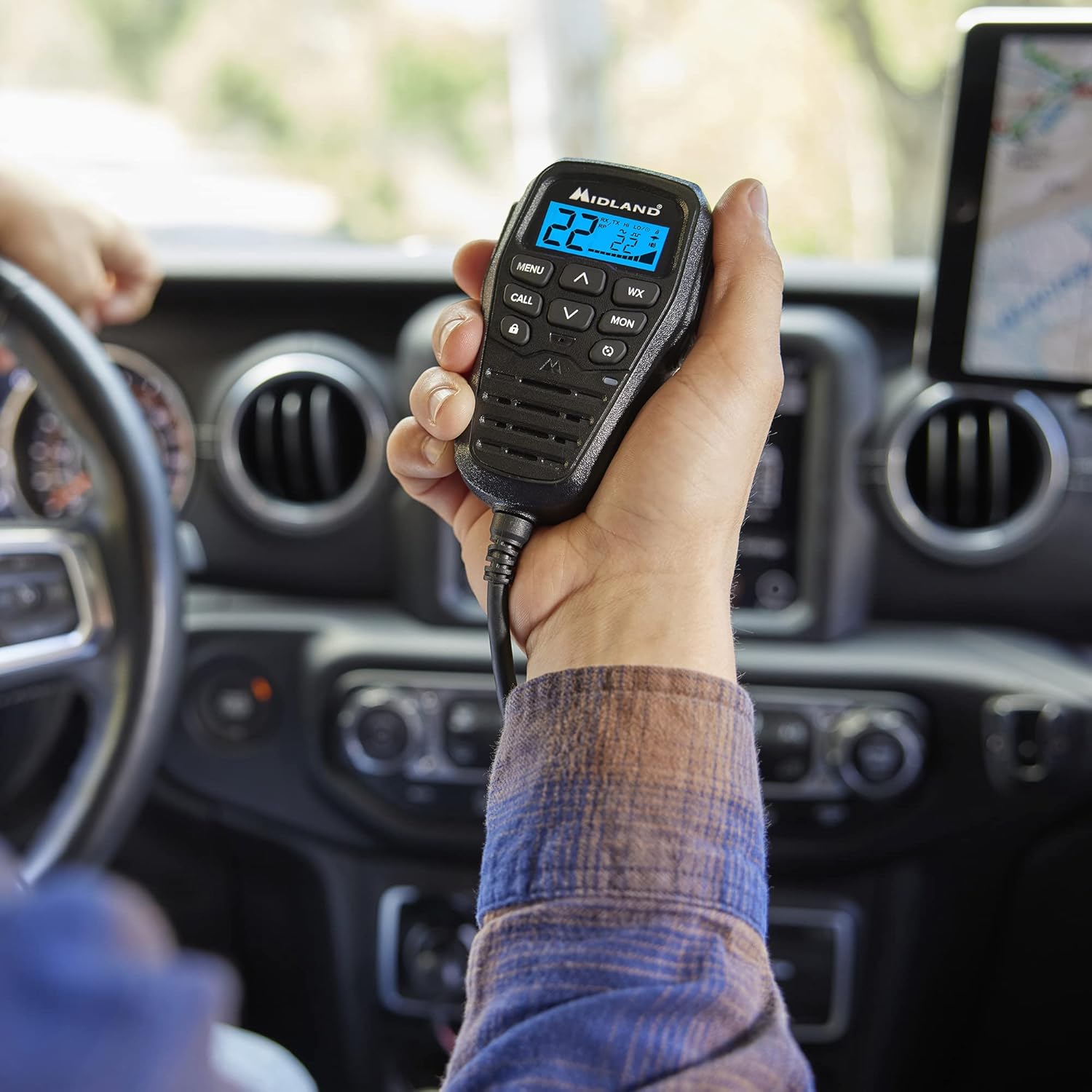
This image demonstrates the ergonomic design of the integrated control microphone, allowing for easy channel selection and communication while driving.
Zapamwamba:
- Privacy Codes (CTCSS/DCS): Use the menu to set one of the 142 privacy codes for clearer communication and reduced interference.
- NOAA Weather Scan: Press the 'WX' button to activate NOAA Weather Scan, which automatically scans for the strongest weather channel.
- Chenjezo la Nyengo la NOAA: The radio will automatically alert you to severe weather conditions when this feature is enabled.
- Njira Zobwereza: Utilize the 8 repeater channels for extended communication range, especially in challenging terrain.
Microphone Features Video:
Video: This video highlights the features of the MXMC01 ANC Microphone, which is compatible with the MXT275, focusing on its noise-canceling capabilities and controls. This video is provided by Midland Radio.
Kusamalira
To ensure the longevity and optimal performance of your Midland MXT275 radio, follow these maintenance guidelines:
- Kuyeretsa: Regularly wipe the radio and microphone with a soft, damp nsalu. Pewani kugwiritsa ntchito mankhwala owopsa kapena zotsukira.
- Kulumikizana: Periodically check all cable connections (power, antenna, microphone) to ensure they are secure and free from corrosion or damage.
- Kusamalira Antenna: Inspect the magnetic mount antenna for any damage to the cable or base. Ensure it is securely mounted when in use.
- Posungira: Ngati simukugwiritsa ntchito kwa nthawi yayitali, sungani wailesi pamalo ozizira komanso ouma kutali ndi dzuwa lachindunji komanso kutentha kwambiri.
Kusaka zolakwika
If you encounter issues with your MXT275 radio, try the following troubleshooting steps:
- Palibe Mphamvu: Check the 12V power cord connection and ensure the vehicle's power outlet is functioning. Verify the fuse in the power adapter.
- Palibe Kulandira/Kutumiza: Ensure the antenna is securely connected and properly mounted. Check that you are on the correct channel and that privacy codes (CTCSS/DCS) match those of the other party.
- Kusamveka Bwino Kwambiri: Adjust the volume. Ensure the microphone is not obstructed and is held at an appropriate distance. Check for loose connections.
- Mtundu Wocheperako: Ensure the antenna is clear of obstructions and mounted in the best possible location. Terrain, weather, and obstacles significantly affect range.
- Radio Not Responding: Try turning the radio off and then on again. If the issue persists, consult the full user manual for a factory reset procedure.
Zofotokozera
| Kulemera kwa chinthu | 2.48 mapaundi |
| Miyeso Yazinthu | 5 x 5.25 x 1 mainchesi (1"D x 5"W x 5.25"H) |
| Nambala Yachitsanzo Yachinthu | Mtengo wa MXT275 |
| Mtundu | Midland |
| Mtundu | Wakuda |
| Chiwerengero cha Channels | 15 |
| Nthawi zambiri | 462 MHz - 467 MHz |
| Talking Range Maximum | 50 Miles (under ideal conditions) |
| Voltage | 12 volts |
| Madzi Resistance Level | Osamva Madzi |
Chitsimikizo
The Midland MXT275 MicroMobile GMRS Radio comes with a Zaka 1 chitsimikizo from the date of purchase. Please retain your proof of purchase for warranty claims. For detailed terms and conditions, refer to the official Midland webtsamba kapena kulumikizana ndi chithandizo chamakasitomala.
Thandizo
For further assistance, technical support, or to inquire about accessories, please contact Midland customer service. You can find contact information on the official Midland website or through the support section of your product documentation.
Zothandizira pa intaneti:


