1. Zamalonda Zathaview
The Xiaomi Mi Bluetooth Speaker Mini (Model: XMYX02YM) is a compact and portable wireless speaker designed for high-quality audio playback. It features Bluetooth connectivity for seamless pairing with various devices and a durable, waterproof design for versatile use.
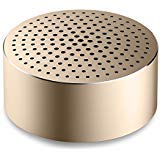
Image: The Xiaomi Mi Bluetooth Speaker Mini, a small, cylindrical black speaker with a mesh grille, showcasing kapangidwe kake kophatikizana.
2. Kukhazikitsa
2.1 Unboxing
Carefully remove all components from the packaging. The box should contain the Mi Bluetooth Speaker Mini.
2.2 Kulipiritsa Wokamba nkhani
The speaker is powered by an internal battery. Before first use, ensure the speaker is fully charged. Connect the appropriate charging cable (not included) to the speaker's charging port and to a compatible USB power source. The charging indicator light will provide status updates.
2.3 Kulumikizana kwa Bluetooth
- Yatsani: Press and hold the power button on the speaker until you hear an audible prompt or see the indicator light flash, indicating it is in pairing mode.
- Yambitsani Bluetooth: On your device (smartphone, tablet, laptop, MP3 player), enable Bluetooth.
- Sankhani Wokamba Nkhani: In your device's Bluetooth settings, search for available devices. Select "Mi Bluetooth Speaker Mini" from the list.
- Tsimikizirani kulumikizana: Once paired, the speaker will provide an audible confirmation, and the indicator light will change to a steady state.
The speaker is now ready for audio playback.
3. Malangizo Ogwiritsira Ntchito
3.1 Kuyatsa/Kuzimitsa
- Kuyatsa: Press and hold the power button for approximately 2-3 seconds.
- Kuzimitsa: Press and hold the power button for approximately 3-4 seconds until the speaker powers down.
3.2 Kusewera Kwamawu
After successful Bluetooth pairing, play audio from your connected device. The sound will be transmitted wirelessly to the Mi Bluetooth Speaker Mini. The speaker supports stereo audio output.
3.3 Touch Controls
The speaker features touch controls for basic functions. Refer to the specific touch areas on your speaker for volume adjustment, play/pause, and track navigation. (Specific touch control details may vary; consult product packaging or quick start guide for exact touch gestures).
3.4 Zothandizira Zothandizira
While primarily a Bluetooth speaker, the device may support an auxiliary audio input. If available, connect an audio cable (not included) from your device's audio output to the speaker's auxiliary input port for wired audio playback.
4. Kusamalira
4.1 Kuyeretsa
To clean the speaker, use a soft, dry, lint-free cloth. Do not use abrasive cleaners, solvents, or strong chemicals, as these can damage the speaker's surface or internal components.
4.2 Kukaniza Madzi
The Xiaomi Mi Bluetooth Speaker Mini is waterproof. While it can withstand splashes and light exposure to water, it is not designed for prolonged submersion. Ensure all ports are securely closed before exposure to water. After exposure, dry the speaker thoroughly before charging or using it again.
4.3 Kusungirako
When not in use for extended periods, store the speaker in a cool, dry place away from direct sunlight and extreme temperatures. It is recommended to charge the speaker periodically to maintain battery health.
5. Mavuto
- Sipika siyiyatsa: Onetsetsani kuti batire yachajitsidwa. Lumikizani choyankhulira ku gwero lamagetsi ndikuyesanso.
- Sitingagwirizane ndi chipangizo:
- Onetsetsani kuti sipika ili mu pairing mode (kuwala kwa chizindikiro).
- Zimitsani ndi kuyatsa Bluetooth pa chipangizo chanu.
- Sonkhanitsani choyankhulira pafupi ndi chipangizo chanu.
- Chotsani malumikizidwe am'mbuyomu a Bluetooth pachipangizo chanu ndikuyesa kulunzanitsanso.
- Palibe phokoso panthawi yosewera:
- Onani kuchuluka kwa voliyumu pa sipika komanso pa chipangizo chanu cholumikizidwa.
- Ensure the speaker is successfully paired and connected to your device.
- Yesani kusewera mawu kuchokera ku pulogalamu kapena chipangizo china.
- Zomveka zosamveka bwino:
- Onetsetsani kuti palibe zopinga pakati pa sipikala ndi chipangizo chanu.
- Move away from sources of interference (e.g., Wi-Fi routers, other Bluetooth devices).
- Yang'anani mtundu wa mawu omwe akuchokera.
6. Zofotokozera
| Mbali | Tsatanetsatane |
|---|---|
| Chitsanzo | Chithunzi cha XMYX02YM |
| Mtundu | XIAOMI |
| Mtundu wa Spika | Bookshelf (Portable) |
| Kulumikizana Technology | Bluetooth, opanda zingwe |
| Wopanda zingwe Technology | bulutufi |
| Zida Zogwirizana | Laputopu, MP3 Player, Foni Yam'manja, Tabuleti |
| Gwero la Mphamvu | Yoyendetsedwa ndi Battery |
| Njira Yowongolera | Kukhudza |
| Njira Zotulutsa Audio | Sitiriyo |
| Mtundu Woyendetsa Audio | Dynamic Driver |
| Kukonzekera kwa Surround Sound Channel | 2.1 |
| Kulemera kwa chinthu | 59g pa |
| Makulidwe a Zamalonda (LxWxH) | 0.43 x 0.43 x 0.2 cm (4 x 4 x 2 Millimeters) |
| Mtundu | Wakuda |
| Chosalowa madzi | Inde |
| Mabatire Amafunika | Yes (Internal, rechargeable) |
| Kuphatikiza Zida | Mi Bluetooth Speaker Mini |
| Wopanga | Xiaomi Technology Inc. |
7. Chitsimikizo ndi Thandizo
For warranty information, please refer to the documentation included with your purchase or visit the official Xiaomi website. For technical support or service inquiries, please contact Xiaomi customer service through their official channels.