Mawu Oyamba
This manual provides essential instructions for the safe and efficient operation of your ICOM IC-7300 Direct Sampling Shortwave Radio. Please read this manual thoroughly before using the transceiver to ensure proper functionality and to prevent damage.
The ICOM IC-7300 is a high-performance HF/50MHz transceiver featuring RF direct sampling technology. It includes a 4.3-inch color touchscreen LCD, a real-time spectrum scope, and a built-in automatic antenna tuner. It supports various modes including SSB, CW, RTTY, AM, and FM, with a maximum output power of 100 Watts.
Zambiri Zachitetezo
- Do not operate the transceiver in explosive atmospheres.
- Onetsetsani malo oyenera kuti musagwedezeke ndi magetsi.
- Avoid exposing the unit to direct sunlight, rain, or extreme temperatures.
- Gwiritsani ntchito magetsi otchulidwa (13.8V DC).
- Do not open the transceiver casing; perekani chithandizo kwa ogwira ntchito oyenerera.
Zamkatimu Phukusi
Onetsetsani kuti zinthu zonse zilipo mu phukusi:
- ICOM IC-7300 Radio Unit
- HM-219 Hand Microphone
- DC Power Cable
- Kuyika Hardware
- Buku la ogwiritsa (chikalatachi)
Khazikitsa
1. Kulumikiza Magetsi
Connect the supplied DC power cable to the transceiver's DC IN connector and to a stable 13.8V DC power source. Ensure correct polarity (red to positive, black to negative) to prevent damage.
2. Kugwirizana kwa Antenna
Connect a suitable HF/50MHz antenna to the ANT connector on the rear panel. For optimal performance and to protect the transceiver, use an antenna designed for the operating frequencies and ensure it is properly matched.
3. Kulumikiza Maikolofoni
Plug the HM-219 hand microphone into the MIC connector on the front panel.
4. Mphamvu Yoyambira
Dinani pa MPHAMVU button to turn on the transceiver. The ICOM logo will appear on the display, followed by the operating screen.

Image: Front panel of the ICOM IC-7300, displaying the main operating screen with frequency, mode, and spectrum scope.
Malangizo Ogwiritsira Ntchito
Basic Operation
- Kusankha pafupipafupi: Gwiritsani ntchito zazikulu MULTI dial to change the operating frequency. You can also directly input frequencies using the touchscreen keypad.
- Kusankha Mode: Tap the mode indicator on the touchscreen (e.g., USB, LSB) to cycle through available modes (SSB, CW, RTTY, AM, FM).
- Kusintha kwa Voliyumu: Gwiritsani ntchito AF/RF/SQL knob to adjust the audio output level.
- Kutumiza: Dinani pa Kutumiza button or the PTT button on the microphone to transmit. Ensure your antenna is tuned before transmitting.
Using the Touchscreen Display
The 4.3-inch color touchscreen provides intuitive access to various functions and settings.
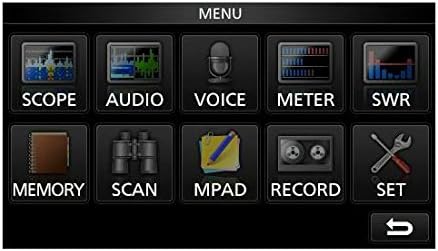
Image: The main menu screen of the IC-7300, accessible via the touchscreen, showing various function icons.
- Spectrum Scope: Dinani KULIMBITSA ku view the real-time spectrum scope, which displays signal activity across a selected frequency range.
- Chiwonetsero cha mita: Dinani METER ku view various operational parameters such as output power, ALC, SWR, and voltage.
- Zokonda: Dinani KHALANI to access detailed configuration options for the transceiver.
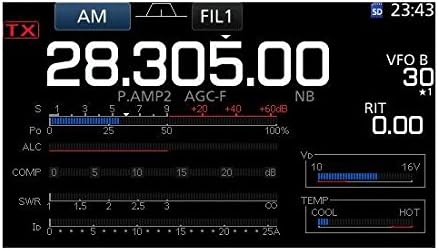
Chithunzi: Mwatsatanetsatane view of the IC-7300's display in AM mode, showing frequency, filter settings, and various operational meters.
Built-in Auto Tuner
The IC-7300 includes an internal automatic antenna tuner. To activate, press the AUTO TUNE button. The tuner will automatically adjust to achieve the lowest possible SWR for your connected antenna. This function is effective for SWR values up to approximately 3:1.
Kusamalira
- Kuyeretsa: Use a soft, dry cloth to clean the exterior of the transceiver. Do not use abrasive cleaners or solvents.
- Mpweya wabwino: Ensure the ventilation holes on the top and sides of the unit are not obstructed to prevent overheating.
- Posungira: When not in use for extended periods, store the transceiver in a dry, dust-free environment.
Kusaka zolakwika
| Vuto | Chifukwa Chotheka | Yankho |
|---|---|---|
| Palibe mphamvu | Power cable disconnected; incorrect voltage; blown fuse. | Check power cable connections; verify 13.8V DC supply; inspect and replace fuse if necessary. |
| Palibe zotulutsa | Volume too low; speaker/headphone disconnected; squelch set too high. | Adjust AF/RF/SQL knob; check speaker/headphone connection; reduce squelch level. |
| Sitingathe kufalitsa | Antenna not connected; high SWR; PTT button not pressed. | Connect antenna; use auto tuner or external tuner to reduce SWR; ensure PTT is engaged. |
| Kulandirira bwino | Antenna issue; incorrect mode/frequency; high noise level. | Check antenna connection and type; verify operating mode and frequency; adjust noise reduction (NB, NR) settings. |
Zofotokozera
| Mbali | Tsatanetsatane |
|---|---|
| Nambala ya Model | IC-7300 |
| Ma Frequency Range (RX) | 0.030 - 74.800 MHz |
| Mphamvu Zotulutsa | 100 W (SSB, CW, RTTY, FM); 25 W (AM) |
| Wopatsa Mtundu | Direct Sampling |
| Chiwerengero cha Channels | 101 |
| Mphamvu Wonjezerani Voltage | 13.8 V DC (±15%) |
| Makulidwe (W×H×D) | 9.4 x 3.7 x 9.4 mainchesi (240 × 94 × 238 mm) |
| Kulemera | 8.4 mapaundi (3.8kg) |
| Zapadera | 4.3-inch Color Touchscreen LCD, Real-time Spectrum Scope, Built-in Auto Tuner |
Chitsimikizo ndi Thandizo
For warranty information and technical support, please refer to the official ICOM website or contact your authorized ICOM dealer. Keep your purchase receipt as proof of purchase for warranty claims.
Online resources and additional support may be available at the ICOM America Store on Amazon.
Zambiri Zogwirizana
Chipangizochi chikugwirizana ndi Gawo 15 la Malamulo a FCC. Kugwira ntchito kumadalira zinthu ziwiri izi: (1) Chipangizochi sichingabweretse kusokoneza koopsa, ndipo (2) chipangizochi chiyenera kuvomereza kusokoneza kulikonse komwe kumalandira, kuphatikizapo kusokoneza komwe kungayambitse ntchito yosayenera.


