Mawu Oyamba
Zikomo pogulaasing the SENTRY HPXBT150 Bluetooth Flat Cord Earbuds. This manual provides detailed instructions on how to set up, operate, and maintain your new wireless earbuds. Please read this manual thoroughly before use to ensure optimal performance and longevity of your device.
Zamkatimu Phukusi
- SENTRY HPXBT150 Bluetooth Flat Cord Earbuds
- Mlandu Woteteza
- USB Charging Cable (Micro-USB)
- Removable Ear Hooks
- Buku Logwiritsa Ntchito
Zathaview
The SENTRY HPXBT150 earbuds feature Bluetooth wireless technology, allowing for a cord-free listening experience. They include an in-line microphone for hands-free calls and media control buttons for easy operation. Removable ear hooks provide a secure fit, especially during physical activity.
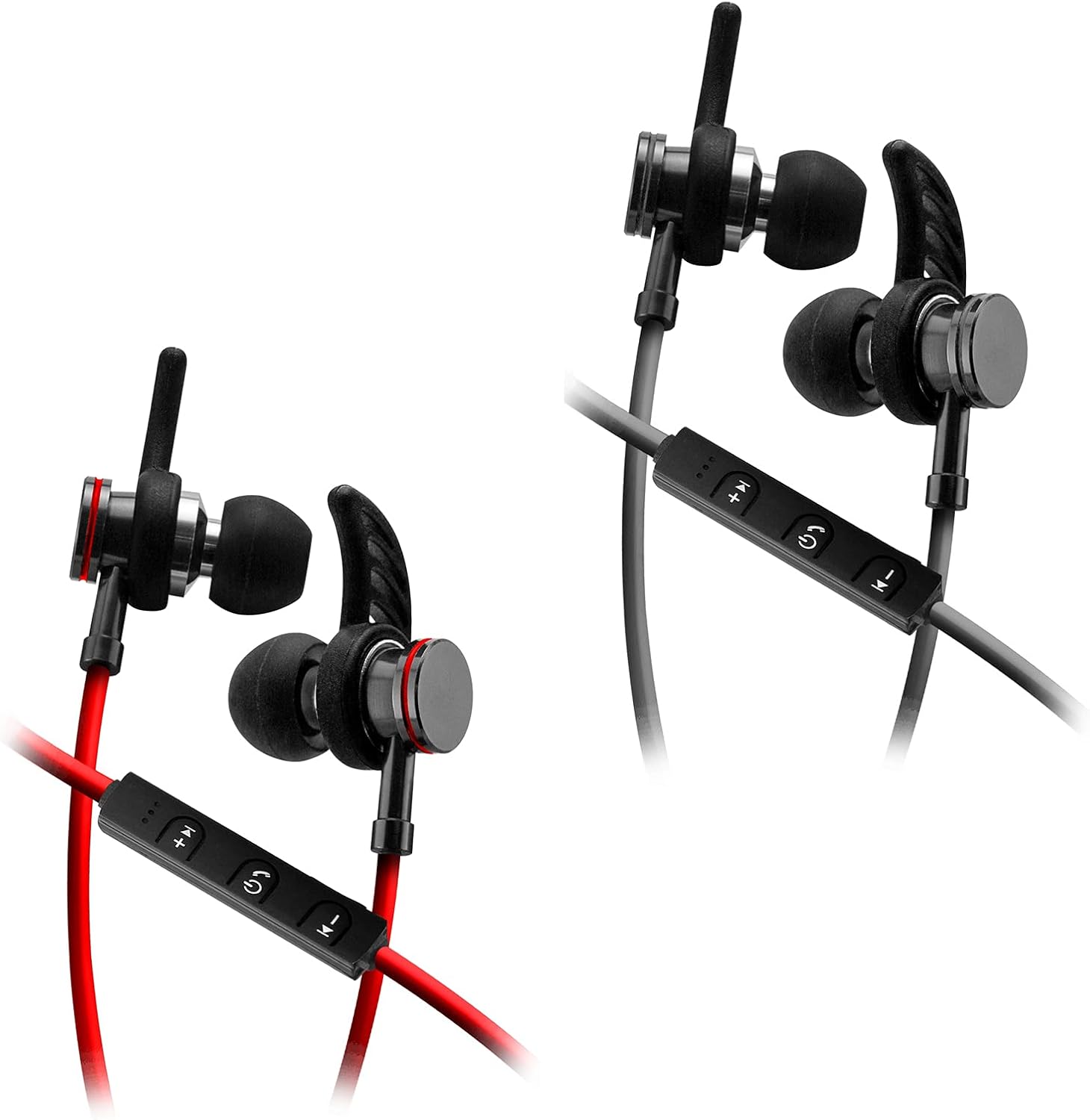
Image: SENTRY HPXBT150 Bluetooth Earbuds showing the in-line control panel and ear hooks. The control panel features volume up/next track, power/multifunction, and volume down/previous track buttons.
Khazikitsa
1. Kulipiritsa ma Earbuds
- Locate the Micro-USB charging port on the in-line control unit.
- Connect the provided USB charging cable to the earbuds' charging port.
- Lumikizani mbali ina ya chingwe cha USB mu gwero lamagetsi logwirizana ndi USB (monga doko la USB la kompyuta, adaputala ya USB pakhoma).
- The LED indicator light will illuminate during charging. It will change color or turn off once charging is complete. A full charge typically takes approximately 1-2 hours.
2. Kuyanjanitsa kwa Bluetooth
- Ensure the earbuds are fully charged before initial pairing.
- Press and hold the multi-function button (usually the center button on the in-line control) for approximately 5-7 seconds until the LED indicator light flashes red and blue alternately. This indicates the earbuds are in pairing mode.
- Pa chipangizo chanu chogwiritsa ntchito Bluetooth (foni yam'manja, piritsi, kompyuta), pitani ku menyu ya zoikamo za Bluetooth.
- Yambitsani Bluetooth ndikusaka zida zomwe zilipo.
- Select "HPXBT150" or a similar name from the list of found devices.
- Once successfully paired, the LED indicator on the earbuds will typically flash blue slowly or turn off, and you will hear an audible confirmation.
- Ngati mukufuna chinsinsi, lowetsani "0000".
Malangizo Ogwiritsira Ntchito
Kuyatsa/Kuzimitsa
- Yatsani: Press and hold the multi-function button for approximately 3 seconds until the LED indicator flashes blue and you hear a power-on tone.
- Kuzimitsa Mphamvu: Press and hold the multi-function button for approximately 3-5 seconds until the LED indicator flashes red and you hear a power-off tone.
Kusewera Nyimbo
- Sewerani/Imitsani: Dinani batani la ntchito zingapo kamodzi.
- Onjezani Pamwamba: Dinani batani la '+'.
- Voliyumu Pansi: Dinani batani la '-'.
- Nyimbo Yotsatira: Dinani ndikugwira batani la '+'.
- Njira Yakale: Dinani ndikugwira batani la '-'.
Imbani Management
- Yankhani/Imitsani Kuyimba: Dinani batani la ntchito zingapo kamodzi.
- Kanani Kuyimba: Dinani ndikugwira batani la multifunction pafupifupi 2 masekondi.
- Imbaninso Nambala Yomaliza: Dinani kawiri batani la multifunction.
Kusamalira
- Kuyeretsa: Use a soft, dry cloth to clean the earbuds. Do not use harsh chemicals or abrasive materials.
- Posungira: When not in use, store the earbuds in the provided protective case to prevent damage.
- Kusamalira Battery: To preserve battery life, avoid fully discharging the earbuds frequently. Charge them regularly, even if not used for extended periods.
- Pewani Chinyezi: Keep the earbuds away from water and excessive moisture.
Kusaka zolakwika
| Vuto | Njira Yotheka |
|---|---|
| Zomvera m'makutu siziyatsidwa. | Ensure the earbuds are fully charged. Connect to a power source and allow time to charge. |
| Sitingagwirizane ndi chipangizo. | Ensure earbuds are in pairing mode (flashing red/blue). Turn off and on Bluetooth on your device. Move earbuds closer to your device. Forget previous pairings on your device and try again. |
| Palibe phokoso kapena kutsika kwamphamvu. | Check volume levels on both the earbuds and your connected device. Ensure earbuds are properly paired. Try re-pairing the earbuds. |
| Mgwirizano wapakati. | Ensure there are no obstructions between the earbuds and your device. Move closer to your device. Avoid environments with strong Wi-Fi or other wireless interference. |
Zofotokozera
- Chitsanzo: HPXBT150
- Kulumikizana Technology: Wopanda zingwe (Bluetooth)
- Dalaivala Unit: 10 mm
- Kusokoneza: 32+/-3 Ohms
- Kukhudzika: 103dB+/-3dB
- Mayankho pafupipafupi: 20Hz - 20kHz
- Zida Zogwirizana: Phones, Tablets, MP3 Players, Computers, Gaming Consoles
- Mtundu Wowongolera: Media Control
- Zapadera: Microphone Included, USB Connectivity, Removable Ear Hooks
- Kulemera kwa chinthu: 2.08 pawo
Zambiri Zachitetezo
- Do not expose the earbuds to extreme temperatures, direct sunlight, or fire.
- Do not disassemble or modify the earbuds. This may void the warranty and cause damage.
- Pewani kumvetsera mokweza kwambiri kwa nthawi yaitali kuti mupewe kuwonongeka kwa makutu.
- Sungani kutali ndi ana ndi ziweto.
- Tayani katunduyo moyenera malinga ndi malamulo a m'deralo.
Chitsimikizo ndi Thandizo
For warranty information and technical support, please refer to the documentation included with your purchase or contact SENTRY customer service directly. Keep your proof of purchase for warranty claims.