Mawu Oyamba
This user manual provides essential information for the safe and effective use of TASER X2 Pro Series Replacement Cartridges. These cartridges are designed specifically for use with TASER X2 devices, ensuring continued protection and operational readiness. It is crucial to read and understand all instructions before handling or installing the cartridges.
Zathaview
The TASER X2 Pro Series Replacement Cartridges are vital components for your TASER X2 device, enabling its primary function as a conducted electrical weapon. Each cartridge contains compressed nitrogen to propel two probes up to 15 feet, delivering an incapacitating electrical pulse. The cartridges are designed for quick and easy replacement, ensuring minimal downtime for your device.
- 15-Foot Safety Range: Amapereka ample distance from a threat.
- Anti-Felon Identification (AFID) Tags: Each deployment ejects small, confetti-like tags with the cartridge serial number, aiding in post-incident investigation.
- Easy Reload: Designed for quick and efficient cartridge replacement.
- TASER-Certified: Ensures compatibility and optimal performance with TASER X2 devices.

Image: A single TASER X2 Pro Series Replacement Cartridge, showing its black and yellow casing and the probe deployment area.

Image: Two TASER X2 Pro Series Replacement Cartridges, shown side-by-side, highlighting their compact design.
Kukhazikitsa ndi Kuyika
Proper installation of the replacement cartridges is critical for the safe and effective operation of your TASER X2 device. Always ensure the device is disarmed and pointed in a safe direction before handling cartridges.
- Onetsetsani Chitetezo: Verify your TASER X2 device is in the "SAFE" position and the safety switch is engaged.
- Chotsani Katiriji Yogwiritsidwa Ntchito: Press the cartridge release button (if applicable) or firmly pull the used cartridge straight out from the front of the device. Dispose of used cartridges according to local regulations.
- Inspect New Cartridge: Before installation, visually inspect the new cartridge for any damage or defects. Ensure the protective blast doors are intact.
- Ikani Cartridge Yatsopano: Align the new cartridge with the cartridge bay on the front of your TASER X2 device. Push the cartridge firmly into the bay until it clicks securely into place. Do not force the cartridge.
- Tsimikizirani Kuyika: Gently tug on the cartridge to ensure it is seated properly and does not wobble. The device should now be ready for use once the safety is disengaged.
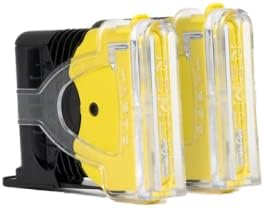
Image: Two TASER X2 Pro Series Replacement Cartridges with clear protective covers over the probes, indicating they are new and ready for installation.
Malangizo Ogwiritsira Ntchito
These cartridges are designed to be used with TASER X2 devices. Refer to your TASER X2 device's primary user manual for complete operating instructions. The following outlines the general use of the cartridges:
- Cholinga: Point the TASER X2 device at the target, ensuring a clear line of sight. The 15-foot range allows for a safe distance.
- Kutumizidwa: Disengage the safety and press the trigger. The cartridge will deploy two probes, which attach to the target and deliver an electrical pulse.
- Londola: After deployment, assess the situation. If the threat is neutralized, re-engage the safety and secure the device. If necessary, a second cartridge can be deployed if your X2 device is equipped with two bays.
For a better understanding of TASER technology and its benefits, please watch the following informational video:
Video: "The Taser Difference | Explore the Future of Personal Safety". This video explains the core benefits and operational principles of TASER devices, including the safety distance provided by cartridges.
Kusamalira ndi Kusunga
To ensure the longevity and reliability of your TASER X2 Pro Series Replacement Cartridges, follow these maintenance and storage guidelines:
- Posungira: Store cartridges in their original packaging in a cool, dry place, away from direct sunlight and extreme temperatures.
- Kuyendera: Periodically inspect unused cartridges for any signs of damage, cracks, or tampering. Do not use damaged cartridges.
- Kutha ntchito: Cartridges have an expiration date. Always check the date printed on the cartridge and replace expired cartridges to ensure optimal performance.
- Kutaya: Dispose of expired or deployed cartridges responsibly and in accordance with local laws and regulations. Contact your local law enforcement or waste management facility for proper disposal procedures.
Kusaka zolakwika
If you encounter issues with your TASER X2 Pro Series Replacement Cartridges, consider the following:
| Vuto | Chifukwa Chotheka | Yankho |
|---|---|---|
| Cartridge does not seat properly. | Kusakhazikika bwino kapena kutsekeka. | Ensure proper alignment and clear any debris from the cartridge bay. Push firmly until it clicks. |
| Probes do not deploy. | Expired cartridge, faulty cartridge, or device issue. | Check cartridge expiration date. Replace with a new, unexpired cartridge. If issue persists, consult your TASER X2 device manual or contact TASER support. |
| Device indicates cartridge error. | Improperly seated cartridge or internal device error. | Remove and re-insert the cartridge. If the error persists, try a different cartridge. If the problem continues, refer to your TASER X2 device manual. |
Zofotokozera
| Mbali | Tsatanetsatane |
|---|---|
| Dzina lazogulitsa | TASER X2 Pro Series Replacement Cartridges |
| Nambala ya Model | 22149 |
| Kugwirizana | TASER X2 Devices |
| Mtundu | 15 mapazi (4.5 mita) |
| Kuchuluka | 2-Paketi |
| Makulidwe (L x W x H) | 5.67 x 4.13 x 1.22 mainchesi |
| Kulemera | 0.11 kg |
| Mtundu | Black/Yellow |
| Zakuthupi | Other (as per manufacturer) |
| Wopanga | Axon Enterprises, Inc. |
Chitsimikizo ndi Thandizo
These TASER X2 Pro Series Replacement Cartridges come with a 1-zaka chitsimikizo from the manufacturer, Axon Enterprises, Inc. For warranty claims, technical support, or further inquiries, please refer to the contact information provided with your TASER X2 device or visit the official TASER webmalo.
Kuti mudziwe zambiri ndi zothandizira, mukhoza kupita ku TASER Store on Amazon.