1. Mawu Oyamba
This manual provides detailed instructions for the installation, operation, and maintenance of your D-Link DCS-8350LH 2K QHD Indoor Wi-Fi Camera. Please read this manual thoroughly before using the product to ensure proper setup and functionality.
The D-Link DCS-8350LH is designed to provide precise and detailed surveillance for your home or small office. It features 2K QHD resolution, color night vision, AI-based detection, and two-way audio for comprehensive monitoring.
2. Zambiri Zachitetezo
- Ensure the camera is installed in a stable location to prevent it from falling.
- Gwiritsani ntchito adaputala yamagetsi yokha yomwe ili ndi kamera.
- Do not expose the camera to water or moisture. This product is for indoor use only.
- Pewani kuyika kamera pafupi ndi malo otentha kapena padzuwa la dzuwa.
- Do not attempt to open or repair the camera yourself. Refer all servicing to qualified personnel.
- Sungani kamera ndi zipangizo zake kutali ndi ana.
3. Zamalonda Zathaview
Familiarize yourself with the components of your D-Link DCS-8350LH camera.
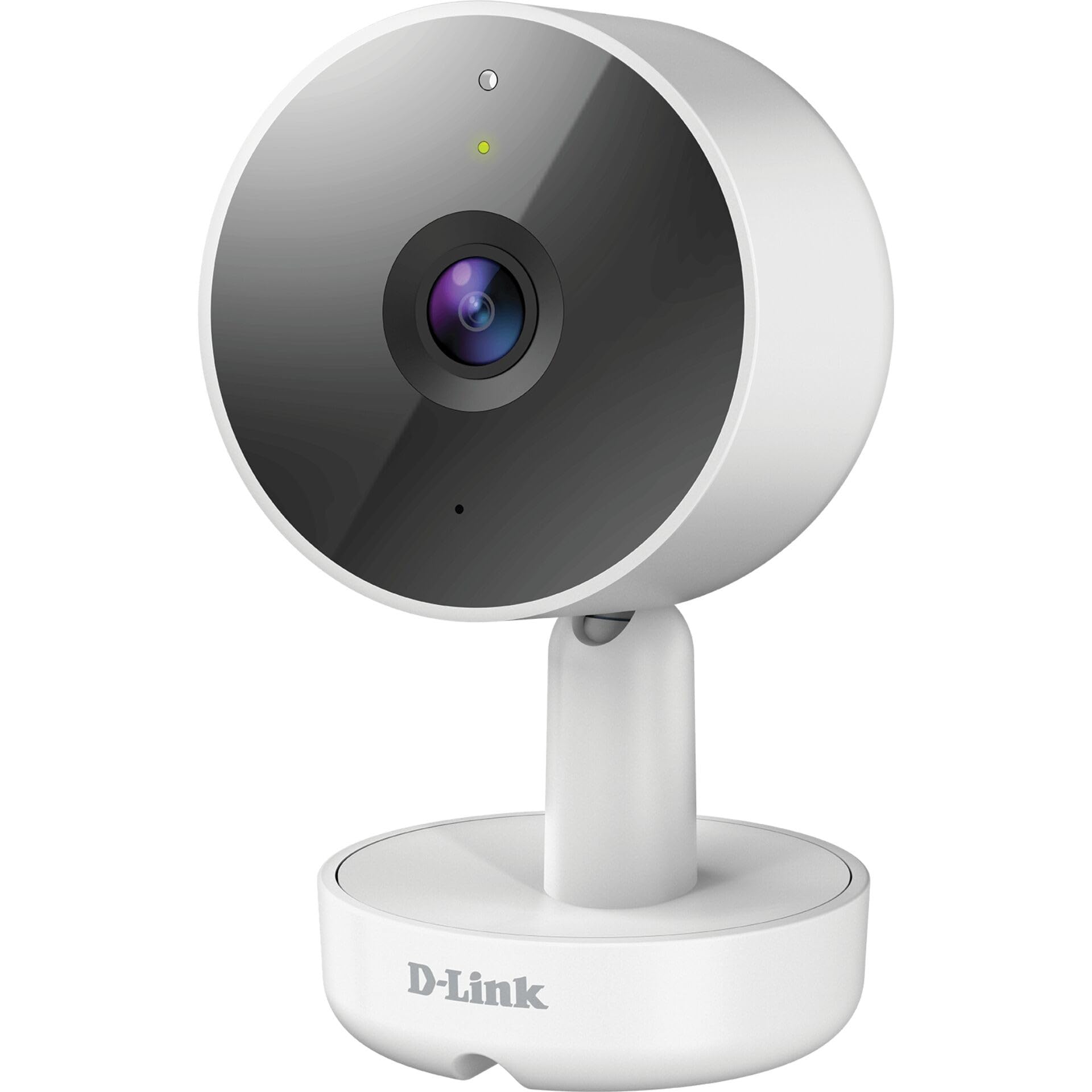
Chithunzi 3.1: Patsogolo View wa Kamera
- 1. Lens: Imajambula kanema.
- 2. Mawonekedwe a LED: Indicates camera status (e.g., power, connection).
- 3. Maikolofoni: Imajambula mawu kuti azitha kulankhulana mbali zonse ziwiri.
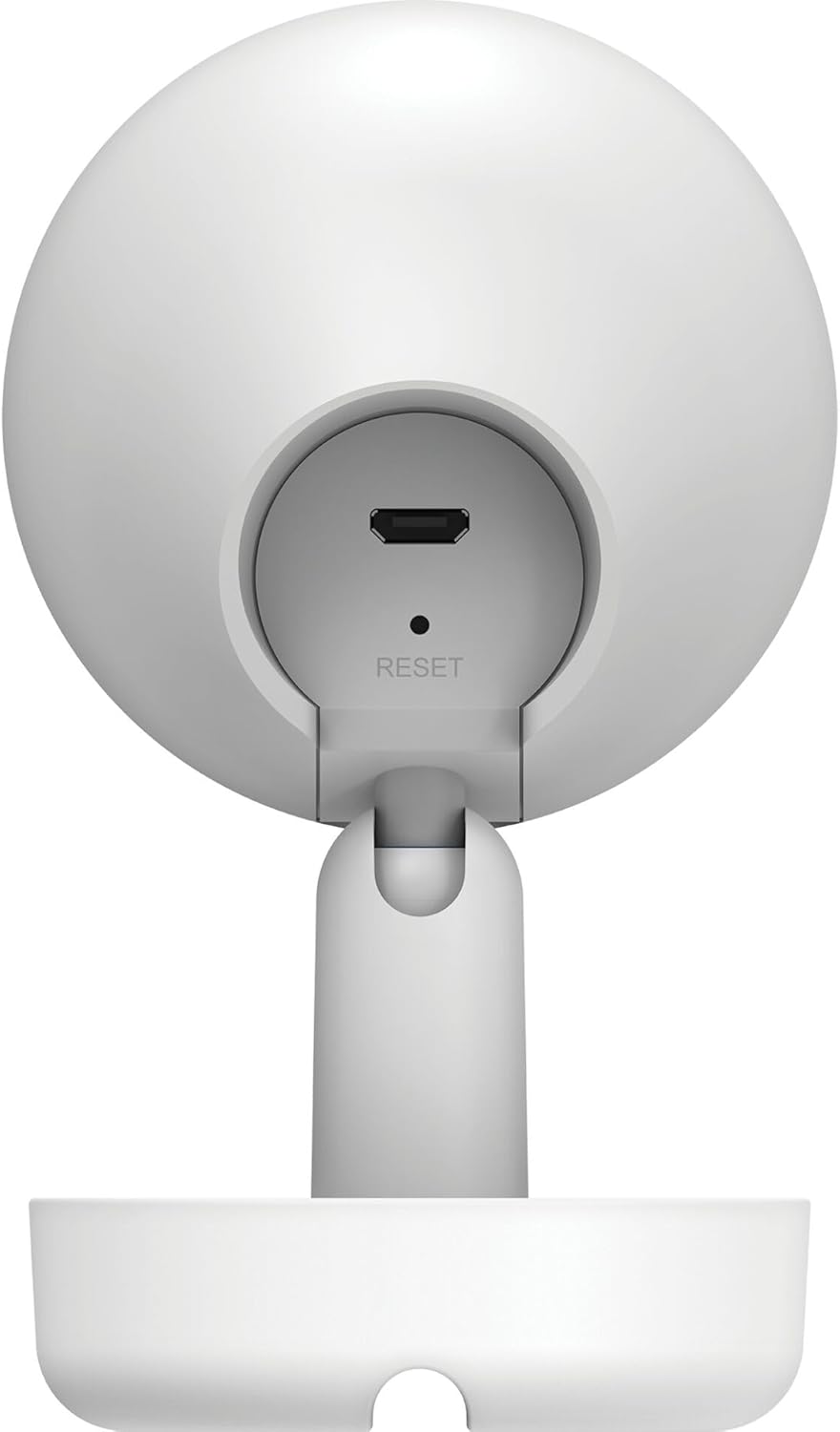
Chithunzi 3.2: Kumbuyo View wa Kamera
- 1. Micro USB Power Port: Imalumikizana ndi adaputala yamagetsi.
- 2. Bwezeretsani Batani: Used to restore factory default settings.
- 3. Wolankhula: Imatulutsira mawu kuti azitha kulankhulana mbali ziwiri.
- 4. MicroSD Card Slot: For local video storage (located on the side or bottom, not visible in this specific image, but mentioned in features).
4. Kukhazikitsa
Follow these steps to set up your D-Link DCS-8350LH camera:
- Tsitsani pulogalamu ya mydlink: Saka "mydlink" on the App Store (iOS) or Google Play (Android) and download the official mydlink app.
- Create a mydlink Account: Open the app and follow the on-screen instructions to create a new mydlink account or log in if you already have one.
- Mphamvu pa Kamera: Connect the provided power adapter to the camera's Micro USB port and plug it into a power outlet. The status LED will begin to blink.
- Onjezani Chipangizo: In the mydlink app, tap the menu icon (usually three lines) and select "Add a Device". Scan the QR code located on the camera or its packaging.
- Lumikizani ku Wi-Fi: Follow the app's instructions to connect your camera to your home Wi-Fi network. Ensure your mobile device is connected to the same Wi-Fi network during setup.
- Kuyika: Position your camera in the desired indoor location.

Chithunzi 4.1: Camera and mydlink App Integration
5. Kuyika
The D-Link DCS-8350LH camera supports wall mounting for optimal placement.
- Sankhani Malo: Sankhani malo amkati omveka bwino view of the area you wish to monitor and within range of your Wi-Fi network.
- Mounting Surface: Ensure the wall or surface is strong enough to support the camera.
- Tetezani Base: Use appropriate screws and anchors (not included) to secure the camera's base to the chosen surface.
- Sinthani ngodya: Once mounted, adjust the camera's angle to cover the desired viewing area. The camera has a 108-degree viewngodya.
6. Malangizo Ogwiritsira Ntchito
Once set up, you can access and control your camera using the mydlink app.
6.1. Khalani ndi Moyo View
Open the mydlink app and select your DCS-8350LH camera from the device list to view the live feed. The camera provides 2K QHD (1440p) resolution for clear images.
6.2. Kuwona Mitundu Usiku
The camera automatically switches to color night vision in low-light conditions, allowing you to see detailed color video even when it's dark.
6.3. AI-based Event Detection
The camera features intelligent detection capabilities:
- Kuzindikira Munthu: Identifies human presence, reducing false alarms from pets or moving objects.
- Kuzindikira Kumveka: Alerts you to specific sounds, including carbon monoxide and smoke alarm sounds.
Configure detection zones and sensitivity settings within the mydlink app to customize alerts.
6.4. Njira ziwiri Zomvera
Use the built-in microphone and speaker to communicate with people or pets near the camera. Tap the microphone icon in the live view within the mydlink app to speak.
6.5. Kujambula ndi Kusunga Makanema
The DCS-8350LH offers multiple recording options:
- MicroSD Card: Insert a microSD card (not included) into the camera's slot for local storage of recorded video clips.
- mydlink Cloud Recording: Utilize the mydlink Cloud service for secure off-site storage. Free and paid subscription plans are available.
- Smartphone Recording: Capture snapshots and video clips directly to your smartphone via the mydlink app.
7. Kusamalira
7.1. Kuyeretsa
To clean the camera, gently wipe the lens and exterior surfaces with a soft, dry cloth. Do not use liquid cleaners or abrasive materials.
7.2. Zosintha za Firmware
Regularly check for firmware updates through the mydlink app. Keeping your camera's firmware up-to-date ensures optimal performance, security, and access to new features.
8. Mavuto
If you encounter issues with your D-Link DCS-8350LH camera, refer to the following common solutions:
- Camera Offline / Wi-Fi Disconnection:
- Onetsetsani kuti kamera ili pakati pa rauta yanu ya Wi-Fi.
- Check your Wi-Fi network status.
- Yambitsaninso kamera mwa kuchotsa pulagi ndikuyikanso adaputala yamagetsi.
- If the issue persists, try resetting the camera to factory defaults (see below) and re-adding it to the mydlink app.
- Kanema Wosakwanira:
- Onetsetsani kuti lens ya kamera ndi yoyera.
- Check your internet connection speed. A stable and fast connection is required for 2K QHD streaming.
- Adjust the camera's position to avoid glare or obstructions.
- Kukhazikitsanso Kamera:
To restore the camera to its factory default settings, use a paperclip or a thin object to press and hold the recessed Bwezerani button (refer to Figure 3.2) for approximately 10 seconds while the camera is powered on. The status LED will change, indicating a reset. You will then need to reconfigure the camera through the mydlink app.
9. Zofotokozera
| Mbali | Tsatanetsatane |
|---|---|
| Dzina lachitsanzo | Gawo #: DCS-8350LH |
| Kanema Kujambula Resolution | 1440p (2K QHD) |
| Viewngodya | 108 digiri |
| Kulumikizana Protocol | Wifi |
| Wopanda zingwe Technology | Bluetooth (for initial setup) |
| Kugwiritsa Ntchito M'nyumba / Panja | M'nyumba |
| Gwero la Mphamvu | Chingwe Chamagetsi |
| Kugwiritsa Ntchito Mphamvu | 8 Watts |
| Fomu Factor | Nyumba |
| Mtundu Wokwera | Wall Mount |
| Zakuthupi | Pulasitiki |
| Makulidwe achinthu (L x W x H) | 6.67 x 6.57 x 11.14 masentimita |
| Kulemera | 320g pa |
| Kuphatikiza Zida | Kamera yamkati |
| Mtundu Wowongolera | Amazon Alexa |
10. Chitsimikizo ndi Thandizo
For warranty information, technical support, and further assistance, please visit the official D-Link website or contact D-Link customer service. Keep your purchase receipt as proof of purchase.
You can find the latest support resources, FAQs, and contact details at www.dlink.com.


